

PalmAgent ONE
- 31.00
- 3.4
- Installs
- 10.00K
- Price
- Free

Screenshots
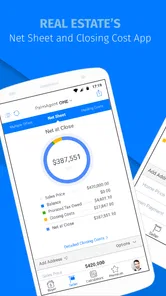
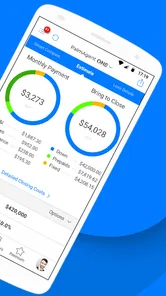
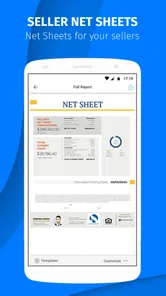


Analysis by Reviewed
Real estate work rarely fails because someone cannot open an app. The harder problems usually appear afterward: a sign-in step that is not obvious, a screen that seems empty, a workflow that does not match the way an agent organizes a day, or a connection that drops at exactly the wrong moment. I approached PalmAgent ONE with that practical mindset because it is aimed at real estate professionals rather than casual finance-app users.
My overall impression is that this is a focused tool for people who already understand the property business and want a mobile point of access during their working day. It is not the kind of finance app I would recommend simply because someone wants to track household spending or check a bank balance. Its value depends on whether your real estate work fits the way the app expects you to operate.
PalmAgent is the developer behind the app, which is available free of charge for an Everyone-rated audience. That sounds approachable, but the intended user is still a working professional. Optional purchases range from $0.99 to $9.99 per item, so I would look carefully at any purchase prompt before treating the basic download as the complete cost of using it.
Where real estate users are most likely to get stuck
The first point of friction is expectation. A short app description can make a professional tool sound self-explanatory, yet a real estate app often depends on an existing work process, account, or organization. If you install it expecting a consumer dashboard to appear immediately, an unfamiliar opening screen can feel like a malfunction when it may simply be waiting for the right professional context.
I would begin by identifying what the app is supposed to replace in your routine. Is it meant to be checked while you are away from a desk, used during property-related conversations, or kept as a companion to another office system? That answer matters more than the word “finance” in the category. The category helps with discovery, but it does not describe the daily task as clearly as the real estate focus does.
A second common sticking point is an apparently incomplete view. A mobile tool can look unhelpful when the user has not reached the correct account, has selected the wrong working area, or is viewing a period with no relevant activity. I avoid repeatedly tapping buttons in that situation. Instead, I return to the previous screen, check the active context, and give the app a moment to reload before trying the same action again.
There is also a difference between an app problem and a data problem. If a property-related item, contact, or transaction detail is missing, the app may be displaying exactly what it has received. Deleting and reinstalling it is a poor first response because that can remove local state without correcting the source information. I prefer to note what is missing, when it was expected, and whether the same information appears in the normal office workflow.
More From Our News Desk

 Gmail
GmailGmail in a Busy Inbox: Who Benefits Most?
From first account to crowded workday, Gmail earns its place through dependable search and flexible sorting—but its best fit depends on how much inbox maintenance you can tolerate.

 Prime Video
Switching to Prime Video: What Changes in Your Viewing Routine
Prime Video can make a compelling second home for streaming, but switching means learning a different catalog, rental layer, and route from browsing to playback.

 Universal TV Remote Control
Universal TV Remote Control Works Best as a Reliable Backup
A phone remote earns its place through quick setup and reliable habits. Here is how to get more from Universal TV Remote Control—and where its limits show.

 Weather - By Xiaomi
Weather by Xiaomi Review: Clear at a Glance, Less Clear Up Close
Xiaomi’s weather app makes everyday forecasts quick to scan, but its calm surface can leave useful details and recovery paths harder to find than they should be.

 X
XX Under Pressure: Can It Recover When Posting Goes Wrong?
A resilience-focused review of X, examining setup, mistaken posts, interruptions, weak connections, and the gaps that matter when recovery needs to be dependable.

 Clash of Clans
Clash of Clans Is Won Between the Battles
Its raids are quick; its community is a long-term project of coordination, teaching, rivalry, and shared responsibility—with all the friction that entails.
Latest News



One useful habit is to test the app with a low-risk task before relying on it during a busy appointment. Open it when you have time, move through the screens you expect to use, and learn where you return after backing out. This is more valuable than judging it from the first launch alone. Professional apps often reward familiarity, especially when a user needs to work quickly without stopping to interpret every label.
Why the rating deserves context
The app currently holds a 3.4 average from around 63 ratings, with roughly 31 written reviews. I would treat that as a signal to test it against your own workflow rather than as a simple pass-or-fail verdict. A modest average can reflect setup confusion, device compatibility, account issues, or a mismatch between what users expected and what a specialized professional tool actually does.
Its reach is also relatively focused, with over 10K installs. That is consistent with a product aimed at a specific professional audience rather than a mass-market money app. I would not use the install figure as a quality guarantee, but I would keep it in mind when comparing the amount of community guidance available with the help ecosystem around a much larger finance platform.
Setup checks that prevent avoidable trouble
The first technical check is operating-system compatibility. The app requires Android 7.0 or later, so an older device is not a good candidate for testing. If you are using a work phone that has not been updated in a long time, confirm its Android version before spending time troubleshooting installation or launch behavior.
I would also install it on the device you actually carry for work, not only on a spare handset. Screen size, keyboard behavior, notification handling, and background restrictions can all affect how comfortable a professional app feels. A workflow that seems fine on a large personal phone may be awkward on a smaller company device, especially when you are entering information while standing outside a property.
Before opening the app, I make sure the phone has a stable connection and enough free storage for normal app operation. I do not interpret a slow first launch as proof that the app is broken. A weak signal, a congested office network, or an operating system that is busy updating other applications can create the same impression.
Account preparation is just as important as installation. Keep the work credentials or access details you normally use nearby, but avoid guessing repeatedly if a sign-in does not work. Repeated attempts can make it harder to tell whether the problem is a mistyped detail, an account state, or an app screen that has not loaded correctly. A careful retry after checking the basics is safer than cycling through random passwords.
Another worthwhile check is the app version. PalmAgent ONE is listed as version 4.8.5.1.6, and I would compare the installed version with the current version shown on the download page before diagnosing a strange display or a missing control. Version differences can change the location of options and the way a workflow behaves, so instructions from a colleague using an older installation may not line up perfectly with your screen.
Do not rush through the first session. I would open the main areas one at a time, identify the screen that contains the information I need most often, and then close and reopen the app to see whether it returns to a useful place. That small test tells you whether the application fits quick, interrupted work or expects a longer session from the beginning.
Because the app is free to download but includes item purchases, I would also establish a simple rule for your team: no one approves an optional purchase while trying to solve a loading or access problem. A payment prompt does not automatically mean that the app is malfunctioning without it. Read the wording, understand what the item is for, and decide whether it belongs in your normal workflow before spending anything.
A setup routine I would use with a new work phone
Confirm that the phone runs Android 7.0 or later and has a reliable connection.
Install the current release and note the version shown on the device.
Prepare the correct professional access details instead of relying on memory while rushing.
Open the app in a quiet moment and map the screens you expect to use during property work.
Test one ordinary task, leave the app, reopen it, and check whether the workflow remains understandable.
This routine is deliberately simple, but it exposes the most expensive kind of friction: discovering during a client meeting that you do not know where to find something you assumed would be obvious.
Recovering a workflow without making the problem worse
When a screen stops responding or information appears stale, I use a gradual recovery process. First I wait briefly and check the connection. Then I move back one screen and return to the task. If that does not help, I close and reopen the app. These steps preserve more context than immediately clearing everything or uninstalling the application.
If the app opens but shows the wrong working context, I check the selected area before repeating an action. In a real estate environment, the difference between a personal view, an office view, a property record, or a financial item can be more important than the button being pressed. A repeated tap on the right button from the wrong context still produces the wrong result.
For a missing or delayed item, I write down the exact symptom. “Nothing works” is difficult to act on; “the expected record is absent after reopening, while another record appears normally” is much more useful. This note also helps separate a single missing entry from a broader loading issue.
I would avoid creating duplicates while trying to recover. If an action appears not to have saved, first check whether the screen is simply slow to update or whether the item is visible elsewhere. Re-entering the same information several times can create a second problem that is harder to clean up than the original delay.
There is a practical trade-off here. Restarting the app is quick, but it may interrupt a task. Continuing to tap can preserve your place, but it can also repeat an action. My preference is to pause, observe what changed, and then take one deliberate recovery step. That approach is especially important when the work involves money, property details, or information that another person will rely on later.
If the app behaves normally on one device but not another, compare the environment before blaming the application. Look at the Android version, connection, available storage, display settings, and whether the device is managed by an employer. A company phone may apply restrictions that a personal phone does not, and the difference can appear as a missing option or an interrupted session.
For teams, the best recovery plan is not a long technical document. It is a short shared sequence: check the connection, confirm the active account or area, reopen the app, and record the exact screen where the problem remains. That keeps every colleague from inventing a different fix and makes escalation more efficient if outside help is needed.
When PalmAgent ONE is not the cause
Real estate work is connected to many moving parts, so an app can be blamed for information that is delayed somewhere else. If a colleague has not completed an update, if an office process has not synchronized, or if the underlying record is incomplete, restarting the phone will not create the missing information. The right response is to verify the source workflow first.
A useful comparison is to check the same item through the usual office method, if one exists. If both views show the same gap, the issue probably belongs to the record or process rather than the mobile interface. If the office view is correct while the phone view is not, then the app, device, connection, or account context becomes more relevant.
I also would not use this as my only financial reference for general personal money management. A broad budgeting or banking app is usually better for household spending, account balances, recurring bills, and personal financial planning. PalmAgent ONE makes more sense when the user’s financial work is tied to real estate responsibilities and professional activity.
Likewise, a large all-in-one real estate platform may be a better choice for a team that needs extensive collaboration, reporting, document handling, or a broad customer-management system in one place. The advantage of a focused app is that it can be easier to bring into a property-centered routine. The disadvantage is that it may not replace every other tool your office already uses.
This is where the app’s professional focus becomes both its strength and its limitation. Someone who understands the surrounding process can often recognize where the mobile app fits. Someone new to real estate may see a narrow or confusing experience because the app does not explain the entire business around it. I would recommend onboarding it alongside a known work procedure, not as a standalone education tool.
Privacy and device habits matter too. Use a lock screen on any phone that carries professional information, avoid leaving the app open where clients or passersby can view it, and be cautious when using public networks. These are sensible precautions for any work application, but they matter more when the phone is used around properties, clients, and financial discussions.
Who should use it and who should skip it
I see the best fit as a real estate professional who needs mobile access to a specialized work process and is willing to spend a little time learning the app’s layout. It may also suit a small team that wants a consistent mobile tool rather than asking every person to improvise with unrelated finance applications.
I would be more cautious if you want a polished personal-finance dashboard, a complete property-management suite, or a single replacement for every office system. Those needs call for a broader alternative. The app’s free entry point makes testing reasonable, but the presence of optional purchases means a team should decide in advance which functions are genuinely necessary.
For a realistic everyday scenario, imagine an agent moving between appointments who needs to check a work-related financial detail before discussing next steps with a client. The useful preparation happens before leaving the office: confirm access, learn the relevant screen, and test the phone connection. During the appointment, the app can then serve as a quick reference instead of becoming a new problem to solve in front of the client.
Another scenario is a busy office where one person reports that an item is missing. Rather than reinstalling immediately, I would compare the mobile view with the office process, confirm the active context, and record whether other items load correctly. That sequence tells the team whether it is facing a single record issue, a device issue, or a wider service problem.
My practical verdict
PalmAgent ONE is worth trying if your work is specifically connected to real estate and you want a mobile companion for that professional routine. I appreciate that it is free to start, supports devices running Android 7.0 or later, and keeps its purpose narrower than a general money-management app. That focus can be useful when your day is organized around properties and related financial work.
My reservation is that the app may require more context than a casual user expects. The modest 3.4 average and focused install base suggest that I would test it carefully rather than assume it will suit every office or device. I would also keep an alternative workflow available until I had confirmed that the screens, account access, and information timing were reliable enough for real appointments.
The most important lesson from using it is to troubleshoot the workflow, not just the installation. Check the Android version, verify the correct professional context, avoid duplicate actions, compare missing information with the normal office source, and treat purchase prompts separately from technical problems. Those habits make the app easier to judge fairly.
My recommendation is conditional but positive: real estate professionals should give PalmAgent ONE a controlled trial on their actual work phone, while personal-finance users and teams seeking a complete all-in-one platform should choose a broader alternative. If it matches your existing process, its focused design can save time. If your needs extend far beyond that process, the same focus may become the reason you move on.
PalmAgent ONE Frequently Asked Questions
Is PalmAgent ONE free to download and use?
PalmAgent ONE is free to download, so you can install it without an upfront purchase. The app also offers in-app purchases priced from $0.99 to $9.99 per item, so some optional features or services may involve a charge. As it is designed for real estate professionals, check with your organization about any access or account arrangements before relying on the app for work.
Which devices and operating systems can run PalmAgent ONE?
PalmAgent ONE is available for Android and iOS devices, with a minimum operating system requirement of version 7.0. Before downloading, check that your device meets the requirement and has enough available storage. Keeping your operating system and the app updated can help with compatibility and stability, especially if your organization depends on the app for professional tasks.
What kind of app is PalmAgent ONE, and who develops it?
PalmAgent ONE is a finance app developed by PalmAgent for real estate professionals. It has been available since August 21, 2015, and its current version is 4.8.5.1.6. The app has over 10,000 installs and an average rating of 3.4 from 63 ratings, giving prospective users a general sense of its reach and reception. Individual experiences can vary depending on how the app is used.
What is PalmAgent ONE used for?
PalmAgent ONE is a mobile tool designed for insurance professionals who need access to policy and customer information while working away from a desk. After signing in, users can typically review account details, check policy-related information, communicate with clients, and complete selected service tasks. Its exact features may depend on the insurance company, agency configuration, user permissions, and the version available for Android or iOS.
Who can use PalmAgent ONE, and is an account required?
PalmAgent ONE is generally intended for authorized insurance agents, agency staff, or other professionals connected to organizations that use the PalmAgent platform. It is not normally a public app that anyone can use immediately after installation. You will usually need valid login credentials, an invitation, or an account provided by your employer or participating agency. Contact your administrator if you cannot sign in or do not know which credentials to use.
Pros
- Centralizes property listings
- contacts
- and daily tasks in one mobile workspace.
- Helps agents stay updated with real-time changes while working away from the office.
- Supports faster communication between agents
- clients
- and office staff.
- Reduces reliance on paper notes and separate spreadsheets for routine work.
- Useful for agents who need access to business information during property visits.
Cons
- Some features may depend on your brokerage’s PalmAgent setup and permissions.
- The interface can feel dense for new users unfamiliar with real estate software.
- Frequent notifications may become distracting during busy workdays.
- Performance and available tools may vary between Android and iOS devices.
- Agents may need training to use the platform efficiently across all workflows.













