

ChicagoAgent ONE
- 77.00
- 4.2
- Installs
- 10.00K
- Price
- Free

Screenshots

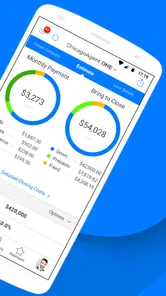
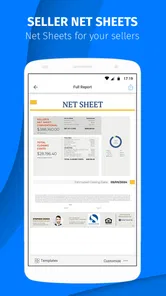


Analysis by Reviewed
If you work in real estate around Chicago, ChicagoAgent ONE is worth approaching as a focused professional tool rather than as a general finance app. I found its purpose easy to understand from the start: it is built for real estate professionals, and its value depends on whether your daily work fits that local, industry-specific focus. It is free to install, although the app includes optional in-app purchases ranging from $0.99 to $9.99 per item.
My first impression was that this is an app for people who want a practical mobile companion while handling property-related work, not for someone looking for a broad personal budgeting service. That distinction matters. The app is listed in the Finance category, but its real audience is much narrower than that label suggests. If you are an agent who needs a dedicated place to begin working from a phone, it makes more sense than a generic finance application. If you are simply tracking household spending, I would look elsewhere.
What to expect before you begin
The app comes from PalmAgent and has been available since October 10, 2014. That long presence gives it a more established feel than a brand-new experiment, while the current version, 4.8.5.1.5, shows that it has continued to receive attention. It supports devices running Android 7.0 or later, so anyone using an older phone should check compatibility before planning a workday around it.
Its public audience is modest but meaningful: the app has passed 10K installs, with an average rating of 4.2 from 168 ratings and 77 written reviews. I would not treat those figures as a substitute for personal testing, especially because real estate workflows vary so much from one professional to another. Still, they suggest that the app has reached a real group of users rather than existing only as a lightly used listing.
The Everyone content rating is reassuring if you want to keep a work tool on a shared or family device. It does not mean the app is designed for casual users, though. The interface and terminology are likely to make more sense when you already understand property transactions, clients, listings, and the pace of an agent’s day. A first-time user should expect a professional utility, not a guided real estate course.
The most important expectation is to judge it by workflow fit, not by the Finance label alone. Before installing, ask yourself whether your work is connected to the Chicago real estate market and whether you want a mobile tool dedicated to that context. That simple check can save time. A local real estate professional may find the narrow focus useful; an agent working in a completely different market may find it less relevant than a broader platform.
I also recommend treating the free price as an opportunity to evaluate the app rather than as proof that every part of the experience is unlimited. Optional purchases are present, so I would review any purchase prompt carefully and decide whether an extra item genuinely supports your work. For a professional app, even a small charge is worth considering in terms of how often you will use the related function.
More From Our News Desk

 Gmail
GmailGmail in a Busy Inbox: Who Benefits Most?
From first account to crowded workday, Gmail earns its place through dependable search and flexible sorting—but its best fit depends on how much inbox maintenance you can tolerate.

 Prime Video
Switching to Prime Video: What Changes in Your Viewing Routine
Prime Video can make a compelling second home for streaming, but switching means learning a different catalog, rental layer, and route from browsing to playback.

 Universal TV Remote Control
Universal TV Remote Control Works Best as a Reliable Backup
A phone remote earns its place through quick setup and reliable habits. Here is how to get more from Universal TV Remote Control—and where its limits show.

 Weather - By Xiaomi
Weather by Xiaomi Review: Clear at a Glance, Less Clear Up Close
Xiaomi’s weather app makes everyday forecasts quick to scan, but its calm surface can leave useful details and recovery paths harder to find than they should be.

 X
XX Under Pressure: Can It Recover When Posting Goes Wrong?
A resilience-focused review of X, examining setup, mistaken posts, interruptions, weak connections, and the gaps that matter when recovery needs to be dependable.

 Clash of Clans
Clash of Clans Is Won Between the Battles
Its raids are quick; its community is a long-term project of coordination, teaching, rivalry, and shared responsibility—with all the friction that entails.
Latest News



Who is most likely to benefit
Chicago-based agents and other real estate professionals are the clearest audience. The app may also suit someone who is moving into real estate work and wants to become familiar with a purpose-built mobile environment instead of assembling several unrelated apps. In that situation, I would use it alongside your existing professional process at first, not replace everything immediately.
It is less convincing for a homeowner, tenant, investor outside Chicago, or casual user who only needs mortgage calculations or personal expense tracking. Those people may get more from a mainstream finance app or a property platform designed for their exact task. ChicagoAgent ONE is not automatically the best choice simply because it is free and has a professional-sounding name.
Another practical point is device age. Android 7.0 support covers many older phones, but anyone relying on a very old handset should confirm that installation and day-to-day use are comfortable. A real estate app is often opened while traveling between appointments, so a phone that struggles with current applications can turn a useful tool into a source of delays.
Starting setup without making the process harder
When I begin with an app like this, I prefer a short test rather than trying to configure every possible option at once. Install it on the phone you actually carry to appointments, open it when you have a few uninterrupted minutes, and read each first-run prompt instead of tapping through automatically. That approach helps separate essential setup from optional extras.
Use professional information consistently if the app asks for it. A small spelling difference in a name, office detail, or contact entry can create confusion later, especially when you are moving quickly. I would also keep the first session deliberately simple: establish the account or working profile, look through the main navigation, and identify where a normal work action begins and ends.
Do not start by importing or recreating your entire business history. A better first test is one current, low-risk example that resembles your everyday work. This gives you a chance to see how the app presents information, how many steps are involved, and whether its language matches the way you already organize a transaction. If the process feels awkward with one example, adding dozens more will not solve the underlying problem.
Because optional purchases are available, I would avoid buying anything during the first few minutes. First learn what the free installation already lets you do, then decide whether a paid item removes a real obstacle. This is especially important for new users who may mistake an optional upgrade prompt for a required setup step. Take a moment to distinguish “continue using the app” from “add something extra.”
A useful setup habit is to keep a small note of the information you expect to need repeatedly. I am not suggesting that you store sensitive credentials in an unprotected note. Instead, prepare non-sensitive reference details, such as the wording you use for your professional identity or the order in which you normally handle a client task. That preparation makes the first meaningful session faster without forcing you to rush through unfamiliar screens.
How I would test the app on day one
I would divide the first session into three checks. First, can I reach the main working area without getting lost? Second, can I recognize the information the app expects from me? Third, can I finish one small professional action without needing to guess what happens next? These checks are more useful than simply browsing every menu.
I would also test it under realistic conditions, but not during a time-sensitive appointment. Open it while connected to the kind of network you normally use, then repeat the same basic action later in a quieter setting. This does not prove every situation will behave identically, but it helps you learn whether the app feels comfortable on your phone and whether you can read its screens quickly.
Keep your existing method available during this trial. If you normally use a calendar, notes, email, or a desktop real estate system, do not abandon it after one successful screen. The strongest early role for ChicagoAgent ONE is as a focused addition while you discover where it saves time. Only after repeated use would I decide whether it can replace part of another workflow.
Finding the first successful action
The first success should be small and concrete. Rather than trying to manage an entire client relationship immediately, choose one current property-related task and follow it from opening the app to reaching a clear result. The result might be locating the correct working area, completing a basic entry, or confirming that the app’s workflow matches what you need. The key is finishing something you can recognize as useful.
For example, imagine that you are between two Chicago appointments and need to prepare for the next conversation. I would open the app, go directly to the relevant professional section, use one active example, and check whether the information is arranged in a way that helps me make the next decision. If I can complete that preparation without switching repeatedly between unrelated screens, the app has already demonstrated practical value.
That scenario also reveals an important trade-off. A specialized app can reduce the mental effort of adapting a general-purpose tool to real estate work, but it may feel restrictive when your needs fall outside its intended scope. I would not judge it only by the number of visible options. I would ask whether the available path is quicker and clearer for the tasks I actually perform.
After completing the first action, repeat it with a slightly different example. This second pass is where hidden friction usually appears: a field you forgot, a navigation choice that was not obvious, or a difference between preparing information and actually finalizing it. Learning those details before a busy day is more valuable than simply reading a feature list.
One of my practical tips is to create a personal “starting point” routine. Decide which screen or area you check first, what information you confirm, and what you do before leaving the app. A consistent routine reduces the chance of overlooking a step when you are moving between showings or speaking with a client. It also makes it easier to tell whether the app is genuinely improving your process over time.
Using it alongside familiar tools
I would not expect this app to replace every tool used by a real estate professional. A calendar remains useful for appointments, email remains useful for communication, and a larger desktop system may still be better for detailed records or extended document work. The sensible comparison is not “one app versus everything,” but “does this app handle its specific part more conveniently than my current workaround?”
Compared with a generic finance app, ChicagoAgent ONE has the advantage of being aimed at a professional real estate context. That focus can make it more relevant during property work, but it also narrows its usefulness. Compared with a full real estate platform, a mobile-focused tool may feel quicker for short tasks while offering less comfort for complex administration. Your best choice depends on whether you need speed during the day or a complete command center.
A good test is to time your own effort informally without turning the process into a technical experiment. Notice how many times you leave the app, how often you search for the same information elsewhere, and whether you can return to an unfinished task without confusion. Those observations tell you more than a general claim that an app is “easy to use.”
Common confusion and sensible workarounds
The first likely confusion is assuming that the app is meant for every kind of financial need. It is not how I would position it. Its identity is tied to real estate professionals, so someone looking for banking, budgeting, investing, or ordinary expense management should not expect it to behave like a general personal finance service.
The second is confusing a free download with a completely purchase-free experience. The installation costs nothing, but optional in-app purchases are part of the product. I would read each purchase screen slowly, identify what the item adds, and decide whether it supports a task you perform often. If you only use the app occasionally, paying for an extra may not make financial sense.
Another source of friction can be local relevance. The Chicago focus is an advantage when it aligns with your market, but it is a reason to pause if your work is elsewhere. An agent in another region may prefer a broader tool with less geographic emphasis. That does not make this app poor; it simply means specialization can be valuable for one user and limiting for another.
New users may also expect the app to teach them how to become an agent. I would not rely on it for that. Go in with a basic understanding of your own professional process, then use the app to support that process. If you are still learning real estate fundamentals, pair it with proper training and established guidance rather than treating the app as an instruction manual.
For privacy and reliability, I would apply normal professional discipline. Avoid entering information casually while someone is waiting, review recipients and details before confirming anything, and keep your broader records organized elsewhere when appropriate. A mobile screen encourages quick taps, but property-related work deserves a final check before you consider a task complete.
If navigation feels unclear, stop and retrace the last action instead of repeatedly tapping. That small habit helps identify whether you are in a viewing area, an editing area, or a confirmation step. I also recommend using one consistent example during your first learning session, because changing properties or clients every few minutes makes it harder to understand the app’s structure.
When another option is the better choice
I would skip this app if my work had no meaningful connection to Chicago real estate. I would also choose a broader platform if I needed a single system for extensive client management, detailed reporting, communication history, and large-scale administration. A focused mobile tool can complement that kind of platform, but it may not be a full substitute.
Likewise, personal finance users should choose an app designed around budgets, accounts, bills, or spending categories. The Finance category alone should not lead you to download it for those purposes. Its professional real estate orientation is the defining factor, and ignoring that would create unrealistic expectations from the first launch.
I would also reconsider it if the optional purchase model does not suit your budget or if your preferred workflow already works smoothly with another system. Switching tools has a cost in attention and training. ChicagoAgent ONE needs to save enough time or reduce enough repetition to justify becoming part of your routine.
What I would do after the first successful session
Once I had completed one useful action, I would spend the next few days testing only the parts connected to my regular work. I would note which tasks feel natural, which ones require repeated checking, and where I still need another app. This creates a realistic picture instead of an overly positive first impression based on a single successful launch.
I would then decide whether the app belongs in a daily routine or only as an occasional reference. Daily use makes sense when it helps with short, repeated professional actions during a busy schedule. Occasional use may be enough if your real estate work is less frequent or if a larger system already handles most of your needs.
Before relying on it during an important appointment, practice the exact path you expect to take. Know where you begin, what information you need ready, and how you recognize completion. That preparation is particularly helpful for first-time users because confidence comes from repeating a small workflow, not from exploring every available screen.
My overall view is positive but specific. PalmAgent has created a free finance-category app with a clear professional identity, and the established release history, current version, and user response give it a credible starting point. Its real strength is not universal usefulness; it is the possibility of giving Chicago real estate professionals a dedicated mobile workflow that feels more relevant than a generic finance alternative.
At the same time, I would not recommend installing it blindly. Check your Android version, consider whether your market and role match its focus, and treat optional purchases as decisions rather than automatic steps. Start with one low-risk task, compare the experience with your current method, and keep your existing tools available until the app proves itself.
If that first task feels clear and repeatable, ChicagoAgent ONE could become a practical part of your working day. If you need broad personal finance features, a complete nationwide real estate suite, or a tool unrelated to Chicago property work, another option will probably serve you better. For the right professional, though, its focused approach is exactly what makes it worth trying.
ChicagoAgent ONE Frequently Asked Questions
What is ChicagoAgent ONE?
ChicagoAgent ONE is a mobile application designed for Chicago Police Department personnel and authorized public-safety users. It brings selected operational tools, information, and communication features together in one place, helping users access work-related resources more efficiently from a smartphone or tablet. Because it is intended for an official audience, its available functions may depend on the user’s department, role, account permissions, and current agency configuration.
Is ChicagoAgent ONE available for my device?
ChicagoAgent ONE is an app for real estate professionals, and its listed minimum operating system is 7.0. Before downloading, check that your device meets the operating-system requirement and that the app is available through the store you use. Keeping your device’s software current can also help with compatibility and security when using finance-related apps.
Who can download and use ChicagoAgent ONE?
The app is generally intended for authorized Chicago Police Department users rather than the general public. Installing it from the App Store or Google Play does not necessarily mean that anyone can use it. Access may require official credentials, enrollment, approval, or connection to department systems. Public users should check the application listing and official Chicago Police Department instructions before downloading, while employees should follow their department’s IT and security requirements.
What features does ChicagoAgent ONE provide?
The exact feature set can vary according to the version of the app and the permissions assigned to an account. In general, ChicagoAgent ONE is intended to provide convenient access to official public-safety resources, department information, communications, and operational tools through a mobile interface. Users should review the current store description and official documentation for a complete list of supported functions, since some features may only appear after authentication or agency activation.
Is ChicagoAgent ONE free to download, and does it require an account?
The application may be available to download without a direct purchase price, but downloading it is different from being authorized to use it. Most official department applications require a valid account, approved credentials, or an organization-managed login. Additional mobile-data or internet charges may also apply depending on your connection. Before installing, confirm that your agency supports the app and that you have the required access information.
Pros
- Fast access to Chicago Police Department services and non-emergency information.
- Clear interface makes common requests easy to find and submit.
- Helpful for checking local alerts
- safety updates
- and community resources.
- Can reduce the need to call or visit a police station for basic assistance.
- Useful location-based information helps residents stay aware of nearby activity.
Cons
- Some features may depend on location services and accurate device permissions.
- Response times for submitted reports or requests can vary considerably.
- Not intended for emergencies
- so users must still call 911 when needed.
- Information may be limited compared with the department’s full website.
- Occasional technical issues or outdated listings may affect the user experience.













