

FidelityAgent ONE
- 131.00
- 4.2
- Installs
- 50.00K
- Price
- Free

Screenshots

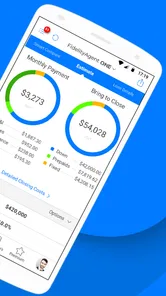
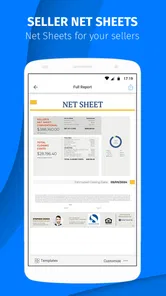


Analysis by Reviewed
Real estate work rarely falls apart because someone cannot find a property. More often, the trouble starts when an agent is between appointments, working with an unfamiliar login, or trying to complete a task on a phone instead of at a desk. That is where FidelityAgent ONE caught my attention. It is a finance app from PalmAgent, built specifically for real estate professionals rather than for everyday personal banking.
My overall impression is that it is best understood as a focused work tool, not a general-purpose finance app. The free download makes it easy to try, and its Everyone age rating keeps the barrier low, but the experience depends heavily on whether it fits the systems and routine already used by an agent or office. I would recommend approaching it as a companion for real estate work, with a little patience during setup and a clear idea of what you need it to do.
Where the real friction usually begins
The first thing I would tell a new user is not to judge the app during the first few minutes. A professional app can feel more difficult than a consumer finance tool because it assumes a work context. A personal money app normally guides you through a simple account, balance, or payment task. An app for real estate professionals may sit inside a wider process involving clients, transactions, documents, or office procedures. If that surrounding process is unclear, the app can appear unhelpful even when the real problem is the setup around it.
That distinction matters with FidelityAgent ONE. The store summary identifies it as an app for real estate professionals, so I would not install it expecting a budgeting dashboard, a personal investment tracker, or a replacement for every service used by a property business. Its value is more likely to appear when it is used for a defined professional purpose. Before downloading, I would ask myself whether I need a real estate work tool or simply a conventional finance app. That single decision prevents a lot of disappointment.
Another common sticking point is identity. If an agent works with more than one office, team, or professional account, choosing the wrong sign-in route can make the app seem empty or incomplete. I would check the exact account details supplied by the relevant office before repeatedly trying different credentials. Repeated attempts with a remembered password are not always the fastest solution; confirming which account is meant to be used is usually more sensible.
There is also a difference between an app problem and a workflow problem. If a colleague expects one process while the agent is following another, no amount of tapping will make the experience feel smooth. I found it more useful to define the intended task first: am I trying to access a work resource, continue an existing activity, or start something new? That question helps separate navigation confusion from a genuine technical issue.
The most useful mindset is to treat the app as one part of a professional workflow, not as the entire real estate office. That sounds obvious, but it changes how I troubleshoot it. Instead of asking whether the app “does everything,” I ask whether it is helping with the specific step for which my workplace expects me to use it.
More From Our News Desk

 Gmail
GmailGmail in a Busy Inbox: Who Benefits Most?
From first account to crowded workday, Gmail earns its place through dependable search and flexible sorting—but its best fit depends on how much inbox maintenance you can tolerate.

 Prime Video
Switching to Prime Video: What Changes in Your Viewing Routine
Prime Video can make a compelling second home for streaming, but switching means learning a different catalog, rental layer, and route from browsing to playback.

 Universal TV Remote Control
Universal TV Remote Control Works Best as a Reliable Backup
A phone remote earns its place through quick setup and reliable habits. Here is how to get more from Universal TV Remote Control—and where its limits show.

 Weather - By Xiaomi
Weather by Xiaomi Review: Clear at a Glance, Less Clear Up Close
Xiaomi’s weather app makes everyday forecasts quick to scan, but its calm surface can leave useful details and recovery paths harder to find than they should be.

 X
XX Under Pressure: Can It Recover When Posting Goes Wrong?
A resilience-focused review of X, examining setup, mistaken posts, interruptions, weak connections, and the gaps that matter when recovery needs to be dependable.

 Clash of Clans
Clash of Clans Is Won Between the Battles
Its raids are quick; its community is a long-term project of coordination, teaching, rivalry, and shared responsibility—with all the friction that entails.
Latest News



What to check before blaming the application
My first setup check would be the device itself. The listed minimum operating system is Android 7.0, so an older phone should be checked before anything else. A device may technically meet a minimum requirement and still provide a less comfortable experience if it is slow, crowded with other apps, or short on available storage. I would also make sure the phone has a stable connection before deciding that a screen or account is not loading correctly.
Next, I would confirm that the application is current. The current version is 4.8.5.1.5, and keeping a professional tool updated is particularly important when it is used alongside an office process. An outdated installation can create confusion if another person is working from a newer version or if the app has changed its handling of a task. I would update through the normal app store, restart the device, and then try the same action again before making more complicated changes.
Storage is another easy detail to overlook. A phone with almost no free space can behave unpredictably when an app needs to refresh or save information. I would remove a few unnecessary files, close unrelated apps, and retry. This is a simple check, but it is often more productive than immediately uninstalling a work application and starting from scratch.
For sign-in problems, I would slow down rather than guess. I would check capitalization, keyboard layout, saved-password errors, and whether the account belongs to the correct professional environment. If the app is being introduced by a brokerage or team, I would ask the responsible person for the exact access path instead of assuming that a personal account should work.
Permissions deserve a practical approach. I would not approve every request automatically, but I would read each prompt and consider whether it relates to the task I am trying to complete. If I deny something and a particular function stops working, I would revisit the device settings and allow only what is necessary for that function. This keeps troubleshooting controlled and avoids changing several settings at once.
The free price is helpful here because an agent can test the fit without paying an upfront purchase cost. However, the app also lists in-app purchases ranging from $0.99 to $9.99 per item. I would therefore check the purchase prompt carefully before confirming anything, especially on a work phone shared with someone else or connected to a company payment method. Free installation does not mean every optional item inside the app is free, so this is one place where a few seconds of attention can prevent an unwanted charge.
A setup routine that saves time later
My preferred first session would be short and deliberate. I would install the app, confirm the operating system and available storage, open it on a reliable connection, and sign in using the account intended for professional use. I would then explore only the basic path needed for the next real task instead of changing settings at random. This creates a reference point: if something goes wrong later, I know what the normal starting state looked like.
I would also keep a simple note of the account used, the office or team it belongs to, and the task that was successfully completed during the first session. I would not store a password in an insecure note, but recording the account identity and workflow context can make future support conversations much clearer. This is especially useful for agents who move between a phone, a tablet, and a desktop during the same working day.
One non-obvious advantage of this approach is that it exposes organizational problems early. If the app opens but the expected professional context is missing, the issue may be that the account has not been prepared correctly rather than that the installation failed. Finding that out during a quiet setup session is far better than discovering it while standing outside a client meeting.
I would also avoid testing with sensitive live work unless I already understand the process. A safer first run uses the least consequential task available within the normal office procedure. That lets me learn the navigation and identify access issues without risking confusion during an active transaction. The app may be free to install, but professional mistakes can still be expensive in time and trust.
Recovering a workflow when something goes wrong
When a screen stops responding or a task appears incomplete, I use a layered recovery process. First, I repeat the action once after checking the connection. If the result is the same, I close and reopen the app. Then I restart the phone. These steps sound basic, but they are valuable because each one changes only a small part of the situation, making it easier to identify what helped.
I would avoid clearing all app information immediately. That can remove local state or force another sign-in, which may make the original problem harder to understand. If a restart does not help, I would note the exact screen, the action that led there, and whether the issue affects one task or the whole app. A precise description is much more useful to an office administrator or support contact than saying that “the app is broken.”
If the problem concerns a particular work item, I would first return to the beginning of that workflow rather than repeatedly pressing the same control. For example, I might leave the screen, reopen the relevant area, and check whether the item is already present. Repeating an action can sometimes create duplicate attempts or simply hide the fact that the first attempt actually succeeded but the display did not refresh clearly.
This is where a small written record helps. I would note the approximate time, the device being used, the connection type, and the visible message. I would not include private client information in a casual support message. Instead, I would describe the sequence without exposing confidential details. That makes escalation safer and gives the person helping me enough context to reproduce the issue.
Another useful trade-off is deciding when to switch devices. If the same account and task work on a second supported device, the original phone becomes the main suspect. If the problem follows the account or workflow, changing devices is unlikely to solve it. I would use another device as a diagnostic comparison, not as a permanent workaround unless the office permits that arrangement.
Reinstalling is a last resort in my routine, not the first. Before doing it, I would make sure I know the correct sign-in details and understand what information may need to be entered again. After reinstalling, I would test one basic task before restoring my full routine. This prevents a long session of setup from hiding the fact that the original issue was caused by account access or a wider service problem.
When the app is not the cause
Real estate work depends on more than a phone application. An account may be restricted, a professional workflow may not yet be activated, or an office process may require a step outside the app. In those situations, the application can open normally while still failing to provide the result the user expects. I would contact the relevant office or account administrator when the problem involves access, missing work context, or a process that other team members control.
A weak connection can also imitate an application failure. If the issue appears only in one location, during travel, or on one type of network, I would compare the behavior somewhere with a more reliable connection. I would not assume that a successful installation proves that every later operation can work offline or under unstable service. The right response is to identify the condition under which the problem appears, then report that condition clearly.
Device age and background load matter as well. A phone may meet the minimum operating system requirement but still struggle when several demanding apps are open. I would close unnecessary applications, restart the device, and check whether the behavior improves. If it does, the practical answer may be device maintenance rather than replacing the professional app.
There is also a human factor. If an agent is rushing between showings, it is easy to tap the wrong item, overlook a confirmation, or mistake a delayed refresh for a failed submission. I like to pause after an important action and verify the resulting state before trying again. That habit is particularly valuable in work where duplicate actions or incomplete records can create confusion for other people.
Compared with a general finance app, FidelityAgent ONE is a narrower choice. A banking or budgeting application is usually better for personal spending, account balances, or household planning. A broad project-management tool may be better for assigning tasks across a team. A generic cloud-storage app may be better for organizing files. I would choose this app when the real estate-specific workflow is the priority, not simply because it belongs to the finance category.
That specialization is both its appeal and its limitation. An agent who wants a focused professional companion may appreciate the narrower purpose. Someone looking for a complete customer relationship manager, accounting package, document system, or personal finance dashboard should compare other tools instead of expecting one app to cover every need. The right choice depends on the job it must perform inside the user’s existing routine.
Who will benefit most from it
I see the strongest fit for real estate professionals who already have a defined reason to use it and who need that work context available on a mobile device. It can be useful for an agent who moves between office work and appointments, provided the account and office process are already clear. It may also suit a professional who prefers a dedicated app over trying to manage a real estate task through a collection of unrelated tools.
The app has a modest but meaningful public footprint, with over fifty thousand installs and an average rating of 4.2 from around three hundred ratings. I treat those figures as signs that it has found a real audience, not as proof that it will fit every brokerage or device. The rating is encouraging, while the limited scale compared with mass-market finance applications reinforces my view that this is a specialized product rather than a universal one.
The Everyone content rating makes it suitable from an age-classification standpoint, but the intended audience is still professional. A family member looking for a simple money app would not gain much from installing it merely because the age label is broad. Likewise, a new agent without access to the relevant professional workflow may find the app difficult to evaluate fairly until that access is ready.
I would skip it if my main goal were personal budgeting, bill reminders, investment research, or ordinary banking. I would also hesitate if my office has standardized a different platform and cannot explain how this one fits alongside it. Using two overlapping systems without a clear division of responsibilities can create more work, not less.
On the other hand, I would give it a fair trial if I were a real estate professional who had been directed to use it and wanted a mobile route into that process. The free installation lowers the risk of testing it, while the optional purchases mean I would still review each in-app payment before accepting it. That combination makes a controlled trial more sensible than an unquestioning commitment.
My practical verdict after weighing the trade-offs
FidelityAgent ONE is not an app I would recommend simply because someone works with money. I would recommend it when the person works in real estate and has a clear professional use for it. PalmAgent has kept the product focused enough to stand apart from ordinary personal finance tools, but that focus means the surrounding account and office workflow matter a great deal.
The release history also suggests a mature product: it first appeared on September 9, 2012, and the current version is 4.8.5.1.5. I would see that longevity as a reason to test the app seriously, while still judging it by how well it behaves on my own device and within my own workplace. A long-running application can be dependable for its audience without being the right answer for every modern real estate process.
My advice is to install it before a busy workday, verify the device and account, complete one low-risk professional task, and learn the recovery steps while there is no client waiting. If the app fits the office workflow, that preparation can make it a useful mobile companion. If the experience remains confusing after the account, connection, device, and process have all been checked, I would not force it. A different professional platform may be the better choice.
In short, I see this as a practical, specialized finance app for real estate professionals rather than a broad financial toolbox. Its free entry point, established presence, and focused purpose are genuine positives. The main caution is that setup friction may come from the account or workflow surrounding the app, and optional purchases deserve attention. For the right user, it is worth a careful trial; for everyone else, choosing a tool designed for their actual financial task will be more efficient.
FidelityAgent ONE Frequently Asked Questions
Is FidelityAgent ONE available for my phone or tablet?
FidelityAgent ONE is a finance app for real estate professionals. It supports devices running Android 7.0 or later, so check your device’s operating system before downloading. The app is free to install, and the current version is 4.8.5.1.5. Compatibility and access can still depend on your device and professional account, so make sure you can sign in before relying on it for work.
Who develops FidelityAgent ONE, and is it intended for general homebuyers?
FidelityAgent ONE is developed by PalmAgent and is intended for real estate professionals rather than general homebuyers looking for a property-search app. Its focus is supporting professional real estate work, so casual users may find it is not suited to their needs. The app is rated for Everyone, but that age rating does not change its professional purpose or guarantee that its tools will be useful without an appropriate account.
What is FidelityAgent ONE and who is it designed for?
FidelityAgent ONE is a real estate platform created for agents, brokers, and property professionals who need tools for managing listings, communicating with clients, organizing leads, and supporting daily business activities. Before downloading it, users should confirm that their brokerage or organization supports the platform, since some features may depend on an active account, assigned permissions, or access provided by Fidelity National Financial-related services.
Do I need an account or invitation to use FidelityAgent ONE?
Yes, access is generally intended for authorized real estate professionals rather than casual users. You may need valid login credentials, an invitation, or an account connected to your brokerage before the application can be used fully. Installing the app alone may not provide access to its main functions, so it is best to check with your broker, administrator, or FidelityAgent ONE representative before downloading.
What features can I expect from FidelityAgent ONE?
The application is designed to bring several real estate workflow tools together in one place. Depending on your organization and subscription, it may help with lead management, client follow-up, listing information, transaction-related tasks, communication, notifications, and access to business resources. Available features can vary by user role, market, and account configuration, so not every user will see the same tools.
Pros
- Centralizes client information
- tasks
- and follow-ups in one workspace.
- Helps agents organize leads and maintain consistent communication.
- Mobile access supports productivity while working away from the office.
- Designed for Fidelity-affiliated workflows and real estate processes.
- Can reduce duplicate data entry between daily agent activities.
Cons
- Its usefulness is limited if you are not part of the Fidelity network.
- Some features may require an active account or administrator permissions.
- The interface may feel complex for agents who prefer simple tools.
- Performance can depend on internet connectivity and backend availability.
- Users may need training to take full advantage of the platform.













