

LawyersAgent ONE
- 37.00
- 4.1
- Installs
- 10.00K
- Price
- Free

Screenshots

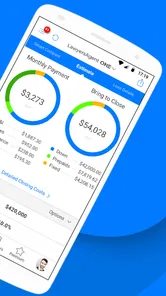
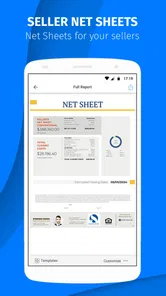


Analysis by Reviewed
LawyersAgent ONE is the kind of finance app that makes the most sense when your work already revolves around real estate transactions and legal coordination. I approached it less like a general money-management tool and more like a focused work companion for property professionals. That distinction matters: if you want budgeting, banking, investing, or personal expense tracking, this is probably not where I would start. If your daily work involves moving between property details, clients, agents, and legal tasks, its narrow purpose is much more relevant.
Developed by PalmAgent, the app has been available since October 10, 2014, and its current version is 4.8.5.1.5. It is free to install, with optional in-app purchases ranging from $0.99 to $9.99 per item. The age rating is Everyone, and it runs on Android 7.0 or later. Those details make it accessible to a broad range of users, although accessibility should not be confused with simplicity: a professional app can be easy to install and still require careful setup before it becomes useful.
Where real users are most likely to get stuck
The first point of friction is understanding what role the app is meant to play. The name suggests a specialized tool for lawyers and real estate professionals, but that does not automatically mean it replaces every system used in a transaction. I would treat it as one part of a professional workflow rather than assuming it is a complete replacement for a brokerage platform, document-management system, email account, or office database.
That expectation is especially important for someone who discovers the app through the Finance category. Finance can mean many things on an app store, but this product is aimed at the business side of real estate rather than personal financial planning. A new user who expects charts of spending or a conventional accounting dashboard may feel lost simply because the app is solving a different problem.
Another common obstacle is entering information without first deciding how it will be used. In a property transaction, details are rarely isolated. A contact may be connected to a property, a legal step may depend on a deadline, and a follow-up may only make sense when viewed in the context of the whole deal. I found that the app is easier to judge when I think in terms of a repeatable transaction routine instead of opening it casually and tapping around.
The most useful mindset is to treat LawyersAgent ONE as a transaction-focused workspace, not as a general-purpose finance app. That single adjustment helps clarify what belongs in the app, what should remain in another tool, and why a short setup period is worthwhile.
Why the first session deserves more attention
Professional apps often feel disappointing when the first session is treated as a quick test. A real estate user may open the app between appointments, enter a few details, then decide it is not helpful because the surrounding context is missing. My recommendation is to begin with one active or recently completed matter that you already understand well. That gives you a practical reference point for judging whether the app fits your working habits.
More From Our News Desk

 Gmail
GmailGmail in a Busy Inbox: Who Benefits Most?
From first account to crowded workday, Gmail earns its place through dependable search and flexible sorting—but its best fit depends on how much inbox maintenance you can tolerate.

 Prime Video
Switching to Prime Video: What Changes in Your Viewing Routine
Prime Video can make a compelling second home for streaming, but switching means learning a different catalog, rental layer, and route from browsing to playback.

 Universal TV Remote Control
Universal TV Remote Control Works Best as a Reliable Backup
A phone remote earns its place through quick setup and reliable habits. Here is how to get more from Universal TV Remote Control—and where its limits show.

 Weather - By Xiaomi
Weather by Xiaomi Review: Clear at a Glance, Less Clear Up Close
Xiaomi’s weather app makes everyday forecasts quick to scan, but its calm surface can leave useful details and recovery paths harder to find than they should be.

 X
XX Under Pressure: Can It Recover When Posting Goes Wrong?
A resilience-focused review of X, examining setup, mistaken posts, interruptions, weak connections, and the gaps that matter when recovery needs to be dependable.

 Clash of Clans
Clash of Clans Is Won Between the Battles
Its raids are quick; its community is a long-term project of coordination, teaching, rivalry, and shared responsibility—with all the friction that entails.
Latest News



Use that first matter to check three things: whether the information you normally need can be represented comfortably, whether you can return to it without confusion, and whether the app reduces repeated searching during the day. Those are better tests than simply asking whether the interface looks familiar. An app can appear polished yet still be a poor match if it forces you to duplicate work.
I would also avoid importing your entire working history immediately. Start with a limited sample, learn the rhythm of the app, and only then decide whether it deserves a larger place in your process. This is not just a matter of convenience. Smaller initial entries make it easier to identify whether a problem comes from your workflow, the way information was entered, or the app itself.
Setup checks that prevent avoidable trouble
Before relying on the app for a time-sensitive transaction, I would check the basics in a calm setting. Confirm that the device is running Android 7.0 or newer, install the latest available version, and make sure the phone has enough free space for normal operation. These steps sound ordinary, but they eliminate several false alarms that can otherwise look like application failures.
The version number is useful when asking for help or comparing behavior between devices. If you are working with colleagues, record the version each person is using before trying to diagnose an inconsistent result. A difference in app version can make two people describe the same workflow differently, especially when one person has recently updated and another has not.
Next, prepare the information you will actually use. For a real estate professional, that may include the names and contact details associated with a matter, property identifiers, and the sequence of legal or administrative steps you need to follow. Keep the first test clean and consistent. Mixing incomplete records with old notes makes it much harder to tell whether the app is difficult or the input is simply unclear.
One practical tip is to establish a naming convention before entering several matters. Use a format that lets you recognize a property or client quickly without opening every record. The exact convention is up to you, but consistency becomes increasingly valuable once more than one transaction is active. This is a small workflow decision that can save more time than searching for advanced settings.
Check the surrounding workflow, not only the installation
Installation is only one part of setup. I would also decide where the app fits beside the tools you already use. If your office relies on email for communication, a separate calendar for appointments, or another system for official documents, define which tool is the source of truth for each type of information. The app is less likely to create confusion when it has a clear job.
For example, you might use the app to keep the working context of a property matter while retaining formal document storage elsewhere. That arrangement avoids the temptation to treat every note as an official record. It also makes it easier to continue working when another participant in the transaction does not use the same application.
I would pay particular attention to the boundary between convenience and sensitive information. Real estate and legal work can involve personal and commercially important details. Enter only what is appropriate for the role you want the app to play, and follow your own office procedures for confidential records. The fact that an app is rated Everyone does not remove the need for professional judgment about what belongs on a mobile device.
Another useful check is to try the app on the device you will actually carry during the day. A workflow that feels comfortable on one phone may feel cramped or awkward on another. If you switch between devices, repeat a small test rather than assuming the experience will be identical. This is particularly important when you need to review information quickly in a hallway, car park, or client meeting.
Recovering a workflow when something goes wrong
When an entry appears missing or a screen does not behave as expected, I would resist immediately re-entering everything. First, leave the affected area and return to it through the normal route. Check whether the issue is limited to one record or affects the whole workflow. A single incomplete entry points to a different problem than a broad failure across several matters.
Then review the last action you took. Was the information fully entered? Did you move away before finishing? Were you working with a record that had been created earlier under a slightly different name? These questions are simple, but they often reveal that the app is displaying a result that follows the entered information rather than losing data.
A reliable recovery habit is to test with one small, non-critical example. Do not use an urgent closing or a live client matter as your diagnostic experiment. Create a controlled test using information that does not create professional risk, follow the same steps, and observe where the result differs. This gives you a reproducible description if you need assistance from PalmAgent or your internal support contact.
If the app becomes unresponsive, I would begin with general device troubleshooting: close other demanding apps, restart the device, check available storage, and confirm that the operating system is supported. If the issue started immediately after an update, note that timing. If it happens only with one particular record, preserve the details of that record and avoid repeatedly editing it until you understand the pattern.
What to do before reinstalling
Reinstalling is often suggested too quickly. Before taking that step, make sure you understand how your important information is retained and whether you have another record of anything you cannot afford to lose. I would not use deletion as the first response to a problem involving active transaction information. Capture the error in plain language, note the device and app version, and try the smallest safe troubleshooting step first.
This is also where the free price can be misleading. There is no purchase required to install the app, but optional items may cost between $0.99 and $9.99 each. Before paying for anything, identify exactly what the purchase is intended to change in your workflow and whether it addresses the problem you are experiencing. A paid item should not be treated as a substitute for fixing an installation, compatibility, or data-entry issue.
When seeking help, provide a short sequence rather than a vague complaint. Explain what you opened, what you entered, what you expected, and what appeared instead. Include the device type, Android version, app version, and whether the problem affects one matter or several. That information is far more useful than saying only that the app “does not work.”
When the app is not the cause
Some frustrations come from the nature of real estate work rather than the software. A transaction may stall because another person has not supplied information, a deadline may change, or two systems may contain different versions of the same detail. No mobile app can remove those underlying coordination problems. LawyersAgent ONE may help organize your side of the work, but it cannot make an external party respond or turn an unclear process into a clear one by itself.
This distinction matters when comparing it with ordinary alternatives. A notes app is faster for capturing a thought, an email client is better for communication, a calendar is better for time-based reminders, and a dedicated office platform may be stronger for centralized team administration. The advantage of a specialized real estate tool is the possibility of keeping transaction-related context together. The trade-off is that it may feel less flexible than a blank notes page.
I would choose this app over a basic notes tool when I repeatedly need to revisit the same property matter and connect several pieces of professional context. I would choose a broader platform instead when a whole team needs shared permissions, extensive reporting, formal document controls, or deep integration with existing office systems. The right decision depends less on the app’s category than on how many separate tools your current process already requires.
A further limitation is that specialization can narrow the audience. A real estate lawyer or agent may understand the intended workflow quickly, while a casual property owner may find it excessive. Someone who handles only occasional transactions may prefer a simpler checklist and a standard contact app. In my view, the product earns its place when it is used repeatedly enough to reduce duplicated effort; otherwise, its professional focus may become unnecessary overhead.
A realistic day-to-day example
Imagine leaving a property meeting with several follow-ups: one person needs a call, a transaction detail needs checking, and a legal step must remain connected to the correct matter. Instead of scattering those details across a paper notebook, a personal notes app, and a long email thread, you open the relevant workspace in LawyersAgent ONE and review the context before moving to the next task.
The benefit in that situation is not dramatic automation. It is reduced mental switching. You are less likely to confuse two properties, forget why a contact matters, or spend the next appointment reconstructing the history of a matter from memory. The workflow works best when you enter information consistently at the moment it becomes useful, rather than waiting until the end of the week.
There is a trade-off, though. If you already record the same details in an office system, adding them here may create duplicate maintenance. I would test whether the app genuinely shortens retrieval time before making it part of every transaction. A tool that saves a minute during review but adds ten minutes of repeated entry is not improving the process.
Who should use it and who should skip it
I see the strongest fit for real estate professionals who want a mobile-focused way to keep transaction work organized and who are willing to establish consistent habits. It may also suit a small practice where one person needs a practical working view of matters without immediately adopting a large, complex platform. The app’s long availability and current version suggest an established product rather than a brand-new experiment, while its average rating of 4.1 from around 86 ratings indicates a generally positive but not unanimous reception.
The install base is over 10 thousand, which is enough to show that other users have adopted it, but it is still a specialized audience rather than a mass-market finance community. I would interpret that as a reason to judge the app by professional fit, not popularity alone. A focused tool can be valuable to the right user even when it is not designed for everyone.
I would skip it if you are looking for personal budgeting, investment tracking, banking access, or a simple way to jot down occasional property notes. I would also hesitate if your office already has a mandatory system that covers the same work and requires all staff to keep information in one place. In that case, a second app could increase inconsistency instead of reducing it.
Before committing to a larger workflow, use the free installation to test one representative matter. Ask yourself whether you can find the information faster after entering it, whether the app fits your device and schedule, and whether it creates duplicate work. Those three answers will tell you more than the store summary or the number of downloads.
My practical verdict after weighing the friction
LawyersAgent ONE is worth considering when your work is specifically tied to real estate and legal transaction organization. I like its focused identity because it gives the app a clear purpose, but that same focus means it should not be mistaken for a universal finance solution. Its value depends on whether your daily work contains recurring property matters that benefit from a dedicated mobile workflow.
The main lesson is to set it up deliberately. Begin with a familiar, low-risk matter, use consistent names, decide what information belongs inside the app, and keep other systems responsible for the tasks they already handle well. If something goes wrong, test the smallest reproducible example before reinstalling or purchasing an optional item. Those habits make the review fairer because they separate genuine product friction from avoidable workflow confusion.
PalmAgent’s app is free to install, suitable for Everyone, and compatible with Android 7.0 and later, so the entry barrier is modest. The optional purchases mean I would still examine each paid item carefully rather than assuming every professional need is included without extra cost. For a real estate professional who wants a specialized companion and can accept some setup discipline, I think it deserves a practical trial. For everyone else, a simpler notes, calendar, or general office tool may be the more sensible choice.
LawyersAgent ONE Frequently Asked Questions
What devices and operating systems can run LawyersAgent ONE?
LawyersAgent ONE is available for Android devices running version 7.0 or later. Before downloading, check your device’s operating system and available storage, then install the app through a trusted app store. Keeping your device and app updated can also help you use the version currently offered and avoid compatibility issues.
Is LawyersAgent ONE intended for real estate professionals or legal practices?
LawyersAgent ONE is an app for Real Estate professionals, so people working in real estate are its stated audience. Its name may suggest a legal-practice tool, but users should consider the intended real estate focus when deciding whether it fits their day-to-day work. It is listed in the finance category, which may help set expectations before installation.
What is LawyersAgent ONE?
LawyersAgent ONE is a legal practice management application designed to help lawyers and law firms organize everyday work from one place. Depending on the available plan and version, it may support client and matter management, calendars, tasks, documents, billing, communication, and case-related information. It is intended to reduce administrative work, but users should confirm which features are included before downloading or subscribing.
Who can use LawyersAgent ONE?
The app is primarily aimed at legal professionals, including independent attorneys, small practices, and law firm teams that need a more structured way to manage cases and clients. Some functions may require an administrator account or an invitation from a firm using the platform. It may not be suitable for private individuals looking for general legal advice, because a practice-management app is not a substitute for consulting a qualified lawyer.
Does LawyersAgent ONE protect confidential legal information?
Because lawyers may use the platform for sensitive client and case data, security and privacy are important considerations. Before uploading confidential documents, review the provider’s privacy policy, terms of service, authentication options, data-storage practices, and any available encryption or access-control features. Firms should also verify that the app fits their professional, regulatory, and data-retention obligations in their jurisdiction.
Pros
- Quick access to legal professionals from a mobile device.
- Useful for requesting legal assistance while away from an office.
- Centralizes case-related communication in one app.
- May simplify finding a lawyer for specific legal needs.
- Convenient for users who prefer digital legal services.
Cons
- Availability of lawyers may vary by location and time.
- Some services may require additional fees or consultations.
- Response times can differ depending on lawyer availability.
- The app may not replace in-person legal advice for complex cases.
- Users should verify lawyer credentials before sharing sensitive information.













