

Open Radio - Online FM Radio
- 298.00
- 4.4
- Installs
- 1.00M
- Price
- Free
Screenshots
Analysis by Reviewed
When I want radio to fill a particular moment rather than a playlist I have to curate, Open Radio is an appealing place to start. I can use it to look beyond familiar local broadcasts and explore stations from elsewhere, whether I want music in the background or a different kind of programming. It is a listening app, not a tool for producing or editing audio, so its creative value is in helping me find a sound and carry it into the day.
A practical way to begin listening
I get the most from this kind of app when I treat the first search as a small experiment, not a commitment to find one perfect station. I might search for a place I have visited, a genre I usually enjoy, or a topic that suits the task in front of me. Then I listen long enough to decide whether the station’s overall character works, rather than judging it from a brief opening moment. With live radio, the mix of voices, music, and pacing is part of the choice.
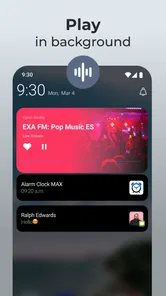
That approach is especially useful when I’m working, cooking, or tidying and want a changing sound without stopping to pick each next track. A station can provide a sense of company while leaving my hands free. If I’m reading closely or joining a call, though, speech-heavy programming may become distracting; I would choose a more familiar music station or turn the audio off rather than expect the app to adapt automatically to the task.
Discovering the World of Radio
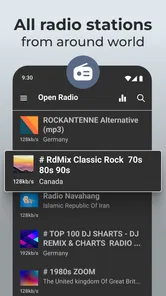
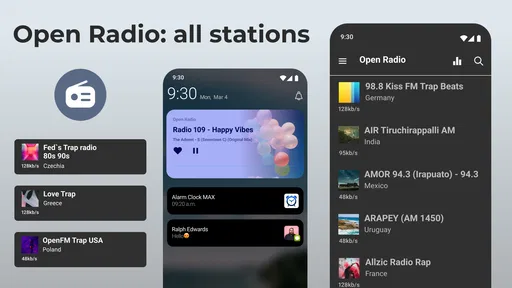
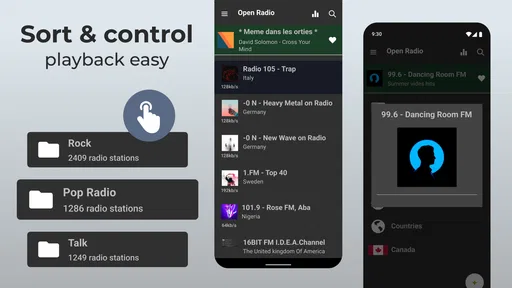
Open Radio is like having a world of radio stations right at your fingertips. It’s an app that essentially brings together a massive collection of FM radio stations from around the globe. Whether you’re in the mood for some classic rock from the USA, pop hits from the UK, or traditional tunes from Japan, this app’s got you covered. The app’s interface is simple and user-friendly, which makes navigating through the vast array of stations a breeze.
Ease of Use
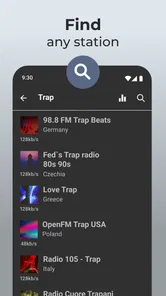
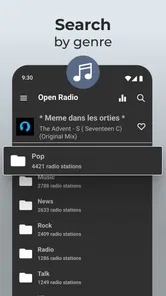
Let’s talk about user experience for a minute. When I first opened the app, I was pleasantly surprised by its clean design. There’s nothing worse than an app cluttered with unnecessary features, and thankfully, Open Radio keeps it straightforward. You can search for stations by country, genre, or even by specific keywords. Plus, you can save your favorite stations for easy access later. The app runs smoothly, with minimal buffering, which is a huge plus for those of us who hate interruptions.
Choosing a Station for the Moment
That search approach works best when I start with a listening intention rather than browsing without a goal. For example, I might look for a country first when I want a sense of place, or try a genre when I want a broad musical mood. Keywords are useful when I already know a station name or a particular subject. Those routes are not interchangeable: a broad search can surface unfamiliar options, while a specific term is quicker when I have a destination in mind.
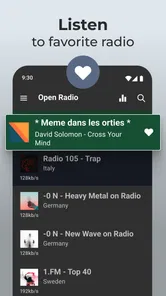
A realistic everyday use is putting on a station while cooking or doing a routine task, then saving it if I enjoy the mix of music and speech. The favorite list can become a compact set of dependable choices rather than a long catalogue I have to search through every time. I’d keep it selective; a few stations I genuinely return to are more useful than saving every interesting result and having to sort through them later.
More From Our News Desk

 Gmail
GmailGmail in a Busy Inbox: Who Benefits Most?
From first account to crowded workday, Gmail earns its place through dependable search and flexible sorting—but its best fit depends on how much inbox maintenance you can tolerate.

 Prime Video
Switching to Prime Video: What Changes in Your Viewing Routine
Prime Video can make a compelling second home for streaming, but switching means learning a different catalog, rental layer, and route from browsing to playback.

 Universal TV Remote Control
Universal TV Remote Control Works Best as a Reliable Backup
A phone remote earns its place through quick setup and reliable habits. Here is how to get more from Universal TV Remote Control—and where its limits show.

 Weather - By Xiaomi
Weather by Xiaomi Review: Clear at a Glance, Less Clear Up Close
Xiaomi’s weather app makes everyday forecasts quick to scan, but its calm surface can leave useful details and recovery paths harder to find than they should be.

 X
XX Under Pressure: Can It Recover When Posting Goes Wrong?
A resilience-focused review of X, examining setup, mistaken posts, interruptions, weak connections, and the gaps that matter when recovery needs to be dependable.

 Clash of Clans
Clash of Clans Is Won Between the Battles
Its raids are quick; its community is a long-term project of coordination, teaching, rivalry, and shared responsibility—with all the friction that entails.
Latest News



Making a Listening Routine
There is a useful middle ground between searching every day and saving so many choices that the favorites list stops helping. I would keep a small set for distinct situations: one station for focused background music, another for a lively kitchen or cleaning session, and perhaps one whose spoken programming I enjoy when I can give it attention. That makes the list work like a simple listening toolkit without requiring a complicated setup.
If a search result sounds promising but does not fit the moment, I would not immediately dismiss it. A station that feels too talkative while I’m concentrating might be a good companion during a walk or a slower chore. This is one of the advantages of live broadcasts over a hand-built playlist: the station has its own rhythm, and I can choose the context in which that rhythm is welcome. The trade-off is that I cannot assume every moment of a broadcast will suit my mood.
Personalization and Features
Something I really appreciated about Open Radio is the level of personalization it offers. You can create your own list of favorites, which is perfect if you have a specific lineup of stations you love listening to. Moreover, the app supports Android Auto, meaning you can easily integrate it into your car’s system for a seamless listening experience while driving. And for those who are tech-savvy, there’s even support for streaming to other devices via UPnP/DLNA.
Listening Beyond the Phone
Those connection options make the app more flexible than a radio app used only on a handset, but they also suit different situations. Android Auto is the practical choice when I want to browse or resume a saved station through the car’s interface; I would set up the station before driving rather than search while on the road. UPnP/DLNA is more relevant at home, where a compatible device can take over playback. If I only listen through my phone, these options are extras rather than reasons to choose the app.
One useful habit is to test a station in the place where I expect to listen to it. A stream that feels reliable on home Wi-Fi may behave differently on a mobile connection during a commute. Since live radio depends on a continuing stream, I’d also keep a saved alternative ready for a favorite station that happens to stall. This is a small practical trade-off: the app opens access to distant broadcasts, but listening still relies on a working internet connection.
Everyday Reliability and Data Trade-offs
For a commute, I would choose a station and check that it starts before setting off, then rely on the car’s controls rather than browse while driving. At home, I would try a few stations on the Wi-Fi network and keep a backup favorite for the occasions when one stream is unavailable or slow to resume. These are modest habits, but they matter more with live radio than with an audio file already stored on a device.
Because this is streaming, it is also sensible to consider where and how long I listen when using mobile data. I would use Wi-Fi for extended listening when convenient and save mobile playback for situations where it is worth the data use. That is not a flaw unique to this app; it is a practical cost of taking internet radio away from a home connection. Anyone who needs dependable listening in places without a connection should choose downloaded audio instead.
Performance and Reliability
Now, onto one of the most crucial aspects: performance. In my experience, Open Radio delivers a stable performance with high-quality audio streaming. I haven’t encountered any major issues in terms of lag or crashes, which is often a concern with streaming apps. The audio quality is clear, and even when I switched between different stations, the transition was smooth without any noticeable delays.
How It Fits Among Radio Options
Compared with a conventional FM radio, the main appeal here is the ability to explore stations beyond the reach of a local signal. Compared with music-streaming services, live radio is less about choosing every track and more about letting a station set the pace, with its own selection and presentation. That can be refreshing when I don’t want to build a queue, but it is the wrong fit if I need a specific song on demand or want fine control over every play.
There is another difference worth considering: a local radio receiver can be useful where mobile internet is weak, while an online station app can offer a broader sense of place and choice when a connection is available. Neither is automatically better. If I am at home with reliable Wi-Fi and want to explore, internet radio makes sense; if I am travelling through an area with patchy coverage, a conventional receiver or offline audio is a safer choice.
Open Radio is a free music and audio app from Battery Stats Saver. It has a 4.4 average from around 24,000 ratings and has passed 1 million installs. It is rated for Everyone, and optional in-app purchases range from $0.99 to $99.99 per item. I’d treat the free entry point as a chance to see whether its station discovery suits my routine, and check any purchase details in the app before choosing to spend. Its long-running presence, with a release date of December 21, 2014, suggests a familiar radio-listening format rather than a production workspace for creators.
Who Will Get the Most from It
I think it is most appealing to listeners who like radio as a source of discovery, not just a way to replay known favorites. Someone who enjoys hearing unfamiliar presenters, station identities, and programming from other places can make better use of the search options than a listener who only wants a fixed album or carefully ordered playlist. It can also suit people who want a simple background companion for repetitive tasks and prefer a station to make the next choice for them.
On the other hand, I would skip it if offline access is essential, if I need exact track selection, or if uninterrupted playback is critical in places where internet access is unreliable. Those needs point toward downloaded music, a local radio receiver, or an on-demand service, depending on the situation. The important question is whether I want to choose the sound myself or let a broadcaster shape it.
If you’re someone who enjoys variety in their listening habits, Open Radio is a gem. It brings you a world of music and talk shows without the geographical limitations. Whether you’re at home, commuting, or on a road trip, this app ensures you’re never far from your favorite tunes.
Who Should Try It—and Who Might Prefer Something Else
I’d recommend it to curious listeners who enjoy discovering broadcasts from different places, people who want live radio in the car, and anyone who likes having a few dependable stations ready for everyday background listening. It is less suitable for someone who expects offline playback, precise control over song order, or a personal music library. If those are the priorities, a downloaded collection or an on-demand streaming service is likely a better match.
It also helps to think of this as a listening and discovery tool rather than a way to publish creative work. The favorites list supports a personal routine, and streaming to another device can move listening into a room, but neither turns a broadcast into an editable project or a deliverable. For a creator looking for recording, mixing, or sharing controls, I’d choose a dedicated audio-production app instead.
From Discovery to Handoff
For a person making a podcast, music track, or other audio project, this app can still be useful as a listening reference: I might compare the feel of different stations, notice how spoken segments sit beside music, or find inspiration for a mood. But that is informal research, not a production workflow. I would keep notes separately if a station sparks an idea, because listening here does not itself create a file I can edit or hand to someone else.
That distinction is helpful before installing it for a creative project. If the goal is to find something to listen to while drafting or to explore broadcast styles, it can play a supporting role. If the goal is to record, edit, publish, or manage deliverables, I would use a purpose-built tool and treat this app only as a source of listening inspiration.
In conclusion, Open Radio stands out as a solid choice for anyone looking to explore radio stations beyond the traditional FM dial. Its ease of use, personalization options, and reliable performance make it a must-try for radio enthusiasts. So, why not give it a shot and see where the world of radio takes you?
My advice is to try a few searches tied to the places or styles you actually enjoy, save the stations that earn a repeat listen, and see whether live programming fits your day better than a playlist. For that kind of low-effort discovery, I think it earns a place on the phone; for offline listening or tightly controlled music selection, I’d reach for a different option.
Open Radio - Online FM Radio Frequently Asked Questions
Does Open Radio - Online FM Radio stream stations from different countries?
Yes. Open Radio is designed to provide live feeds from radio stations around the world, so it can help you explore broadcasts beyond the stations you usually hear locally. Since listening is live and internet-based, what you hear depends on the station you select and its broadcast. You can use the app to find programming that suits your interests, from music to other radio content.
Will streaming radio use my mobile data?
Yes, streaming live radio over a mobile network uses mobile data. If you want to keep data use in check, connect to Wi-Fi when it is available and consider your mobile plan before listening for long periods away from Wi-Fi. A stable internet connection also helps keep a live broadcast playing smoothly. The app is intended for online listening, rather than downloading broadcasts for later.
Can I choose which radio stations I listen to?
Open Radio is built around finding and listening to live stations, so you can choose broadcasts that match your interests rather than being limited to a single preset stream. Its purpose is to make radio from around the world accessible in one app. Station availability and the content you hear depend on the broadcast you select, so exploring the options is a useful way to find programs you enjoy.
Is Open Radio - Online FM Radio suitable for listening while traveling?
It can be useful while traveling if you have an internet connection, since the app streams live radio rather than relying on a traditional radio tuner. Wi-Fi or mobile data can provide that connection, though mobile streaming may use data from your plan. If you expect to be without connectivity, keep in mind that live radio cannot be played offline through the app.
Who develops Open Radio - Online FM Radio, and what kind of app is it?
Open Radio - Online FM Radio is developed by Battery Stats Saver and belongs to the Music & Audio category. It is designed for people who want to listen to live radio stations through a mobile app, rather than tuning in with a traditional radio. Its focus is straightforward: browse or find broadcasts and stream them over the internet.
Pros
- Wide variety of radio stations
- User-friendly interface
- High-quality audio streaming
- Offline listening feature
- Customizable station lists
Cons
- Contains ads in free version
- Limited offline stations
- No podcast support
- Occasional buffering issues
- Requires stable internet













