

NOAA Weather Unofficial (Pro)
- 8.08K
- 4.8
- Installs
- 100.00K
- Price
- $1.99

Screenshots
Analysis by Reviewed
Weather apps ask for a surprising amount of trust: I want a forecast I can act on, but I also want to understand what I’m choosing when location is involved. NOAA Weather Unofficial (Pro) is a paid weather app from Granite Apps, built around NOAA forecasts and radar for a precise location. Its focus is practical rather than flashy, which suits me when the question is simply whether rain could disrupt the day.
Trust starts with the forecast you need
The app has been around since February 22, 2012, and its current version is 2.16.0. It costs $1.99, is rated for Everyone, and runs on Android 4.4 or later. Those details make it a modest one-time purchase rather than a free app whose value depends on enduring ads or a subscription. It has a 4.8 average from around 18,000 ratings, with more than 100,000 installs; that response is encouraging, though I’d still judge it by how well its local forecast fits my routine.
Its NOAA-centered approach also gives it a different feel from general-purpose weather apps that combine forecasts with news, lifestyle panels, or broader visual dashboards. I prefer a focused source when I’m checking conditions before leaving home. The trade-off is that a source-centered app may not feel as polished or entertaining as services designed to wrap weather in a richer presentation. If you mainly want a quick glance at an attractive forecast card, your phone’s built-in weather option may be enough.
Features That Make a Difference
First off, let’s talk about the features. The app pulls its data straight from the National Oceanic and Atmospheric Administration, which means you’re getting super accurate and up-to-date weather information. And for someone like me, who plans their day around the weather, this is a game-changer.
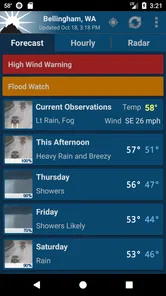
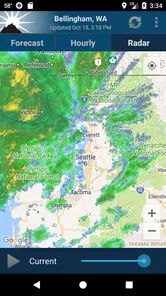
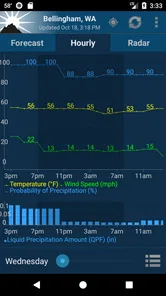
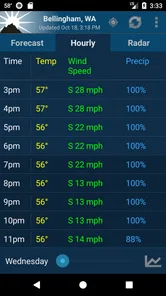
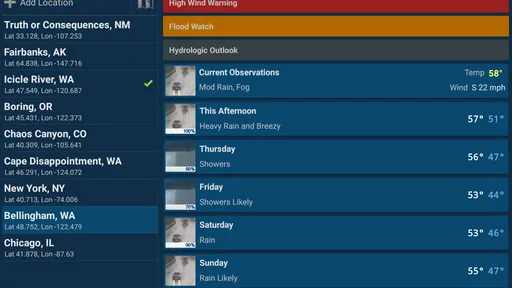
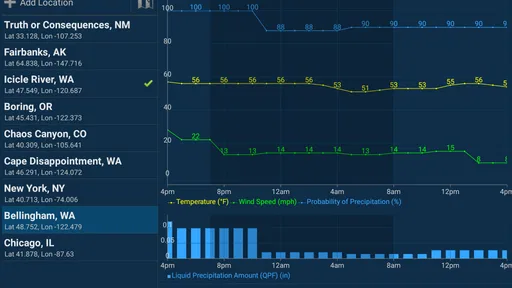
What’s cool is the detailed weather forecasts. You get hourly updates, seven-day forecasts, and even severe weather alerts. I find the radar maps particularly useful when I’m planning a weekend hike; I can see exactly where the storm clouds are brewing.
Location choices and everyday decisions
The most useful way I’d make a location-based forecast part of a routine is to check the destination, not just the place where I’m standing. Before a hike or a drive across town, I’d compare the forecast for the starting point with the conditions where I expect to spend time. That small habit matters because a reassuring glance at home can be misleading when the outing takes me somewhere with different weather.
For an ordinary workday, I’d look at the hourly view before choosing when to walk, commute, or carry groceries. If rain looks possible later, checking the radar close to departure can help me decide whether to leave early or bring a raincoat. I wouldn’t treat a radar image as a promise about exactly what will happen at my street; it is a planning aid, and local conditions can change. For time-critical outdoor work or a serious safety decision, I’d also consult official alerts and use judgment rather than relying on one app alone.
More From Our News Desk

 Gmail
GmailGmail in a Busy Inbox: Who Benefits Most?
From first account to crowded workday, Gmail earns its place through dependable search and flexible sorting—but its best fit depends on how much inbox maintenance you can tolerate.

 Prime Video
Switching to Prime Video: What Changes in Your Viewing Routine
Prime Video can make a compelling second home for streaming, but switching means learning a different catalog, rental layer, and route from browsing to playback.

 Universal TV Remote Control
Universal TV Remote Control Works Best as a Reliable Backup
A phone remote earns its place through quick setup and reliable habits. Here is how to get more from Universal TV Remote Control—and where its limits show.

 Weather - By Xiaomi
Weather by Xiaomi Review: Clear at a Glance, Less Clear Up Close
Xiaomi’s weather app makes everyday forecasts quick to scan, but its calm surface can leave useful details and recovery paths harder to find than they should be.

 X
XX Under Pressure: Can It Recover When Posting Goes Wrong?
A resilience-focused review of X, examining setup, mistaken posts, interruptions, weak connections, and the gaps that matter when recovery needs to be dependable.

 Clash of Clans
Clash of Clans Is Won Between the Battles
Its raids are quick; its community is a long-term project of coordination, teaching, rivalry, and shared responsibility—with all the friction that entails.
Latest News



User Experience: Smooth Sailing
Now, onto the user experience. The interface is clean and straightforward, which is a big plus. You don’t have to wade through tons of menus to find what you need. Everything is just a tap away. Plus, the app doesn’t bombard you with ads, which is a breath of fresh air compared to some other weather apps out there.
I also love how customizable the app is. You can set it up to give you notifications for specific weather events, which is great if you’re as forgetful as I am when it comes to checking the weather regularly.
Alerts without handing over your attention
Notifications work best when they’re selective. I’d enable only the weather events that could actually change my plans, then keep routine forecast checks manual. Too many alerts can become background noise, and a warning that gets ignored is less useful than a quiet app I remember to open. This is a practical balance: let the app interrupt me for conditions I care about, without turning every change in the forecast into a reason to look at my phone.
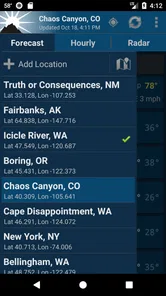
Location is another choice worth making deliberately. A forecast for an exact location is most convenient when the app can use where I am, but a saved or manually chosen place can be preferable when I’m checking a trip ahead of time or limiting location sharing. I’d review the location options available on my device and grant only the access I’m comfortable with. I don’t assume that the app’s forecast focus tells me every detail about its data practices; I make the decision based on the controls I can see and the permissions my device presents.
Why It Stands Out
So, what makes NOAA Weather Unofficial (Pro) stand out? For me, it’s the reliability and accuracy. It’s like having a personal meteorologist at your fingertips. The app also supports widgets, so you can have the weather info right on your home screen without opening the app. This feature is super handy, especially when you’re in a rush.
A widget is useful when I want a quick check without opening the full forecast, but it is not a substitute for looking at hourly detail before making a weather-sensitive plan. I’d keep the widget as a quick status glance and use the app’s radar and forecast views when timing matters. Anyone who rarely checks beyond a single daily temperature may not get enough value from those deeper views to justify paying for another weather app.
Sure, there are tons of weather apps available, but the level of detail and accuracy you get with this one is impressive. Whether you're planning a picnic or just trying to decide if you should wear a jacket, this app has got your back.
Putting a forecast to work
One realistic routine is a Saturday hike with a flexible start time. I’d check the seven-day view while choosing the day, then use the hourly forecast to decide when to set out. Just before leaving, I’d look at radar for the direction and movement of precipitation, rather than reading a single image as a guarantee. If the picture looks uncertain, I’d choose a route with an easy turnaround or postpone the outing. That sequence uses each view for a different decision instead of repeatedly checking one screen and hoping for certainty.
The same approach helps with less adventurous plans. If I’m deciding whether to hang laundry outdoors or take a dog for a longer walk, the hourly forecast is more relevant than the day’s overall high. Radar can then help me judge whether a shower seems close enough to change the plan. I’d still keep a backup option: a forecast can guide a choice, but it cannot make the weather behave on schedule.
Where it fits among weather apps
Compared with a built-in weather app, this one makes more sense when I want to move from a quick temperature check to a closer look at radar, hourly conditions, or alerts. The built-in option is often simpler for a glance, and it may be all a casual user needs. NOAA Weather Unofficial (Pro) is more appealing when I expect to use those extra views regularly and want an app centered on NOAA-based information rather than a broad lifestyle dashboard.
That focus is also a boundary. People who want a lively visual forecast, extensive editorial content, or a single service for international travel may be happier with another weather app. Coverage and forecast sources matter, so I would check whether the locations I routinely need are served before building my plans around it. For someone whose everyday life is mostly in the United States and whose decisions depend on local conditions, its narrower focus can be a strength rather than a drawback.
Who will get the most from it
I’d recommend it most to people in the United States who regularly make plans around NOAA-based local forecasts, want radar and alerts together, and are willing to spend a little for a focused experience. Hikers, dog owners, gardeners, and anyone whose commute is affected by showers can get practical value from checking more than the day’s high temperature. For a weekend outing, I’d check the hourly forecast before setting a departure time, then revisit radar shortly before leaving; that is more useful than repeatedly refreshing the same screen all morning.
It may be the wrong fit if you want global coverage, a highly visual lifestyle forecast, or a service whose main draw is a broad collection of weather extras. It also won’t remove the uncertainty that comes with forecasting: a detailed screen can still be wrong for a particular block or hour. In those situations, a simpler built-in app may be adequate, while someone traveling internationally should choose a service that clearly covers the places they need.
Questions I’d settle before relying on it
Would I need to grant precise location access just to check the weather? I’d first look at the permission choices offered by my device and consider whether selecting a location myself suits my habits better. If I mainly check home and a few regular destinations, manually choosing those places may be a comfortable way to keep the forecast useful without making location access feel automatic. The choice should reflect how I actually use the app, not just what is most convenient on the first launch.
Would I leave alerts on all day? I wouldn’t. I’d start with only the events that could alter a commute or an outdoor plan, then adjust if the notifications prove either too quiet or too frequent. And can the radar settle a close call? It can add useful context, but I would not use it as a precise countdown for a specific street. For travel, severe conditions, or an important event, I’d combine the app’s view with official guidance and a backup plan.
Finally, is the paid version worth it if I already have a weather app? I’d compare how often I open the radar, hourly forecast, and alerts with how often I only check the temperature. If the richer views change decisions several times a week, paying for a dedicated tool can feel reasonable. If I almost never look beyond a daily summary, keeping the built-in option is the more sensible choice.
Final Thoughts
In a nutshell, if you’re looking for a reliable weather app that’s packed with features and doesn’t skimp on accuracy, NOAA Weather Unofficial (Pro) is definitely worth a shot. It’s easy to use, highly informative, and just what you need to stay ahead of the weather game. So next time you’re stepping out, check it out and see how it can change your weather-checking routine. Trust me, you won’t regret it!
My cautious recommendation is to treat it as a useful planning tool, not an authority that replaces common sense or official emergency guidance. Before paying, ask yourself whether you’ll use the radar, alerts, and detailed forecasts often enough to justify a dedicated app; if you only need a quick temperature check, you probably don’t. For me, its appeal is the combination of a focused NOAA-based forecast and practical ways to check conditions, provided I stay thoughtful about location access and keep alerts limited to what genuinely matters.
NOAA Weather Unofficial (Pro) Frequently Asked Questions
Does NOAA Weather Unofficial (Pro) focus on local weather, or can I use it for other locations too?
The app’s main purpose is to provide NOAA forecasts and radar for your exact location, which makes it a practical choice for checking conditions where you are. If you are considering it for travel or for keeping an eye on another place, think about whether location-based weather information fits the way you plan to use the app. Its focus is weather rather than general-purpose news or entertainment.
What should I check before downloading NOAA Weather Unofficial (Pro) on my phone?
Before installing, check that your device runs a compatible operating system and that you are comfortable with the app’s paid price. NOAA Weather Unofficial (Pro) is a weather app from Granite Apps, built around NOAA forecasts and radar. It is intended for users who want weather information on a mobile device, so consider whether that NOAA-focused approach matches the forecasts and tools you normally rely on.
What devices and operating systems can I use with NOAA Weather Unofficial (Pro)?
NOAA Weather Unofficial (Pro) is a weather app from Granite Apps for checking NOAA forecasts and radar for your location. On Android, it requires Android 4.4 or later, so it is worth checking your device’s software before downloading. The app is also available for iOS, giving users on both major mobile platforms a way to access weather information.
What does NOAA Weather Unofficial (Pro) cost, and is it suitable for all ages?
NOAA Weather Unofficial (Pro) is a paid app priced at $1.99. Its content rating is Everyone, making it suitable for a general audience. If you are comparing weather apps before installing one, consider whether its NOAA-focused forecasts and radar are a good fit for how you check local conditions. The app is designed for practical weather information rather than entertainment.
What features does NOAA Weather Unofficial (Pro) offer?
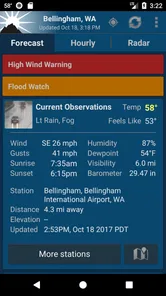
NOAA Weather Unofficial (Pro) provides users with up-to-date weather forecasts, radar imagery, and alerts directly from NOAA. The app offers detailed weather information, including temperature, humidity, wind speed, and more. Users can customize their weather dashboard, receive push notifications for severe weather alerts, and access hourly and weekly forecasts to plan their activities.
Pros
- Highly accurate weather forecasts
- Customizable weather alerts
- Detailed radar and satellite maps
- Ad-free experience
- Easy to navigate interface
Cons
- Requires internet connection
- No free version available
- Limited international coverage
- No social sharing features
- Subscription needed for full features












