News On 6
- 761.00
- 4.6
- Installs
- 100.00K
- Price
- Free

Screenshots



Analysis by Reviewed
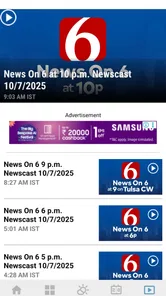
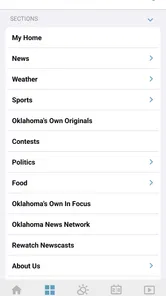
News On 6 is the kind of local news app I open when I want to know what is happening in Oklahoma without sorting through a national news feed first. It covers the three areas I would expect to check during a normal day—news, weather, and sports—and its local focus gives it a practical role that broad news apps often miss. I found it most useful as a quick check-in tool rather than an app I would leave open constantly.
The app is free, belongs to the News & Magazines category, and is developed by Griffin Media, L.L.C. It is rated for Everyone 10+, so it is aimed at a general audience while recognizing that news coverage can sometimes involve mature subjects. With a 4.6 average from around 3.7 thousand ratings and more than 100 thousand installs, it has clearly found an established audience. The current version is 8.0.564, and it supports devices running iOS 9 or later.
How I use News On 6 during an ordinary day
My baseline routine is simple. I check the app in the morning for the main local headlines, look at the weather before making plans, and return later if there is a developing story or a sports update I care about. That rhythm suits the app better than treating it like a full replacement for every source of information on my phone.
The local emphasis is the main reason to choose it. A national news application may give me a polished overview of major events, but it can take several steps to reach the information that affects a commute, a school schedule, a local event, or a nearby team. News On 6 places Oklahoma at the center, which makes the first screen more relevant when my question is, “What matters here today?”
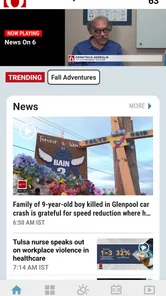
I also like the separation between quick awareness and deeper reading. I can scan a headline when I only have a moment, then decide whether it deserves more attention. That is a better workflow than opening a social network and hoping its algorithm surfaces the right local story. The app gives me a more intentional starting point.
For a realistic example, imagine leaving home before sunrise for work. I would open the app, check the latest weather information, scan local headlines for traffic-related or public-safety developments, and then close it. Later, during a lunch break, I might return for a sports result or a follow-up on a story that was still developing. That takes advantage of the app’s local scope without turning every notification or headline into a distraction.
What the local focus does especially well
The strongest benefit is context. Local reporting is useful precisely because it narrows the field. If I am interested in Oklahoma news, a general-purpose feed may bury relevant coverage between national politics, international events, entertainment, and opinion. News On 6 starts closer to the information I am likely to act on.
More From Our News Desk

Weather by Xiaomi Review: Clear at a Glance, Less Clear Up Close

X Under Pressure: Can It Recover When Posting Goes Wrong?

Clash of Clans Is Won Between the Battles

Android Auto Makes the Case for Quieter Car Software

MobiOffice: Transforming Mobile Productivity with Seamless Integration

EA SPORTS FC™ Mobile Soccer: Redefining Mobile Sports Gaming
This also makes the app helpful for people who have moved away from Oklahoma but still want a connection to home. It can serve as a compact way to keep up with local developments without subscribing to several separate sources or manually searching for stories every day. I would recommend it to former residents, relatives of people in the area, and anyone whose work or travel regularly involves Oklahoma.
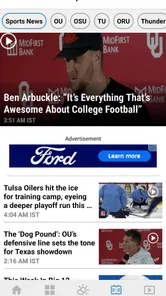
Sports coverage adds another reason to return. A broad sports app may be stronger for league-wide statistics, fantasy tools, or deep analysis, but it is not always the fastest way to see what a local audience is discussing. News On 6 works better when I want local sports news alongside the rest of the day’s Oklahoma coverage, rather than a specialized national sports experience.
Settings and habits worth checking first
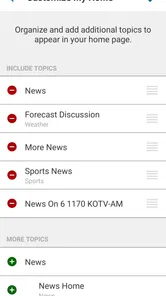
When I install a local news app, I do not immediately allow every alert. I first decide what role I want it to play. If I only want a morning and evening check, I keep my routine manual and avoid turning the app into a constant interruption. If timely local developments are important to me, I review the available notification controls and choose only the alerts that genuinely help.
This is an important distinction with News On 6 because local news can be valuable precisely when something changes quickly, but not every headline deserves the same urgency. A useful habit is to treat notifications as prompts to investigate, not as complete explanations. I open the relevant story before drawing a conclusion, especially when the headline concerns weather, public safety, or an ongoing event.
I would also check the device’s text-size and accessibility settings if reading on a small screen feels tiring. News apps are often used in short sessions, and comfortable reading matters more than squeezing extra headlines onto one screen. Increasing text size may mean more scrolling, but that is a worthwhile trade-off if it makes articles easier to follow.
Another practical setting is the device’s background and battery behavior. I do not need a news app working aggressively all day if I mainly open it at set times. Restricting unnecessary background activity can make sense for someone who wants a lighter phone setup. On the other hand, a user who depends on timely weather or breaking-news alerts should test notifications rather than assuming that a quiet app is working exactly as intended.
Because the app supports iOS 9 and later, it can be relevant to people using older Apple devices. That is convenient, but older hardware may feel less fluid than a recent phone, especially when moving between sections or loading media. I would judge the experience on the actual device rather than assuming that the minimum operating-system support guarantees identical performance everywhere.
Faster patterns for repeat users
The quickest workflow I found is to give each visit a purpose. On one visit I check weather, on another I scan headlines, and on another I look for sports updates. That sounds basic, but it prevents the common habit of opening a news app without knowing what I want and then spending too long browsing.
I also recommend reading the headline list in two passes. First, scan everything quickly and identify the one or two items that affect me directly. Second, open only those stories. This is more efficient than opening every headline, and it reduces the risk of confusing a short headline with the full context of a developing report.
A useful routine for severe-weather days is to combine the app with a more specialized source when necessary. News On 6 can help me understand the local situation and follow reporting, while an official emergency channel or dedicated weather service may be better for immediate warnings and precise alerts. The app is strongest as a local news hub, not as the only safety tool I would rely on.
For sports fans, the repeatable pattern is slightly different. I would use News On 6 for local stories, results, and the regional angle, then switch to a dedicated sports application when I need detailed schedules, live statistics, standings, or extensive commentary. The advantage is not forcing one app to do everything; it is using this one for the local information it handles naturally.
Another small improvement is saving the app for deliberate check-ins instead of repeatedly refreshing it. If I am waiting for a developing story, I can revisit at sensible intervals. Constant refreshing rarely produces better understanding, and it can make a news habit feel stressful. A local app works best when it supports awareness rather than anxiety.
Where it compares with the usual alternatives
Compared with a national news app, News On 6 feels more focused and more immediately relevant to Oklahoma readers. The trade-off is breadth. If I want international reporting, extensive business coverage, or a wide range of viewpoints from around the world, I need another source. This is not a weakness in itself; it is a reminder that the app has a clear job.
Compared with reading a news website in a mobile browser, the app is more convenient for repeat visits. I do not have to remember the address or navigate through a general search each time. The dedicated format also makes it easier to build a small daily habit. A browser may still be preferable for someone who rarely checks local news or wants to keep app installations to a minimum.
Compared with social media, the app offers a calmer starting point. Social platforms are useful for seeing reactions and discovering what people are discussing, but they can mix confirmed reporting with speculation, repetition, and personal commentary. News On 6 is a better first stop when I want a news-oriented presentation rather than a stream shaped mainly by engagement.
Compared with a dedicated weather app, its advantage is the connection between weather and local reporting. Its disadvantage is specialization: people who need radar layers, detailed forecasts, historical data, or highly technical meteorological tools may prefer a weather-focused alternative. I would use News On 6 for the local news context and a specialist weather tool for more demanding forecasting needs.
Limits experienced users should understand
The app’s local scope can become a limitation if my interests are broad. I would not install it expecting a complete national news replacement. Even a strong local source cannot cover every subject with the depth of a specialist publication, and readers who want extensive investigative, financial, or international coverage will probably build a wider news setup around it.
There is also a difference between convenience and completeness. A headline feed helps me decide what to read, but it cannot replace careful reading when a story is complicated or personally important. I try not to share a headline before opening the article, and I avoid treating a short update as the final word on a developing event.
Notifications require judgment as well. They can be useful for timely local information, but too many alerts can make the app feel noisy. The best setup depends on how closely I need to follow Oklahoma events. Someone who checks news only once a day may find frequent alerts unnecessary, while a user with family, travel, or work ties to the region may value faster updates.
The age rating of Everyone 10+ is worth keeping in mind for families. It makes the app broadly accessible, but news is not automatically child-friendly simply because the application is easy to use. Parents may still want to explain that reports can include upsetting subjects and should be discussed with appropriate context.
Finally, the app is free, which lowers the barrier to trying it, but free access does not mean it will replace every paid or specialized service. I see its value in reducing the effort needed to follow Oklahoma news, weather, and sports. I would not choose it as my only information source if I require advanced tools, highly customized research, or comprehensive coverage outside the region.
Who should install it, and who should skip it?
I would recommend News On 6 to Oklahoma residents who want a straightforward local check-in, people with family in the state, commuters who care about regional developments, and sports followers who prefer local coverage mixed with general news. It is also a sensible choice for anyone tired of searching through a national feed to find information close to home.
I would be less enthusiastic about it for someone who mainly wants global headlines, deep financial reporting, extensive sports statistics, or advanced weather analysis. That reader would probably be better served by a national news service, a specialist sports app, or a dedicated weather application. Installing this app alongside those tools can still make sense, but it should not be expected to replace them.
My practical advice is to try it for a few days with a defined routine: check the main headlines once, review weather before important plans, and adjust alerts only after seeing how often they help. That approach gives the app a fair test without allowing it to dominate the phone’s notification panel.
My verdict after building a routine around it
News On 6 succeeds because it understands the value of being local. I found it most useful when I wanted a quick, Oklahoma-centered view of news, weather, and sports, without the clutter of a much broader feed. Griffin Media, L.L.C. has produced an app with a clear everyday purpose, and the combination of a free price and wide device support makes it easy for many readers to try.
Its best feature is not a flashy extra; it is the reduction of searching. I can open one place, see what deserves attention, and decide whether I need a deeper source. The most effective users will pair it with sensible notification choices, short repeatable check-ins, and specialist apps when they need more detailed weather, sports, or national coverage.
My final recommendation is positive for readers who put Oklahoma first in their news routine. I would keep it on my phone as a local starting point, while remembering its boundaries. It is not the right tool for every kind of information, but for regional awareness and convenient daily updates, News On 6 earns its place in my app lineup.
News On 6 Frequently Asked Questions
Is News On 6 available for my phone?
News On 6 is available for Android and iOS devices, making it a practical choice if you want local Oklahoma news on a phone or tablet. On Android, the app requires Android 9 or later. Before downloading, check your device’s operating system version and the app’s current compatibility details in your platform’s store.
Who develops News On 6, and is it intended for a particular audience?
News On 6 is developed by Griffin Media, L.L.C. It is a local news app for readers interested in Oklahoma news, weather, and sports, rather than a general-purpose national news reader. Its content rating is Everyone 10+, so families may want to consider that age guidance when deciding whether it is suitable for younger users.
What is News On 6?
News On 6 is a local news application focused on delivering updates from News On 6 and the surrounding Oklahoma communities. After exploring the app, its main purpose is to provide access to breaking news, weather information, traffic reports, sports coverage, videos, and other regional stories in one convenient place. It is designed for users who want quick access to local developments from their Android or iOS device.
What type of content can I find in the News On 6 app?
The app typically includes a broad selection of local and regional content, including breaking news, weather forecasts, severe weather alerts, traffic updates, investigative reports, community stories, sports, entertainment, and video coverage. The available sections may change as news develops, but the application is primarily useful for keeping up with events in Oklahoma and receiving information that may be more relevant to local residents than national news apps.
Does News On 6 provide weather alerts and live updates?
Yes, weather is one of the important features available through News On 6. Users can check current conditions, forecasts, radar information, and severe weather coverage when significant storms or other hazardous conditions occur. Depending on device permissions and the app’s current settings, notifications may also be used for breaking news or urgent weather alerts. It is worth reviewing notification and location permissions after installation.
Pros
- Covers breaking news and local events across the Tulsa area.
- Includes weather forecasts
- radar
- alerts
- and severe-weather updates.
- Live video streams help users follow major stories as they develop.
- Push notifications can deliver urgent local news quickly.
- Simple layout makes headlines and sections easy to browse.
Cons
- Coverage is mainly focused on northeastern Oklahoma and nearby communities.
- Frequent alerts may feel excessive unless notification settings are adjusted.
- Some articles may contain advertising between content sections.
- Video playback can use significant mobile data on cellular networks.
- Certain features may depend on a stable internet connection.












