Neku: OC character creator
- 9.89K
- 4.7
- Installs
- 10.00M
- Price
- Free
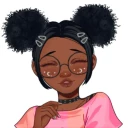
Screenshots

Analysis by Reviewed
If you enjoy inventing characters but don’t want to begin with a blank canvas, Neku: OC character creator is an approachable place to experiment. I see it as an entertainment app for sketching out an original character’s look through a hand-drawn, cartoon style. It is free to install, and Neku Avatar Studio is the developer. The Teen content rating is worth keeping in mind if you’re choosing an app for a younger user.
A good fit for short creative sessions
I find the clearest use for Neku is making a visual reference when an idea is still loose. Say you’re writing a fantasy character on the bus or chatting with friends about a new role-playing persona: you can try a few looks and leave with a more concrete sense of the character’s appearance. It’s a different kind of creative session from opening a blank page and deciding what to draw first.
That convenience also makes it useful when you want to compare directions rather than finish a piece of art. I’d try a recognizable base look, save it, then test a more dramatic change—perhaps a different palette or a contrasting outfit. Keeping the first version gives you a reference for what changed and can stop a promising design from getting lost in experimentation.
One practical question is whether it suits a complete beginner. The guided, component-based approach is a friendly entry point for someone who has an idea but little drawing experience. It can help turn a few descriptive words into a visual starting point. For someone who already draws confidently, though, that same structure may feel restrictive when they want to control pose, anatomy, or every mark themselves.
Making a character, one choice at a time
The appeal is less about producing a polished illustration from scratch and more about exploring a design idea. You can try combinations of features, colors, clothes, and accessories, then decide which version feels right. That makes the app useful when you have a character concept in mind but need a visual starting point, or when you simply want to play with a few looks without committing to one.
Explore Your Creativity
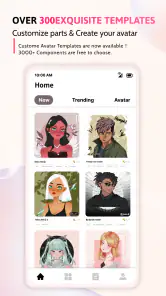
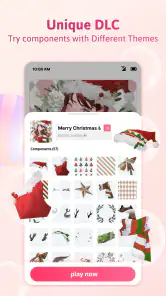
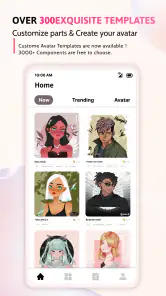
Right off the bat, Neku: OC character creator invites you into a world where imagination knows no bounds. The user interface is super intuitive, making it a breeze even for beginners to navigate. You start by choosing from a variety of templates to base your character on, but trust me, the real fun begins when you start tweaking those templates to suit your vision.
Dive into Endless Customization
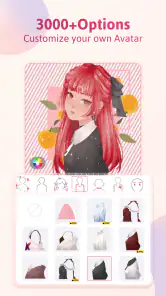
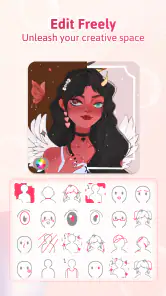
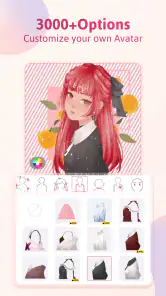
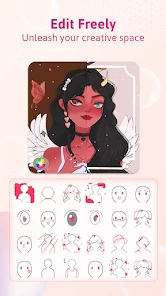
One of the standout features of this app is the sheer amount of customization it offers. You can adjust everything from facial features, hairstyles, to clothing and accessories. And let me tell you, the options are practically endless! Want to create a character with purple hair and dragon wings? Go for it! The app supports a vast palette of colors and styles, allowing your creativity to run wild.
More From Our News Desk

Weather by Xiaomi Review: Clear at a Glance, Less Clear Up Close

X Under Pressure: Can It Recover When Posting Goes Wrong?

Clash of Clans Is Won Between the Battles

Android Auto Makes the Case for Quieter Car Software

MobiOffice: Transforming Mobile Productivity with Seamless Integration

EA SPORTS FC™ Mobile Soccer: Redefining Mobile Sports Gaming
What’s more, the layering feature is a game-changer. It allows you to build your character step by step, ensuring every detail is just right. This feature is particularly useful for those who like to experiment with different looks before settling on the final design.
A low-pressure design session
A useful way to work is to settle on the character’s broad silhouette first, then adjust smaller details such as hair and accessories. Because layers let you build the look in stages, I’d save a version when the overall design feels strong before trying a more unusual outfit or color combination. That gives you a practical comparison point if the experiment takes the character in a direction you don’t like.
For example, if I had a few minutes between tasks, I could make a quick character concept for a story idea, test two different hairstyles, and leave the finer choices for another time. This is a casual creative exercise rather than a replacement for drawing software: it suits visual brainstorming, but someone who wants precise brushwork or complete control over every line would likely prefer a traditional art app.
Build a design that remains readable
A small design tip I use with character makers is to change one visual family at a time. I might settle the hair and face first, then compare clothing choices without also changing the palette. That makes it easier to tell whether an outfit actually suits the character or whether a new color is doing all the work. When too many choices change at once, it is harder to understand why one version feels more convincing.
Layers are especially helpful for this kind of comparison because they encourage a deliberate order: establish the main look, then add details that support it. I wouldn’t assume that more accessories automatically make a stronger character. A simpler version can communicate a clearer idea, while an elaborate one may be more fun for a playful avatar. The right amount of detail depends on where you plan to use the design.
User-Friendly and Fun
Now, you might be thinking, "This sounds complicated!" but fear not. The developers have done a fantastic job of making this app accessible to all. The drag-and-drop functionality is smooth, and there’s a handy undo button for those inevitable mis-clicks. Plus, there’s a whole community of users sharing their creations, so you can draw inspiration from others or even join in the fun by sharing your own unique designs.
Looking at alternatives, the main difference is the focused, character-building approach. A general drawing app offers more freedom if you want to draw every element yourself, while Neku is the more inviting choice when you’d rather start from a template and explore appearance options. I’d choose it for quick OC ideas and choose a drawing tool when line control, custom poses, or a fully original composition matters more.
Choosing between a creator and a drawing app
The usual alternatives split into two broad approaches. A character creator gives you ready-made visual parts to combine, which lowers the effort needed to get a coherent look. A conventional art app gives you a blank surface and tools for making the parts yourself. Neku sits on the first side: I’d use it to explore an outfit, color scheme, or general character identity, not to practise drawing hands or construct a pose from scratch.
There is a useful middle ground, too. You can use a finished character concept as a reference for a separate drawing or written description. That way, the creator helps with decisions but doesn’t have to be the final destination. If your goal is a clean, personal illustration with exact framing or a distinctive pose, a drawing app is the better place to finish. If you mainly want to answer “what might this character look like?” without the pressure of drawing everything, Neku is the more direct choice.
Saving, sharing, and deciding what to keep
On top of that, Neku: OC character creator doesn’t just stop at designing. Once you’ve perfected your character, you can save it in various formats, making it easy to share your masterpiece with friends or on social media. It’s a great way to showcase your creativity and perhaps even get some feedback to refine your skills further.
If you’re making several variations, I’d give each saved design a clear name or note what changed before sharing it. That simple habit helps when you’re comparing versions later, especially if you are developing a character for a personal story or role-playing profile. The community can provide inspiration, but I’d treat shared designs as a source of ideas rather than a substitute for your own style.
Sharing with a purpose
Before sharing a character, I’d decide what kind of feedback would actually help. Asking whether the color palette feels cheerful or mysterious is more useful than simply asking if someone likes the design. For a story character, I might share a version with a short description of their role; for a profile picture, I’d focus on whether the face and colors remain easy to recognize at a glance. That turns sharing into a small design check rather than a popularity test.
If you’re making a character for a group project or a role-playing setting, it also helps to keep a private note of the choices that matter to the concept. The picture can capture appearance, while a few words can preserve details that aren’t obvious from the image. I see the app as a visual aid in that process, not a complete replacement for a character sheet or a written backstory.
Free to start, with paid extras
The app is free, with optional in-app purchases priced from $0.99 to $45.99 per item. That range is broad, so I’d begin with the free experience and only consider paying if a particular add-on clearly improves the way you want to create. The listing’s price range alone doesn’t tell me which purchase is right for every user, so it makes sense to check the item details in the app before spending.
Its reach is substantial: it has over 10 million installs, a 4.7 average from around 310,000 ratings, and about 9,900 written reviews. Those figures suggest that many people enjoy it, but they don’t guarantee that its style or workflow will suit you. It is free to try, which makes a short hands-on session a better test than relying on popularity alone.
What the price means in practice
For value, I’d separate the free starting point from the optional spending. You can install it without paying, while purchases are available at a range that extends from low-cost items to much more expensive ones. That makes it sensible to explore the no-cost experience first and decide whether the app already meets your needs before considering any add-on.
I wouldn’t judge an individual purchase by the overall range alone. Instead, I’d look at the exact item in context: does it solve a limitation you’ve actually encountered, and will you use it often enough to justify the cost? If you’re only making a one-off character for a story idea, paying may not add much value. If you return to character design regularly, an optional extra could be more appealing—but only if its contents suit the kind of designs you want to make.
Who will enjoy it—and who may not
I’d recommend it to character-focused creators, casual doodlers, and anyone who likes building a look from visual components rather than starting with a blank page. It can also be a handy first step before writing a character description: settling on colors, clothes, and a hairstyle can make personality and story details easier to imagine.
I’d skip it if your main goal is professional illustration, highly controlled anatomy, or a drawing workflow built around custom strokes. Its template-based approach is convenient, but it also means the creative process is guided by the app’s available choices. The Teen rating is another reason to check whether it fits the intended user; free access does not mean it is automatically suitable for every age.
Where it fits into an ordinary day
Picture having a short break after work or school and wanting to develop a character you’ve been thinking about. I’d open Neku, choose a starting look, and use that session to settle one or two major choices instead of trying to complete an elaborate design at once. Later, I could return to the saved idea with a clearer eye and decide whether the accessories or colors still fit. That stop-and-start workflow suits casual creative time better than a task that demands a long, uninterrupted drawing session.
It can also help when a group is trying to agree on a character’s appearance. Rather than describing every detail in a message, you can make a visual draft and use it to discuss what feels right. I’d still treat that draft as a starting point: if the group needs a specific pose, a detailed expression, or artwork that matches a particular style, a separate illustration tool or artist-led process will offer more control.
Compatibility and the right expectations
The current version is 1.7.08.11, and the minimum operating system is Android 7.0. That gives Android users a straightforward compatibility check before installing. The app is listed for a Teen audience, so I’d also make the age rating part of the decision when choosing it for someone else rather than assuming that a character creator is automatically intended for every child.
In terms of expectations, I’d think of Neku as a tool for appearance exploration, not a full art studio or a guarantee that every idea can be represented exactly. Its appeal comes from choosing and combining visual elements, so your results naturally depend on what the creator makes available. If you enjoy working within that kind of structure, it can feel liberating; if you want unlimited control, the structure itself is the main trade-off.
Final Thoughts
In a nutshell, if you're someone who loves to express themselves through art, or you're just looking for a fun way to pass the time, Neku: OC character creator is definitely worth checking out. It’s engaging, easy to use, and offers a fantastic range of features that cater to both beginners and more experienced designers alike.
So why not give it a whirl? Dive into the world of character creation and let your imagination take the reins. Who knows, you might just create the next big character everyone talks about!
Neku: OC character creator Frequently Asked Questions
Is Neku: OC character creator suitable for younger users?
Neku: OC character creator has a Teen content rating, so it is intended for a teen audience rather than very young children. Parents and caregivers may want to consider that rating when deciding whether it is appropriate. The app focuses on creating hand-drawn, cartoon-style original characters, making it an entertainment option for people interested in character design.
Who develops Neku: OC character creator?
Neku: OC character creator is made by Neku Avatar Studio. Knowing the developer can help you identify the app when browsing for character-creation tools and distinguish it from similarly named apps. Its focus is on making original characters with a hand-drawn, cartoon style, so it may appeal to users who enjoy designing and personalizing characters.
Is Neku: OC character creator free to download?
Yes. Neku: OC character creator is free to download, so you can try its character-making tools without paying upfront. It also offers optional in-app purchases, with individual items priced from $0.99 to $45.99. Those purchases are separate from the free download, so consider them if you want access to additional content while deciding whether the app suits your creative projects.
What is the minimum Android version needed to use Neku: OC character creator?
On Android, Neku: OC character creator requires Android 7.0 or later. Checking your device’s software version before downloading can help you avoid compatibility problems. If your phone or tablet meets that requirement, you can give this entertainment app a try and explore its hand-drawn, cartoon-style approach to creating original characters.
What is Neku: OC character creator?
Neku: OC character creator is a mobile application designed for creating original characters (OCs) using a variety of customization tools. The app offers an extensive range of features that allows users to tailor characters' appearances, including facial expressions, clothing, and accessories. It's ideal for artists, writers, and hobbyists who enjoy character design.
Pros
- Highly customizable character creation
- Intuitive user interface design
- Vast range of clothing options
- Regular updates with new features
- Offline mode available
Cons
- Limited save slots for characters
- In-app purchases for premium items
- Occasional app crashes
- Requires significant storage space
- No option for exporting characters
- Category
- Entertainment
- Version
- 1.7.08.11











