Medium: Read & Write Stories
- 13.49K
- 4.7
- Installs
- 10.00M
- Price
- Free

Screenshots
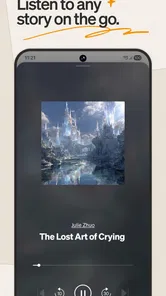
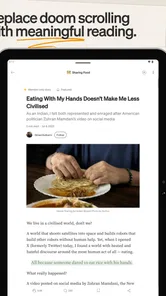
Analysis by Reviewed
I usually reach for a reading app when I have a few minutes to spare but don’t want to scroll through an endless stream of headlines. Medium can suit that mood: it brings essays and articles from individual writers into one place, with a reading experience that feels more focused than a general news feed. Its mobile experience still depends on your connection at important moments, though, so it helps to know what works best when you’re online and what may feel less convenient on the move.
When a connection shapes the reading experience
Opening a feed, exploring a new topic, or following a writer is most useful when your connection is steady, because those actions depend on loading fresh content. I find Medium better for choosing something to read than for checking breaking headlines every few minutes. It leans toward longer stories and individual perspectives, while a conventional news app is often the more direct choice when I want quick updates on a developing event.
A practical routine is to browse while connected, choose one or two pieces that genuinely interest you, and then give them your attention rather than repeatedly refreshing the feed. That makes the app feel less like another noisy stream. I wouldn’t assume that every story will be available without a connection, so if I expect to be offline, I avoid relying on Medium as my only reading option.
Small-screen reading and everyday routines
On a phone, Medium works best in short, deliberate sessions: a quiet commute with reliable service, a lunch break, or a few minutes before bed. Its emphasis on reading makes it a better fit for settling into one story than for skimming dozens of tiny updates. If a piece is long, I’ll start it when I have enough time to follow the argument, rather than opening it during a rushed moment and losing my place in the day.
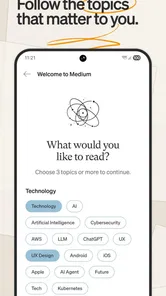
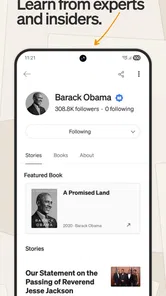
The app is especially appealing if you like moving between subjects such as business, technology, design, and current events without installing a separate publication app for each one. The trade-off is that a broad range of contributors also means the experience depends on which writers and topics you choose to follow. I recommend being selective: follow voices you return to, and use your reading habits to shape a feed that feels useful instead of endlessly broad.
What to do when loading stalls
If a story takes too long to open, I first check whether other apps are connecting normally and try again when the signal improves. That’s a more sensible response than repeatedly tapping around, especially on a weak mobile connection. A feed that hasn’t refreshed may not reflect the latest available recommendations, so I treat it as a temporary snapshot rather than assuming the app has stopped working.
For a smoother session, it helps to open a story while your connection is good and stay with that piece instead of hopping constantly between recommendations. I also wouldn’t make Medium the sole source for information I need immediately: a dedicated news service can be a better fit for urgent updates. Medium is more rewarding when I have the patience to read and compare perspectives, not when every second matters.
More From Our News Desk

Weather by Xiaomi Review: Clear at a Glance, Less Clear Up Close

X Under Pressure: Can It Recover When Posting Goes Wrong?

Clash of Clans Is Won Between the Battles

Android Auto Makes the Case for Quieter Car Software

MobiOffice: Transforming Mobile Productivity with Seamless Integration

EA SPORTS FC™ Mobile Soccer: Redefining Mobile Sports Gaming
What Makes Medium Worth Opening?
Have you ever found yourself drowning in a sea of information, desperate for a streamlined, personalized experience? That's exactly where Medium comes into play. If you haven't tried it yet, let me take you on a quick tour of an app that has changed how I spend time with online articles.
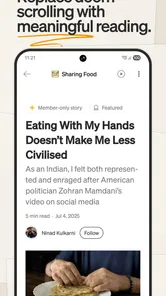
The first thing you'll notice when you open Medium is its sleek, minimalist design. It's like a breath of fresh air in a crowded room. The app's main focus is to deliver quality content without the unnecessary fluff. Whether you're into tech, culture, or personal development, Medium has a wide range of writers and subjects. A Medium Corporation develops the app, which sits in the news and magazines category; the current version is 4.5.1300372 and it requires Android 6.0 or later. It is free to install, although in-app purchases range from $4.99 to $149.99 per item, so I’d check the terms before committing to any paid access. Its Teen age rating is also worth bearing in mind if you’re choosing an app for a younger reader.
Personalized Feed: Your Content, Your Way
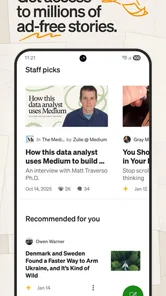
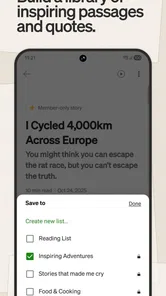
One of the standout features of Medium is its personalized feed. As someone who loves reading about varied topics, I find it useful. The app learns from your reading habits and tailors the content to fit your interests. It's like having your own personal curator, minus the pretentiousness. Plus, with the highlight feature, you can mark favorite lines and return to them. I treat recommendations as a starting point, not a final verdict: when a topic matters to me, I look for more than one writer’s take rather than letting a single engaging story settle the question.
Engagement and Interaction
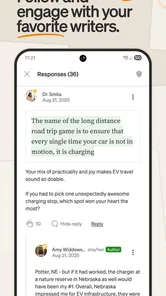
Medium isn't just about passive reading; it's about engagement and interaction. You can clap for articles you love, comment on them, and connect with writers. The community gives writers a place to share their work and readers a way to encounter fresh perspectives. The app also offers a membership plan for access to premium content. I’d think about how often I actually read here before paying: casual readers may be happy with what they can explore, while regular readers who value premium stories may find membership more relevant. Its 4.7 average across around 490,000 ratings suggests that many users rate it highly, but popularity alone can’t tell you whether its mix of voices matches your tastes.
For people who write, Medium can complement rather than replace a personal site or a specialist publication. Publishing where readers discover stories is convenient, and the built-in analytics can help you reflect on how your work is doing. I’d still keep a copy of my writing elsewhere: relying on a single platform for a finished piece is a choice, not a writing strategy. Readers benefit from the creator mix, but the range of quality and subject matter means it’s worth checking an author’s other work before treating one article as an authority.
A Writer's Paradise
If you're a writer, Medium offers tools to publish your work and reach readers. Writing there is straightforward, and the built-in analytics help you track how your work performs. It can be a useful place to test an idea and see how people respond, though I wouldn’t treat any one platform as a substitute for building a lasting home for your writing.
It is also a reasonable option for curious readers who want to follow ideas across fields, but it is not the best match for everyone. If you prefer brief, verified updates, a newspaper app or a wire-service feed will usually be faster to scan. If you want a tightly edited selection from one publication, that publication’s own app may feel more consistent. Medium’s strength is variety; its corresponding compromise is that you need to make your own judgments about which writers deserve your time.
Medium has more than 10 million installs, but I’d judge it by whether the stories make me want to return, not by its reach. It was released on June 23, 2015, and its lasting appeal for me is the combination of reading and publishing in one place. A useful everyday approach is to open it with a question in mind—what do I want to learn or understand?—then follow a promising story to related writers rather than aimlessly refreshing. That makes the personalized feed feel more like a tool and less like a habit that consumes spare minutes.
A more intentional reading routine
I get more from the app when I separate discovery from reading. If I have a reliable connection during a break, I browse and choose a story; later, I can focus on that piece instead of repeatedly checking for something new. This small distinction matters because Medium’s appeal is not just the number of topics available. It is the chance to give a particular argument enough attention to decide whether it is useful.
For example, if I’m trying to understand a design idea, I might read one article that introduces it and then look for another writer’s perspective. I don’t assume two pieces make a complete picture, but comparing them can reveal where authors agree, disagree, or are drawing on different experiences. That is a better use of the app than treating a popular story as a definitive answer. For health, legal, financial, or other consequential decisions, I would still seek authoritative sources rather than rely on personal essays alone.
Choosing what deserves your attention
A broad reading platform can make discovery feel effortless, but it also asks readers to do some of the editorial work. I pay attention to whether a writer explains their reasoning, distinguishes observation from evidence, and links an idea to enough context to evaluate it. A confident tone or an appealing headline is not a substitute for those things. Following writers whose work has proved thoughtful can make the feed more useful, while occasionally exploring outside familiar subjects helps prevent it from becoming a narrow loop.
This is one reason I would not recommend Medium to someone who wants every item in a feed to be selected by a publication’s editors. It offers range, but that range comes with variation in style, depth, and reliability. Readers who enjoy making their own choices may see that as a strength. If the task is simply to know what happened today, a conventional news service is likely to offer a clearer, more efficient route.
What to expect from paid access
The app is free to install, but that does not mean every reading experience is necessarily free of limits. Since paid access is offered, I’d check the membership terms and the purchase screen carefully before subscribing, especially if I only read occasionally. I would not pay based on the promise of an endless supply of worthwhile stories; the real question is whether the writers and subjects I personally value make regular reading worthwhile to me.
If I were deciding, I’d first use the app long enough to learn whether its recommendations and followed writers fit my habits. Someone who opens it once in a while may not need a membership, while a reader who returns often and encounters premium work they genuinely want to read could have a stronger reason. The range of in-app purchase prices makes it particularly sensible to review exactly what a purchase covers rather than assuming all options mean the same thing.
Where it fits among reading apps
Compared with a newspaper app, Medium feels less like a single publication’s carefully defined daily package and more like a place to discover writing from different contributors. Compared with a social feed, it encourages a more deliberate relationship with an individual article, though recommendations can still tempt me to keep browsing. Neither comparison makes one format universally better: I choose a news app when speed and editorial structure matter, and Medium when I want to explore a subject through a writer’s perspective.
It can also sit alongside newsletters, blogs, and specialist sites rather than replacing them. A newsletter is useful when I want a familiar voice delivered on a regular basis; a specialist source is preferable when accuracy and depth in one field are the priority. Medium is most compelling when I’m curious across several areas and willing to judge each piece on its own merits. Its value is not that it removes the need to choose, but that it gives me a place to make those choices.
Who will enjoy it—and who may not
I’d recommend giving Medium a try if you like essays, personal perspectives, and ideas that take more than a headline to explain. It suits readers who can spare a few uninterrupted minutes, enjoy following writers, and are comfortable separating a persuasive story from a thoroughly established fact. It may also suit writers who want a straightforward publishing space and a way to reflect on audience engagement, provided they keep their own copies and don’t depend on one platform alone.
I’d steer away from it as a primary tool if you need live alerts, a reliably edited news briefing, or dependable reading in places with no service. It is also a weaker fit if recommendation feeds tend to pull you away from the task you opened your phone to do. In that case, deciding what you want to read before opening the app—and stopping after that piece—can help, but another format may still suit you better.
In conclusion, Medium is more than just an app; it's a community where readers and writers come together to share ideas, stories, and insights. It's a platform that values quality and engagement above all else. If you haven't tried it yet, give it a go. You might just find your new favorite corner of the internet. For me, the best reason to keep it installed is the chance to discover a thoughtful article when I have the time and connection to enjoy it; for immediate news or dependable reading in a dead zone, I’d choose a different tool. That balance is what makes Medium worth trying without expecting it to replace every other way I read.
Medium: Read & Write Stories Frequently Asked Questions
Can I read stories offline in Medium?
Medium is designed for reading stories across topics such as business, technology, design, and current events. Whether you want to catch up during a commute or browse when you have a quiet moment, the app gives you a mobile way to explore its articles. Your reading experience is shaped by the writers, publications, and topics you choose to follow.
Do I need an account to use Medium?
Medium is a platform for reading, writing, and engaging with articles, and an account can help tailor your experience. Following writers, publications, and topics lets you shape the stories that appear in your reading experience. If you plan to publish your own work, creating an account is part of getting started, so it is worth considering how you want to use the app before downloading.
What kind of stories can I read on Medium?
Medium is a News & Magazines app for exploring writing across subjects such as business, technology, design, and current events. Its mix of expert stories and personal perspectives makes it useful for readers who want to go beyond short headlines. You can browse topics and follow writers or publications to shape the stories that appear in your reading experience.
Is Medium suitable for younger readers?
Medium is rated Teen, so families may want to consider that age guidance when deciding whether it is appropriate. The app covers a broad range of subjects, and the experience can vary depending on the writers and publications a reader follows. Reviewing the content together and choosing topics thoughtfully can help younger users make better-informed choices about what they read.
What is Medium and how does it work?
Medium is a popular online publishing platform that allows users to read, write, and engage with articles on a wide range of topics. Users can follow writers, publications, and topics to tailor their reading experience. The platform encourages thoughtful and in-depth writing, providing both readers and writers a space to explore diverse ideas and stories.
Pros
- User-friendly interface.
- Diverse content categories.
- High-quality writing.
- Free membership option.
- Engaging community interaction.
Cons
- Limited free content access.
- Subscription can be pricey.
- No offline reading mode.
- Ad presence for free users.
- Occasional content repetition.