Mc Gun Mod for Minecraft PE
- 64.00
- 4.8
- Installs
- 10.00M
- Price
- Free
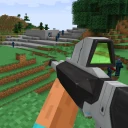
Screenshots




Analysis by Reviewed
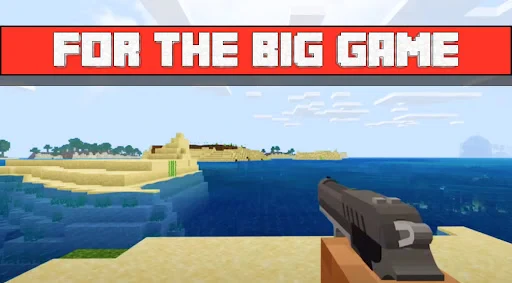
When I want to change the feel of a familiar Minecraft Pocket Edition world, adding guns is a more direct shift than changing the scenery or building a new base. Mc Gun Mod for Minecraft PE is an entertainment app from Finecrafter - Home of Mobile Modding, centered on bringing firearms into Minecraft PE. Its appeal is easy to understand: it gives combat a different rhythm, which can make a well-known world feel less routine.
A combat-focused change, not a new Minecraft
The key idea is firearms as another way to face threats and take on encounters. That focus matters: this is for players who want to alter how combat feels, not for someone looking for a new world, a building tool, or a broad collection of unrelated add-ons. I’d treat it as a targeted change to the Minecraft experience rather than a replacement for the game’s usual loop.
In practice, the useful question is where you want that change. A player who enjoys defending a base may find guns make attacks feel more active; someone who mostly mines, farms, or builds peacefully may have little reason to use them. Before adding a mod to a world you care about, I’d check that it is compatible with the way you play and keep an untouched copy of anything important. That small habit makes experimenting less stressful.
Choosing a world for the experiment
I would not make a long-term survival save my first test. Instead, I’d use a fresh or disposable world, spend a little time learning how the firearms affect encounters, and then decide whether the change deserves a place in a more valuable save. This is useful even if you already know Minecraft well: the question is not simply whether guns are powerful, but whether they make the kind of session you enjoy more satisfying.
That test also helps separate novelty from lasting appeal. A new weapon can be exciting for a few minutes, but if your favorite part of Minecraft is carefully planning a build or gathering materials at a relaxed pace, the combat shift may not add much. I’d judge it by whether I actually want to return to the world with the mod enabled, rather than by the first burst of excitement.
Questions worth answering before you install
A practical first question is whether the mod is intended for the Minecraft edition you play. The app is focused on Minecraft PE, so I would not assume the same setup applies to a different edition or that an add-on transfers between versions. Check the instructions presented by the app and the Minecraft version you use before making changes to a world.
I’d also think about whether you want the experience for solo play or for a shared session. If friends are involved, it is better to agree on the combat-focused idea first; otherwise one person may be looking for a relaxed building evening while another wants to turn every encounter into a fight. And if something does not work as expected, my first move would be to remove the change from the test world rather than risk a save I care about.
More From Our News Desk

Weather by Xiaomi Review: Clear at a Glance, Less Clear Up Close

X Under Pressure: Can It Recover When Posting Goes Wrong?

Clash of Clans Is Won Between the Battles

Android Auto Makes the Case for Quieter Car Software

MobiOffice: Transforming Mobile Productivity with Seamless Integration

EA SPORTS FC™ Mobile Soccer: Redefining Mobile Sports Gaming
How it compares with other Minecraft add-ons
Among common ways to customize Minecraft, a firearm-focused add-on has a more immediate effect on decisions in combat than a texture pack, which chiefly changes the game’s appearance. It is also more focused than a broad overhaul that adds several kinds of content. That narrow scope is a real advantage when you want one clear change, but it means this is not the best choice if you are searching for new building options, a different exploration structure, or a general-purpose pack.
For everyday use, I’d match the add-on to the world rather than trying to use one setup for every mood. A short session built around defending a base is a natural place to try it. A creative project, a peaceful farm, or a world where combat is deliberately kept minimal is less likely to benefit. Keeping a separate test world makes switching between those moods straightforward.
Unleashing the Firepower
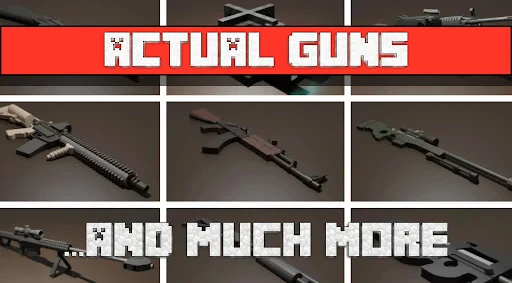
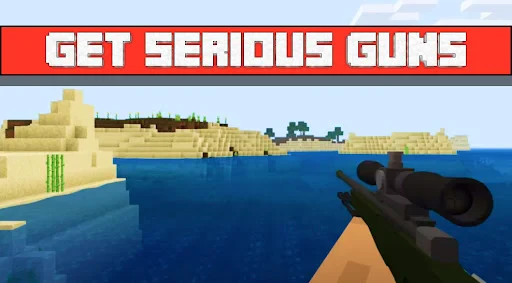
Alright, let’s talk about what makes the Mc Gun Mod for Minecraft PE stand out. As the name suggests, this mod introduces a variety of guns into the game, offering players a brand-new way to tackle challenges and, let’s be honest, have a lot of fun in the process. From pistols to assault rifles, this mod adds a whole new dimension to combat in Minecraft PE.
Getting Started with the Mod
First things first, installation is a breeze. All you need to do is download the mod from a reliable source, and you’re good to go. Once installed, you’ll find a new tab in your inventory dedicated to all the new weapons. The mod’s integration is seamless, and it feels like a natural extension of the game, which is always a big plus in my book.
One of my favorite things about this mod is the attention to detail. Each weapon comes with its own unique sound effects and animations, making the experience incredibly immersive. The developers have clearly put a lot of thought into how these weapons should behave, and it shows in the gameplay.
Getting more from a first session
Rather than trying every weapon in the middle of a difficult survival moment, I’d explore the inventory tab in a low-pressure setting first. That gives you a chance to get familiar with what is available before deciding how you want to use the guns. It also avoids the frustration of learning an unfamiliar control or weapon choice while enemies are already putting you under pressure.
Sounds and animations matter here because they make the change feel more present than a simple visual reskin. If you play with sound on, the weapons can make combat feel more dramatic; if you usually play quietly or in a shared room, that part of the experience may matter less to you. It is a small but useful consideration when deciding whether this particular style of add-on fits your normal play habits.
Trying it without disrupting your usual world
For a low-risk first session, I’d try the weapons in a separate world before bringing them into a long-running survival save. That gives you room to learn how the mod changes encounters and whether its style suits your group. It also helps answer a practical question: do you enjoy the added action enough to keep it, or does it distract from the slower gathering and crafting that make Minecraft appealing to you?
If you play with friends, agree on the kind of session you want before introducing firearms. A combat-heavy outing can be fun when everyone expects it, while a peaceful building session may feel less focused if weapons become the main attraction. This is one reason I see the mod as best for a deliberate change of pace, rather than something every player needs enabled all the time.
A realistic evening with the mod
Picture a short session after school or work: you have already spent plenty of time on your main world and want a different kind of challenge without starting a large building project. I’d open a separate test world, try the firearms in a few encounters, and see whether the quicker, more active combat is enjoyable. If it is, that world can become a place for occasional action-focused play; if it is not, your main save stays untouched.
That is where the app makes the most sense to me: as a way to change the mood of a session, not as an essential upgrade to every Minecraft world. The separate-world approach also makes it easier to compare how you feel about the usual combat and the modded version. You can switch back without having to redesign a carefully planned survival or creative project around a feature you may only want sometimes.
Gameplay Experience
Now, let’s talk about how this mod changes the game. The introduction of firearms adds a strategic element to encounters. Whether you’re defending your base from a horde of zombies or going on an adventure to explore new biomes, having access to a variety of guns changes the way you approach these situations.
The guns are not just for show; they pack a punch! You’ll notice a significant difference in how you handle enemies, especially those pesky creepers that always seem to sneak up on you. Plus, the thrill of using these weapons is something that keeps the gameplay fresh and exciting.
What changes, and what does not
The main trade-off is that making combat more forceful can change the balance of an encounter. If the fun for you comes from the tension of facing danger with the game’s familiar tools, firearms may reduce some of that challenge rather than improve it. If you prefer a more action-led session, that same shift is likely the point. I’d decide based on the feeling you want, not on the assumption that more weapons automatically make a world better.
It is also worth keeping expectations focused. This is a gun-centered change, not a substitute for a full collection of new activities. Players hoping for a major redesign of building, exploration, or the whole progression of Minecraft should look for an add-on aimed at those goals instead. Here, the value is in seeing familiar encounters through a different combat approach.
Where it fits among add-ons
Compared with a texture pack, which mainly changes how the world looks, a gun-focused mod is much more noticeable during play because it changes your approach to danger. It is also narrower than a large content pack that tries to reshape several parts of Minecraft at once. That narrow scope is a strength if you only want a combat twist, but it is a limitation if you want new building materials, exploration goals, or a different overall progression.
My practical tip is to think about the world’s purpose before installing anything: a short action session is a natural fit, while a careful creative build may not benefit from extra combat tools. If the change does not suit that save, keeping it separate is simpler than trying to make every play style work together.
Small decisions that make testing easier
Before trying it, I’d make a quick note of which world is meant for experimentation and which one I want to leave alone. That sounds obvious, but it prevents the common mistake of treating every new add-on as harmless to a save that took time to build. I’d also avoid changing several parts of my setup at once: when only one change is being tested, it is much easier to tell whether the firearms are the reason a session feels different.
If you are choosing between this and another add-on, ask what you want to change first. Pick this one if the answer is specifically “combat”; choose a texture-focused option if appearance is the goal, or a broader pack if you want several parts of Minecraft to feel new. That simple check can save time and helps keep a favorite world consistent.
Who should give it a try
I’d point this toward players who already enjoy Minecraft PE but want encounters to feel less familiar, especially those who like defending a base or setting up a combat-themed session. It is less appealing for players who prefer peaceful building, want a comprehensive overhaul, or would rather keep combat close to Minecraft’s standard feel. If you are unsure, start with a world you can afford to experiment in and decide after a short play session.
The app itself is free, has an Everyone age rating, and is listed at version 1.8, with Android 7.0 or later required. It has a 4.8 average from around 6,100 ratings and has passed 10 million installs, so plenty of players have shown interest. Those figures are useful context, but they do not tell you whether the mod’s combat style will suit your own world; that comes down to the kind of Minecraft session you enjoy.
Who may be better off choosing something else
I would skip this if firearms are not the kind of change you want in Minecraft, or if your favorite worlds are deliberately peaceful and carefully balanced around familiar combat. It is also not the option I’d pick when the goal is to expand construction choices or make exploration feel broadly different. A focused add-on is useful precisely because it does one kind of thing; that same focus makes it a poor match when your wish list is wider.
For someone who is curious but cautious, the free price makes it easier to consider trying, but I would still take care with the world I use. Keep a separate copy of anything important and follow the app’s own setup instructions rather than assuming every Minecraft installation handles add-ons identically. That is a sensible habit with any change to a world, especially one you have invested time in.
Final Thoughts
So, is the Mc Gun Mod for Minecraft PE worth checking out? Absolutely! It brings a new layer of excitement and strategy to the game without compromising the beloved core mechanics of Minecraft. Whether you’re a seasoned player looking for a new challenge or a newbie eager to spice things up, this mod offers something for everyone.
In conclusion, if you’re looking to enhance your Minecraft PE experience with a bit of firepower, this mod is definitely worth a try. Just remember to download from trusted sources to keep your device safe. Happy crafting, and may your adventures be ever thrilling!
Mc Gun Mod for Minecraft PE Frequently Asked Questions
Is Mc Gun Mod for Minecraft PE free, and what kind of app is it?
Mc Gun Mod for Minecraft PE is a free entertainment app from Finecrafter - Home of Mobile Modding. Its short description is “Mc Gun Mod,” and it presents itself as an add-on for Minecraft Pocket Edition. Before downloading, check that the app is suitable for your device and that you are comfortable using a separate app to access Minecraft-related content. The app is rated for Everyone.
What is the Mc Gun Mod for Minecraft PE?
The Mc Gun Mod for Minecraft PE is an exciting modification for Minecraft Pocket Edition that introduces a variety of firearms and weapons into the game. This mod enhances the gameplay experience by allowing players to craft and use guns, adding a thrilling combat dimension to the classic sandbox game. It's designed to work seamlessly within Minecraft PE, offering an enriched and diverse way to play.
How do I install the Mc Gun Mod on Minecraft PE?
To install the Mc Gun Mod for Minecraft PE, you need to first download the mod file from a trusted source. Then, import the mod using a Minecraft mod manager app like BlockLauncher or MCPE Master. Ensure that you have the latest version of Minecraft PE and that your device supports external mods. Follow the app instructions to enable the mod within the game settings.
Is the Mc Gun Mod safe for my device?
Yes, the Mc Gun Mod is generally safe for your device if downloaded from a reputable source. However, users should always be cautious and ensure that they are using trusted websites to avoid malware or viruses. It's advisable to read reviews and check community feedback before proceeding with the download and installation to ensure a secure experience.
What features does the Mc Gun Mod include?
The Mc Gun Mod for Minecraft PE includes a wide range of firearms, such as pistols, rifles, and shotguns, each with unique characteristics. It also introduces new crafting recipes and ammunition types. Additionally, the mod may feature enhancements like custom sounds and animations, making the gunplay more immersive and realistic within the Minecraft world.
Pros
- Enhances gameplay with new weapons
- Easy to install and integrate
- Regular updates for new content
- Compatible with most Minecraft versions
- Supports multiplayer mode
Cons
- May cause lag on older devices
- Some features require in-app purchases
- Occasional bugs with weapon textures
- Not all weapons are balanced
- Limited support for custom mods
- Category
- Entertainment
- Version
- 1.8











