Lyft Driver
- 49.21K
- 4.8
- Installs
- 5.00M
- Price
- Free

Screenshots
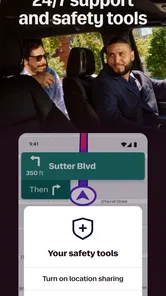
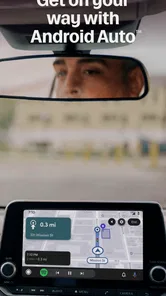
Analysis by Reviewed
I treat a rideshare shift as a small work system, not simply a matter of opening an app and waiting for a request. The Lyft Driver app is built for people who want to drive with Lyft, and its real value depends on how well that work fits around their time, vehicle and energy. I found it most useful when I had a clear plan for a session and a way to review how it went afterward.
Build a plan before you go online
Flexible hours sound appealing, but I’d treat driving as work that needs a plan, not as effortless spare-time income. Before opening the app, decide how long you can drive, which areas you know well, and when you need to stop. Fuel, vehicle upkeep, traffic and unpaid time between rides all affect whether a shift makes sense for you.
A useful approach is to choose a small, manageable window for a first outing rather than setting out for an undefined day. That gives you a chance to learn how requests and navigation fit into your driving habits without committing more time than you intended. If you’re relying on rideshare earnings to cover a fixed bill, remember that flexible scheduling does not make the work itself predictable.
I’d also decide in advance what would make a session worth repeating. That might be whether the work fits comfortably around another commitment, whether the driving feels manageable, or whether the time spent is worthwhile after you account for expenses. A personal threshold like this helps keep a busy spell from making the whole job seem more attractive than it is, and a slow spell from making you abandon a routine that otherwise fits.
Getting Started with Lyft Driver
Jumping into the Lyft Driver app is as easy as pie. Signing up involves a quick background check and some basic onboarding. I appreciated how the app walked me through each step with clear instructions and warm encouragement, almost like having a friendly buddy by your side.
Lyft Driver is a free business app from Lyft, Inc., aimed at people who want to drive with Lyft rather than book a ride as a passenger. It has an Everyone age rating, an average rating of 4.8 from around 199,000 ratings, and more than five million installs. It first appeared in May 2017, and version 2025.46.3.1764141534 supports Android 9 and later. Those details suggest a well-established app, but they don’t tell you whether driving will suit your schedule or vehicle; that decision still comes down to your own costs and local conditions.
The practical distinction matters if you are browsing for a rideshare app: this is for the driver’s side of the work, not for arranging a trip as a passenger. Before getting attached to the idea of driving, I’d first make sure the onboarding path and the work itself match what you want from a job. The app can help organize the driving workflow, but it cannot make the underlying commitment disappear.
More From Our News Desk

Weather by Xiaomi Review: Clear at a Glance, Less Clear Up Close

X Under Pressure: Can It Recover When Posting Goes Wrong?

Clash of Clans Is Won Between the Battles

Android Auto Makes the Case for Quieter Car Software

MobiOffice: Transforming Mobile Productivity with Seamless Integration

EA SPORTS FC™ Mobile Soccer: Redefining Mobile Sports Gaming
Keep your own record alongside the app
The app's interface is a breath of fresh air—simple, intuitive, and stylish. Whether you're tech-savvy or not, you'll find navigating through your daily schedule, earnings, and ride requests a breeze. Everything you need is just a tap away, and it doesn’t get any more convenient than that.
To make the app part of a more sustainable work routine, I’d use its in-app information as one piece of a simple personal record. After a shift, note the time spent driving and any vehicle expenses you want to track elsewhere. That helps you judge the value of a session more realistically than looking at earnings alone. It also makes it easier to compare a short evening outing with a longer weekend shift without relying on memory.
One small habit makes this review much more useful: write down the start and finish of your planned window, then record what actually happened while it is still fresh. Don’t try to reconstruct a week of work from a vague impression that it was “busy.” The point is not to build a complicated spreadsheet; it is to notice patterns in your own routine, such as whether a certain time window leaves you tired or whether an outing keeps overrunning.
This is especially helpful if you are fitting driving around another job, study or family responsibilities. A session that looks fine in isolation may be harder to sustain when it regularly pushes dinner, sleep or other plans aside. I’d use the record to protect those boundaries, not only to judge earnings. If the app’s schedule and summaries are enough for your day-to-day review, keep the process simple; add separate notes only for the details you need to make a sound decision.
Use navigation without letting it run the shift
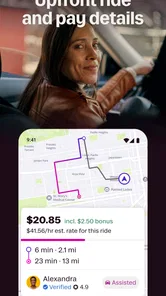
Once you hit the road, you’ll notice how the app seamlessly integrates navigation with ride requests. The real-time updates and alerts kept me on my toes, ensuring that I never missed a beat. One of the standout features is the in-app GPS, which is surprisingly accurate and reliable. No more detours or missed turns—unless, of course, you’re feeling adventurous!
In practice, navigation is most helpful when it reduces the need to switch between screens, but I wouldn’t treat any in-app route as infallible. Busy streets, confusing pickup spots and unfamiliar blocks can still demand careful attention. Set up your phone securely before moving, follow traffic rules, and pull over somewhere safe if you need to sort out a confusing instruction. The app can guide a trip; it cannot replace your judgement behind the wheel.
A useful trade-off is that keeping requests and directions together can make the driving flow feel more coherent, while also making the phone an important part of your attention. I’d set up the device and route preferences before moving, keep the screen easy to glance at, and avoid trying to solve a pickup problem while the car is in motion. When a location is awkward, safe judgement matters more than following a prompt blindly.
For example, imagine you have a free evening after your regular job. You can set aside a defined driving window, follow incoming requests, and then stop when your planned time is up instead of letting a busy stretch turn into an exhausting night. Checking your own notes afterward—time on the road, earnings and costs—helps you decide whether that particular routine is worth repeating.
The same approach works for someone who is still learning the rhythm of driver work. Start with an area you already understand, give yourself enough time to get comfortable with the flow, and review the session afterward rather than judging everything by the first ride. A familiar route can reduce one source of stress while you learn the app’s working pattern; it does not guarantee that every pickup or trip will be straightforward.
Make flexibility useful, not misleading
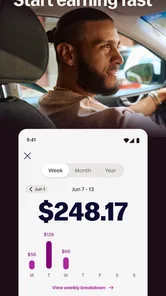
One of the biggest perks of using the Lyft Driver app is the transparency around earnings. You can track your earnings in real-time, and the weekly summaries give you a nice overview of your hustle. Plus, you can work whenever you want. Need a day off? No problem. Want to grind it out on a Saturday night? Go for it!
That flexibility is a genuine advantage over a fixed-shift job, but it shouldn’t be confused with a guaranteed income or a predictable hourly return. A quiet period, traffic, and the distance involved in reaching a pickup can change how worthwhile a session feels. I’d review the weekly summary alongside your own cost notes, rather than treating the displayed earnings as money left over after expenses.
For a realistic week, I’d think of the app as one option in a schedule rather than the entire plan. A person with a free block after work may find a short shift convenient, while someone who needs the same dependable amount each week may find the uncertainty difficult. If you are weighing the app against another job, compare the actual routine you can sustain, including time spent driving and costs, rather than comparing a promising evening with someone else’s best-case story.
Compared with the usual alternatives, this is a more direct choice for someone who wants to take Lyft rides through the driver workflow. A passenger rideshare app is for booking transportation, not managing driver work; a conventional job may offer more routine but less control over when you work. If you need steady shifts, employer-provided structure or income you can forecast closely, a scheduled role may be a better fit. If choosing your own driving windows matters more, this app’s approach has a clear appeal.
There is also a difference between choosing when to make yourself available and controlling what happens during that time. Requests, traffic and pickups shape the session once you are working, so flexibility is strongest at the level of planning your availability. I’d keep a clear end time and avoid treating one unexpectedly good stretch as a reason to ignore the next day’s commitments.
Where the workflow can become tiring
Driving can sometimes feel a bit solitary, but the app's support features make sure you're never alone. The in-app help section is packed with useful tips and the customer support team is just a message away. There's also a vibrant driver community where you can share stories, swap tips, and even make new friends.
When something goes wrong on the road, support and guidance can be reassuring, but they are not a substitute for planning around common friction. A pickup may take longer than expected, alerts can compete for attention, and a new driver may need time to feel comfortable with the flow of requests. I’d start in familiar areas and avoid trying to learn every part of the workflow while navigating a stressful route. If you find the alerts distracting or the uncertainty draining, taking a break or choosing another kind of work is sensible, not a failure.
One practical question people often have is whether the app makes driving effortless once it is installed. My answer is no: it can bring requests, navigation and work information into one driver-focused flow, but you still have to manage the road, your schedule and your costs. If you need detailed personal budgeting, keep that alongside the app. If you need a quiet, predictable task with little interruption, ride requests and in-car navigation may not suit your work style.
Another point worth considering is what to do when a session does not go to plan. I would not keep driving simply because I had already set aside the time. If tiredness, confusing directions or road conditions make the work feel unsafe, stop somewhere appropriate and reassess. The ability to choose your availability is useful precisely because it lets you build a routine around real-life limits rather than forcing every planned session to happen.
For drivers who are new to this kind of work, learning one part of the routine at a time is more manageable than trying to optimize everything immediately. First get comfortable with the way requests and navigation fit together; then decide what personal notes help you assess the work. That sequence keeps the early experience focused and makes it easier to tell whether a problem comes from unfamiliarity, a poor fit with the job, or a particular difficult session.
Who should make it part of their routine
I’d recommend Lyft Driver to someone who already has access to a suitable vehicle, enjoys being on the road, and wants control over when to make themselves available. It may also suit a person testing rideshare work alongside other responsibilities, provided they keep realistic expectations and track the costs that sit outside the app.
I’d be more cautious if you depend on a stable weekly amount, dislike driving in traffic, or need a work arrangement with fixed hours and clear routine. It is also not the right choice if you want an app for arranging your own rides as a passenger. The key question is not whether the app is easy to open; it is whether driving fits your finances, energy and local routine.
I’d also skip it if you want a job where a manager sets the hours and the next task is always clear. The freedom to decide when to drive can be valuable, but it puts more responsibility on you to choose a sensible schedule and to judge how a session is going. If that responsibility sounds appealing, the app can support a self-directed routine; if it sounds like extra mental load, a more structured role may be the better alternative.
For someone who is curious but unsure, I’d treat the first few sessions as a practical test rather than a commitment to a new identity or full-time plan. Keep the time window modest, choose familiar roads, and review how the work affected both your schedule and your finances. That gives you a more grounded answer than deciding from the app’s convenience alone.
In conclusion, the Lyft Driver app offers a fantastic opportunity for anyone looking to earn on their own terms. Its user-friendly design, combined with the flexibility and transparency it offers, really makes it stand out. Whether you're looking to make a few extra bucks or dive into full-time driving, this app has got you covered. So, buckle up and enjoy the ride!
My more practical recommendation is to use it with boundaries: decide when you will drive, keep a record that reflects your costs, and check whether the routine remains comfortable over time. Lyft Driver is most appealing when you value control over your availability and are prepared to manage the less predictable parts of driving. If stable hours and dependable pay matter more, I’d choose a more structured alternative; if a self-directed driving routine suits you, this app is a focused place to start.
Lyft Driver Frequently Asked Questions
Can passengers use Lyft Driver to request rides?
No. Lyft Driver is the work app for people who drive with Lyft, rather than the passenger app for booking a ride. Its store summary invites people to apply and start earning, so it is most relevant to prospective and active drivers. Passengers looking to arrange a trip should use Lyft’s passenger service instead.
Does downloading Lyft Driver mean I can start driving right away?
Downloading the app is only the first step. Applicants must meet Lyft’s driver requirements and complete the application process before they can drive through the platform. Lyft Driver is designed to help drivers manage their work, but installing it alone does not establish eligibility or guarantee approval. Review the requirements and application details before relying on it to begin driving.
What is Lyft Driver, and what does the app help you do?
Lyft Driver is Lyft, Inc.’s business app for people who drive with the platform. Its store summary invites users to start earning and apply, while the app itself is the tool drivers use to manage their work. It is free to download and is intended for an Everyone audience, though becoming a driver involves meeting Lyft’s requirements.
What devices can run Lyft Driver?
Lyft Driver is available for Android devices running version 9 or later. Before downloading, check your device’s operating system so you know it meets that minimum. The app is designed for drivers to use while managing their work, so a compatible smartphone is also one of the practical requirements for applying and using the service.
What are the basic requirements to become a Lyft Driver?
To become a Lyft Driver, you must meet several requirements, such as being at least 21 years old, possessing a valid driver’s license, and having at least one year of licensed driving experience. Additionally, you need to own a smartphone to use the Lyft Driver app and pass a background check that examines your driving record and criminal history.
Pros
- User-friendly interface makes navigation easy.
- In-app navigation helps optimize routes.
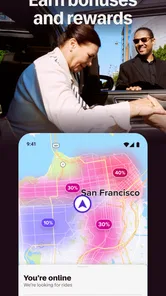
- Instant ride requests reduce idle time.
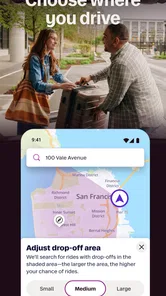
- Flexible scheduling suits various lifestyles.
- Real-time earnings updates enhance transparency.
Cons
- High competition may affect earnings.
- App can drain phone battery quickly.
- Limited customer support availability.
- Inconsistent ride demand in smaller areas.
- Frequent app updates require data usage.













