Citi Bike
- 1.42K
- 4.6
- Installs
- 1.00M
- Price
- Free

Screenshots

Analysis by Reviewed
I find a bike-share app most useful when it helps me make a quick, grounded decision: is there a bike nearby, and does riding make sense for this trip? Citi Bike is built around that practical question for getting around New York City. It is a free Maps & Navigation app from Lyft, Inc., and its 4.7 average from around 6,600 ratings suggests many riders find it useful. The app is rated for Everyone, has over one million installs, and is currently version 2025.46.3.1764142083, with Android 9 as the minimum OS.
What free access means for the decision
The app itself is free to download. That makes it easy to try the station map before deciding whether bike-share fits your day, but free access should not be confused with a free ride. The app also describes passes, including a day pass, so I would check the current ride and pass terms in the app before setting out rather than assume a particular trip is included at no cost.
That distinction matters most for visitors and occasional riders. If I only need a bike once, I would compare the pass or ride option shown in the app with the alternatives available for that outing. If I expect to ride regularly, I would weigh the convenience of using Citi Bike against the actual costs and terms shown when I sign up. The download price alone does not tell me which ride option offers better value.
Your Gateway to Exploring NYC
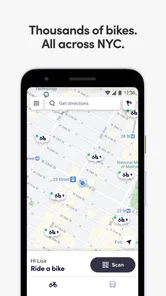
One of the coolest things about the Citi Bike app is how it transforms your smartphone into a personal bike concierge. Whether you're a local or just visiting, this app makes it super easy to locate bikes near you. Just open the app, and voila, you're presented with a map dotted with available stations. It’s like an instant ticket to freedom, whisking you away from the crowded subway and right into the heart of the city.
Features That Enhance Your Ride
The app isn’t just about finding bikes; it’s packed with features designed to enhance your riding experience. For starters, the real-time updates on bike availability are a lifesaver, ensuring you’re never left stranded without a ride. Plus, the integration with city maps means you can plan your route with ease, avoiding those pesky traffic jams and construction detours. Who knew navigating NYC could be this stress-free?
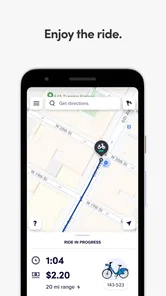
Another feature I absolutely love is the ability to track your ride statistics. It’s not just about getting from point A to B; it’s about enjoying the journey. The app provides insights into your trip duration, distance, and even calories burned. It’s perfect for those of us who love to keep an eye on our fitness goals while exploring the city.
Using the map with a little foresight
I would treat station availability as a changing snapshot, not a promise that a bike will still be waiting when I arrive. For a time-sensitive trip, checking the map before leaving and again near the station is a sensible habit. It also helps to look beyond the closest pin: a slightly farther station can be a better starting point if it gives me a more workable destination or avoids a last-minute scramble.
More From Our News Desk

Weather by Xiaomi Review: Clear at a Glance, Less Clear Up Close

X Under Pressure: Can It Recover When Posting Goes Wrong?

Clash of Clans Is Won Between the Battles

Android Auto Makes the Case for Quieter Car Software

MobiOffice: Transforming Mobile Productivity with Seamless Integration

EA SPORTS FC™ Mobile Soccer: Redefining Mobile Sports Gaming
That same planning matters at the end of a ride. Before setting off, I would check where I can finish near my destination rather than assume the nearest station will suit me later. This is especially useful for errands with a fixed appointment or a trip across a busy part of town. A bike-share ride can save time on the middle leg, but only if the pickup and drop-off points fit the whole journey.
Seamless and User-Friendly Experience
What really sets the Citi Bike app apart is its user-friendly interface. Seriously, even if you’re someone who usually struggles with technology, you’ll find this app incredibly intuitive. From the moment you download it, everything from signing up to unlocking a bike is straightforward. The developers have clearly put a lot of thought into making the user experience as smooth as possible.
And let’s not forget about the payment options. The app supports a variety of payment methods, making it convenient for everyone. You can even purchase a day pass if you’re just in town for a short visit. It’s flexibility like this that makes Citi Bike accessible to a wider audience.
Planning a ride around the real shape of your day
For me, the most useful way to use a station map is to plan the whole chain, not just the ride itself. If I am carrying groceries, meeting someone at a precise time, or making several stops, I would check whether a bike is sensible for each leg rather than assume one ride neatly solves the day. A short ride between two known points is a better fit than a wandering itinerary with uncertain stops.
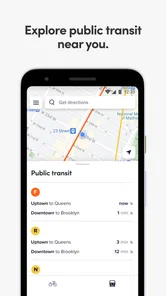
There is also a practical difference between a route that looks short on a map and one that feels comfortable on a bike. I would use the app to decide whether a shared bike is available, then make my own judgement about the streets and the amount of time I have. That separation is useful: the app can answer the bike-access question, while a broader navigation tool can help compare transit or walking routes when the overall journey is still undecided.
A useful fit, but not for every journey
In an everyday scenario, I might use the app to bridge the gap between a subway stop and a meeting across town: check the nearby stations, decide whether the bike option is practical, then verify the destination before unlocking. That is where it can beat relying on a general map alone. A standard navigation app may be better when I need broad route comparisons across walking, transit, and driving; Citi Bike is more focused when the key question is access to a shared bike.
The trade-off is that a station map cannot make New York traffic or street conditions disappear. I still need to choose a route I feel comfortable riding, allow time for finding a suitable station, and keep a non-bike option in mind if the map does not show a convenient start or finish. I would skip it for a trip where carrying bags, weather, or unfamiliar streets makes cycling an awkward choice, or when a direct transit route is simpler.
Small habits that make the app more useful
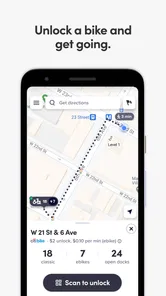
One habit I would build is checking both ends of the trip before unlocking. It is easy to focus on the nearest available bike because that is the immediate problem, but a convenient start can lead to an inconvenient finish. Looking for a workable destination station first gives me a better basis for deciding whether the ride is worth taking at all.
I would also avoid planning a tight arrival around a single station result. Availability can change between checking the map and reaching the dock, so it is sensible to have a nearby alternative in mind, especially before a meeting or appointment. That small backup plan is more valuable than repeatedly refreshing the same pin after I have already set out.
For someone new to bike-share, a low-pressure trial is a better first use than making the app responsible for a commute on the first day. It gives me room to learn how the station map relates to the streets I actually use and whether a bike fits my comfort level. If that first ride feels awkward, the app cannot compensate for the mismatch; if it works well, I can then decide whether the routine and ride terms suit me.
Who is likely to get the most value?
I think the app is most useful for New Yorkers who already know when cycling suits their routine, and for visitors who want to add a short ride without buying or bringing a personal bike. The ride statistics can also be a nice extra for someone who enjoys tracking activity, though I would treat those details as a record of the trip rather than the main reason to choose bike-share.
Before relying on it for a commute, I would try the map on a low-pressure trip and learn how the station pattern fits my regular route. Before a short visit, I would check the pass information and nearby stations so the first ride does not become a search for a convenient starting point. Those small checks answer the practical questions that matter: can I find a bike, can I finish near where I am going, and does the ride option make sense for this particular outing?
When another option makes more sense
I would choose a general map or transit planner when I have not settled on a mode of travel and need to compare several ways across the city. That kind of tool is usually the better first stop for a door-to-door decision, especially if walking, subway, or bus connections are central to the plan. The bike-share app is more valuable once I know a shared bike is a serious possibility and want to check station access.
I would also skip a bike-based plan when the destination is awkward for docking, when my schedule leaves no margin for locating another station, or when I would rather not ride in busy streets. These are not failures of the app; they are limits of the trip itself. A focused station tool cannot turn every errand into a good cycling errand, and being honest about that prevents a convenient-looking map from dictating a poor choice.
For a visitor, the main decision is whether a day pass or another ride option fits the visit, not whether the free download is worth trying. For a regular rider, the question is whether the stations line up with the places they actually travel and whether the current terms work for their pattern. I would check those details before building a routine around it, rather than assume that frequent use automatically makes it the best value.
Final Thoughts
All in all, if you’re looking to explore New York City in a unique and eco-friendly way, the Citi Bike app is a game changer. It offers a perfect blend of convenience, functionality, and fun. Whether you’re commuting to work or just enjoying a leisurely ride through Central Park, this app makes biking in NYC an absolute breeze. So, next time you’re in the city, ditch the cab and give Citi Bike a spin. Trust me, you won’t regret it!
My recommendation is more measured: I would install it if I expected to use shared bikes around New York and wanted a dedicated way to check stations and review trips. The free app is an easy starting point, while the value of riding depends on the pass or ride terms that suit your plans. If you need door-to-door transit planning, dislike cycling in city traffic, or are visiting somewhere beyond its useful station coverage, another option may serve you better. For the right trip, though, the station-focused approach makes it a handy companion rather than just another map.
Citi Bike Frequently Asked Questions
Is the Citi Bike app free to download, and what devices can run it?
Citi Bike is a free Maps & Navigation app from Lyft, Inc., designed to act as a co-pilot for biking adventures in the city. It is rated for Everyone and requires Android 9 or later. The app can help you plan and manage a bike-share trip, while the rides and membership options are separate from the app download.
What is Citi Bike and how does it work?
Citi Bike is a bike-sharing system available in New York City and some parts of New Jersey. It allows users to rent bikes for short trips, providing an eco-friendly and convenient mode of transportation. Users can unlock a bike using the Citi Bike app, ride to their destination, and return the bike to any docking station, all within a designated time limit.
How do I sign up for a Citi Bike membership?
To sign up for a Citi Bike membership, download the Citi Bike app on your smartphone. Create an account by providing your personal information and choosing a payment method. You can opt for various membership plans, such as a single ride, day pass, or annual membership, depending on your needs. Once registered, you can start using the service immediately.
Are there any safety measures in place for Citi Bike users?
Yes, Citi Bike places a strong emphasis on safety. All bikes are regularly maintained to ensure they are in good working condition. Users are encouraged to wear helmets while riding, although they are not provided by Citi Bike. Additionally, the app offers safety tips and guidelines to educate users on safe riding practices in urban environments.
What should I do if I encounter an issue with a Citi Bike?
If you experience any problems with a Citi Bike, such as a flat tire or malfunctioning brakes, you should report it immediately via the app. The app has a feature where you can flag the bike for maintenance after your ride. Additionally, you can contact customer support for assistance. Returning the bike to the nearest station and selecting a different bike is also recommended if the issue persists.
Pros
- Convenient bike-sharing service.
- Affordable pricing for quick trips.
- Extensive network of stations.
- Eco-friendly transportation option.
- User-friendly mobile app interface.
Cons
- Limited bike availability during peak hours.
- Occasional maintenance issues with bikes.
- Service mainly in urban areas.
- App requires stable internet connection.
- No cash payment option available.













