Divvy
- 390.00
- 4.6
- Installs
- 100.00K
- Price
- Free

Screenshots


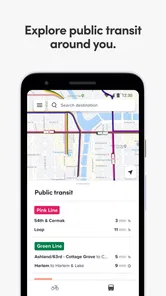
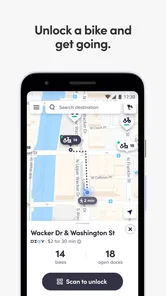
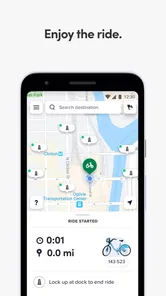
Analysis by Reviewed
Getting around Chicago by bike feels much easier when I can check the Divvy network before I leave, and that is where Divvy earns its place on my phone. This free Maps & Navigation app is built for Chicago’s bike-share system, so its value is very practical: I can use it to plan a short ride, find a nearby station, and make a better decision before walking several blocks with a bike in mind. It is not trying to replace a full city map or become a general travel planner. Its strength is staying focused on Divvy.
That focus matters for visitors, commuters, students, and anyone who occasionally combines walking, public transit, and cycling. I found the app most useful when I treated it as a live companion to a Divvy trip rather than as a complete navigation solution. It helps answer the questions that matter immediately: where can I start, where might I finish, and is using a shared bike sensible for this particular journey?
How the app feels in its current form
The current release is version 2026.31.3.1786519319, and the app has been available since May 10, 2018. That long presence gives it the feel of an established service rather than a newly assembled map with a bike-share label attached. It is developed by Lyft, Inc., and the app’s identity remains closely tied to Divvy’s Chicago network.
On Android, it supports operating systems from version 9 onward, which is helpful if you are using a phone that is not among the newest models. The app is free and rated for Everyone, so there is no purchase decision to make before trying it. Its average rating is 4.6 from around two thousand ratings, with 388 written reviews, while the installation count has passed one hundred thousand. Those figures suggest a healthy level of use, but I would still judge it by whether its station information and trip workflow fit your routine.
The opening experience is refreshingly direct. I do not need a broad collection of travel tools before reaching the bike-share information I actually came for. That makes it less distracting than a general navigation app when I am already standing near a station and simply want to organize the next part of my trip.
Planning a ride before leaving home
My preferred way to use Divvy is before I walk out the door. I first think about the destination, then check whether a nearby station makes the first part of the trip easier than walking or waiting for a bus. I also look at the likely destination area before committing. A bike-share journey is only convenient if the end of the ride works, and checking both ends prevents the common mistake of finding a bike easily but struggling to finish the trip.
This is one of the app’s less obvious strengths: it encourages station-to-station thinking. A regular map may show a route across Chicago, but Divvy makes me consider the practical handoff points. For a short appointment, a ride to a station close to the destination can be more useful than following the entire route blindly. I can leave the bike where the network allows and continue on foot, rather than forcing the bike to take me right to a building entrance.
More From Our News Desk

Weather by Xiaomi Review: Clear at a Glance, Less Clear Up Close

X Under Pressure: Can It Recover When Posting Goes Wrong?

Clash of Clans Is Won Between the Battles

Android Auto Makes the Case for Quieter Car Software

MobiOffice: Transforming Mobile Productivity with Seamless Integration

EA SPORTS FC™ Mobile Soccer: Redefining Mobile Sports Gaming
For a visitor, this is especially useful around an unfamiliar neighborhood. I would not rely on the app alone to understand every street, crossing, or traffic condition, but I would use it to decide whether a Divvy trip is realistic. A separate map remains better for detailed walking directions and broader public-transit comparisons.
A realistic everyday trip
Imagine I am leaving a train stop for a meeting on the other side of a busy area. Walking the whole way might take too long, while waiting for another connection could add unnecessary uncertainty. I open Divvy, inspect the nearby starting station, and then check the area around the meeting location. If both ends look workable, I can choose a bike and keep the final walk short.
The important habit is to check the return or next leg before beginning the ride. If I need to continue somewhere else afterward, the best destination station may not be the one closest to the meeting. I may prefer a station that leaves me near the next train stop or along the direction of my following errand. That small change in planning is where the app becomes more useful than simply searching for “bike share” in a general map.
I also keep a backup in mind. If the station arrangement does not suit the destination, I switch to walking, transit, or another navigation app instead of treating Divvy as the only answer. The app supports a decision; it does not remove the need to make one.
What has changed and what that means
The current version number shows that the product is still being maintained and evolving, but I would be careful not to read a version label as proof of a particular new feature. What I can say from using the present release is that the app remains centered on the practical Divvy experience rather than drifting into a generic transportation portal.
That continuity is good news for existing users. If you already understand the basic station workflow, the app does not ask you to relearn the whole service every time you return. The value of an updated release is often less dramatic than a redesigned interface: smoother day-to-day use, better compatibility with current phones, and a more dependable way to reach the information you need. I appreciate that kind of quiet progress because bike-share apps are tools I open briefly, often while standing outside.
New users should not expect the release history alone to teach them how to ride responsibly in Chicago. The app can help with the service side of a trip, but I still recommend checking the route separately, especially if I am unfamiliar with the neighborhood, carrying luggage, riding after dark, or traveling with someone who is not comfortable in traffic.
Where it fits beside ordinary map apps
Google Maps, Apple Maps, and other broad navigation tools are better when I need a complete journey across several transport modes. They are useful for comparing walking, driving, rail, and buses in one place. They can also provide more context about businesses, entrances, and the final walk. If my main question is “What is the fastest way from this address to that address?”, I would start there.
Divvy is better when my question is narrower and more operational: “Can I use Chicago’s bike-share system for this trip, and where should I start or end?” A general map can show a bike-share location, but a dedicated app keeps the bike-share network at the center of the task. That reduces the amount of searching and makes station planning feel more intentional.
The trade-off is that I would not use Divvy as my only route guide. It is strongest at the service layer and weaker as a complete city orientation tool. I still want another map for street-level turns, pedestrian entrances, complicated intersections, and the last few minutes after leaving the bike.
Small habits that make it more useful
One useful habit is to inspect the destination before selecting the starting point. Many people naturally search for a bike first, but the ending is just as important. A station that looks close on a map may still leave a longer walk than expected, while a slightly farther station may align better with the building entrance or the next part of the journey.
Another is to open the app before I am in a hurry. If I wait until the moment I need to move, I am more likely to accept the first station I see without thinking about the full route. A quick check at home or on the train lets me compare Divvy with walking and transit while I still have time to change plans.
I also use it as a coordination tool when traveling with another person. Instead of describing a station vaguely, I can agree on a clear meeting point and then decide whether both of us should start and finish near the same places. This is more practical than assuming that a nearby station will automatically solve the logistics for everyone in the group.
Finally, I avoid treating a station map as a guarantee that the entire trip will be effortless. Conditions can change, and the app cannot make a busy road comfortable for every rider. My best experience comes from combining the station information with common sense, extra time, and a backup route.
Where the experience still has limits
The biggest limitation is scope. Divvy is designed around one bike-share system in one city, so it is not a sensible installation if I rarely travel in Chicago or if I need a multi-city cycling planner. A general navigation app will be more useful for someone who wants one tool for every destination.
It can also feel incomplete when I need detailed guidance beyond the bike-share portion of the trip. I may know which station I want, yet still need another app to understand the safest or simplest way to reach it on foot. The same is true after I return a bike. The station decision is only one piece of the journey, and Divvy should not be mistaken for a substitute for citywide navigation.
There is also a planning trade-off for people with rigid schedules. A bike-share app can help me organize the route, but I would leave breathing room rather than building a meeting around a perfectly timed station-to-station assumption. If the journey is critical, I prefer a plan that still works if I decide to walk or use transit instead.
These limitations do not make the app poor; they define its proper role. I recommend it to people who regularly want Divvy-specific information. I would skip it if my travel needs are mostly outside Chicago, if I never use shared bikes, or if I want a single application to handle every step of a complex itinerary.
Who should install it
For Chicago residents, the app makes sense when bike share is part of an ordinary routine rather than an occasional experiment. It can help commuters bridge the gap between a station and an office, students move between neighborhoods, and residents combine cycling with rail or walking. Visitors can benefit too, particularly when they want to explore without planning every block around a car.
I think it is most valuable for people who make short, flexible trips. Those riders can use the station network to avoid a long walk without committing to owning, storing, or maintaining a bicycle. It is less compelling for someone seeking exercise tracking, long-distance cycling routes, or detailed turn-by-turn riding guidance. Those needs belong to different kinds of apps.
The age rating of Everyone also makes the app broadly approachable from a content perspective, but that should not be confused with a promise that every rider will find Chicago streets comfortable. A young or inexperienced rider may still need an adult’s judgment about traffic, route choice, and whether bike share is appropriate for a particular trip.
What I would watch going forward
For future updates, I would pay attention to how clearly the app communicates the practical state of a trip: choosing a starting station, selecting a sensible destination, and moving smoothly between the bike-share information and the rest of the journey. Those are the moments that decide whether the app saves time or merely adds another screen to check.
I would also value continued attention to people who use Divvy as part of a mixed journey. The strongest version of this app is not one that tries to become every kind of map. It is one that makes the handoff between cycling, walking, and public transit easier while preserving the focused experience that gives it a reason to exist.
My final view is positive, with realistic expectations. Divvy is a focused, free navigation companion for Chicago’s bike-share network, and I find it worthwhile when I am deciding whether a shared bike fits a specific trip. Its current release reflects an established product that continues to be maintained, while its main weakness remains the same practical boundary: it does not replace a full city map or careful route judgment.
If you regularly use Divvy, this is the app I would keep ready before leaving home. I would pair it with a general map for walking and transit details, check both the start and end of the ride, and leave enough flexibility for a change of plan. Used that way, Divvy is not just a station finder; it becomes a useful part of a realistic Chicago travel routine.
Divvy Frequently Asked Questions
What is Divvy and what can I use it for?
Divvy is a personal finance and expense-sharing app designed to help users organize spending, track transactions, and manage shared costs more conveniently. Depending on the version and region, it may support features such as budgeting, expense categorization, bill splitting, and payment management. It is especially useful for roommates, couples, families, or groups that need a clearer overview of who paid and what each person owes.
Is Divvy free to download and use?
Divvy may be available to download without an upfront charge, but the exact cost structure depends on the platform, country, and specific services offered. Some features can require an account, subscription, transaction fee, or eligibility through a supported financial provider. Before registering or connecting payment information, review the app’s current pricing, terms, and in-app purchase details listed on the official Google Play Store or Apple App Store.
Is Divvy safe for managing financial information?
Divvy may request sensitive details such as an email address, account information, transaction data, or payment credentials, so users should review its privacy policy and security practices before using it. Download the application only from an official store, enable device security features, and avoid sharing passwords or verification codes. No financial app can eliminate every risk, so monitor accounts and report suspicious activity promptly.
Can I use Divvy to split bills with friends, roommates, or family members?
One of Divvy’s most practical uses is organizing shared expenses, although the exact splitting tools can vary by app version and location. Users may be able to record a purchase, assign participants, divide costs evenly or by custom amounts, and track outstanding balances. Confirm that everyone involved has compatible access and understands whether Divvy records payments only or also processes money transfers.
What should I check before downloading Divvy on Android or iPhone?
Before installing Divvy, check that your device meets the current Android or iOS requirements and that enough storage is available. Read recent user reviews for comments about reliability, login problems, synchronization, and customer support. Also verify the developer name, requested permissions, privacy disclosures, and regional availability. If you plan to connect a bank account or card, make sure the service is officially supported in your country.
Pros
- Makes splitting group expenses quick and organized.
- Supports fair cost sharing without complicated calculations.
- Useful for trips
- dinners
- and recurring shared bills.
- Helps track who has paid and who still owes money.
- Digital records reduce the need for paper receipts.
Cons
- Requires everyone in the group to use or access the app.
- Some features may depend on account setup or invitations.
- Users may need to enter expenses manually after purchases.
- Payment availability can vary by country or supported services.
- Notifications may become distracting in large or active groups.













