Locket Widget
- 3.62K
- 4.6
- Installs
- 10.00M
- Price
- Free

Screenshots
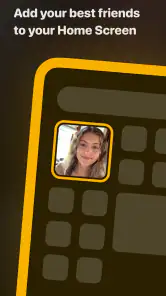
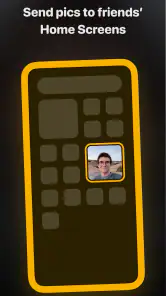
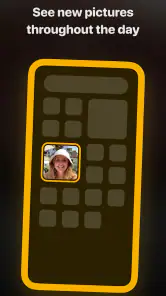
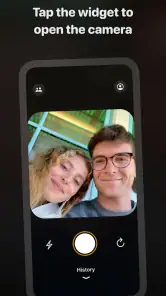
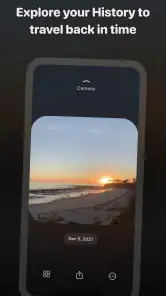
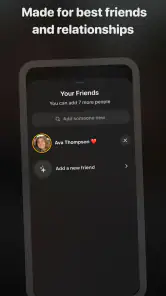
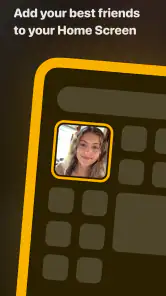
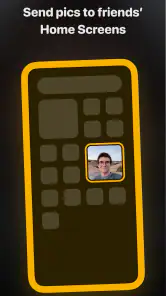
Analysis by Reviewed
I like the idea of keeping in touch without turning every small moment into a conversation that needs an immediate reply. That is the space Locket Widget aims to fill: a social app built around photos that appear on a phone’s home screen. It suits people who want a quiet reminder of close friends and family, rather than another feed to scroll through. In my view, its best quality is also its main trade-off: it makes connection feel easy, but only if everyone involved enjoys sharing everyday snapshots.
When a photo is enough
Some relationships don’t need another channel for long conversations; they need small signs of life that fit into a busy day. That is where this format makes sense. A quick image can show what someone is up to without asking either person to stop and type. It changes the feeling of checking in from a task to a passing moment, which can be a welcome difference for friends or relatives who care about each other but don’t share the same routine.
A realistic example is a family with one person commuting and another working from home. One can share a view from the train, while the other sees it later between tasks. Nobody has to reply on the spot, and the image itself can be enough to prompt a conversation when they next speak. I’d still use a message for anything urgent or important: a photo-based exchange is a gentle signal, not a dependable way to get someone’s attention.
What’s the Buzz About?
At first glance, Locket Widget might seem like just another app in the endless sea of widgets available for your home screen. But don’t let its simplicity fool you. The magic of this nifty little app lies in its ability to keep your loved ones close, literally, right on your phone. It’s like having a digital photo frame that updates in real-time with snapshots from your friends and family.
Setting Up: A Walk in the Park
Getting started with the app is as easy as pie. After downloading, you simply invite your friends to join you on the platform. Once connected, you’ll have the delightful experience of receiving photos directly on your home screen. Imagine waking up to a goofy selfie from your best friend or a beautiful sunset captured by your sibling.
The interface is straightforward and user-friendly, which means you won’t be fumbling around trying to figure out what button does what. Just add the widget to your home screen, and voila, you’re all set to start receiving photos!
Making the sharing routine work
Before inviting a whole group, I’d treat the first few days as a low-pressure trial. Start with people who already send each other casual photos, then notice whether the exchange feels natural or starts to feel like a chore. This is a useful distinction: a widget can make sharing more visible, but it can’t make people enjoy sharing. If participation is uneven, it’s better to talk about expectations than to assume someone is ignoring the group.
More From Our News Desk

Weather by Xiaomi Review: Clear at a Glance, Less Clear Up Close

X Under Pressure: Can It Recover When Posting Goes Wrong?

Clash of Clans Is Won Between the Battles

Android Auto Makes the Case for Quieter Car Software

MobiOffice: Transforming Mobile Productivity with Seamless Integration

EA SPORTS FC™ Mobile Soccer: Redefining Mobile Sports Gaming
There’s also a small practical choice in what you send. A snapshot that makes sense on its own—a meal, a funny detail, a view, or a pet doing something odd—works better than an image that needs a long explanation. If there’s a story behind it, you can follow up in a conversation. Thinking this way keeps the photo exchange light and avoids turning every update into a half-finished message thread.
Small Updates, Different Conversation Rhythm
The appeal is less about replacing messages than changing their rhythm. A photo can say “thinking of you” without asking the recipient to stop what they’re doing and compose a reply. For example, a parent on a busy workday might glance at a picture from a child’s walk, then answer later when there’s time. That lighter exchange can feel warmer than a stream of check-ins, especially when people live apart or keep different schedules.
It also changes what counts as a shareable moment. A perfectly framed holiday photo may belong in a group chat or album; a silly lunch, a pet sprawled across the sofa, or a view from the bus is more suited to this casual format. I’d treat the widget as a small window into someone’s day, not a reliable record of everything happening. If a message needs context, a decision, or a prompt response, ordinary texting remains the clearer tool.
A Touch of Personalization
One of the standout features is the personalization aspect. You can select which friends’ photos you want to display, ensuring that your widget is filled with the faces that matter most to you. Plus, it’s a great way to stay updated without the noise and distraction of other social media apps. Privacy-conscious users will appreciate that the app doesn’t bombard you with ads or unnecessary notifications.
That choice of audience is worth making deliberately. I’d think of the home screen as a shared space, not a private inbox: someone might see it when you unlock your phone beside them. If a photo would feel uncomfortable in that casual setting, it may not be the right kind of update to send. A good rule is to share images you’d be comfortable having appear briefly in everyday company, rather than treating the widget like a hidden conversation.
Keeping the Sharing Comfortable
A home-screen photo is more visible than a message tucked inside an app, so I’d agree on the basics with friends before inviting them: who is in the group, what kinds of pictures feel comfortable, and whether anyone would rather share less often. That simple conversation helps prevent the widget from feeling like an expectation to perform or send something every day. If a friend goes quiet, I wouldn’t read meaning into it; people have different habits and comfort levels around sharing.
There’s another practical point: choose the people whose updates genuinely make you happy to see in passing. A smaller circle can make the widget feel personal, while adding every acquaintance may make it less meaningful. If you want a broad audience, public posts, or a searchable archive, a conventional social network or shared album is likely a better fit. This app’s strength is intimacy, not reach.
Attention without another feed
The main attention advantage is that the experience doesn’t ask me to keep scrolling for something worthwhile. I can notice a familiar face or scene as part of looking at my phone for another reason, then move on. That can feel calmer than opening a feed designed around a steady stream of posts. But the home screen is still a place I see often, so the widget can become a distraction if I find myself checking it repeatedly or wondering whether anyone has sent something new.
To keep it from becoming another checking habit, I’d choose a spot on the home screen where the photos are easy to notice but not the first thing competing for attention. I’d also avoid treating a quiet widget as a cue to prompt everyone for updates. The point is to make connection available, not to create a new obligation. If seeing personal pictures in the middle of work or study pulls your focus, removing or moving the widget is a reasonable adjustment rather than a failure to use the app correctly.
Where It Fits Among Social Apps
Compared with a typical social feed, Locket asks for less browsing and offers less room for polished posts, comments, and public discovery. Compared with a group chat, it makes casual photos easier to notice but is less suited to discussion or coordinating plans. I see it as a companion to those tools rather than a replacement: use it for low-pressure moments, then switch to messages when words or a clear response matter.
It also differs from a shared photo album in purpose. An album is usually better when you want to collect, sort, and revisit images from an event or over time. This widget is better suited to an informal present-tense exchange, where an image is noticed in passing rather than filed for later. Neither approach is universally better. If the important part is preserving a set of photos, choose the album; if the important part is a small reminder of people you already know, the widget has a more personal feel.
The app is free, made by Locket Labs, Inc., and sits in the social category. It has a 4.6 average from around 329,000 ratings, with over 10 million installs. Its Teen content rating makes it worth discussing sharing habits with younger users, particularly because a photo on a home screen can be seen casually by people nearby. The current version is 1.210.0, and the app requires iOS 8.1 or later. Optional in-app purchases range from $1.99 to $35.99 per item, so I’d check the purchase details before choosing anything beyond the free experience.
Practical considerations before you settle in
People often ask whether this can replace their group chat. I wouldn’t use it that way. A photo can carry a mood or show a small moment, but it’s not the clearest place to settle plans, explain a problem, or make sure everyone has understood a decision. Keeping the chat for coordination and using the widget for casual sharing gives each tool a distinct job and makes it less likely that an important message gets lost among images.
Another question is whether it works for someone who rarely takes pictures. It can still be worth trying if that person enjoys receiving updates and is comfortable contributing occasionally, but the group should agree that participation doesn’t have to be symmetrical. If everyone expects a constant stream, a quieter member may feel pressured. A more generous approach is to make room for different habits and judge the app by whether the exchanges feel welcome, not by how often each person posts.
The free starting point makes it easy to see whether the routine suits your circle, while optional purchases are a reason to pause before tapping through any paid choice. I’d first use the basic experience long enough to answer the real question—does seeing these people’s everyday moments make the home screen feel more personal?—rather than assuming a purchase will improve a mismatch in sharing habits. No extra feature can solve the social part if the group doesn’t want the same kind of exchange.
Why It’s a Game-Changer
In a world where we’re constantly bombarded with information and notifications, Locket Widget offers a refreshing change. It’s all about fostering genuine connections without the clutter. Whether you’re at work, traveling, or just lounging at home, those little photo updates can bring a smile to your face and make you feel more connected.
Plus, it’s super low maintenance. Unlike other social apps that demand constant interaction, Locket lets you enjoy the photos without feeling the need to like, comment, or share. It’s just about being present.
Who Will Enjoy It—and Who May Not
I’d recommend trying it if you have a few close people who already trade informal snapshots and would enjoy seeing one another’s everyday lives. It may be especially appealing to family members in different places, close friends with mismatched schedules, or anyone who wants a personal touch on their home screen without checking a busy feed. A useful habit is to agree on a small group first, see whether the exchange feels natural, and expand only if everyone wants to.
I’d skip it if you prefer to keep your home screen entirely private, dislike sharing ordinary moments, or need a social app that helps you meet new people and follow public conversations. It can also lose its appeal if the group rarely sends pictures: the widget is only as lively as the people sharing with you. For those cases, a shared album gives more control over collecting photos, while messaging is better for direct back-and-forth.
Final Thoughts
Overall, if you’re someone who values connection and cherishes the simple joys of life, then this app might just be your new best friend. The app is not just an app; it’s a way to keep your loved ones close, no matter the distance. So, go ahead, give it a whirl and let those heartwarming moments fill your home screen.
Locket Widget Frequently Asked Questions
Can I choose which photos to send to friends with Locket Widget?
Yes. Locket Widget is designed around sharing the photos you choose with friends, rather than posting every picture you take. Its store description highlights “only the photos you want to see,” which reflects this selective, friend-focused approach. Before sharing, take a moment to check that the image is intended for the people you have selected.
Do I need to add a widget to use Locket Widget?
The home-screen widget is central to the Locket Widget experience: it lets you receive live photos from friends where you can see them throughout the day. Adding the widget is therefore a useful step if you want to enjoy the app as intended. You can still explore its photo-sharing features, but the widget is what brings incoming pictures directly to your home screen.
Is Locket Widget suitable for teenagers?
Locket Widget is a social app with a Teen content rating, so it is intended for a teenage audience as well as adults. Its focus is sharing photos with friends, making it useful for keeping up with people you know. As with any social app, consider who you connect with and what you choose to share before getting started.
How much space does Locket Widget need, and what operating system does it support?
Locket Widget requires operating system version 8.1 or later. Check that your device meets this minimum before downloading, and make sure you have enough free storage for the app and the photos you choose to share. The app’s central experience is receiving friends’ pictures through a home-screen widget, so it is best suited to a device you use regularly.
Who makes Locket Widget, and is it popular?
Locket Widget is developed by Locket Labs, Inc. It has an average rating of 4.6 from around 329,000 ratings, with about 3,600 written reviews and over 10 million installs. Those figures suggest that many people have tried the app, though whether its simple, friend-focused photo sharing suits you will depend on how you like to stay in touch.
Pros
- Intuitive and user-friendly interface.
- Seamless integration with social media.
- Customizable widget settings.
- Real-time updates and notifications.
- Low battery consumption.
Cons
- Limited free features.
- No offline functionality.
- Occasional sync issues.
- Requires constant internet connection.
- Limited customization options.
- Category
- Social
- Version
- 1.210.0











