

Local Weather Forecast
- 2.60K
- 4.6
- Installs
- 5.00M
- Price
- Free
Screenshots
Analysis by Reviewed
Weather apps are easy to underestimate until you need a useful answer quickly. I tested Local Weather Forecast as a straightforward daily weather companion, and its main appeal is clear from the first use: it focuses on nearby conditions instead of trying to become a complete lifestyle platform. That makes it comfortable for checking the morning temperature, deciding what to wear, or seeing whether an outdoor plan still makes sense.
It is a free weather app from Tools Dev, available for Everyone and compatible with Android 7.0 or later. The app has been around since December 23, 2016, and its current version is 4.27.8. Those details matter because this is not a brand-new experiment; it is an established utility that has had time to settle into a familiar role on a phone.
My overall impression is positive, with one important qualification: Local Weather Forecast is best when you want a quick local overview and a repeatable checking habit. If you need highly specialized meteorological tools, detailed storm analysis, or a broad collection of travel-planning features, a larger weather service may suit you better. For ordinary day-to-day decisions, though, this app keeps the process pleasantly uncomplicated.
How I use it as a daily weather baseline
My normal routine starts with the current location and the immediate question I am trying to answer. I do not open a weather app merely to admire charts; I want to know whether I should take a jacket, postpone a walk, or change the timing of an errand. Local Weather Forecast works well in that role because its local focus keeps the first check relevant.
The most useful habit is to separate a quick glance from a proper forecast check. In the morning, I look at the current conditions and the upcoming outlook before leaving home. Later, I return only when the plan has changed. This prevents the common mistake of repeatedly refreshing weather information without making a decision. The app is most valuable when it supports that small decision-making loop.
A realistic example is a school run followed by an afternoon appointment. In the morning, I check whether the conditions are comfortable for walking and whether the later part of the day looks different enough to justify carrying another layer. Before leaving for the appointment, I check again rather than relying on memory. That second look is especially useful when the day has shifted from a cool morning to a warmer afternoon, or when an outdoor plan depends on a narrow window of comfortable weather.
I also like using it before short trips around town. I am not asking it to plan an entire holiday; I simply want to compare the weather where I am with the conditions near the place I am heading. That local comparison is more practical than opening a general search page, typing a location, and sorting through unrelated results.
More From Our News Desk

 Prime Video
Switching to Prime Video: What Changes in Your Viewing Routine
Prime Video can make a compelling second home for streaming, but switching means learning a different catalog, rental layer, and route from browsing to playback.

 Universal TV Remote Control
Universal TV Remote Control Works Best as a Reliable Backup
A phone remote earns its place through quick setup and reliable habits. Here is how to get more from Universal TV Remote Control—and where its limits show.

 Weather - By Xiaomi
Weather by Xiaomi Review: Clear at a Glance, Less Clear Up Close
Xiaomi’s weather app makes everyday forecasts quick to scan, but its calm surface can leave useful details and recovery paths harder to find than they should be.

 X
XX Under Pressure: Can It Recover When Posting Goes Wrong?
A resilience-focused review of X, examining setup, mistaken posts, interruptions, weak connections, and the gaps that matter when recovery needs to be dependable.

 Clash of Clans
Clash of Clans Is Won Between the Battles
Its raids are quick; its community is a long-term project of coordination, teaching, rivalry, and shared responsibility—with all the friction that entails.

 Android Auto
Android Auto Makes the Case for Quieter Car Software
The car interface is no longer judged by how much it can do, but by how quietly it helps. Android Auto shows what drivers now expect—and what still gets in the way.
Latest News



The app’s strongest quality is therefore not entertainment or depth for its own sake. It is the low effort between opening the app and understanding the nearby weather. For routine decisions, a fast and readable local check is often more useful than an overloaded forecast dashboard.
What the local focus gets right
Local weather information is valuable because weather can change noticeably over a short distance. A forecast for a whole city may not feel accurate near its edge, in a nearby suburb, or around a different elevation. I found the local orientation helpful when deciding whether conditions outside my immediate area were likely to affect a short journey.
That does not mean I treat one screen as an absolute promise. Weather forecasts are guidance, not guarantees, and the practical value depends on how often I check and how important the decision is. For a casual walk, commute, or shopping trip, the app gives me a sensible starting point. For a safety-critical activity, I would combine it with official alerts and more specialized information.
Another advantage is that the app is free. There is no purchase decision to make before trying it, so it is easy to install, test in your own area, and decide whether its presentation fits your habits. Its 4.6 average from around 40 thousand ratings suggests that many people find the basic experience dependable enough for regular use, while the more than 5 million installs show that it has reached a substantial audience.
Settings I would check before settling in
I recommend spending a few minutes reviewing the available settings rather than accepting every default. The first thing I would check is the location behavior. A weather app becomes less useful when it is showing an old place, a broad area that does not match your routine, or a location you only visited once. Make sure the displayed place is the one you actually want to monitor before judging the forecast.
I would also review any notification choices carefully. Weather alerts can be useful, but too many interruptions turn a helpful utility into background noise. My preference is to keep only notifications that support a real decision, such as a meaningful change that could affect a commute or outdoor plan. If the app allows different notification categories, I would enable the narrowest useful set instead of turning everything on.
Units are another small detail with a large effect. Temperature and wind information are only useful when they match the measurements you already understand. I always check this after installing a weather app, particularly if I have moved between regions or changed phones. A forecast can look precise while still being confusing if the units are unfamiliar.
It is also worth checking the visual presentation. Some people prefer a compact screen that can be understood immediately, while others want more forecast detail in one place. I found Local Weather Forecast more suitable for the first group. If the screen feels busy, I would simplify the way I use it rather than trying to extract every available detail. A weather app should reduce friction, not create a second task.
One practical tip is to test the app at two different times of day before deciding whether the defaults work for you. Morning weather checks and evening planning have different needs. In the morning, current conditions and the next part of the day matter most. In the evening, I care more about tomorrow’s broad shape. A setting or display that feels convenient in one situation may be less useful in the other.
Repeatable patterns that make checking faster
Experienced use is less about opening the app constantly and more about building a few dependable patterns. I use one check before leaving home, one check before a weather-sensitive activity, and an extra look only when conditions appear unsettled. This rhythm gives me enough information without making weather monitoring feel like a chore.
A useful shortcut is to connect the forecast to a decision already present in your day. Instead of asking, “What is the weather doing?” ask, “Do I need an extra layer for the return trip?” or “Should I move this outdoor task earlier?” That wording makes the app’s information actionable. It also helps avoid spending time on details that will not change your plan.
For commuting, I check the weather for the time I expect to travel rather than relying only on the current conditions. A comfortable morning does not automatically mean a comfortable journey home. For exercise, I check close enough to the start that the information is still relevant, then use common sense about visibility, surfaces, and personal comfort. For errands, I check before combining several stops, because a short trip can become much less pleasant when it extends into a different part of the day.
I also recommend keeping the app in a consistent place on the phone. That sounds trivial, but a predictable location removes the temptation to use a search engine instead. If your phone supports a shortcut or a convenient home-screen arrangement for frequently used apps, placing Local Weather Forecast where your thumb naturally reaches can make the daily habit almost automatic. I am not treating that as a special feature of the app; it is simply a practical way to reduce steps.
Another non-obvious habit is to compare the app’s forecast with what you actually experience, but only over time and without expecting perfect agreement. If the local result regularly seems out of step with your surroundings, check the selected location and units first. If the issue continues, use another trusted source for important decisions. This turns the app into something you evaluate honestly instead of assuming that every displayed detail must be right.
Where it fits beside larger weather alternatives
Compared with a general web search, Local Weather Forecast is more convenient for repeated checks. A search page may offer plenty of information, but it also introduces extra reading and unrelated results. The dedicated app gives weather its own place on the phone, which is helpful when the same question comes up several times in a week.
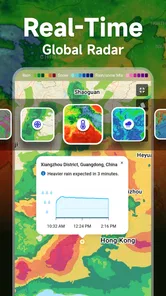
Compared with a feature-heavy weather service, the trade-off is simplicity. Larger alternatives may be better for radar views, severe-weather tracking, long-range planning, maps, or specialist outdoor activities. If you are a sailor, pilot, mountain guide, or storm enthusiast, I would not make this app your only source. Those situations demand a level of detail and verification beyond a simple local overview.
For everyday users, however, more information is not always better. A crowded interface can slow down the one answer you wanted. Local Weather Forecast makes more sense for someone who values a clear routine: open it, understand the nearby conditions, and continue with the day. I would choose a larger alternative when I need to investigate why weather is changing, follow a system over a map, or compare several detailed locations at once.
Limits that become clearer with advanced use
The app’s focused design also creates its main limitation. A local forecast is not the same as a complete weather-analysis workspace. When I need context across multiple places, deeper visual information, or a more specialized view of changing conditions, I would look elsewhere rather than forcing this app to do a job it was not designed to handle.
There is also a human limitation: a forecast can encourage false confidence if I check it once and stop thinking. I treat the app as a current planning aid, not a guarantee. If my activity is important, remote, or sensitive to sudden changes, I verify the situation through official local warnings and another reliable source. That is not a criticism unique to this app; it is a sensible boundary for any consumer weather tool.
People who dislike adjusting settings may find the first setup less satisfying than expected if the location, units, or notification behavior do not match their preferences immediately. My advice is not to abandon it after one glance. Check those basics first, then use it for several ordinary situations. A weather app’s usefulness is strongly tied to whether its information appears in the form you naturally understand.
I would also skip it if your main requirement is a rich weather map or professional-grade interpretation. The free price is attractive, and the Everyone rating makes it approachable for a broad audience, but accessibility should not be confused with specialist depth. Someone who only wants a local answer will likely appreciate the restraint; someone who wants a technical weather workstation may feel limited.
My verdict after building a routine around it
Local Weather Forecast succeeds because it stays close to a real need: understanding nearby weather without turning every check into research. I found it most useful when paired with simple habits, sensible settings, and a clear idea of what decision the forecast is meant to support.
Tools Dev has produced a practical weather app rather than an all-purpose outdoor command center. That distinction helps me recommend it honestly. It is a strong choice for checking local conditions, preparing for ordinary travel, and maintaining a quick daily forecast routine. It is less convincing as the sole tool for severe-weather decisions, specialist activities, or detailed multi-location analysis.
The app is free, runs on Android 7.0 and later, and has earned a 4.6 average across roughly 40 thousand ratings, with around 2.6 thousand written reviews. Its current release is 4.27.8, and its long availability gives it the feel of a mature utility rather than a temporary novelty.
I would recommend it to a friend who wants a simple local forecast and is willing to spend a moment tailoring the basics. Install it, confirm the location and units, keep notifications purposeful, and connect each check to a real plan. Used that way, it is an efficient companion for everyday weather decisions. If your needs go beyond that, keep Local Weather Forecast as a quick first look and use a more specialized service when the situation calls for deeper detail.
Local Weather Forecast Frequently Asked Questions
Can I use Local Weather Forecast to plan an outdoor activity?
Local Weather Forecast can help you review nearby conditions and forecasts before making everyday plans. Its weather information may be useful when deciding what to wear or whether the conditions look suitable for an outing. Forecasts can change, particularly when the weather is unsettled, so check the app again closer to your plans and use official alerts or local authorities for severe-weather guidance.
Is Local Weather Forecast easy to understand for someone new to weather apps?
The app is aimed at people who want local weather information in an easy-to-understand format. You can use it to check conditions and forecasts for locations you select, while the store summary describes it as a way to understand nearby weather. If you are comparing weather apps, its straightforward local-weather focus may suit you; explore the screens and controls to see whether the presentation works for your needs.
Can I add and check weather for more than one city?
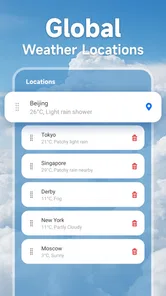
Local Weather Forecast is intended to show conditions for locations you select, which can be useful when you want to follow the weather somewhere beyond your immediate area. Search for a city to view its forecast, then check the app’s location controls for options to switch between places or keep locations available. This is handy for planning a trip or checking on family in another area.
Who is Local Weather Forecast designed for, and what devices can run it?
Local Weather Forecast is a weather app for people who want nearby conditions and forecasts in an easy-to-understand format. It is rated for Everyone, so its intended audience is broad. The app is available for Android devices running version 7.0 or later. Before installing, check that your device meets that requirement and that you are downloading the app from the appropriate store for your platform.
What is Local Weather Forecast, and what information does it provide?
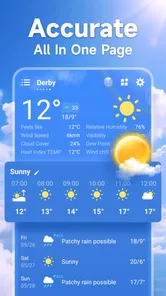
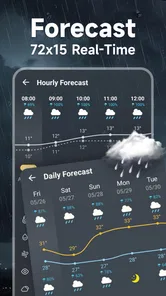
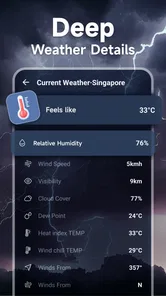
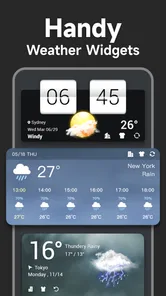
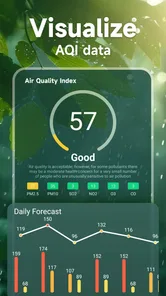
Local Weather Forecast is a weather app designed to give you current conditions and upcoming forecasts for locations you select. During testing, the app presented useful details such as temperature, feels-like temperature, precipitation chances, wind, humidity, and daily outlooks. Depending on the device and available data, it may also include hourly forecasts, weather warnings, sunrise and sunset times, and longer-range predictions.
Pros
- Clear hourly and daily forecasts make planning easier.
- Useful alerts help users prepare for severe weather conditions.
- Location support provides forecasts for multiple places.
- Weather details include temperature
- wind
- humidity
- and precipitation.
- Simple layout makes key information quick to find.
Cons
- Forecast accuracy may vary depending on the location.
- Some features or details may require an internet connection.
- Frequent notifications can feel excessive for some users.
- Advertising may reduce the clarity of the forecast screen.
- Battery and data use may increase with continuous location access.












