Live weather: Forecast, widget
- 21.00
- 4.2
- Installs
- 1.00M
- Price
- Free
Screenshots


Analysis by Reviewed
Ever wondered if you can predict the weather without having to switch on the TV or check out an online forecast? Well, welcome to the tech era where you have the convenience of a personal weather station right in your pocket, thanks to Live Weather: Forecast, Widget! This app has quickly become my go-to for all things weather-related, and after spending some time with it, I’m here to spill the beans on why it’s worth your attention.
Getting Started: First Impressions
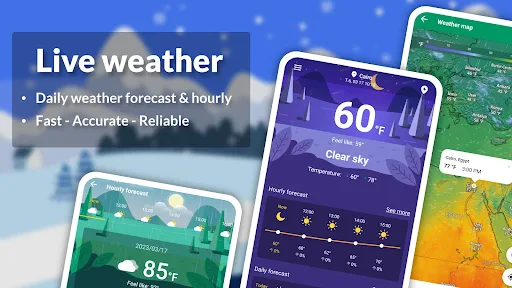
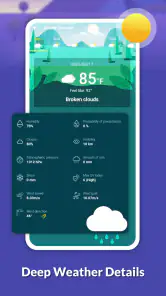
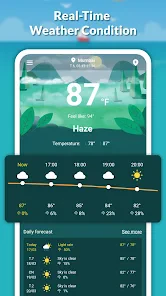
Setting up Live Weather: Forecast, Widget is a breeze. The installation process is straightforward – just download it from the app store, and you’re good to go. Once I launched the app, I was greeted with an intuitive interface that’s both sleek and user-friendly. The home screen offers a neat overview of the current weather conditions, including temperature, humidity, wind speed, and more. I found it incredibly easy to navigate through the app, which is always a plus in my book.
Features That Stand Out
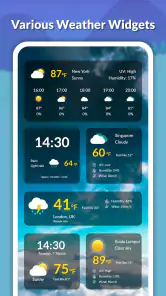
What sets this app apart is its robust feature set. Not only does it provide real-time weather updates, but it also offers a comprehensive 7-day forecast, which is perfect for planning ahead. I particularly love the widget functionality, which allows me to have live weather updates right on my home screen without even opening the app. It’s like having a mini weather station at your fingertips!
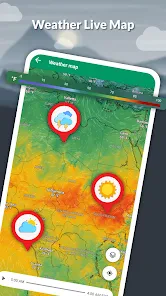
Additionally, the app includes radar and satellite imagery, which is a treat for weather enthusiasts like me who enjoy tracking storms and atmospheric changes. The detailed maps and animations make it easy to visualize weather patterns, providing a deeper understanding of the forecast.
Practical Use: Real-Life Application
Using the app in daily life has been a game-changer, especially when planning outdoor activities or just deciding what to wear for the day. The accuracy of the forecasts has impressed me time and again, saving me from unexpected showers on more than one occasion. The alerts and notifications feature ensures that I’m never caught off guard by sudden weather changes.
The customizable settings also deserve a mention. You can tailor the app to suit your preferences, from choosing the units of measurement to setting up specific alerts for severe weather conditions. It’s all about making the app work for you, which I truly appreciate.
Closing Thoughts
In conclusion, Live Weather: Forecast, Widget is more than just a weather app – it’s a reliable companion for anyone looking to stay informed about the weather. Whether you’re planning a trip, heading out for a jog, or simply curious about the weather, this app has got you covered. Its combination of accuracy, user-friendly design, and comprehensive features make it a must-have for any smartphone user. So, if you haven’t already, give it a try and experience the weather like never before!
More From Our News Desk

Clash of Clans Is Won Between the Battles

Android Auto Makes the Case for Quieter Car Software

MobiOffice: Transforming Mobile Productivity with Seamless Integration

EA SPORTS FC™ Mobile Soccer: Redefining Mobile Sports Gaming

How Microsoft OneDrive Became a Mobile Productivity Giant

How Google Translate Breaks Language Barriers Effortlessly
Live weather: Forecast, widget Frequently Asked Questions
What features does the Live Weather app offer?
The Live Weather app provides real-time weather updates, detailed forecasts, and a variety of widgets to customize your home screen. It offers hourly and weekly weather predictions, severe weather alerts, and radar maps. Users can personalize weather notifications based on their preferences and access weather updates for multiple locations worldwide.
Is the Live Weather app free to use?
The Live Weather app is available for free with basic features. However, there are in-app purchases and subscription options that unlock additional features such as ad-free experience, premium widgets, and advanced radar maps. Users can choose to opt for the premium version to enhance their experience and access all features.
How accurate is the weather forecast in the Live Weather app?
The Live Weather app uses advanced technology and data from multiple reliable sources to provide accurate weather forecasts. While no weather prediction is 100% accurate, the app's forecasts are highly reliable and updated frequently to reflect real-time changes in weather conditions. Users generally find the app dependable for planning daily activities.
Can I customize the widgets on the Live Weather app?
Yes, the Live Weather app offers a variety of customizable widgets that users can add to their home screen. You can choose from different widget styles and sizes, and personalize them with information such as current temperature, forecast details, or severe weather alerts. This allows users to access the weather information most relevant to them at a glance.
Does the Live Weather app provide weather alerts?
The Live Weather app provides timely weather alerts to keep users informed about severe weather conditions. These alerts are customizable, allowing users to receive notifications about specific weather events such as storms, heavy rainfall, or extreme temperatures. This feature is particularly useful for staying prepared and safe during adverse weather conditions.
Pros
- Provides accurate weather forecasts
- User-friendly interface
- Customizable weather widgets
- Offers severe weather alerts
- Supports multiple locations
Cons
- Contains ads in free version
- Limited features without subscription
- Occasional app crashes
- Requires stable internet connection
- Battery consumption can be high
- Category
- Weather
- Version
- 1.3.3