Karrot: Buy & sell locally
- 695.00
- 4.1
- Installs
- 10.00M
- Price
- Free

Screenshots






Analysis by Reviewed
I find Karrot most useful when a secondhand deal is close enough to become a real-world exchange rather than a shipping transaction. That local focus makes the app feel different from browsing a nationwide resale site: the practical question is not only whether an item is a bargain, but whether the seller is nearby and you can agree on a convenient handoff. The experience depends on a working connection, too, because browsing current listings and coordinating with another person are online activities. Karrot is a social app from Danggeun Market Inc., and its neighborhood scale is both its appeal and its main constraint.
When a live connection matters
Marketplace browsing can be casual, but the moments that matter most are time-sensitive: checking whether an item is still available, replying to a question, or settling on a meeting time. I would treat chat as part of the transaction rather than something to leave until the last minute. If I am interested in an item, I send a clear message with a practical question and check back before setting out. That small habit helps avoid an unnecessary trip if plans have changed.
Alerts can help you notice listings that match what you are seeking, but they are not a substitute for making a decision. When a useful item appears, I would review its condition and location, then contact the seller promptly. For sellers, concise descriptions and readable photos can reduce back-and-forth questions. A local listing may attract nearby interest quickly, but a message is not the same as an agreed sale, so I would confirm the arrangement before carrying a bulky item outside.
Using it around a busy day
The app suits short checks between errands better than a long, aimless scroll. I can imagine spotting a small table while waiting for a bus, saving the details mentally, and messaging the seller once I can give the conversation proper attention. For something awkward to carry, I would first make sure the collection plan works with my schedule and transport. Local distance helps, but it does not make a large item easy to move.
It also works best when your expectations match the neighborhood nature of the listings. The selection depends on what people nearby choose to post, so a common household item may be easier to find than a rare model or a specific size. If I need a precise product by a fixed deadline, a conventional retailer or a broader marketplace with delivery options may be more dependable. Karrot is better for flexible searches where I can wait, compare, and arrange a local exchange.
What to do when plans or service falter
As with any app-based exchange, a slow connection can interrupt the useful part of the process: seeing a reply or confirming a meetup. I would not rely on a listing screen as proof that a deal is settled. Before leaving home, I would check the latest conversation, agree on a time and place, and make sure I have the seller’s relevant details available. If the conversation stalls, it is sensible to wait for confirmation rather than assume the other person will be there.
There is a human element that no interface can remove. A seller may change their mind, another buyer may act first, or an item may not match its photos as well as expected. I treat the app as a way to find and coordinate an exchange, not as a guarantee of stock or condition. Clear questions, a public meeting point, and a quick inspection before completing a handoff are practical safeguards. They also make a short local transaction less stressful.
More From Our News Desk

Weather by Xiaomi Review: Clear at a Glance, Less Clear Up Close

X Under Pressure: Can It Recover When Posting Goes Wrong?

Clash of Clans Is Won Between the Battles

Android Auto Makes the Case for Quieter Car Software

MobiOffice: Transforming Mobile Productivity with Seamless Integration

EA SPORTS FC™ Mobile Soccer: Redefining Mobile Sports Gaming
Keeping mobile use purposeful
For data-conscious use, I would keep browsing focused rather than repeatedly refreshing a wide search, and save the details I need before travelling. Messaging only when I have a concrete question keeps the exchange efficient for both people. These are sensible habits on a limited data plan, but they do not turn the app into an offline marketplace: current availability and coordination still depend on connecting.
The same focused approach helps prevent impulse buying. Before messaging, I ask myself whether I can collect the item, whether its condition suits the intended use, and whether the price is worthwhile compared with buying new or choosing a shipped secondhand option. That check matters especially for furniture and electronics, where condition, transport, and fit can outweigh an attractive listing.
If you're like me, always on the lookout for a great way to snag a bargain or declutter your home, let me introduce you to Karrot. This app is the latest gem in the world of local buying and selling, and trust me, it's worth checking out. Whether you're a seasoned thrifter or just someone trying to make an extra buck, Karrot offers a unique blend of community-centric features that make transactions feel personal and trustworthy.
Getting Started with Karrot
First things first, setting up an account on Karrot is a breeze. You simply download the app, and within minutes, you're ready to dive into your local marketplace. The interface is clean and user-friendly, which means no getting lost in endless menus or confusing settings. I found myself navigating through the app seamlessly, whether I was listing an old piece of furniture or browsing for a vintage jacket.
Community-Centric Approach
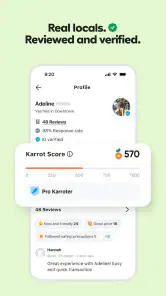
What sets Karrot apart from other marketplace apps is its strong emphasis on community. It’s like having a neighborhood garage sale right in your pocket! You can see who you're buying from or selling to, thanks to profiles that include photos and reviews. This feature significantly adds to the trust factor, and let’s be honest, in the world of online transactions, trust is everything. Plus, there’s a delightful little feature that allows you to chat directly with buyers and sellers, making it feel all the more personal.
An Abundance of Features
Karrot doesn't just stop at buying and selling. The app includes a variety of features designed to enhance your experience. For instance, there are categories for everything – from electronics to clothes, and even a “Free” section for those looking to give away items they no longer need. I was particularly impressed with the notification system. You can set alerts for items you're hunting for, ensuring you never miss out on a great deal.
Moreover, the app promotes safe meetups by suggesting popular public locations for exchanges. It’s a thoughtful touch that shows the developers truly care about user safety. I’ve used this feature multiple times, and it’s reassuring to know there’s a focus on creating a safe environment for all users.
My Experience with Karrot
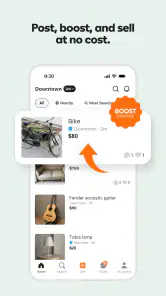
I decided to put Karrot to the test by listing a few items from my spring cleaning spree. Within hours, I had multiple inquiries and even managed to sell a couple of things I thought I’d never get rid of! The process was straightforward, and I appreciated how the app facilitated every step, from listing to finalizing the deal.
On the buying side, I found a lovely set of vintage teacups that I'd been hunting for ages. The seller was friendly and accommodating, and we arranged a meetup without any hitches. It felt more like a casual exchange between neighbors than a transaction between strangers, which I really enjoyed.
Choosing a local exchange over other shopping routes
The key decision is not simply whether secondhand is cheaper; it is whether local collection suits the item and your day. A neighborhood marketplace can be more convenient than shipping for a lamp, a box of kitchenware, or a chair you can inspect in person. In contrast, a large resale platform may be better when you need a wider selection, a particular make or size, or delivery to your door. A retailer is the safer fit when timing, returns, and predictable condition matter more than saving money.
I would use Karrot for searches with room to adapt. If I am furnishing a room gradually, I can compare a few nearby options and wait for one that is in good shape. If my old kettle breaks and I need a replacement before tomorrow, the local listings may not line up with that deadline. The useful trade-off is flexibility for proximity: you may avoid shipping and meet a neighbor, but you have to handle availability, transport, and the final inspection yourself.
Making a local listing easier to act on
When selling, I would think like a buyer before posting: show the item clearly, describe wear honestly, and mention practical details that affect collection. For a chair, that might mean whether it folds or needs a vehicle; for a jacket, the size and visible condition matter more. These details can save both sides several messages and help avoid a meetup where expectations do not match. For free items, a clear collection window is especially useful because several interested neighbors may respond.
For buyers, I would keep a short checklist in mind instead of relying on enthusiasm in the moment: confirm the item is still available, ask about any flaw that matters to you, and settle the location before setting off. Profiles and reviews can offer useful context, but they cannot replace checking the item yourself. The public-meetup suggestion is a helpful prompt, not a reason to share more personal information than the exchange requires.
A simple routine for a same-day find
Imagine I notice a used side table while having breakfast and want to pick it up after work. I would first check the listing carefully, then ask about dimensions, visible damage, and whether collection later that day is actually convenient. Once the seller confirms, I would settle a public meeting point and think through how the table will get home. If I am taking public transport, a nearby listing is not automatically practical; its size and weight still matter.
Before leaving, I would reopen the conversation while I have a stable connection and make sure the latest plan is clear. If the reply has not arrived, I would avoid treating silence as confirmation. At the meeting, a brief inspection is sensible, especially for an item whose condition affects how I can use it. This workflow is less about adding ceremony to a small purchase and more about avoiding a wasted journey or an awkward surprise.
Who will get the most from it
Karrot makes the most sense for people clearing out household clutter, furnishing a space gradually, or hunting for everyday secondhand bargains without shipping. It can also suit someone who likes passing usable things to a nearby person rather than throwing them away. The app is free, carries a Teen content rating, and has an average rating of 4.1 from around 184,000 ratings, with over 10 million installs. It was released on April 14, 2020; version 25.48.1 supports devices running Android 8.0 or later.
My main reservation is that community character does not guarantee a smooth exchange every time. Response speed and listing quality depend on individual users, while local availability can be uneven. If you dislike messaging strangers, arranging collection, or judging secondhand condition, a shop with a clear return process will feel simpler. I would also avoid making a long trip for a low-cost item unless the seller has confirmed the plan close to departure.
Questions worth settling before a handoff
Is a listing still available just because it appears in a search? I would not assume so; I would ask the seller and wait for a direct confirmation. Can profiles and reviews prove that an item is as described? They can provide context about the person, but I would still ask about relevant wear and inspect the item at collection. Does a nearby result mean it will be easy to collect? Not necessarily: a bulky purchase can call for a car, help from another person, or a time window that does not fit your schedule.
For a seller, the equivalent question is whether an interested message means the item is sold. I would regard it as interest until the collection details are agreed, and keep the description accurate so the buyer knows what to expect. If a plan changes, communicating promptly is more useful than leaving someone to guess. These simple distinctions make the app’s social side work better without treating a profile or chat as a guarantee.
A practical verdict on connectivity
In everyday use, the connection matters most when I need fresh information: a new listing, a seller’s reply, or a final change of plans. I would browse when convenient, but keep the actual handoff dependent on a recent confirmation. If service drops at an inconvenient moment, pausing is safer than guessing; once connected again, check the conversation before continuing. That simple approach makes the app easier to use without pretending a neighborhood marketplace can remove the uncertainty of coordinating with another person.
For data-conscious browsing, I would search with a clear idea of what I need instead of continually checking broad results, and use alerts selectively for items I genuinely plan to buy. The value of a local listing is not measured by how long I scroll; it comes from finding a suitable item and arranging a workable exchange. If I am commuting through areas with inconsistent service, I would handle key messages before the trip rather than depend on resolving a last-minute question on the way.
Overall, my experience with Karrot has been nothing short of excellent. It’s a refreshing change from the impersonal nature of larger marketplace platforms. If you’re keen on buying and selling locally with a touch of community spirit, give Karrot a try. You might just find it becomes your go-to app for all things local.
Karrot: Buy & sell locally Frequently Asked Questions
Who makes Karrot, and what is the app for?
Karrot is a social app developed by Danggeun Market Inc. It is designed for people who want to buy and sell preloved items within their local community. The idea is to make it easier to find nearby buyers or sellers and give unwanted belongings another use. Its focus is on local connections rather than a general, long-distance shopping experience.
What should I know about Karrot before downloading it?
Karrot is a social app from Danggeun Market Inc. focused on buying and selling preloved items in local communities. It is free to download, rated for Teen audiences, and requires Android 8.0 or later on Android devices. Its local approach is intended for people who want to connect with nearby buyers and sellers rather than rely on long-distance shipping.
What is Karrot and how does it work?
Karrot is a community-based marketplace app that allows users to buy and sell items locally. It connects people within the same neighborhood, making it easier to purchase or sell goods without the hassle of long-distance shipping. Users can list items for sale, chat with potential buyers or sellers, and arrange meet-ups to complete transactions.
Is Karrot free to use, or are there any hidden fees?
Karrot is completely free to download and use. There are no hidden fees for listing items, browsing, or making purchases. However, always be cautious of sellers who might try to impose additional costs. The app promotes transparency and encourages users to communicate clearly about any potential costs before finalizing a deal.
How does Karrot ensure the safety and security of its users?
Karrot has a user rating and review system that helps maintain a trustworthy community. Users can rate their experience after each transaction, providing feedback for future buyers and sellers. Additionally, the app encourages in-person meet-ups in safe, public locations to minimize risks. Users are advised to follow safety tips provided within the app to ensure secure transactions.
Pros
- User-friendly interface for quick browsing.
- Secure transactions with verified users.
- Free to list items for sale.
- Wide range of categories for diverse needs.
- Community-focused with local deals.
Cons
- Limited to local transactions only.
- Occasional delays in user response.
- App requires location permissions.
- Some categories have fewer listings.
- No built-in payment system.
- Category
- Social
- Version
- 25.48.1











