

Instrument Tuner
- 390.00
- 4.4
- Installs
- 1.00M
- Price
- Free
Screenshots
Analysis by Reviewed
Choosing a tuner sounds simple until you are standing with an instrument in your hands, trying to decide whether a note is actually in tune or whether the app is reacting to room noise. I spent time with Instrument Tuner as a practical music and audio tool, and my main impression is that it aims to remove distractions rather than turn tuning into a lesson. That makes it appealing for quick checks, but the right choice depends on how, where, and how often you tune.
Instrument Tuner is a free Android app from TarrySoft, available for everyone and compatible with devices running Android 5.0 or later. It has been around since September 14, 2015, and its current version is 1.18.2.0. With a 4.4 average from around eighteen thousand ratings and more than a million installs, it has clearly found an audience among people who want a straightforward way to check an instrument without carrying a separate electronic tuner.
What matters before choosing a tuner
My first decision criterion is speed. A tuner is most useful when it lets me open it, play a note, read the result, and make the adjustment without wandering through unrelated tools. That matters before rehearsal, during a practice break, or when a string suddenly sounds wrong. Instrument Tuner fits that kind of short session better than apps designed around lessons, song libraries, recording, or elaborate practice systems.
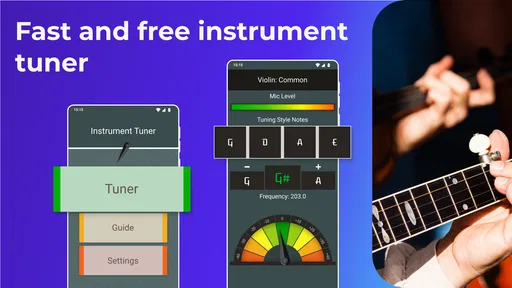
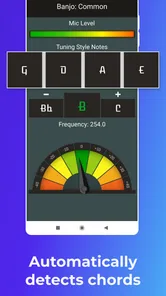
The second criterion is how much attention the app demands. A large, clear tuning display is valuable because I should be listening to the instrument, not interpreting a complicated interface. In my experience, the best workflow is to pluck one string at a time, let the note settle, and adjust gradually. The app is most useful when treated as a measuring aid rather than as a substitute for listening.
The third question is the setting. Phone microphones are convenient, but they also hear conversations, television, traffic, other instruments, and handling noise. A simple tuner can work well in a quiet bedroom or practice room and become less comfortable in a crowded rehearsal space. That is not a flaw unique to this app, but it is an important trade-off when comparing a phone tuner with a clip-on device.
I also look at whether the app suits the player’s level. A beginner may want an uncomplicated visual reference, while an experienced musician may care more about dependable note recognition in difficult surroundings. Someone who tunes several instruments every day may prefer dedicated hardware. Someone who only needs a tuner occasionally may reasonably prefer keeping one on a phone they already carry.
The first-use experience
Instrument Tuner makes the most sense when I approach it as a focused utility. I open it, place the phone near the instrument, play a clean note, and watch the indication settle before turning a peg or adjusting a key. That order is more important than it sounds. If I change the instrument while the note is still ringing or while several strings are sounding together, I can end up responding to unstable information.
More From Our News Desk

 Gmail
GmailGmail in a Busy Inbox: Who Benefits Most?
From first account to crowded workday, Gmail earns its place through dependable search and flexible sorting—but its best fit depends on how much inbox maintenance you can tolerate.

 Prime Video
Switching to Prime Video: What Changes in Your Viewing Routine
Prime Video can make a compelling second home for streaming, but switching means learning a different catalog, rental layer, and route from browsing to playback.

 Universal TV Remote Control
Universal TV Remote Control Works Best as a Reliable Backup
A phone remote earns its place through quick setup and reliable habits. Here is how to get more from Universal TV Remote Control—and where its limits show.

 Weather - By Xiaomi
Weather by Xiaomi Review: Clear at a Glance, Less Clear Up Close
Xiaomi’s weather app makes everyday forecasts quick to scan, but its calm surface can leave useful details and recovery paths harder to find than they should be.

 X
XX Under Pressure: Can It Recover When Posting Goes Wrong?
A resilience-focused review of X, examining setup, mistaken posts, interruptions, weak connections, and the gaps that matter when recovery needs to be dependable.

 Clash of Clans
Clash of Clans Is Won Between the Battles
Its raids are quick; its community is a long-term project of coordination, teaching, rivalry, and shared responsibility—with all the friction that entails.
Latest News



For a reliable routine, I recommend tuning in the same direction whenever possible. If a note is below the target, raise it slowly rather than making a large correction. After reaching the target, I check the string again because changing tension can affect the instrument’s overall balance. This is especially useful on stringed instruments, where the first pass may not be the final pass.
A less obvious but practical tip is to reduce competing sound before blaming the app. Close a door, mute nearby strings, and avoid touching the phone’s microphone area. If the reading jumps, play a softer, cleaner note instead of repeatedly plucking harder. A louder note is not automatically a better note for recognition; a controlled note with less background sound is often more useful.
Where the simple approach works best
The strongest use case is everyday maintenance. I can imagine keeping the app ready for a guitar at home, checking a student instrument before a lesson, or making a quick adjustment before recording a short idea. It is also handy for a player who travels light and does not want another small accessory in a bag.
It suits beginners because the task is easy to understand: produce a note, compare the reading, and adjust. It also suits casual players who do not need a full music workstation. The free entry point makes that decision easier, although in-app purchases range from $0.99 to $99.99 per item, so I would pay attention to any purchase screen rather than assuming every part of the experience is included without cost.
Another strength is mental clarity. Many music apps try to combine tuning with lessons, rhythm tools, recording, effects, song practice, or community features. Those additions can be useful, but they can also make a quick job feel like a larger project. Instrument Tuner is better for the person who wants to solve the immediate tuning problem and return to playing.
Small workflow improvements that make a difference
I would keep the phone stable instead of holding it in the same hand that is adjusting the instrument. A stable position makes the display easier to read and reduces accidental movement around the microphone. For a guitar, placing the phone close enough to hear the string clearly but not directly against the instrument is a sensible starting point. For quieter instruments, the room matters even more.
I would also tune before warming up and then check again after playing for a while. Temperature, playing intensity, and fresh strings can all change the result. The app can show me what is happening at that moment, but it cannot make a physical instrument stay perfectly fixed. That distinction prevents a common frustration: repeatedly chasing tiny changes that are normal during a session.
When tuning by ear with another musician, I would use Instrument Tuner as a shared reference rather than insisting that the screen is the only authority. Let one person play while another watches the display, then listen together. This is a useful teaching workflow because it connects the visual indication with the sound of a note that is too high or too low.
Where dedicated tuners and broader music apps may fit better
Instrument Tuner is not automatically the best answer for every environment. A clip-on tuner may be more comfortable on a noisy stage because it reads vibration through the instrument rather than relying only on sound in the room. A dedicated pedal tuner may be a better choice for a guitarist who needs hands-free operation during a live setup. Those alternatives involve carrying extra hardware, but that cost can be worthwhile when speed and reliability under pressure matter more than convenience.
A broader music app may be a better fit for someone who wants tuning alongside structured practice. If the main goal is learning songs, recording ideas, following lessons, or working with rhythm exercises, a dedicated tuner can feel too narrow. Instrument Tuner does not need to compete with those tools on their own terms; its value is that it stays focused.
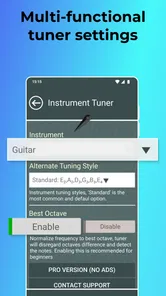
There is also a difference between a quick reference and a specialist workflow. A player who needs unusual tuning arrangements, detailed calibration controls, or a highly specialized interface should compare the app carefully with tools built around that particular instrument. I would not choose a simple phone tuner solely because it is free if my regular work depends on advanced control or a stage-ready setup.
That said, I would not dismiss a phone tuner just because dedicated devices exist. For home practice, lessons, songwriting, and occasional maintenance, the convenience can outweigh the disadvantages. The decision is less about which category is universally superior and more about whether the phone’s microphone and display are suitable for the place where I will actually use them.
What the ratings and history suggest
The app’s 4.4 average and roughly eighteen thousand ratings suggest a generally positive reception, while its install base of over one million shows that a phone-based tuner is a familiar solution for many musicians. I see those figures as signs of usefulness rather than proof that every instrument and environment will behave identically. A tuner can be well regarded and still be affected by room sound, phone placement, or the player’s technique.
Its release history also gives it the feel of an established utility rather than a brand-new experiment. The developer is TarrySoft, and the app continues under version 1.18.2.0. For me, that makes it easier to consider for routine use, although I would still test it with my own instrument before depending on it for an important performance.
The real cost of switching from another tuner
Switching to a phone app is easy if I already carry my phone and only need occasional tuning. There is no separate device to remember, and the free price makes testing uncomplicated. The more meaningful cost is not money but habit: I need to find a quiet position, keep the microphone unobstructed, and give each note enough time to settle.
Someone moving away from a clip-on tuner may notice the biggest difference in noisy rooms. Someone moving away from a feature-heavy music app may notice the opposite difference: there are fewer surrounding tools, but the tuning task is less cluttered. I would make the switch gradually by using Instrument Tuner at home first, then comparing its behavior with my usual tuner in a rehearsal room.
The in-app purchase range is another reason to review the purchase screen carefully before confirming anything. The app is listed as free, but optional items can cost from $0.99 to $99.99 each. That does not automatically make it poor value, yet it means the practical cost depends on what I choose to use. For a person who only wants a basic tuning check, I would avoid paying for anything unless it clearly solves a problem I actually have.
There is also a small attention cost. Opening a phone during practice can invite notifications and interruptions, while a dedicated tuner has one obvious purpose. I can reduce that friction by silencing notifications or keeping the app easy to reach. If I regularly lose focus whenever I pick up my phone, a separate tuner may be the better purchase even if the app itself works well.
Who should use it and who should skip it
I would recommend Instrument Tuner to beginners, casual musicians, students, songwriters, and home players who want a convenient check without buying another device. It is especially sensible for someone who tunes before practice, after changing strings, or when an instrument has been sitting unused. The Everyone content rating also makes it approachable for households where different ages may use the same phone.
I would be more cautious about recommending it as the only tuner for live performers, loud bands, orchestral sections, or musicians who need hands-free operation. In those situations, a clip-on or pedal-based alternative may reduce the effect of surrounding sound and make the workflow faster. I would also steer a player toward a more specialized option if they need controls or instrument-specific behavior beyond a straightforward tuning check.
For a realistic everyday example, imagine arriving at a lesson with a guitar that sounded fine at home but has shifted during the trip. I would open the app in a quiet corner, mute the strings I am not checking, and tune each one slowly. If the display became unstable, I would move away from the conversation rather than keep adjusting blindly. After the lesson began, I would use my ears and the teacher’s feedback as the final check. That is where the app is useful: it saves time without pretending to replace musical judgement.
My recommendation after using it
Instrument Tuner is a good first choice when convenience and a focused workflow matter more than specialized hardware. I like it because it turns a phone into a practical tuning companion without asking a casual player to build an entire music setup. The best results come from quiet surroundings, clean single notes, stable phone placement, and a second check after the instrument has been played.
I would install it for home practice or as a backup even if I owned a dedicated tuner. The free price lowers the risk of trying it, while the established presence of TarrySoft’s app and its broad user base make it a reasonable option for everyday use. I would simply avoid treating the rating or the screen as a guarantee in every environment.
My final choice would come down to routine. If I usually tune in a quiet room and want one less accessory in my bag, I would choose Instrument Tuner. If I perform in noisy spaces, need hands-free control, or rely on specialist tuning features, I would choose dedicated hardware or a more advanced music tool instead. For everyone in between, this is a sensible, accessible way to keep an instrument ready to play.
Instrument Tuner Frequently Asked Questions
Can I use Instrument Tuner while traveling or away from home?
Instrument Tuner can be useful wherever you need a quick tuning check, including a practice room, classroom, or outdoor session. Its core function listens to your instrument through your device’s microphone, so you do not need to bring a separate physical tuner. For the clearest reading, find a relatively quiet spot and make sure the phone’s microphone is not covered.
What should I check before granting microphone access?
The microphone is central to Instrument Tuner’s job: the app listens to the notes you play so it can help identify whether they are in tune. Before granting access, consider whether you are comfortable allowing the app to use the microphone while tuning, and review the app’s permission controls and privacy information. You can also manage microphone access through your device settings.
What devices and operating systems can I use Instrument Tuner on?
Instrument Tuner is a mobile app in the Music & Audio category, and its Android version requires Android 5.0 or later. Before downloading, check that your device meets that requirement and that its microphone works properly, since the app listens to your instrument to identify notes. TarrySoft is the developer, and the app is free to download.
What is Instrument Tuner and what instruments does it support?
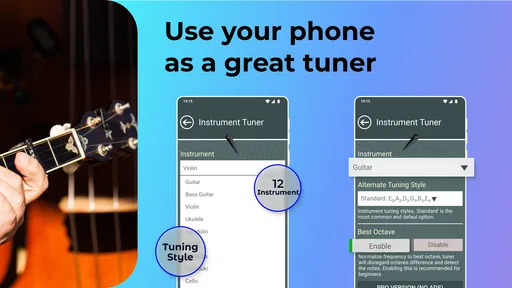
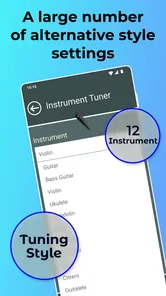
Instrument Tuner is a mobile tuning app designed to help musicians tune their instruments using the microphone on an Android or iOS device. It is generally suitable for guitar, bass, ukulele, violin, viola, cello, mandolin, and other string instruments. Depending on the version, it may offer chromatic tuning as well as specific presets, so beginners and experienced players can choose the method that best matches their instrument.
How accurate is Instrument Tuner for everyday practice and performance?
During testing, Instrument Tuner was useful for regular practice, rehearsals, lessons, and quick tuning checks before playing. Its accuracy depends on microphone quality, surrounding noise, the instrument’s condition, and how clearly each note is played. For the best results, tune in a quiet room, play one string at a time, and keep the phone close enough to detect the sound without touching or obstructing the microphone.
Pros
- Accurately tunes guitar
- bass
- ukulele
- violin
- and other instruments.
- Responsive pitch detection makes tuning quick
- even for beginners.
- Chromatic mode supports notes outside standard instrument presets.
- Clear visual feedback helps identify whether a note is sharp or flat.
- Useful for practice sessions
- rehearsals
- and quick tuning on the go.
Cons
- Microphone permission is required for automatic pitch detection.
- Background noise can reduce accuracy in busy environments.
- Some advanced features may be limited or unavailable in the free version.
- The interface may feel basic compared with dedicated hardware tuners.
- Battery use can increase during extended tuning sessions.













