IMVU: Social Chat & Avatar app
- 117.01K
- 4.5
- Installs
- 10.00M
- Price
- Free

Screenshots







Analysis by Reviewed
Using IMVU: Social Chat & Avatar on a shared phone or tablet calls for a little planning. I’d treat it as a personal social space, not a casual game that everyone in the household can dip into under one login. The appeal is being able to shape an avatar and spend time in virtual rooms, so another person using the same account could change that experience or blur who is speaking. If several people share a device, agreeing whose account is active before opening the app is a simple, practical boundary.
Keep accounts and purchases distinct
Avatar styling and virtual shopping are central to the experience, which makes account boundaries worth discussing before anyone starts browsing. I’d avoid letting household members make decisions on one another’s behalf, especially around purchases: the app is free to download, but it offers in-app purchases priced from $0.49 to $199.99 per item. That range is a good reason to agree in advance whether spending is allowed and who approves it. A shared device does not need to mean shared shopping habits.
For everyday coordination, a quick check-in can prevent awkward mix-ups: decide who is using the app, whether the device is available afterward, and whether anyone expects a conversation to remain private. This is particularly useful if one person likes long room visits while another only wants to change an outfit briefly. I would also keep personal chats separate from household plans; the app’s social spaces are better suited to meeting and talking than to coordinating schedules or errands.
Age, trust, and the kind of social space it is
The mature 17+ age rating matters in a household with younger users. I would not treat the app’s colorful avatars or room settings as a sign that it is intended for children. It is a social environment where people meet and chat, so anyone deciding whether it suits them should consider age, comfort with online conversations, and how much personal information they are willing to share. A conversation can feel friendly without making a new contact trustworthy, and I’d encourage sensible boundaries rather than assuming a virtual setting removes ordinary social risks.
Compared with a conventional messaging app, this puts more emphasis on presentation, virtual spaces, and browsing a catalog than on simply exchanging messages with people you already know. That makes it a better fit for someone who enjoys role-play, avatar customization, and open-ended social discovery. If your main goal is a dependable way to keep up with family or friends, a regular messaging app is likely more direct and less distracting.
Who will enjoy it—and who may not
I can see the app working well for someone who likes making a character feel distinct, exploring rooms, and chatting without needing a fixed activity or score to chase. It may be less appealing if you dislike browsing virtual goods, want a purely private space for existing friends, or prefer social apps that get straight to messages. The amount of choice can be fun, but it can also make the experience feel busy when all you wanted was a quick conversation.
A realistic use might be opening the app after dinner to adjust an avatar, then visiting a room for a short chat while waiting for a friend to be free. I’d set a small intention before browsing—such as meeting people or changing one part of the look—because the catalog can easily turn a quick visit into a longer session. That little bit of focus helps keep the app enjoyable without treating every new item as something you need.
You May Like

Clash of Clans Is Won Between the Battles

Android Auto Makes the Case for Quieter Car Software

MobiOffice: Transforming Mobile Productivity with Seamless Integration

EA SPORTS FC™ Mobile Soccer: Redefining Mobile Sports Gaming

How Microsoft OneDrive Became a Mobile Productivity Giant

How Google Translate Breaks Language Barriers Effortlessly
For context, IMVU, Inc. develops this free social app, which has a 4.5 average from around 699,000 ratings and over 10 million installs. It was released on October 21, 2014, and version 12.22.1.122201001 requires Android 9 or later. Those details make it an established option, but they do not change the basic decision: its value depends on whether you want an avatar-centered social world rather than a straightforward chat tool.
One useful way to approach a first visit is to separate setting up your look from meeting people. I’d spend a little time getting the avatar to a point that feels recognizable, then leave the catalog rather than trying to perfect every detail before joining a room. That keeps customization from becoming a prerequisite for socializing. It also helps answer a practical question new users often have: you do not need to treat the app as a project or build a complete virtual identity before you can explore its social side.
Make browsing work for you
The catalog is part of the appeal, but it can also pull attention away from the conversations that brought you in. I find it more manageable to decide whether a session is for styling, room exploration, or catching up with someone, instead of trying to do all three at once. If you are comparing items, pause before purchasing and ask whether the change matters to how you want to present your avatar. This is especially sensible when the app is being used on a device with a shared payment method.
Another trade-off is that self-expression here is visual and social at the same time. An avatar can make it easier to try a look or persona that feels unlike your everyday self, but the result is still part of an interaction with real people. I would use that freedom to have fun, not as a reason to share identifying details or assume that a friendly room is automatically private. The experience works best when creativity and ordinary online caution go together.
If you are deciding whether it belongs on a household tablet, I would ask whether the device is genuinely personal during the time it is used. A single account passed between family members can make conversations, avatar choices, and spending harder to keep separate. If the tablet regularly changes hands, it may be better to reserve the app for one person’s use or choose a social option built around the household’s actual communication needs. That is not a judgment on the app; it is a practical fit issue.
Ever wanted to dive into a world where your imagination has no limits, and your social interactions are as vibrant as a Saturday night out? Well, let me introduce you to IMVU: Social Chat & Avatar, a unique app that takes virtual socializing to the next level. This app is like your personal passport to a universe where you can be whoever you want, whenever you want.
Creating Your Unique Avatar
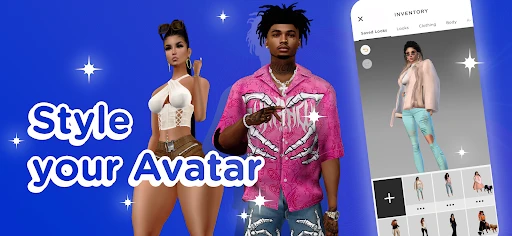
First off, let's talk about the avatars. IMVU gives you the freedom to create a 3D avatar that mirrors your personality or lets you explore a completely different identity. The customization options are so vast, it's like walking into a candy store. From the color of your eyes to the style of your shoes, every detail is in your hands. I spent hours tweaking mine to perfection, and it was worth every minute.
Socializing in Virtual Rooms
Now, the real fun begins in the chat rooms. Whether you want to chill in a cozy café, dance in a bustling nightclub, or simply hang out at a beach party, IMVU has got you covered. Each room is bursting with life and creativity, offering a platform to meet people from all walks of life. The conversations can range from casual small talk to deep, meaningful exchanges. It's like having a global meet-up spot right in your pocket.
That room-based setup changes the rhythm of conversation compared with a standard inbox. Instead of opening a thread and focusing on one contact, you can enter a themed place and see whether the mood and people suit you. I’d treat that as an invitation to explore, not a promise that every room will be lively or that every chat will click. If you want a specific conversation, arranging a time with someone you already know can make the visit feel less aimless.
Shopping and Personalization
Feeling like a shopaholic? The app boasts an extensive catalog of virtual goods. From trendy outfits to quirky accessories, there's something for everyone. I found myself browsing through the virtual stores more often than I'd like to admit. Plus, the thrill of seeing your avatar strut in a brand-new outfit is oddly satisfying.
But it's not just about clothes. You can also spruce up your virtual space. Whether you want a minimalist apartment or a luxurious mansion, the choices are endless. Personalizing your space adds another layer of immersion, making your experience even more enjoyable.
There is a useful distinction between changing your avatar and decorating a room: each gives you a different way to express a mood. If you are mainly there to talk, I would start with the avatar and only explore room personalization when you know you enjoy spending time in that side of the experience. That makes it easier to tell which parts feel rewarding to you, rather than assuming every customization option needs attention.
Connecting Beyond Borders
What truly sets IMVU: Social Chat & Avatar apart is its ability to connect people across the globe. The app breaks down geographical barriers, allowing you to forge friendships and connections that might have been impossible otherwise. It's a melting pot of cultures and ideas, and there's always something new to learn from your virtual pals.
That openness is also why I would not use it as my only way to reach someone important. For a friend you already know, a familiar messaging app is usually quicker for sharing a clear plan or checking whether they are free. Here, the setting and avatar are part of the point; the social experience is less about efficient coordination and more about spending time in a shared virtual place. Choosing between the two depends on whether you want to get a message across or make an occasion of hanging out.
For a low-pressure routine, I can imagine checking in after school or work, changing one small detail, then visiting a room when there is time to stay awhile. If the day is busy, a quick message elsewhere may be more sensible than opening a space designed for browsing and social discovery. The app is at its best when you have enough attention to enjoy the environment, rather than squeezing it into every spare minute.
In conclusion, IMVU is more than just an app; it's a vibrant community where creativity and social interaction go hand in hand. Whether you're looking to express yourself, meet new people, or just explore a new world, this app has something for everyone. So why not give it a whirl? You never know, your new best friend could be just a chat room away.
My household verdict
For a household, I’d recommend it to the person who genuinely enjoys building an avatar and meeting people in virtual rooms, provided the age context and spending boundaries are clear. I would skip it as a shared family account or as a substitute for practical group messaging. Used as one person’s chosen social space, it offers a distinctive mix of self-expression and conversation; used without clear account boundaries, it can invite avoidable confusion. That balance is what I’d keep in mind before installing it on a shared device.
Choosing the right expectations
People often wonder whether this is primarily a game or a chat app. I’d describe it as a social app with game-like presentation: the avatar, rooms, and virtual goods give interactions a playful setting, but the main reason to open it is socializing and self-expression rather than progressing through a conventional campaign. If you want structured challenges or a clear finish line, a dedicated game will probably suit you better. If you enjoy creating a persona and seeing where a conversation goes, the open-ended format is the draw.
I would also set expectations around meeting new people. A virtual room gives you a shared topic and atmosphere, which can make starting a conversation less awkward than sending a cold message. Still, it cannot guarantee that you will find people with the same interests or that a chat will turn into a lasting friendship. Treat each interaction as a small social encounter, and let trust build gradually rather than moving personal conversations elsewhere too quickly.
My practical recommendation is to try it when you have a clear reason to be there: making an avatar, exploring a room, or spending time with someone who already uses it. Keep purchases deliberate, keep household accounts distinct, and choose another tool when the job is simply coordinating a ride or sharing a grocery list. With those expectations, IMVU makes more sense as a distinctive social destination than as an all-purpose communication app.
IMVU: Social Chat & Avatar app Frequently Asked Questions
Does IMVU require a lot of personal information to get started?
IMVU is built around social interaction, so think carefully about the personal details you choose to share while setting up and using your account. Your avatar can represent you without making your real-world identity part of every conversation. As with any social app, keep private information private, and be selective about what you reveal to people you meet in virtual spaces.
Can I enjoy IMVU if I mainly want to chat rather than play a game?
Yes. IMVU is a social app centered on avatars, conversations, and virtual environments, so chatting and meeting people are core parts of the experience. It is not primarily a traditional game with a fixed storyline or a sequence of levels. You can focus on socializing and exploring spaces, while avatar customization adds a creative element if you want it.
Do I need to create an avatar before I can explore IMVU?
Yes, creating a 3D avatar is central to the IMVU experience. It gives you a way to represent yourself while chatting, meeting people, and visiting virtual environments. You can customize its appearance with virtual clothing and accessories, then adjust your look over time. If you enjoy expressive character creation and social spaces, this is a major part of what the app offers.
What is IMVU and how does it work?
IMVU is a social networking app where users can create 3D avatars to interact with others in a virtual world. It combines elements of social media and online games, allowing users to chat, make friends, and explore a variety of virtual environments. Users can customize their avatars, purchase virtual items, and join different chat rooms to meet new people. Its store summary describes a 3D metaverse experience centered on creating an avatar and meeting people.
Is IMVU free to use?
Yes, IMVU is free to download and use. However, like many apps, it offers in-app purchases. Users can buy credits to purchase virtual goods such as clothing, accessories, and decor for their avatars. While you can enjoy the app without spending money, purchasing credits can enhance the gaming experience by offering more customization options. In-app purchase items range from $0.49 to $199.99, so check the purchase details before spending.
Pros
- Highly customizable avatars.
- Diverse and active community.
- Frequent updates and new features.
- Engaging 3D chat rooms.
- Supports creative self-expression.
Cons
- Can be costly with in-app purchases.
- Occasional app glitches.
- Requires stable internet connection.
- Some features locked behind paywall.
- Overwhelming for new users.

- Category
- Social
- Version
- 12.22.1.122201001











