IKEA
- 3.00K
- 4.7
- Installs
- 50.00M
- Price
- Free

Screenshots





Analysis by Reviewed
My first-week reaction to the IKEA app is that it makes browsing furniture feel less like a trip that needs planning and more like something I can do between everyday tasks. I can look through storage, lighting, and home accessories without walking the full store, then save possibilities while I think about what actually suits my room. That convenience is the appeal; the app works best when I treat it as a way to narrow choices, not as a reason to buy things I had not planned to bring home.
Useful before the store visit
For a practical shopping trip, I would use the app to build a short list before leaving home. A saved item gives me a reference point when comparing options in person, while product details and customer reviews can help me spot questions worth checking before I commit. This is especially useful for a room project with several small purchases: I can keep the ideas together rather than relying on memory while moving through a large store.
It is also a helpful fit for people who already know IKEA’s style and want to browse at their own pace. If you are furnishing a first apartment, replacing a worn-out lamp, or looking for a basic storage solution, being able to explore from the sofa lowers the effort of getting started. I would still check important details carefully and see an item in person when its finish, texture, or scale is central to the decision.
Shopping Made Easy
First things first, the app is all about convenience. Once you install it, you’re greeted with a sleek interface that screams Scandinavian minimalism. It’s designed to make your shopping experience as seamless as possible. You can browse through their extensive catalog, which is just as vast as their physical stores. Whether you’re looking for a chic lamp or a sturdy bookcase, everything is just a few taps away.
Features That Stand Out
One of the coolest features I stumbled upon is the augmented reality (AR) capability. This allows you to visualize how a piece of furniture would look in your own space before making a commitment. Just point your phone camera to the spot you’re considering, and voilà, the app overlays the furniture item. It’s like having a personal interior designer with you. And trust me, it’s a game-changer when you’re trying to decide between two different styles.
Additionally, the app provides detailed product information and customer reviews. This means you can make informed decisions based on other users' experiences. It’s like having a conversation with a friend who’s already tried and tested the product. Plus, the wishlist feature is perfect for saving items you’re interested in for future purchase. It’s like window shopping, but from your couch.
User Experience
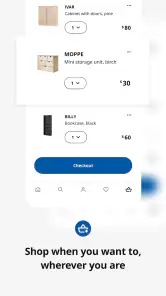
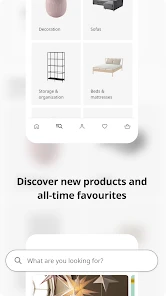
The app is super user-friendly. Navigation is intuitive, and the search function is quite efficient. You can filter products by various categories such as price, size, and color. This makes it easier to find exactly what you need without wading through endless options. Also, the checkout process is straightforward. You can choose to have items delivered to your doorstep or pick them up at the nearest store.
More From Our News Desk

Weather by Xiaomi Review: Clear at a Glance, Less Clear Up Close

X Under Pressure: Can It Recover When Posting Goes Wrong?

Clash of Clans Is Won Between the Battles

Android Auto Makes the Case for Quieter Car Software

MobiOffice: Transforming Mobile Productivity with Seamless Integration

EA SPORTS FC™ Mobile Soccer: Redefining Mobile Sports Gaming
In ordinary shopping apps, I often start with a broad search and have to sort through unrelated brands or styles. Here, the narrower IKEA focus is both an advantage and a limit: it keeps browsing coherent if I want its familiar look, but it is not the place to compare the whole market. For a specific piece, I would use this app to shortlist IKEA choices, then compare dimensions and materials with alternatives elsewhere before deciding. That extra check matters most for larger furniture, where a small mismatch can be costly in space and effort.
Keeping the app useful after the first visit
The lasting value depends on whether I return to it for real household needs. A wishlist can become a simple room-by-room planning tool: I can save a possible desk, shelving, and lighting, then revisit them together instead of making each decision in isolation. My tip is to use saved items as candidates, not commitments. Before checkout, I would measure the available space, check doorways and routes into the room, and compare the product information with what I need the item to hold or do.
A realistic example: I notice that the entryway has become a landing place for bags and shoes. I can browse storage options during a break, save a few candidates, and later check their dimensions against the wall and the space needed to open the door. If I visit a store, I can use those saved choices to focus the trip; if I order from home, I can review details and customer feedback once more before paying. The app helps me organize the decision, but measuring the space and deciding what will actually be stored remain my job.
For people who shop IKEA regularly, that workflow can make the app worth keeping even when the novelty of browsing wears off. It is less compelling if you rarely buy home goods, prefer independent makers, or want one app that compares many retailers. In those cases, a general shopping app or a store visit may be a better starting point. I also would not rely on a screen alone for a color-sensitive purchase: lighting and room surroundings can change how a finish feels, so seeing it in person may prevent disappointment.
What can wear thin
The large catalog is useful, but it can also turn a quick search into a long browsing session. Filters help narrow the field, yet it is still easy to keep comparing similar options after I have found a sensible one. I try to set a practical limit before browsing—what the item needs to do, the space it can occupy, and the look I want—so the abundance of choice does not create more work than it saves.
There is also a difference between confidence about a product and confidence about the whole purchase. Product details and customer reviews can inform my choice, while delivery or pickup options make checkout convenient; neither removes the need to think through timing, carrying, assembly, or whether the item suits the room. I see the app as a shopping companion rather than a substitute for those decisions. If I need broad comparison across brands, or want to judge a material by touch before buying, another route will serve me better.
The app is free, and Inter IKEA Systems B.V is its developer. It has a 4.7 average from around 235,000 ratings, with over 50 million installs, which suggests it has become a familiar tool for many shoppers. Its Everyone age rating also makes it broadly accessible. Version 4.30.2 is the current release, and the app first appeared on October 24, 2020; on Android, it requires version 9 or later.
Making decisions that hold up at home
One useful way to avoid regret is to separate browsing from buying. I might save several storage options while looking casually, then come back when I can check the space, measure what needs to fit, and consider how often I will use it. That pause turns the wishlist into a planning aid rather than a queue of tempting purchases. For furniture with a specific job, I also write down the practical requirement first: what it must store, where it will sit, and what needs to remain accessible around it.
The app’s visual tools can help me judge a broad layout, but I would treat an on-screen preview as a guide rather than a guarantee. A digital view can make it easier to compare the general shape and style of a piece in a room, while the actual feel of a finish and the impression of its scale still deserve a real-world check when they matter. For a low-stakes accessory, browsing may be enough; for a major piece, I would combine the app with measurements and, if convenient, an in-store look.
Reviews are most useful to me when I read them for recurring practical points, rather than treating one person’s experience as decisive. I look for comments that relate to my own intended use and compare them with the product details. That habit is especially helpful when several similar options seem equally appealing: it can reveal which questions I should investigate further. It does not replace checking whether the item fits my room or routine, but it can make the shortlist more informed.
A routine rather than a novelty
For a household that makes occasional, planned improvements, the app can be useful without becoming something to open every day. I would keep it as a reference for a project already in motion—say, sorting a hallway or replacing a desk—then return to it when I am ready to compare choices. This is a healthier pattern than browsing without a purpose, because the catalog can easily turn a small need into a much larger list of possibilities.
It is also a sensible companion for coordinating a shared purchase. One person can collect a few candidates, and another can review the product information before the household agrees on a choice. That can reduce the familiar back-and-forth of trying to remember which shelf or lamp caught someone’s eye. The trade-off is that a saved item is only a starting point: people still need to agree on dimensions, appearance, and whether the object solves the problem they actually have.
Compared with a general marketplace, the focused range makes it easier to stay within IKEA’s styles and product ecosystem, but it naturally offers less breadth across makers. Compared with browsing a physical store, the app is more convenient for early research and shortlisting, while the store has the advantage when I want to judge a material directly or understand how an item feels at full scale. I see the two approaches as complementary, not competing: research on the phone, then visit when the decision depends on seeing or touching the product.
My long-term take
In conclusion, the IKEA app is a must-have for anyone who loves the brand or is simply looking to furnish their home with style and ease. It brings the entire IKEA store to the palm of your hand, offering a shopping experience that is both fun and efficient. So whether you’re a seasoned IKEA fanatic or a newbie trying to revamp your space, give the app a try. Who knows, you might find that perfect piece you’ve been dreaming of.
My more measured view is that it earns a lasting place on my phone if IKEA is part of my regular home-shopping routine. The saved items, product information, reviews, and browsing tools are practical for planning purchases over time, not just for a first exploratory session. If I only need one item once in a while, I can browse when that need comes up rather than keep the app out of habit. For frequent IKEA shoppers, though, it is a useful way to turn an overwhelming store-sized choice into a more deliberate shortlist.
Ultimately, I would recommend it to someone who wants to plan IKEA purchases with less guesswork, especially when a room project involves several items or decisions spread over time. I would not make it my only shopping tool if I care most about comparing many brands, buying from independent designers, or assessing materials by touch before choosing. Used with a clear purpose, careful measurements, and a willingness to check important details in person, it offers recurring convenience without needing to become a daily habit.
IKEA Frequently Asked Questions
Can I browse IKEA products before creating an account?
The IKEA app is designed to let you explore furniture and shop from your mobile device, so it can be useful for browsing as well as completing a purchase. You can look through products before deciding whether to buy. When you are ready to check out, the app provides a mobile shopping flow for handling the purchase.
Does the IKEA app work on both Android and iPhone?
The IKEA app is available for Android and iOS devices. Its current version is 4.30.2, and the minimum supported operating system is version 9. Before downloading, check your device’s operating system and confirm that it meets the requirement shown for your platform. The app is free, so you can install it and explore IKEA shopping on a compatible device.
Is the IKEA app free to download, and what can I do with it?
The IKEA app is free to download and is made for shopping. You can explore furniture, shop for products, and check out from your mobile device. It is a convenient way to browse IKEA’s offerings and handle shopping in one place, whether you are planning a purchase or ready to place an order.
Who is the IKEA app intended for, and is it suitable for all ages?
The IKEA app is a shopping app for people who want to explore and buy IKEA products using a mobile device. Its content rating is Everyone, so it is generally suitable for users of all ages. The app is developed by Inter IKEA Systems B.V., and its straightforward shopping focus makes it useful for both browsing and purchasing.
What devices are compatible with the IKEA app?
The IKEA app is compatible with both Android and iOS devices. For Android, it supports versions 5.0 and up, while iOS devices should have iOS 11.0 or later. It's optimized for smartphones and tablets, ensuring a seamless shopping experience. Make sure your device meets these specifications for optimal performance.
Pros
- Wide variety of products available.
- User-friendly interface.
- Augmented reality feature for better visualization.
- Easy search and filter options.
- Regular updates with new features.
Cons
- Some items may be out of stock.
- App can be slow at times.
- Limited payment options.
- Augmented reality can be glitchy.
- User reviews are sometimes misleading.
- Category
- Shopping
- Version
- 4.30.2











