Haystack News: Local TV News
- 3.28K
- 4.2
- Installs
- 5.00M
- Price
- Free

Screenshots




Analysis by Reviewed
For anyone trying to follow the news without hopping between a pile of broadcaster apps, Haystack News offers a practical starting point. I like the idea of bringing local updates and wider coverage into one video-focused feed, especially when I only have a few minutes. The experience makes most sense as a quick briefing: it can help me decide what deserves more attention, though I wouldn’t rely on short clips alone to understand a complicated story.
A quick briefing, not a full news diet
Haystack News is a free app in the news and magazines category, developed by Haystack News. Its central appeal is the chance to browse reporting from many channels without first choosing a single outlet. That makes it useful when I want a broad view, but it also means I need to pay attention to the source behind each item rather than treating the feed as one unified newsroom.
I’d use it differently from a newspaper app. A newspaper is often better for a carefully structured article, background and analysis; a broadcaster’s app can be better when I want its full programs or a familiar presenter. Haystack sits between those options: it helps me scan and compare clips, then I can move elsewhere when a subject calls for more depth.
Who benefits most from this kind of news feed?
I see Haystack News working best for someone who wants a quick, mixed-source briefing rather than a single newspaper’s full articles. On a weekday morning, I could use it to check local headlines first, then move to national or world stories while breakfast is cooling. That flow is more convenient than opening several broadcasters’ apps one by one, especially when I want a broad scan instead of a deep read.
The trade-off is that a feed built around short updates can make complex stories feel thinner than they are. If I’m researching a policy decision or following a developing event closely, I’d use the clips as a starting point and then seek out a detailed report or primary source. Haystack is a useful front door to coverage, not a substitute for every kind of journalism.
Personalized News Experience
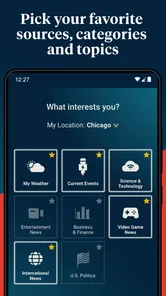
One of the things that immediately caught my attention with Haystack News is how it tailors the news to fit your interests. When you first dive into the app, it asks you about your preferences. Whether you're into sports, tech, politics, or entertainment, it curates the news content to suit your taste. It's like having a personal news assistant who knows exactly what you want to read or watch. And let me tell you, that's a game-changer!
Personalization is handy, but I wouldn’t treat the opening mix as a complete picture of the day. I’d deliberately visit a topic or local section outside my usual interests now and then; otherwise, a comfortable feed can quietly narrow what I encounter. That small habit makes the app more useful for discovery rather than simply reinforcing what I already follow.
More From Our News Desk

Weather by Xiaomi Review: Clear at a Glance, Less Clear Up Close

X Under Pressure: Can It Recover When Posting Goes Wrong?

Clash of Clans Is Won Between the Battles

Android Auto Makes the Case for Quieter Car Software

MobiOffice: Transforming Mobile Productivity with Seamless Integration

EA SPORTS FC™ Mobile Soccer: Redefining Mobile Sports Gaming
Local and Global Coverage
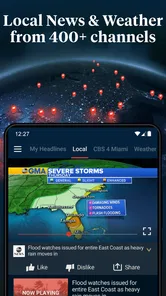
Another fantastic feature is its extensive coverage. Not only does it bring you news from all over the world, but it also gives you access to local news. So, whether you're interested in what's happening in your neighborhood or halfway across the globe, this app has got you covered. The variety of sources is impressive, offering perspectives from different news outlets which I find super beneficial.
For a practical routine, I’d check local coverage before commuting or making weekend plans, then use broader stories to understand how a regional event connects to national news. Having different outlets in one place can make it easier to notice where coverage overlaps and where emphasis differs. It still pays to check who produced a clip before sharing a claim, particularly when a headline concerns a fast-moving local issue.
If I already know I want one particular broadcaster’s complete programs, that broadcaster’s own app or site may be a better choice. Haystack’s appeal is the ability to move among sources and subjects, not necessarily to replace a loyal viewer’s preferred channel.
Video News Clips
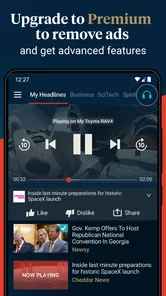
For those who prefer watching news instead of reading, Haystack News provides video news clips. These are short, to the point, and perfect for when you’re on the go. I found myself catching up on news during my morning coffee or while waiting for a friend. The video quality is top-notch and streams smoothly, even on a not-so-great internet connection.
Short clips suit a waiting-room break or a quick catch-up between errands, but watching still depends on having a suitable moment and a connection that can handle video. In a quiet setting, I’d keep the volume low or use headphones; in a noisy place, captions would be valuable, though I wouldn’t assume every clip offers them. For a silent commute or a situation where I need to conserve attention, text-based news may be the more practical option.
One useful way to avoid turning a quick check into endless viewing is to choose a single question before opening the feed—what changed locally, for example—and stop once I have a reasonable answer. That gives the short format a purpose without mistaking a string of clips for a full investigation.
Readability and navigation in everyday use
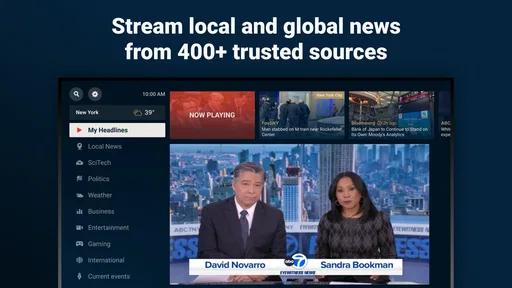
Let's talk about the interface. It's sleek, intuitive, and super user-friendly. Navigating through the app is a breeze. Everything is neatly organized, and you can easily switch between different categories or search for specific topics. Plus, the dark mode option is a nice touch, especially for those late-night news binges.
Clear categories and search can help me get back to a subject without scrolling through every story, while a darker display may feel more comfortable in a dim room. Still, ease of navigation is not the same as accessibility for everyone. People who rely on screen readers, larger text, captions, or reduced motion should check how the app behaves on their own device and with their preferred settings. I would not assume that every visual or video control works equally well for every ability.
A useful habit is to search for a specific topic when I’m returning to a story rather than relying on memory of where it appeared in the feed. That can cut down on repeated browsing, although a search result still needs context: I’d check its source and date within the clip or accompanying information before assuming it is the latest development.
Motor, sensory, and situational access
For motor comfort, the ability to move through topics rather than repeatedly hunting for a tiny target matters in everyday use. If tapping or scrolling is tiring, I’d try a short session and see whether the key actions feel manageable; the app’s simple layout can help, but it cannot remove every device-level or interface barrier.
News video also asks for a particular kind of attention. Someone with limited hearing may need captions, and someone sensitive to sudden audio or busy visuals may prefer to pause or choose a text source. Because accessibility can vary between clips and devices, I’d test the parts I depend on before making this my main way to follow important news. A phone’s built-in accessibility settings may help, but they are not a guarantee that every control or piece of video content will behave as needed.
Context changes the experience too. At home, I can watch and listen; in a shared office, library, or noisy street, I may not be able to use sound comfortably. If I’m driving, cycling, or walking through a crowded area, I would leave the screen alone and catch up later. The app is most useful when I can give it safe, focused attention rather than trying to watch while doing something that needs my eyes.
For a realistic routine, I might check a local update at home before leaving, save the broader question for a break, and read a detailed report later if the issue affects a decision. This separates quick awareness from research and avoids expecting a short video feed to serve every situation or access need.
Cost, audience, and the right expectations
Haystack News is a free news and magazines app from Haystack News, with optional in-app purchases listed at $4.99 per item. It has an average rating of 4.3 from around 18,000 ratings, and it has been installed over 5 million times. Its age rating is Everyone 10+, and it runs on Android 6.0 or later. Those details make it easy to consider as a no-cost starting point, while the optional purchases are worth keeping in mind if you prefer to avoid unexpected spending.
The app has been available since February 28, 2014, and its broad channel selection is useful for people who want variety without maintaining a separate app for every outlet. Still, a large menu is not automatically a better fit: if I know which publication I trust and prefer its writing, layout, and editorial voice, going directly to that source may be simpler. Likewise, anyone who wants to read long-form reporting without video should compare it with text-first news services before settling on a daily routine.
What should a new user do first? I’d choose a few subjects that genuinely matter, include a local interest if that is relevant, and then check whether the resulting feed is balanced enough for my needs. I would avoid selecting only familiar topics, because that makes personalization less useful as a discovery tool. After a few sessions, I’d search for a story I already know and compare its coverage across channels; that is a practical way to judge whether the mix helps me see different angles.
Who should skip it? I’d look elsewhere if I need dependable access features that I have not tested, if I want full-length broadcasts from one specific station, or if reading detailed, sourced articles is my main priority. It may also be a poor match when video is inconvenient because of bandwidth, sound, privacy, or attention. In those cases, a broadcaster’s own service or a text-led publication is likely to feel more direct.
I’d recommend trying it if you want a convenient mix of local, live, and international reporting in one place, especially if you like video and don’t need every story to be a long read. I’d skip it—or pair it with another source—if you prefer carefully edited print-style articles, need guaranteed accessibility behavior, or mainly follow one outlet’s full-length programs. For me, the best use is a flexible first check of the day, followed by deeper reading whenever a story deserves more time.
My inclusive verdict
For me, the strongest case for Haystack News is its role as a flexible first stop: I can move from nearby coverage to a wider topic without committing to one outlet’s entire news experience. That convenience is meaningful for a busy routine, but it does not make the app a complete replacement for careful reading, source checks, or the accessibility tools a person may rely on.
I’d try it with a modest routine: set interests thoughtfully, use search when returning to a subject, and treat each clip as a prompt to investigate further when the stakes are high. If video, navigation, or the range of sources does not fit your needs, choosing a text-based publication or a preferred broadcaster is a sensible decision, not a failure to use the app correctly. Its value depends on whether its mixed, short-form approach works for your day and your abilities.
In conclusion, if you're someone who loves staying informed and wants an app that delivers personalized and diverse news content, Haystack News is definitely worth checking out. It's like having a world of news at your fingertips, and honestly, I can't imagine going back to my old news habits. So go ahead, give it a try and let me know what you think!
Haystack News: Local TV News Frequently Asked Questions
Can I use Haystack News to follow topics beyond local news?
Yes. Haystack News brings local, live, and world coverage together, and its feed can be shaped around topics and sources you want to follow. That makes it useful for people who want more than updates from their area, while still keeping local TV news as part of the experience. You can choose what feels relevant to your interests.
How much news content does Haystack News bring together?
The app’s summary highlights more than 400 news channels, covering local, live, and world news. Rather than treating it as a single TV station, think of Haystack News as a place to explore reporting from a range of channels and sources. The amount of material can make a personalized feed helpful for keeping the coverage you care about easy to find.
Do I need to create an account before using Haystack News?
Haystack News is built around a personalized news feed, where selecting preferred topics, channels, and sources helps shape what you see. Before downloading, consider whether you want to spend time choosing those preferences to make the experience more relevant. The app is free to download, and its optional in-app purchases are separate from the basic download.
Can Haystack News replace my regular local TV news station?
Haystack News can be a convenient way to watch local TV news alongside live and world coverage, but whether it replaces a station you already watch depends on your preferences and the channels available to you. Its feed gathers content from various sources, so it may complement your usual news routine rather than serve as an exact substitute for one local broadcast.
Is Haystack News suitable for children?
Haystack News has an Everyone 10+ content rating, which is worth considering when deciding whether it is appropriate for a child. The app focuses on news, including local, live, and world coverage, so topics may vary with current events and selected sources. A parent or guardian can review the app and its feed choices before a younger user watches independently.
Pros
- Wide variety of local and national news sources.
- User-friendly interface with easy navigation.
- Free to use with optional premium features.
- Customizable news feed based on preferences.
- Real-time news updates and alerts.
Cons
- Contains ads in the free version.
- Limited offline viewing capabilities.
- Some news channels require premium access.
- Occasional streaming quality issues.
- Not all local channels available.











