FOX 5 Storm Team Weather Radar
- 974.00
- 4.2
- Installs
- 500.00K
- Price
- Free
Screenshots
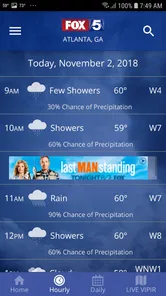
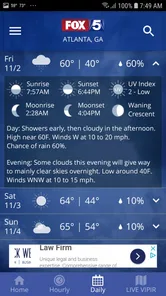
Analysis by Reviewed
I treat a local weather app as a practical tool, not a guarantee: a radar view can help me decide whether to change plans, but it cannot promise exactly what conditions will be at my door. That distinction matters with FOX 5 Storm Team Weather Radar, which is built around Atlanta forecasts, radar, and alerts from the FOX 5 Storm Team. Its local focus is the main reason I would consider it, especially when nearby weather matters more than a broad national snapshot.
Local context and trust
FOX 5 Storm Team Weather Radar is a free weather app from Fox Television Stations, Inc. It has an average rating of 4.2 from around 3,400 ratings, and more than 500,000 installs. Those figures suggest it has found an audience, but I would judge its usefulness by whether the Atlanta-focused information fits my routine rather than treating popularity as proof of accuracy. It is rated for Everyone, and the current version is 6.1.303.
The app’s local identity is useful, but it also sets a boundary: if I regularly need forecasts for places well beyond the Atlanta area, I would compare it with a broader weather service before relying on it as my only source. For an Atlanta resident checking conditions before a commute, outdoor plans, or an errand, a local forecast and radar view are more relevant than a generic city-wide outlook. I would still use judgment during severe weather and follow official safety instructions rather than making a high-stakes decision from an app screen alone.
For me, trust here is best understood as a practical question: can I see enough to make a sensible decision, and do the controls on my phone let me use the app in a way that suits me? The app is published by a local television-station company, which gives it a clear Atlanta identity, but that alone is not a guarantee that every forecast will match a particular street or schedule. I would build confidence through ordinary use: compare its outlook with what I observe, see whether its alerts are useful to my household, and keep another source available for consequential choices.
People often want to know whether a local app can replace a general weather service. I would not frame it that way. Its strongest role is as a regional companion when Atlanta conditions are the question; a national service may be more convenient for someone tracking several distant cities or planning a multi-state trip. Keeping both approaches available is not needless duplication if each answers a different question.
Using radar, alerts, and location thoughtfully
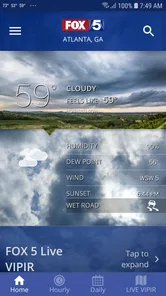
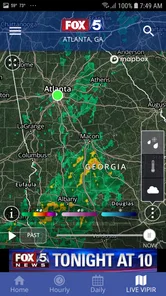
One of the first things you'll notice with the FOX 5 Storm Team Weather Radar app is its user-friendly interface. It offers a detailed, real-time look at weather patterns, which is perfect for planning your day or week. The radar is incredibly responsive, allowing you to zoom in and out with ease, so you can check the weather in your neighborhood or see what's happening halfway across the country. This feature is especially handy for those who travel frequently or have family spread across different regions.
For a more useful radar check, I would zoom out first to understand the wider storm movement, then zoom in to see whether the area around my destination may be affected. Looking only at a close-up can hide the bigger pattern; looking only at a broad view can make local timing hard to judge. I would treat radar as a planning aid, not a promise about the exact minute rain will begin.
More From Our News Desk

Weather by Xiaomi Review: Clear at a Glance, Less Clear Up Close

X Under Pressure: Can It Recover When Posting Goes Wrong?

Clash of Clans Is Won Between the Battles

Android Auto Makes the Case for Quieter Car Software

MobiOffice: Transforming Mobile Productivity with Seamless Integration

EA SPORTS FC™ Mobile Soccer: Redefining Mobile Sports Gaming
That two-step habit is particularly useful when the decision is about timing rather than simply whether rain is possible. If I am choosing between leaving now and waiting, I would look at the broader pattern before focusing on the route or destination. I would then check again closer to departure instead of assuming that a view from earlier in the day still describes what is happening. It is a small routine, but it helps prevent the common mistake of interpreting one still image as a full forecast.
Radar also has limits that are easy to overlook when a display looks precise. A shaded area on a map does not tell me exactly what a particular block, driveway, or stretch of road will experience. I would use it to decide whether I need a backup plan, not to treat a narrow gap on the screen as a guarantee of dry weather. For outdoor work or a long drive, I would give the forecast and official warnings more weight than a single close-up view.
Another highlight is the customizable alerts. You can set up notifications for severe weather updates, keeping you informed about storms, tornadoes, or any other weather-related events in your area. This is crucial for staying safe and prepared, especially during unpredictable weather seasons.
Choices that affect everyday use
Alerts are most helpful when they are selective. I would enable the warnings that matter to my household and review the phone’s notification settings so important messages are not lost among less useful interruptions. In a sensitive situation—overnight, while commuting, or when caring for someone who depends on timely warnings—I would keep the phone’s sound and notification choices in mind rather than assuming an alert will be noticed automatically.
A useful setup is one that matches the way I actually respond to a warning. If I sleep with the phone silenced, a notification that I never hear cannot help much; if every message interrupts work, I may start dismissing them without reading. I would check the device-level settings and make a deliberate choice about sound, vibration, and whether alerts can reach me during the hours I care about. Those are phone controls, not a promise that any single app can overcome every notification setting.
For families, alerts can also be part of a shared plan rather than a substitute for one. I would agree in advance who checks conditions, where everyone should go if a warning affects the area, and how to contact one another. The app may help draw attention to changing weather, but a household should not wait for a phone message to decide what to do when official guidance calls for action.
The app also integrates with your phone’s GPS, ensuring that you receive accurate and timely weather updates no matter where you are. Whether you're hiking in the mountains or just heading out to the grocery store, the app adjusts to your current location, which is a feature I find incredibly useful.
Location-based convenience comes with a trade-off: I would decide whether I want the app to use my current position or whether checking a chosen area is enough for my plans. For a regular commute, a saved or manually selected destination can be more useful than a constantly changing location; for an unfamiliar outing, current location can save time. I would check the device’s location controls and choose the level of access I am comfortable with. I do not assume anything about the app’s data handling beyond the choices I can see on my phone.
This is also the point where I would pause before granting access automatically. If I only check Atlanta conditions from home, I can consider whether manually looking up the area meets my needs; if I want weather tied to where I am while out, location access may be more convenient. The right choice depends on the task, and I would revisit it if my routine changes. A permission decision should be based on the feature I want to use, not on a vague assumption that every app needs the same access all the time.
When I am planning for someone else, such as a relative arriving from another part of town, I would check the relevant area rather than assuming my own location represents theirs. That avoids a small but important mismatch: local weather information is only useful when it corresponds to the place affected by the decision. For an occasional trip, I would make the destination check part of planning, then return to current-location use when I am back to everyday errands.
Who will get the most from it
What really sets this app apart is its local focus. The FOX 5 Storm Team brings a personal touch to its forecasts, providing insights that are specifically tailored to your area. This local expertise means you’re getting more than just generic weather predictions. You're receiving information from a team that understands the nuances of your local climate.
The app should make the most sense to someone whose decisions regularly revolve around Atlanta: a person choosing when to commute, whether to reschedule a weekend activity, or how to prepare for changing conditions at home. Its local emphasis can make those checks feel more relevant than a national app designed to serve a much wider map. If I lived outside the area but still followed Atlanta weather for family or work, I could see a reason to keep it as a focused second source rather than as my main forecast everywhere.
A realistic use is deciding whether to move an outdoor lunch or leave earlier for a drive when storms are approaching the Atlanta area. I would check the forecast before setting out, use radar to get a sense of the wider situation, and turn on relevant alerts when conditions could change. That workflow is more useful than repeatedly opening a general forecast app without a local angle.
For a more involved version of that routine, imagine I have an outdoor lunch planned and a drive afterward. I would check the conditions before the morning gets busy, look at radar again before leaving, and decide whether the gathering needs an indoor alternative. If the weather is changeable, I would keep relevant alerts enabled rather than repeatedly refreshing the screen. That gives the app a clear job: helping me make a timely plan, not making the decision for me.
There is a useful trade-off between a local broadcaster’s view and the all-purpose weather dashboards many people already have installed. A broad service is often easier when I want one place for multiple destinations, a long journey, or a quick glance at places outside Atlanta. This app’s appeal is narrower and more personal: I would open it when local context is the priority. I would not judge either approach as universally better; the choice depends on whether the reader values regional focus or wider coverage most.
It is also worth asking what kind of weather user you are. Someone who wants only a quick temperature check may find radar and alert options unnecessary, while a person who makes outdoor plans or watches for severe conditions has a clearer reason to use them. If I am traveling through several regions, I would choose a service that makes switching between many places straightforward and keep this one for Atlanta-specific checks if that remains useful.
If you live in or around Atlanta and want a straightforward way to check local conditions, this app is a sensible option. If you travel frequently across regions, need one consistent service for many cities, or prefer a forecast source that is not tied to a local broadcaster, a national weather app may suit you better. I would also skip it if I only want a minimal glance at temperature and have no use for radar or severe-weather notifications; a simpler forecast tool may feel less busy.
One practical question is whether it is worth trying if I already use another weather app. I would test it against a specific need rather than replace a familiar setup immediately: check Atlanta before a recurring commute, compare how useful its radar is for a local plan, and see whether its alerts fit your routine. If that local workflow earns a place on your phone, it can complement a broader service. If it adds another screen without changing your decisions, there is little reason to keep it open out of habit.
The app has been available since July 5, 2012, and its current release is version 6.1.303, which runs on Android 9 or later. That makes the basic compatibility question easy to answer for Android users: older devices below that minimum are not suitable. On iOS, I would check the current App Store compatibility details before installing, since the Android requirement does not answer that question.
Final thoughts
In conclusion, the FOX 5 Storm Team Weather Radar app is a reliable companion for anyone who wants to stay informed about the weather. Its combination of real-time radar, customizable alerts, and local insights make it a standout choice in a crowded field of weather apps. So, if you're looking to keep the weather surprises at bay, give this app a try. You'll likely find it as indispensable as I have.
Remember, staying informed is key, and with this app, you’re always a step ahead of the storm!
My cautious recommendation is to try it if Atlanta weather has a regular place in your decisions, then keep only the options you genuinely use. The app is free, so the main cost is attention: checking another forecast and deciding how to handle alerts and location. I would not make it my sole authority for urgent safety decisions, but as a locally focused way to check conditions and keep an eye on radar, it has a clear purpose. If that purpose matches your day, it is worth a place in your weather routine; if not, a simpler or wider-ranging alternative will probably serve you better.
FOX 5 Storm Team Weather Radar Frequently Asked Questions
Who develops the FOX 5 Storm Team Weather Radar app, and what is its current version?
The app is developed by Fox Television Stations, Inc., and its current version is 6.1.303. It is a weather app associated with FOX 5 Storm Team, with a focus on Atlanta forecasts, radar, and alerts. If you are deciding whether to install it, checking that your device can run the current release is a useful first step.
Is the FOX 5 Storm Team Weather Radar app intended for Atlanta users only?
The app’s central focus is Atlanta weather: its store summary describes forecasts, radar, and alerts from FOX 5 Storm Team. That makes it especially relevant if you follow weather in the Atlanta area. The app also offers weather reports for a user’s location, so location-specific information may help people checking conditions where they are, rather than relying only on a general forecast.
What features does the FOX 5 Storm Team Weather Radar app offer?
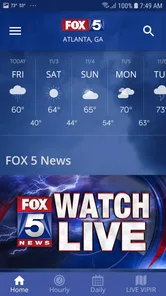
The FOX 5 Storm Team Weather Radar app provides an array of features designed to help users stay informed about the weather. It includes live radar maps, customizable alerts for severe weather, detailed forecasts, and a user-friendly interface that allows for quick navigation. Users can also access weather reports specific to their location, ensuring that they receive the most relevant information.
Is the FOX 5 Storm Team Weather Radar app free to use?
Yes, the FOX 5 Storm Team Weather Radar app is free to download and use. However, it may contain ads, and there could be optional in-app purchases available for users who wish to enhance their experience with additional features or remove advertisements. It's always a good idea to check the app store for the latest details on pricing and available features.
How accurate is the weather information provided by the app?
The FOX 5 Storm Team Weather Radar app is known for its accuracy in providing weather forecasts and alerts. It utilizes data from trusted sources and employs advanced technology to deliver real-time updates. However, like any weather app, predictions are subject to change based on new data, so it's recommended to regularly check the app for the latest updates and advisories.
Pros
- Accurate weather forecasts.
- Real-time radar updates.
- User-friendly interface.
- Customizable alerts.
- Detailed weather maps.
Cons
- Ads can be intrusive.
- Requires internet connection.
- Limited offline functionality.
- Notifications can be overwhelming.
- Some features require location access.













