FOX LOCAL: Live News & Weather
- 1.21K
- 4.6
- Installs
- 1.00M
- Price
- Free

Screenshots
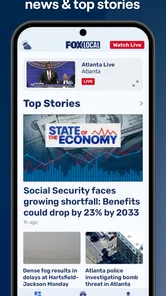
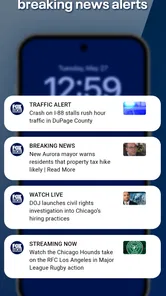


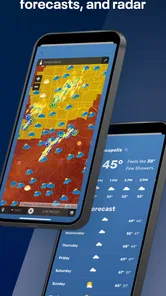



Analysis by Reviewed
I tend to reach for local news when a broad national headline leaves the practical questions unanswered: what is happening in my area, and what should I pay attention to today? FOX LOCAL: Live Streaming News is aimed at that habit, bringing local coverage and live viewing together in a free news app from Fox Television Stations, Inc. I see its clearest value not as a replacement for every news source, but as a convenient way to check in on community stories and weather.
What the free access means
The app is free to download, so trying it does not require an upfront purchase. That makes it an easy option to test alongside the news sources you already use. I would judge its value by whether its local coverage is relevant to where you live and whether you actually prefer watching updates to reading them. Free access is useful, but it is not by itself a reason to make this your only source of news.
That cost point is straightforward: I can recommend trying it without asking you to commit money first. I would still think of “free” as a low-risk way to evaluate the fit, rather than proof that it will suit every news habit. Before making it part of a daily routine, I’d check whether the local stories it presents are the ones I need and whether I’m comfortable getting them through video.
Where local coverage earns its place
A national news app can be better for a quick overview of major stories, while a local station app has a more specific job: helping you follow what is happening close to home. That distinction matters on an ordinary weekday. If I hear about a disruption nearby, for example, I can open a local stream for context, then use a separate source if I need a wider explanation or a written account I can scan quickly.
For a practical routine, I would check the app before leaving home when local conditions could affect the day, then return to it later if a developing story needs more context. This is more useful than leaving a stream running in the background and hoping it covers the exact question I have. The trade-off is that video asks for attention; when I am in a noisy place, short on time, or trying not to use mobile data, a text-based report may suit me better.
A useful way to make that routine more precise is to decide what I want to learn before opening a live stream. If I’m checking whether a local story has changed, I can watch for the relevant update and then move on. If I need one exact detail, I should not assume that watching from the beginning is the quickest route; a written report or another source built for searching may save time. That small distinction keeps the app’s live format working for me instead of turning a quick check into an open-ended viewing session.
Who is likely to get the most from it
I can see it working best for people who care about their local area, like watching news coverage, and want a simple way to check in without starting with a broad national feed. It may also be handy for someone who has recently moved and wants a regular local-news habit. The app is rated for Everyone, has an average rating of 4.3 from around 6,300 ratings, and has more than 500,000 installs, so there is a sizable audience, though those figures alone cannot tell you whether its local coverage matches your needs.
More From Our News Desk

Weather by Xiaomi Review: Clear at a Glance, Less Clear Up Close

X Under Pressure: Can It Recover When Posting Goes Wrong?

Clash of Clans Is Won Between the Battles

Android Auto Makes the Case for Quieter Car Software

MobiOffice: Transforming Mobile Productivity with Seamless Integration

EA SPORTS FC™ Mobile Soccer: Redefining Mobile Sports Gaming
I would skip it as a primary news tool if I mainly want searchable written stories, detailed source comparisons, or a feed centered on national and international reporting. It is also sensible to check whether the local coverage available to you is the coverage you want before relying on the app for a specific routine. A nearby city’s headlines may not answer questions about your own neighborhood, and a live broadcast is not always the fastest format for finding one precise fact.
It is also a less natural choice if most of your news time happens in places where audio would be disruptive or watching a screen is inconvenient. You can still use a local video source selectively, but its central appeal is strongest when you can give a segment your attention. For someone who wants to skim quietly between tasks, a text-first app is likely to fit better; for someone who wants a local presenter’s account and visual context, this format has a clearer role.
Stay Informed with Real-Time Updates
One of the coolest things about this app is its real-time news streaming. Picture this: you're commuting, sipping on your morning coffee, and boom! You get hit with live updates about what's happening in your city or even across the globe. With FOX LOCAL: Live Streaming News, you're always in the loop, and trust me, it's a game-changer for news junkies like us.
Local News at Your Fingertips
Now, I know what you're thinking—"There are a million news apps out there, why this one?" Well, the charm lies in its focus on local news. Whether it's that quirky event happening downtown or a major city council decision, this app keeps you clued in. It's like having your personal news detective, digging up all the stories that matter to your community.
That local emphasis is most useful when the subject has a direct effect on daily plans: a community issue, a city decision, or weather that may change what I do next. It is less useful when I want a complete picture of a national event or a careful comparison of several outlets’ reporting. I would use it to add a local angle, then turn to broader reporting when the story needs context beyond the area.
Easy Navigation and User-Friendly Interface
Let's talk about the user experience, because who wants to navigate a clunky app? Thankfully, FOX LOCAL has nailed it with a sleek and intuitive interface. The moment you fire it up, you're greeted with a clean layout where everything is just a tap away. Categories are neatly organized, making it super easy to jump between different news segments.
For a new user, I would take a moment to explore the available sections before relying on a single entry point. That helps establish whether the content is organized in a way that matches how I follow local stories. In a live-news app, the first thing on screen may not answer the particular question that brought me there, so knowing where to look can make a brief check more purposeful.
Plus, the streaming quality is top-notch. No more pixelated videos or endless buffering—just crisp, clear news content whenever you want it. It's like the app knows that in today's fast-paced world, we don't have time to waste.
Personalized News Feed
Another standout feature is the personalized news feed. The app learns your preferences over time, curating a feed that's tailored to your interests. So, if you're big on sports or perhaps more into politics, the app ensures you get more of what you love. It's like having a news concierge, always ready to serve up your favorite scoop.
And don't even get me started on the notifications! They're timely and relevant, so you never miss out on important updates. It's like having a trusty news buddy who always has your back.
I would treat personalization and alerts as conveniences, not as a substitute for choosing what deserves my attention. A useful check is to notice whether the items that appear are helping me follow local developments or merely encouraging me to keep opening the app. If the alerts become distracting, I would adjust my notification choices or rely on scheduled check-ins. That keeps the app available for important moments without making every new update feel urgent.
Getting more from a local-news routine
One useful way to approach any local stream is to treat it as a check-in, not a constant companion. I would open it when I have a specific window to watch, note the places and developments that matter to me, and then leave rather than letting a live broadcast dictate my attention. That makes the format more manageable during a busy day and helps me separate useful updates from stories I can revisit later.
Notifications can help surface something timely, but I would keep them purposeful. If every alert interrupts work, meals, or family time, the convenience quickly turns into noise. I prefer to allow only the alerts that genuinely help me act or make a decision, then use the app when I choose. For a major developing event, I would also compare coverage with another reputable source instead of treating a single local feed as the whole picture.
There is a practical difference between watching a live segment and finding a specific detail. Video is good when a reporter’s explanation or the unfolding scene adds context; a written article is usually easier when I need a name, location, or fact again. If I am using the app while travelling, I would wait until I am safely stopped before watching, and I would avoid assuming a stream will be convenient in every connection or listening situation.
Here is a realistic example of how I would use it: I hear that a local issue may affect my route or plans, but I do not yet know what has changed. I open the app when I can safely pay attention, watch enough to understand the local angle, and then check a text report if I need a precise location or a detail to share with someone. If the story is still developing, I return later rather than leaving a stream on for the entire day. The app serves as a focused local check-in, while other sources handle quick lookup and wider context.
Cost, fit, and my verdict
FOX LOCAL is free, and its age rating is Everyone. It was released on April 21, 2023, and its News & Magazines focus is clear: this is for people who want local reporting and weather in a viewing-oriented format. I would try it if I lived in an area it covers and wanted a quick way to watch local updates without paying to get started. The value depends on relevance, not on the download itself.
Fox Television Stations, Inc. is the developer, and the app sits in a familiar part of the news landscape: local station coverage rather than a text-led national aggregator. Compared with a general news app, its potential advantage is the local perspective and live viewing; compared with reading a station’s stories, its trade-off is that watching takes time and attention. I would choose between those options based on the question in front of me, not assume one format can replace the others.
If you are wondering whether to keep it after trying it, I would give it a few ordinary check-ins rather than judging it from one headline. See whether the local material feels relevant, whether you find the viewing format comfortable, and whether alerts help rather than interrupt you. Since the app is free to download, that is a practical way to decide its place in your routine without treating the install as a commitment to use it every day.
For me, this is a useful companion rather than a universal news solution. I would keep it in my rotation if local coverage helps me understand my day, but pair it with text-first sources for fast searches and broader outlets for national context. If you prefer to watch the news and want a free local option, it is worth exploring; if you mainly read, need one precise answer immediately, or do not find the local coverage relevant, another news app or a station’s written reporting may be a better fit.
Final Thoughts
In a world where staying informed is crucial, having an app like FOX LOCAL: Live Streaming News is a blessing. It's not just about the news; it's about getting the news that's important to you, when you want it. Whether you're a news aficionado or just someone who likes to stay updated, this app has something for everyone.
So, if you're ready to take your news game to the next level, give it a whirl. Who knows, you might just find yourself hooked, just like I did. Happy news hunting!
FOX LOCAL: Live News & Weather Frequently Asked Questions
Is FOX LOCAL: Live Streaming News suitable for someone who wants local coverage rather than national headlines?
FOX LOCAL: Live Streaming News is focused on local news and weather, making it a natural option for people who want updates tied to their area. Its store summary is “Watch Local News & Weather,” and the app’s stated focus includes local broadcasts and weather updates. It is categorized as a News & Magazines app and is published by Fox Television Stations, Inc.
Can I watch FOX LOCAL on a television or use it on multiple devices?
FOX LOCAL: Live Streaming News is a mobile app for Android and iOS, so it is intended for use on supported phones and tablets. The app’s news and weather focus may make it convenient to check updates while away from home. If you plan to watch on a television or use a particular device setup, check the relevant app store for compatibility before downloading.
What is FOX LOCAL: Live Streaming News and what features does it offer?
FOX LOCAL: Live Streaming News is an application designed to provide users with live streaming of local news, weather updates, and sports coverage. The app offers features like real-time notifications for breaking news, personalized alerts for specific topics, and the ability to watch local news broadcasts live. Users can also access on-demand video clips and read articles for a comprehensive news experience.
Is FOX LOCAL: Live Streaming News free to use, and are there any in-app purchases?
Yes, FOX LOCAL: Live Streaming News is free to download and use. However, there may be in-app purchases available for optional features or premium content. While the core features are accessible without any cost, users might encounter advertisements within the app. It's advisable to check the app store listing for detailed information about any additional costs.
On which platforms is FOX LOCAL: Live Streaming News available, and how can I download it?
FOX LOCAL: Live Streaming News is available on both Android and iOS platforms. Users can download the app from the Google Play Store for Android devices and the Apple App Store for iOS devices. Simply search for 'FOX LOCAL: Live Streaming News' in the respective app store, and click on the download or install button to begin the installation process.
Pros
- High-quality video streaming available.
- Access to local news anywhere.
- User-friendly interface design.
- Live updates on current events.
- Wide range of local channels.
Cons
- Requires stable internet connection.
- Limited international news coverage.
- Occasional ads disrupt viewing.
- App may drain battery quickly.
- Notifications can be overwhelming.













