FOX 13 Tampa: SkyTower Weather
- 854.00
- 3.9
- Installs
- 100.00K
- Price
- Free

Screenshots
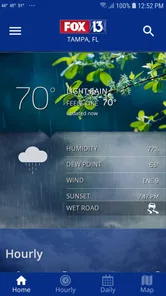
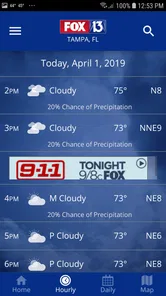
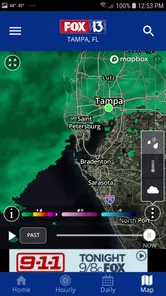
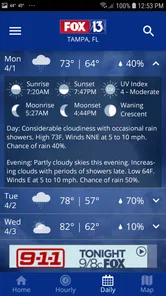
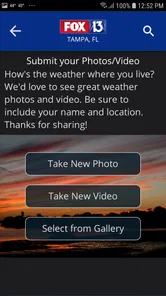
Analysis by Reviewed
When I need a quick answer to “What is the weather doing right now?” I usually want more than a generic temperature. I want to see whether rain is approaching, whether an alert matters to my route, and whether the forecast is useful for the next few hours rather than only the next several days. That is where FOX 13 Tampa: SkyTower Weather makes sense. It is a free weather app from Fox Television Stations, Inc., built specifically around Tampa-area forecasts, live radar, and alerts.
I spent time using it as a practical local-weather tool rather than treating it like a decorative forecast screen. Its strongest quality is the way it puts radar and warnings close to the center of the experience. That focus changes how I use it: instead of checking a temperature once in the morning and forgetting about the forecast, I can look for movement in rain bands and decide whether the next part of my day needs adjusting.
The app is rated 3.9 on average from around 3K ratings, with more than 800 written reviews, and it has passed 100K installs. Those figures suggest a reasonably established audience without making it the only weather source anyone would ever need. It is rated for Everyone, so it is suitable for a household where several people may need a simple way to check Tampa conditions.
Radar is the feature that changes the decision
The most valuable capability here is not the existence of a forecast by itself. Most phones already offer one. The useful difference is having a local weather view that encourages me to inspect what is happening around Tampa, especially when the sky looks uncertain or a shower may affect a short trip.
A forecast can tell me that rain is possible today. Radar helps me ask a more practical question: is there anything nearby that could affect me soon? That distinction matters when I am deciding whether to leave for an appointment, walk outside, drive across town, or wait before starting an outdoor task. I find that the radar view is more useful for immediate choices, while the forecast remains better for planning later in the day.
This is also why the app feels more locally purposeful than a broad international weather service. The name and presentation are tied to FOX 13 Tampa, and the product is aimed at people who care about conditions in that area. I would not install it expecting a universal travel-weather dashboard. I would install it because my routine is connected to Tampa and I want a local source that puts changing conditions in front of me.
What I look for before trusting a radar view
Radar is easy to misunderstand if it is treated as a promise. A colored patch on a map does not automatically mean heavy rain will reach my exact location, and a clear-looking gap does not guarantee a completely dry trip. Weather systems move, weaken, strengthen, and sometimes miss one neighborhood while affecting another. I use the map as evidence for a decision, not as an exact appointment timer.
More From Our News Desk

Weather by Xiaomi Review: Clear at a Glance, Less Clear Up Close

X Under Pressure: Can It Recover When Posting Goes Wrong?

Clash of Clans Is Won Between the Battles

Android Auto Makes the Case for Quieter Car Software

MobiOffice: Transforming Mobile Productivity with Seamless Integration

EA SPORTS FC™ Mobile Soccer: Redefining Mobile Sports Gaming
My preferred workflow is simple. I first check the current conditions, then open the radar when rain is relevant, and finally compare what I see with the broader forecast. If the map shows activity nearby, I give myself extra time rather than assuming I can leave at the last second. This is a small habit, but it is one of the most useful ways to get more value from the app than simply reading the headline temperature.
The practical advantage is not perfect prediction; it is better timing. The app helps me notice when a general forecast deserves a closer look. That can prevent the common mistake of treating “a chance of rain” as either a guaranteed downpour or something that can be ignored completely.
How the app fits into an ordinary day
On a normal morning, I would use the forecast to decide what kind of day I am preparing for. If I am commuting, I care about whether rain could complicate the route. If I am taking children outside, I care about nearby showers and alerts. If I am planning errands, I want to know whether the weather is stable enough to combine several stops. The app works best when I use it as a short planning check rather than leaving it open constantly.
Alerts add another layer because they can matter when I am not actively looking at the screen. I treat them as a prompt to investigate, not as a replacement for judgment. When an alert appears, I want to open the app, read the context, and decide whether it affects my location or plans. This is especially important for anyone who travels beyond the immediate area, since a regional warning may not have the same importance everywhere within its coverage.
One useful trade-off is that a local station app can feel more relevant than a general-purpose weather utility, but it may also feel narrower. If I am checking weather for a trip across several states, I would rather use a service designed for broad location switching and comparison. For a Tampa-centered routine, the local focus is an advantage; for a constantly moving user, it may become an extra step.
A realistic Tampa planning example
Imagine I have planned an outdoor lunch and need to drive across town afterward. A basic forecast might show a warm day with a chance of showers. I could ignore that and leave without thinking about it. With this app, I would check the forecast first, open the radar to see whether rain is developing nearby, and review any alert that appears relevant. If the activity looks close to my route, I might move the lunch earlier, carry rain protection, or allow additional driving time.
The important point is that I am not expecting the app to decide for me. I am using it to connect three pieces of information: the general outlook, the current radar picture, and official warnings. That combination is more useful than any one screen alone. It also gives me a repeatable routine I can use before school runs, outdoor work, sports practice, or an evening drive.
For people who dislike complicated weather tools, this workflow should be approachable because it begins with familiar information. I do not need to understand every meteorological detail to benefit from seeing whether a rain area is nearby. At the same time, users who enjoy detailed maps may find themselves wanting more control than a local news app is designed to provide.
Where the local focus helps most
The app is a strong fit for Tampa residents, commuters, families, and anyone whose outdoor plans are frequently affected by changing local conditions. It is also useful for people who prefer a weather source connected to a familiar regional news identity rather than an anonymous global forecast brand. That familiarity can make the app easier to remember and more likely to be checked when conditions change.
I can also see value for someone who does not want to build a complicated weather setup. The app is free, runs on devices using iOS 9 or later, and its age rating is Everyone. Those details make it accessible to a wide range of users, including households that may share weather information between adults and children. The current version is 6.2.513, so anyone installing it should still keep the app updated through the relevant store when updates are offered.
Another good use is preparing for outdoor work. A landscaper, delivery worker, property manager, or maintenance employee may not need a specialized professional weather platform for every task. A quick local radar check can help decide whether to begin immediately or postpone a short job. That said, safety-critical work should never rely on one app alone. Alerts and radar are useful inputs, but official emergency guidance should take priority when conditions become dangerous.
When another weather app would be better
I would choose a different option if I needed extensive international coverage, detailed aviation information, long-range climate records, or highly specialized storm analysis. A Tampa-focused news weather app is not the same thing as a professional meteorological workstation. It is designed for everyday decisions, not for replacing expert tools.
I would also think twice if I frequently change my location and need a fast way to compare many cities. The local identity that makes this app appealing in Tampa can feel less convenient when I am traveling. In that situation, a broad weather service with strong location management may be more efficient, while this app remains useful as a local reference when I return.
There is also a personal preference issue. Some people want a minimal widget showing only temperature and precipitation. Others want a highly customizable dashboard with multiple layers, charts, and data points. I see this app as sitting between those extremes: more useful than a bare temperature display because of its radar and alerts, but less suited to users who want to configure every part of a weather workspace.
Small habits that make the app more useful
My first tip is to check radar only when it can answer a decision. Opening it repeatedly without a plan can create unnecessary uncertainty because weather maps naturally change. I get more value by checking before leaving, before starting an outdoor activity, and after an alert rather than refreshing it continuously.
My second tip is to compare location relevance with the map itself. If I am near the edge of Tampa or traveling outside the central area, I do not assume that a regional alert affects me equally. I look at the area involved and consider my actual route. This prevents a common mistake with alerts: reacting to the existence of a warning without checking whether it changes my own plans.
My third tip is to use the forecast and radar for different time horizons. I use the forecast to decide what to pack and how to organize the day. I use radar to decide whether I should leave now, wait, or change the order of errands. Treating them as separate tools makes the information easier to interpret and keeps a short-term map from being overused for long-term planning.
A fourth useful habit is to check before an outdoor commitment even when the morning looks calm. Tampa weather can make a pleasant start feel reassuring, but a quick radar review can reveal why carrying a light rain layer or moving an activity earlier is sensible. I would rather spend a moment checking than discover the problem after I am already away from home.
What may feel less convenient
The local specialization can be a limitation for people who want one app to solve every weather need. I would not expect it to replace a dedicated severe-weather resource, a travel planner, or a detailed scientific visualization tool. Its value depends on whether the Tampa-centered approach matches my daily life.
Alerts can also create friction if I enable them without thinking about which situations matter to me. Too many notifications can make important warnings easier to overlook. I prefer to treat alerts as part of a deliberate setup: keep the ones that help with safety and daily planning, then avoid turning every possible notification into background noise.
Another limitation is that weather information always needs interpretation. A radar image may look authoritative, but it cannot remove uncertainty from a changing atmosphere. I still consider timing, route, shelter, and the seriousness of any warning. The app improves awareness; it does not make risky conditions safe.
My recommendation for the right kind of user
I recommend FOX 13 Tampa: SkyTower Weather to anyone who lives in or regularly moves around Tampa and wants a free local weather app with radar and alerts at its core. It is particularly well suited to people who make frequent short-term decisions: when to leave, whether to postpone an outdoor plan, or whether a developing shower deserves attention.
I would recommend it less strongly to travelers, weather hobbyists, and professionals who need advanced data or broad geographic comparison. Those users may be happier with a more specialized alternative. The app is also not a substitute for official emergency instructions during severe conditions, even though its alerts can help draw attention to changing weather.
After using it, my view is that the app succeeds because it turns a vague forecast into a more practical check of what may happen around me soon. The radar capability is the reason I would keep it installed, while the Tampa focus is the reason it will be more useful to some readers than to others. If your day is tied to local conditions, that focused approach is a genuine benefit rather than a drawback.
For me, the best test is whether an app changes a decision in a helpful way. This one can: I can leave earlier, wait out a nearby shower, adjust an outdoor plan, or take an alert more seriously after seeing the surrounding weather picture. It is not the most universal weather tool, but for a Tampa-based routine, its strength is making local weather easier to act on. That is a clear reason to try it, especially since it is available at no cost.
FOX 13 Tampa: SkyTower Weather Frequently Asked Questions
Is FOX 13 Tampa: SkyTower Weather available for my phone?
FOX 13 Tampa: SkyTower Weather is available for Android and iOS, making it an option for users who want local weather information on a smartphone. The Android version requires Android 9 or later, so check your device’s operating system before downloading. The app is free, and its age rating is Everyone.
What is FOX 13 Tampa: SkyTower Weather?
FOX 13 Tampa: SkyTower Weather is a weather app focused on the Tampa Bay area and surrounding communities in Florida. It provides current conditions, hourly and extended forecasts, interactive radar, weather alerts, and video updates from the FOX 13 meteorological team. The app is particularly useful for tracking rapidly changing conditions, tropical systems, thunderstorms, heavy rain, and hurricanes.
Does FOX 13 Tampa: SkyTower Weather provide severe weather alerts?
Yes, the app can provide notifications for important weather threats, including severe thunderstorms, tornadoes, tropical weather, flooding, lightning, and other warnings issued for your selected location. Users should enable location access and push notifications to receive timely updates. However, the app should complement, not replace, official emergency instructions from local authorities and the National Weather Service.
Can I use the app to track hurricanes and tropical storms?
FOX 13 Tampa: SkyTower Weather is useful during hurricane season because it combines forecast information, radar imagery, alerts, and meteorologist updates in one place. You can follow developing tropical systems and monitor changing conditions in the Tampa Bay region. Forecasts may change quickly, so users should also consult official hurricane advisories and emergency-management guidance.
Does FOX 13 Tampa: SkyTower Weather use my location?
The application can use your device location to show relevant local conditions, forecasts, radar information, and weather warnings for where you are. You may also be able to search for and save other locations manually, which is convenient for checking conditions at home, work, or while traveling. Location and notification permissions can generally be managed through your device settings.
Pros
- Accurate Tampa Bay forecasts with frequent local updates.
- Interactive radar helps track storms in real time.
- Clear hurricane and severe-weather alerts for the region.
- SkyTower camera views add useful on-the-ground context.
- Weather videos explain changing conditions in an accessible way.
Cons
- Some features may require location access to work properly.
- Notifications can feel frequent during active weather events.
- Radar and video content may use substantial mobile data.
- Coverage is mainly focused on the Tampa Bay area.
- Advertising can interrupt browsing and reduce screen space.













