Financial Times: Business News
- 2.53K
- 4.5
- Installs
- 1.00M
- Price
- Free

Screenshots




Analysis by Reviewed
Ever found yourself swamped by a deluge of financial news and just wished for a single, reliable source to keep you updated? Well, let me introduce you to the Financial Times: Business News app, a veritable goldmine for anyone keen on the latest in finance and business.
Getting Started with the Financial Times App
First things first, let’s talk about the user experience. Downloading the Financial Times: Business News app is a breeze. Available on both Android and iOS, it’s just a tap away on your device’s app store. Once installed, you’re greeted with a sleek, intuitive interface that’s easy on the eyes and a cinch to navigate. It’s like having a personal news concierge right in your pocket.
The app is free to download, and it comes from The Financial Times Limited. That makes it easy to try the reading experience before deciding whether it suits your routine. I would think of the download as the start of that decision, not as a promise that every article or feature will be free: in-app purchases range from $2.49 to $719.00 per item. Before subscribing or buying anything, I’d read the terms shown in the app and check that the access offered matches the way I expect to read.
Making the Daily Reading Habit Work
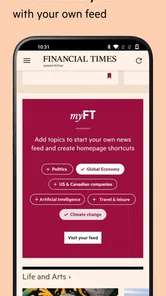
I find the app most useful when I give it a clear job rather than treating it as an endless feed. For a quick morning check, I can scan the main coverage for major developments, then use MyFT to focus on the subjects that matter to me. That distinction is practical: a personalized selection helps me spend less time hunting through unrelated stories, while the broader coverage keeps a topic list from becoming an echo chamber.
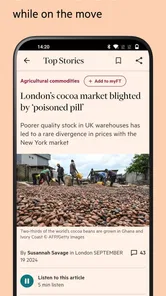
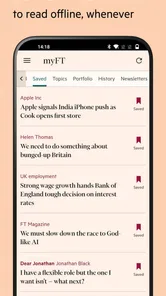
A realistic routine is to check headlines over breakfast, save a longer read for a commute, and return to the article when I have enough time to concentrate. Offline reading suits that pattern, especially when I expect patchy connectivity. I would download a few pieces before leaving rather than assume every story will be available at the moment I want it. Audio versions are another useful option when I am walking or doing a simple task, though I prefer reading when I want to compare details or revisit a passage.
One practical habit is to separate “keep me aware” from “help me understand.” A short scan can tell me which subjects deserve attention, but it is the longer reporting and analysis that help me put a development in context. I try not to judge a complicated story from its alert or headline alone. If I have only a minute, I note the topic and return later rather than letting a quick glance stand in for a full read.
Features that Stand Out
The main draw here is, of course, the real-time updates. Whether it’s breaking news, in-depth analysis, or market trends, the app ensures you’re never out of the loop. One of my favorite features is the “MyFT” section, which allows you to customize your news feed. You can select topics, journalists, and even specific industries to follow. It’s like having a tailored newspaper delivered right to your palm every morning.
More From Our News Desk

Weather by Xiaomi Review: Clear at a Glance, Less Clear Up Close

X Under Pressure: Can It Recover When Posting Goes Wrong?

Clash of Clans Is Won Between the Battles

Android Auto Makes the Case for Quieter Car Software

MobiOffice: Transforming Mobile Productivity with Seamless Integration

EA SPORTS FC™ Mobile Soccer: Redefining Mobile Sports Gaming
Another highlight is the app’s offline reading capability. You can download articles and catch up on your reading during your commute or whenever you’re off the grid. The app also offers audio versions of articles, perfect for those who prefer listening to reading.
These options are most helpful when I match them to the task instead of using them interchangeably. MyFT is a useful filter for recurring interests; offline reading helps when I already know I will have limited connectivity; and audio makes sense when my eyes are occupied but my attention is free. For detailed market or policy coverage, I still prefer text, because it is easier to pause, reread a sentence, and keep track of qualifications.
Settings Worth Checking
When I set up a news app, I check notification preferences early. Push alerts can be helpful for major developments, but too many interruptions make it harder to tell what deserves attention. I’d keep alerts aligned with the topics I genuinely follow and let the rest wait until my next planned check-in. MyFT works best when I review its choices occasionally: interests change, and a feed built around an old project can quietly become less useful.
There is a useful trade-off here: a narrowly tuned feed saves time, but it can also make unfamiliar subjects easier to overlook. I would keep a few interests broad enough to expose me to related coverage, then use the main news area when I want to step outside my usual themes. That small check helps prevent personalization from turning into a comfortable but limited reading loop.
The app is free to download, but that does not mean every reading experience is necessarily free of charge. The Financial Times Limited offers in-app purchases, with listed items ranging from $2.49 to $719.00, so I would check the subscription or purchase terms shown in the app before committing. This matters most if you expect to read regularly: decide whether the journalism you want justifies the cost rather than assuming the download price covers everything.
If I were trying it for the first time, I would first decide what I want from it: occasional headlines, continuing coverage of a few industries, or substantial reading across business and public affairs. Then I would use the app long enough to see whether those needs fit its coverage and the access terms offered. That is a more useful test than installing it, opening a few stories, and assuming the first session represents the value of a regular reading habit.
Staying Informed, Anytime, Anywhere
One of the things I truly appreciate about the Financial Times app is its commitment to keeping you informed no matter where you are. Whether you’re waiting for your coffee or taking a break from work, the app provides a steady stream of information that’s both relevant and reliable.
The app isn’t just about business and finance; it also covers politics, technology, and even lifestyle, making it a comprehensive source for all your news needs. Plus, with its push notifications, you’ll never miss an important update.
For me, “anytime” does not have to mean checking constantly. A more comfortable pattern is to choose a couple of moments in the day, use notifications only for subjects where prompt awareness matters, and leave other reading for those planned sessions. That makes the app feel more like a deliberate briefing than a stream competing for attention. It is particularly useful when a workday is busy and I need to know what has changed without repeatedly opening a feed.
Where It Fits Among News Apps
Compared with a general news aggregator, this app makes more sense if you value the Financial Times’ reporting and want a reading habit organized around its coverage. Aggregators can be better when your priority is seeing many publishers’ takes on the same story in one place. A broad free-news app may also suit someone who only checks headlines occasionally and does not want to consider paid access. I would choose this one for business, markets, and international affairs; I would not make it my only source if I needed a deliberately wide range of publishers or local reporting.
Its audience is not limited to finance professionals. A student following economic policy, a small-business owner tracking industry changes, or a curious reader trying to understand how politics affects markets can all get value from the mix of subjects. The trade-off is that a steady stream of updates can encourage checking too often. I get more from setting a couple of reading moments than from reacting to every alert, and I use longer articles when I want context instead of treating a headline as the whole story.
A useful example is a small-business owner preparing for a planning meeting. They might scan the day’s main coverage before work, use MyFT to keep relevant sectors in view, and save a longer analysis for a quiet break. If an article is likely to be useful on a train or in a place with unreliable service, downloading it ahead of time reduces the risk of arriving without something to read. That sequence makes the app valuable as a repeatable research habit, not just a place to react to breaking news.
For a reader who needs to compare how different outlets frame the same event, I would pair this app with an aggregator or other publications rather than expect one newsroom to provide every perspective. Conversely, if the main goal is following business and policy through a consistent editorial lens, adding a large collection of sources may create more noise than insight. The choice depends on whether breadth of publishers or depth within this particular source matters more to you.
Advanced Limits and a More Deliberate Routine
The app’s strongest routines also reveal its limits. A personalized selection is efficient, but it depends on the interests I choose and maintain; it cannot decide for me when a familiar topic deserves a fresh angle. I would periodically widen or revise the subjects I follow, especially after a change in work or study, and use the broader coverage to check what I have not been seeking out. This is a simple editorial habit rather than a hidden setting, and it helps keep convenience from narrowing my view.
Offline access is useful, but I treat it as preparation, not a guarantee that every item I might want will be ready later. Before a commute, I would select a handful of pieces I actually intend to read, rather than relying on an open-ended queue. Audio is similarly situational: it fits a walk or a routine chore, while close reading is better for arguments with details I may want to verify or revisit. Choosing the format around the task saves frustration.
Another question readers often have is whether this is suitable as their only news app. I would say it can be a strong main source for someone whose interests align with its coverage, but it is not the best single choice for a person who needs local reporting or a broad mix of publishers. That is not a flaw so much as a decision about scope. I would add another source when the job calls for a wider range of perspectives, not simply because more headlines are always better.
It is also worth asking whether the app makes sense for an occasional reader. It may, if a few stories are enough to justify the access available to that reader, but someone who only wants a quick glance at headlines may be better served by a free general-news option. Regular readers should assess the purchase terms against how often they use the reporting they care about. I would make that choice based on actual reading habits rather than on the appeal of installing a familiar publication.
The app is rated for Everyone, and its current version is 2.287.0-snapshot.21.21757738972338.13458+058cb97. Android devices need version 8.0 or later. Those practical details are worth checking before installing, particularly on an older device, but they do not tell me whether the app’s editorial focus or purchase options will suit a particular reader. I would treat compatibility as the first check and the fit of the coverage as the more important one.
The Final Verdict
All in all, the Financial Times: Business News app is a must-have for anyone serious about staying informed in today’s fast-paced world. Its user-friendly design, customizable features, and extensive coverage make it a standout choice among news apps. So, if you’re on the lookout for a reliable news source that fits right into your daily routine, give this app a whirl. Trust me, you won’t regret it!
My recommendation is strongest for readers who will make use of its focused reporting and return often enough to build a routine. The app is rated 4.5 on average, with around 49,000 ratings and 2,500 written reviews, and it has over 1 million installs. It is rated for Everyone, was released on November 8, 2011, and the current version is 2.287.0-snapshot.21.21757738972338.13458+058cb97; devices need Android 8.0 or later. Those details help set expectations, but the real test is whether its coverage fits the questions you follow. If you want a dependable place to keep up with business and the wider forces around it, I think it earns a place in your daily reading. If you mainly want a quick, free scan across many outlets, another news app may be a better match.
Financial Times: Business News Frequently Asked Questions
Is Financial Times: Business News suitable for readers outside the finance industry?
Yes. Although business and finance are central to the app, its coverage also includes politics, the arts and other subjects, so it can appeal to readers with broader interests. The reporting and analysis are useful for following how international events connect with business and markets, rather than only for people working in finance.
What topics does Financial Times: Business News cover?
The app brings together reporting on business, politics, finance, the arts and beyond. That mix makes it useful for readers who want more than market headlines, while still keeping business and economic developments at its core. Its coverage can help you follow international events through several perspectives and find stories suited to a range of interests.
Who publishes Financial Times: Business News, and how is it rated by readers?
The app is published by The Financial Times Limited. It has an average rating of 4.5 from around 49,000 ratings, giving prospective readers a broad indication of how users have responded to it. Ratings are only one part of choosing a news app, so it is also worth considering whether its subjects and reading options match what you want.
What is Financial Times: Business News app and what features does it offer?
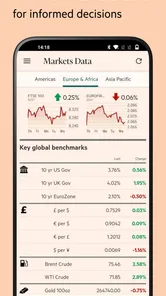
The Financial Times: Business News app provides users with access to international business, finance, economic news, and analysis. It features personalized news feeds, offline reading, market data, and notifications for breaking news. Users can also access exclusive content from Financial Times journalists, making it a comprehensive tool for staying informed about global business trends.
Is the Financial Times: Business News app free to use, or does it require a subscription?
The Financial Times: Business News app can be downloaded for free, but access to its full range of articles and features typically requires a subscription. New users may have access to a limited number of free articles before needing to subscribe for unlimited access. Subscription plans vary, offering different levels of access based on user needs. In-app purchases range from $2.49 to $719.00 per item, so check the available options before purchasing.
Pros
- Comprehensive global news coverage.
- Real-time market updates.
- Expert financial analysis.
- User-friendly interface.
- Customizable alerts.
Cons
- Subscription required for full access.
- Occasional app crashes.
- Limited offline access.
- Ads in free version.
- Requires internet connection.











