Feedly - Smarter News Reader
- 36.51K
- 4.0
- Installs
- 5.00M
- Price
- Free

Screenshots
Analysis by Reviewed
I judge a news reader by whether it helps me choose what deserves attention, not just by how many headlines it can collect. Feedly - Smarter News Reader works best as a personal reading hub: I can bring publications and specialist sites together, then decide what to read now and what to save. That focused approach is useful, though it also means the experience depends on the sources I choose and the time I’m willing to spend shaping my feed.
Choosing sources without creating another chore
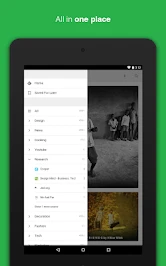
The setup is most rewarding when I think about the job I want each feed to do. Instead of making one sprawling list called “news,” I’d start with a small set of themes that match real moments in my week: industry reading before work, a few local or community sources, and lighter interests for downtime. This makes the app easier to scan and gives each group a purpose. If I add every site I happen to encounter, I risk rebuilding the same noisy stream I wanted to escape.
I also find it useful to treat source selection as an ongoing edit rather than a one-time project. A site that posts rarely may still be worth keeping if its occasional article matters to me; a frequently updated source can be a poor fit if most of its headlines don’t earn a click. Reviewing the mix every so often helps me notice that difference. The goal isn’t to maximize the number of subscriptions but to make opening the app feel worthwhile.
What happens when I have only a few minutes
Feedly suits brief check-ins because I can scan several chosen sources in one place rather than visit each site separately. But a quick scan is not the same as a complete understanding of a subject. When a story is developing, I’d use the feed to spot coverage and then open the publication for the full context, especially if the headline alone leaves important questions unanswered. That distinction matters: the app organizes access to reporting, but I still need to judge what is reliable and what deserves more than a glance.
For a commute or a short break, I’d avoid trying to clear every new item. I’d scan for pieces that match a current interest, save only the ones I genuinely expect to read, and leave the rest behind. That is a more sustainable routine than treating every unread marker as a task. It also helps keep saved articles useful rather than turning them into a pile of good intentions.
A reading habit built around your sources
Feedly is a free news and magazine app from Feedly Team, and its core idea is straightforward: follow sources rather than rely only on a general-purpose news stream. That makes it a better fit for readers who already know which publications, blogs, or subject areas they want to keep up with. It has an average rating of 4.0 from around 315,000 ratings, and more than 5 million installs; those figures suggest a widely used app, but they don’t guarantee that its source-led approach will suit everyone.
Where it earns a place in the routine
For me, the strongest case is reducing the small, repeated chore of checking the same sites throughout the day. I can open one app, scan updates across my chosen sources, and save a piece that needs more attention. A practical workflow is to keep a few clearly focused feeds—such as work-related reading, local interests, and hobbies—rather than throwing every appealing site into one long stream. That separation makes it easier to find an article later and keeps casual reading from crowding out something useful.
More From Our News Desk

Weather by Xiaomi Review: Clear at a Glance, Less Clear Up Close

X Under Pressure: Can It Recover When Posting Goes Wrong?

Clash of Clans Is Won Between the Battles

Android Auto Makes the Case for Quieter Car Software

MobiOffice: Transforming Mobile Productivity with Seamless Integration

EA SPORTS FC™ Mobile Soccer: Redefining Mobile Sports Gaming
A realistic example: during a morning commute, I might skim headlines from a handful of sources, save a longer analysis for lunch, and share one timely story with a friend. The benefit is not that Feedly tells me what matters; it gives me a place to make that judgment without reopening a collection of separate sites. Saving for later is especially helpful when I treat it as a short reading queue, not a second inbox that grows without limit.
Getting to Know Feedly
When I first stumbled upon Feedly, I was intrigued by its promise to make news reading smarter and more efficient. The app is available for both Android and iOS, which is a bonus if you're like me and switch devices often. Setting it up was a breeze; it took me less than five minutes to get started.
Customizing Your News Feed
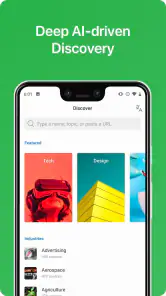
One of the standout features of Feedly is its customization capabilities. You can add any website that has an RSS feed, and voila, it’s added to your personalized news stream. Whether you're into tech, fashion, sports, or even niche topics like vintage car restoration, Feedly has you covered. I found this especially useful because it means I no longer have to hop between different apps and websites to get my daily news fix.
There is a useful trade-off here: a carefully chosen source list can reduce dependence on whatever a broad news app happens to surface, but it places more of the discovery work on me. RSS availability matters too. If a site I like doesn’t provide a feed, I can’t assume it will fit into this workflow in the same way as a feed-enabled publication. I get the best results by adding sources gradually, then removing ones that rarely offer something I want to read.
When discovery matters more than control
Compared with a mainstream news app that selects a broad mix for me, Feedly gives more weight to my own source choices. That is a real advantage when I follow specialist publications or want a steady view from sources I already trust. The trade-off is that I may miss worthwhile voices I haven’t found yet. I’d use a curated news app when I want an easy overview of major stories, and Feedly when I want a reliable place to check my own reading list. A publisher’s app can be better still if I care about its particular presentation or features more than combining sources.
That difference also shapes how I’d use it for research. If I’m tracking a topic for a project, I can gather relevant feeds in one area and check them during a planned reading session. I would not assume that an organized feed is a complete picture, though: it reflects the sources I selected, not every perspective on the subject. For a balanced understanding, I still need to seek out missing viewpoints rather than mistake convenience for comprehensiveness.
User Experience
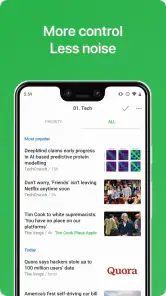
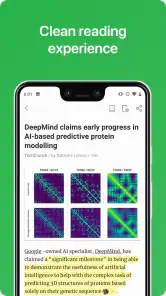
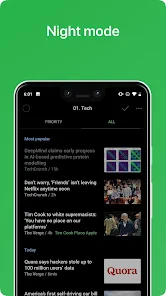
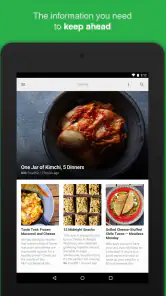
The user interface is clean and intuitive. Navigating through the app is a breeze, and the dark mode option is a lifesaver for late-night reading sessions. I appreciated the option to save articles for later, which is perfect for those busy days when I don't have time to read every interesting headline I come across.
One small habit makes saved articles more useful: I try to open the queue when I have a genuine reading window and clear out pieces that no longer matter. Otherwise, “read later” can turn into a backlog that feels like another task. If you mainly want an app to deliver a fully selected mix of popular stories with almost no setup, a conventional editorial news app may be the easier choice. Feedly is more appealing when control over sources matters more than automatic recommendations.
Keeping a useful reading queue
I’d make the save function work like a temporary holding area, not a permanent archive. When I save an article, I can have a simple reason in mind: read it at lunch, return to it for a work question, or share it with someone. If that reason disappears, removing the item is sensible. This keeps the queue from becoming an intimidating count of unfinished reading and makes the app feel lighter to use.
There is a small but important judgment call when saving: an interesting headline is not always an article I want to spend time on. I’d save selectively, then use a dedicated note-taking or bookmarking tool if I need durable research records or detailed annotations. Feedly’s strength is the flow from source to reading decision; it need not replace every tool I use to manage information.
Integration with Other Tools
Feedly doesn’t just stop at being a news aggregator; it also integrates seamlessly with other productivity tools like Evernote and Pocket. This feature allows me to save and organize my articles efficiently, helping me keep track of everything I find interesting without breaking a sweat.
Moreover, for those who love sharing news, Feedly makes it easy to post articles directly to social media or send them to friends via email.
Sharing without losing the source
Sharing is most useful when I send an article with a sentence explaining why I think the other person might care. A link alone can feel like extra noise, while a quick note gives it context. I’d also check that the story itself says what I think it says before passing it along; a headline skim can miss qualifications in the article. Feedly makes sharing part of the reading workflow, but the care I take with the recommendation still matters.
For someone who already keeps reading notes elsewhere, connections to tools such as Evernote or Pocket can help separate “I want to read this” from “I want to keep this.” That distinction prevents the saved queue from carrying two jobs at once. I would choose whichever destination matches my habit rather than sending every item everywhere, since extra handoffs can add friction instead of saving time.
Costs, limits, and who should choose it
The app is free to start, with in-app purchases ranging from $7.99 to $69.99 per item. I’d begin with the free experience and consider paying only if the available tools and limits fit a real need in my routine; there’s little reason to spend just because an upgrade exists. The content rating is Everyone, and the current version is 90.0.38, with Android support starting at 6.0.
That makes it easy to try the basic idea before deciding whether it belongs in my routine. I’d first ask whether I actually need more than the free setup provides, then compare the specific purchase option with the problem I’m trying to solve. If I only want to follow a modest group of sources and read them in one place, I would not assume that paying is necessary. If a particular limit interrupts a regular workflow, that is a more meaningful reason to look at the available purchases.
Who will get the most from it
I’d recommend it to readers who follow a mix of established publications and niche sites, and who enjoy deciding what enters their daily reading list. It is less suitable for someone who wants breaking-news alerts to do the discovery work, or who prefers one publisher’s own app and presentation. A magazine-style reader can offer more curated discovery, while Feedly’s advantage is bringing chosen feeds into one place; neither approach is automatically better, so the right choice depends on whether you value editorial selection or control.
It is especially useful for people whose interests cross several subjects. A freelancer, student, or curious hobbyist might want to keep professional reading distinct from personal interests without maintaining a separate browsing routine for every publication. On the other hand, someone who checks headlines only occasionally and has no preferred sources may get more immediate value from an app that starts with an editor-selected mix. Feedly asks for a little investment in deciding what belongs there, so it rewards readers who will actually make those choices.
User Experience
The user interface is clean and intuitive. Navigating through the app is a breeze, and the dark mode option is a lifesaver for late-night reading sessions. I appreciated the option to save articles for later, which is perfect for those busy days when I don't have time to read every interesting headline I come across.
Integration with Other Tools
Feedly doesn’t just stop at being a news aggregator; it also integrates seamlessly with other productivity tools like Evernote and Pocket. This feature allows me to save and organize my articles efficiently, helping me keep track of everything I find interesting without breaking a sweat.
Moreover, for those who love sharing news, Feedly makes it easy to post articles directly to social media or send them to friends via email.
Final Thoughts
In the world of ever-increasing news content, having a tool like Feedly to sift through the noise and present only what truly matters to me is invaluable. If you're looking to streamline your news consumption and have all your favorite sources in one place, I highly recommend giving Feedly a try. It’s not just a smarter news reader; it’s a smarter way to stay informed.
My verdict
My recommendation comes with one qualification: Feedly can organize a reading habit, but it cannot make an overloaded one manageable by itself. I’d keep the source list selective, use saved articles intentionally, and reassess the setup when the feed starts feeling like a chore. For that kind of deliberate reader, it is a practical, flexible companion; for someone who wants news chosen and packaged for them, a more editorially curated alternative will probably feel more natural.
Feedly - Smarter News Reader Frequently Asked Questions
Can Feedly help me stay updated without visiting every source separately?
Yes. Feedly brings updates from sources you choose into one reading experience, so you can browse several interests without opening each website or channel individually. You can subscribe to websites, blogs, and YouTube channels, then organize them into categories to make the collection easier to scan. It is a practical approach if you prefer one place to catch up on content you already follow.
Can I follow my favorite websites and topics in Feedly?
Feedly is designed to bring updates from sources you choose into one reading experience. You can subscribe to websites, blogs, and YouTube channels, then browse their latest content in a single feed. This makes it useful if you want to keep up with several interests without checking each source separately. You can also organize sources into categories to make the collection easier to scan.
What is Feedly and how does it work?
Feedly is a news aggregator application that allows users to organize, read, and share content from their favorite websites in one place. Users can subscribe to various news sources, blogs, and YouTube channels, and the app will aggregate all the updates in a single, easy-to-navigate feed. The platform also offers features like keyword alerts and integration with productivity tools, making it a powerful tool for both casual readers and professionals seeking to stay updated on specific topics.
Can I search for specific topics or get alerts in Feedly?
Feedly includes keyword alerts and search capabilities as part of its broader news-reading toolkit. These can help readers keep track of subjects they care about instead of relying only on a general stream of updates. The app also supports organizing sources into categories, which can make it easier to manage related topics. Some advanced capabilities may be associated with paid options, so review the purchase details before choosing them.
Is Feedly free to use, and are there any premium features?
Feedly offers a free version that provides basic features such as subscribing to news sources, organizing content into categories, and sharing articles. However, for users seeking more advanced functionalities, Feedly offers a premium subscription. The premium version includes features such as more powerful search capabilities, integration with third-party apps like Evernote and Pocket, keyword alerts, and enhanced customer support, providing a more comprehensive experience for power users. Paid in-app options range from $7.99 to $69.99 per item, so check the purchase details before subscribing.
Pros
- User-friendly interface enhances reading experience.
- Seamless integration with various news sources.
- Customizable feeds and categories.
- Offers offline reading mode.
- Syncs across multiple devices.
Cons
- Occasional sync issues reported.
- Limited free version features.
- Ads in the free version may be intrusive.
- Requires internet for initial setup.
- Some users find navigation unintuitive.
- Category
- News & Magazines
- Version
- 90.0.38











