Eventbrite App
- 31.14K
- 4.9
- Installs
- 10.00M
- Price
- Free

Screenshots


Analysis by Reviewed
I use Eventbrite when I want to find something to do beyond the places and activities I already know. It’s an entertainment app from Eventbrite, and its focus is practical: browse events, decide whether one suits you, and keep track of tickets in the same place. That makes it most useful when I have an open evening or weekend and want ideas, rather than when I already know exactly where I’m going.
Decide whether discovery is what you need
Before relying on any event app, I’d ask myself whether I enjoy browsing or prefer to make a plan first and search for a specific event. Eventbrite suits the browsing approach: you can explore by interests and look for activities that might not have occurred to you. If you usually decide on a concert, class, or gathering through a venue’s own page or a friend’s recommendation, it can still be handy as another place to check, but it may not need to become your main planning tool.
The app is free, rated for Everyone, and has a 4.9 average from around 199,000 ratings. It has passed 10 million installs, and its current version is 10.39.0, with Android 8.0 as the minimum operating system. Those figures suggest a well-established option, but they don’t tell you whether the events near you match your interests. I’d treat the first few searches as a quick test of local relevance before building a routine around it.
I’d make that test specific rather than judging the app after one broad search. Try an interest you genuinely follow, then try a different kind of activity you would consider if the timing and location were right. That gives you a better sense of whether the results offer useful variety or simply repeat the same kinds of listings. If you are searching for something to do with a particular person, think about their preferences too; a good discovery result is only good if it works for the people you are inviting.
Find events that fit your plans
With Eventbrite, it’s all about tailoring the experience to your interests. Whether you’re into music festivals, tech conferences, yoga classes, or food truck rallies, this app has got you covered. The app allows you to search for events by your favorite categories, ensuring you never miss out on anything you love.
How browsing works in practice
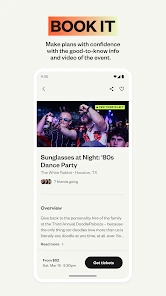
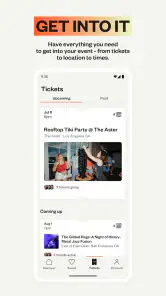
One of the first things you'll notice after downloading the app is its sleek and intuitive design. Navigating through the different sections feels natural, and you can easily switch between browsing events and managing your tickets. The user interface is clean and uncluttered, making it a breeze to find what you’re looking for.
For a realistic use, imagine finishing work on Friday with no plans. I’d browse by a couple of interests, compare the event details that matter to me, and save the promising option for a closer look before committing. That small pause is worthwhile: a listing that sounds appealing at a glance still needs to fit your schedule, location, and idea of a good night out. If I’m coordinating with friends, I’d share the event details before buying so we can agree on the plan rather than sort it out after tickets are purchased.
More From Our News Desk

Weather by Xiaomi Review: Clear at a Glance, Less Clear Up Close

X Under Pressure: Can It Recover When Posting Goes Wrong?

Clash of Clans Is Won Between the Battles

Android Auto Makes the Case for Quieter Car Software

MobiOffice: Transforming Mobile Productivity with Seamless Integration

EA SPORTS FC™ Mobile Soccer: Redefining Mobile Sports Gaming
When comparing listings, I’d focus on the practical details that determine whether an event is genuinely workable: when it takes place, where it is, and what the listing says the experience involves. A title alone can make two events sound similar when their formats or audiences may be quite different. I also wouldn’t treat a promising description as a substitute for checking the organizer’s information. This is a small but useful habit when you are choosing between an unfamiliar event and something you already know you enjoy.
Use recommendations as a starting point
What makes Eventbrite stand out from the crowd is its ability to offer personalized recommendations based on your preferences. As you engage with the app, it learns your tastes and suggests events you might be interested in. It's like having a personal assistant who knows exactly what you love!
Recommendations are most helpful when I treat them as a discovery tool, not a complete agenda. I’d use them to spot a new kind of local activity, then search deliberately for other options before choosing. If suggestions begin to feel repetitive or don’t reflect what I want to do this week, switching back to a direct search is a sensible way to stay in control. A recommendation can surface an idea; it can’t decide whether the timing and practical details work for you.
There is also a useful distinction between browsing for inspiration and searching with a firm constraint. If I have a free afternoon and just want ideas, recommendations can help me break out of my usual routine. If I need an event on a particular day or close to a specific destination, I’d start with those requirements and judge results against them instead of scrolling simply because the feed offers more options. The app is more useful when I bring a clear decision to it, even if that decision is only “something relaxed” or “an activity I can do with a friend.”
Keep ticket decisions organized
No more fumbling with paper tickets or worrying about losing them. With Eventbrite, purchasing tickets is seamless. You can complete your purchase in just a few taps and your tickets will be stored directly in the app. Plus, it supports multiple payment options to make the process as convenient as possible.
Keeping tickets in the app makes the most sense if you expect to return to it for event information and ticket management. I’d check that the right event and date are selected before completing a purchase, especially when comparing similar listings. If you’re buying for a group, settle who is attending and who is handling the booking first; that avoids confusion about whose account holds the tickets. For a one-off event discovered elsewhere, the organizer’s own ticketing route may be simpler, so I wouldn’t assume every outing needs to start here.
For a group plan, I find it helpful to separate the decision to go from the act of buying. First agree on the event and the people who are attending; then have one person handle the booking and tell everyone how the tickets will be managed. That keeps an enthusiastic early purchase from becoming a last-minute conversation about who has access to what. If plans are uncertain, take the time to read the event’s own terms and details before committing rather than assuming every ticket works the same way.
Know when updates matter
Never miss an update again with Eventbrite’s notification feature. The app keeps you informed about any changes to events you’re attending, like time adjustments or venue changes. Simply enable notifications, and you’ll be in the loop without needing to constantly check the app.
Notifications are useful when a plan could change, but they work best alongside a quick check of the event details before leaving home. That is a practical habit for any ticketed outing, particularly if you’re travelling across town or meeting other people. If alerts feel distracting, I’d keep them focused on events I’m actually attending rather than letting event discovery interrupt the day.
That balance matters if you browse often but only book occasionally. Discovery is something I want to dip into when I have time; a change to an event I’ve chosen is something I would rather not miss. Keeping those two needs separate makes the app feel more like a planning aid and less like another source of noise. Before setting out, I’d still confirm the final details in the event information, especially if the trip involves coordinating transport or meeting a group.
Where other sources can be better
Eventbrite is strongest as a broad event-discovery and ticket-management option. A venue’s calendar can be better when you already know which place you want to visit; a local community group may be more useful for informal gatherings; and a general search can be quicker when you only need one specific answer. These alternatives aren’t automatically better, but they can offer a more direct route depending on how you plan.
The main trade-off is that a wide selection can take time to sift through, and the usefulness of discovery depends on what is happening in your area. I wouldn’t choose it as a replacement for every local listing source, or expect recommendations to anticipate every preference. Instead, I’d compare the details of a promising event and use the app where its combination of browsing and ticket access saves effort.
Compared with social feeds, the advantage here is having event discovery and ticket handling connected rather than relying only on posts that happen to reach you. A feed can be a better way to hear about a small gathering through people you know, while Eventbrite is a stronger place to browse across different interests. Neither route is complete on its own: a practical approach is to check the app for possibilities and use the organizer or venue’s own information when you need to verify the specifics of a particular plan.
It is also worth choosing the source that matches the event’s scale and formality. For a venue you visit regularly, its own calendar may be faster and easier to follow. For a neighborhood get-together organized informally, a community group or a personal invitation may give you more relevant context. Eventbrite earns its place when you want to explore beyond those familiar channels, not because every event should be listed or discovered in the same way.
Who gets the most from it
I’d recommend Eventbrite to people who enjoy trying new activities, want a single place to browse and keep track of tickets, or often need ideas for a free evening. It can also help when you’re new to an area and don’t yet have a familiar list of venues and organizers. Someone who rarely attends events, already follows a few trusted organizers, or prefers planning entirely through a venue may get less value from adding another app.
It is particularly suited to flexible planners: people who can choose between a few possible activities and are happy to discover something beyond their standard routine. It may be less satisfying if your plans depend on a very narrow niche, if you only want to follow one venue, or if you prefer every arrangement to happen through direct conversations with organizers. I’d keep expectations grounded: its value is not that it removes the need to make a decision, but that it gives you another way to find and manage options.
If you are new to event apps, there is little need to reorganize your whole social life around it. I’d start by searching for one upcoming occasion, such as a weekend activity, and see whether the available listings are both relevant and easy to assess. If the results help you find something you would not otherwise have considered, keep it as a discovery tool. If you already have a reliable source for the events you attend, using it only when you want fresh ideas is a perfectly sensible middle ground.
Eventbrite was released on January 25, 2012, and its 31,000 reviews add more context to its large audience. I see that history as a reason to consider it, not a guarantee that every listing will suit every person. The app is free, so trying a few searches is a low-commitment way to see whether its local results are useful to you.
Make it part of a routine only if it helps
Switching to a new event app has a small but real cost: you need to learn where its discovery and ticket sections are, decide whether its results suit your area, and remember to check it alongside the sources you already use. I wouldn’t move all my planning into it on day one. A gradual approach is easier: use it for one search, then keep it if finding an option or returning to a ticket feels simpler than your usual route.
People often wonder whether they need to use it for every ticket. I wouldn’t. It makes most sense when you discover an event there or want the convenience of keeping the booking connected to your event browsing. If you already have a direct route to a particular venue or organizer, continuing to use that source may be more straightforward. The right choice depends on whether you value broad discovery for that plan or simply want to complete a familiar booking.
Another practical question is whether it is worth opening when you do not have a fixed plan. That is exactly when I find event discovery most useful, provided I set a loose boundary first: a type of activity, a time window, or a reasonable travel area. Without any boundary, browsing can turn into an endless comparison. With one, the app can help turn an empty evening into a short list of plausible choices, while leaving the final call to you.
For a specific event, I’d also ask whether the app is giving me enough context to decide. If the listing leaves me unsure about the schedule, location, or what to expect, I would look at the organizer’s details before buying rather than filling in the gaps myself. That isn’t a reason to avoid the app; it is a sensible way to use an event marketplace where each listing represents a different organizer and experience.
My recommendation
In a nutshell, Eventbrite is a must-have for anyone looking to explore new events and streamline their social calendar. It’s user-friendly, offers personalized recommendations, and makes managing events a hassle-free experience. Whether you’re planning your weekend or just looking for something fun to do, this app has you covered!
My recommendation is a little more conditional: I’d install it if I like browsing for activities, want ticket access close to event discovery, or have recently moved and need more ways to find things happening nearby. I would not make it my only source for every outing, and I would not expect recommendations to replace checking a listing carefully. Used alongside a venue calendar, local group, or organizer page when appropriate, it is a useful free option for turning “I should do something” into a concrete plan.
Eventbrite App Frequently Asked Questions
Can I browse events by location in Eventbrite?
Yes. Eventbrite is designed to help you discover events, and searching by location can make it easier to see what is happening near you. You can also explore different categories and review event pages to decide which options fit your plans. Results and available events can vary by area, so checking the details for each listing is a useful step before booking.
Who develops Eventbrite, and what kind of app is it?
Eventbrite is an entertainment app developed by Eventbrite. Its focus is helping people discover events and find new things to do, from local activities to larger gatherings. It can be useful when you are looking for ideas as well as when you already have a particular event in mind. Eventbrite has a 4.9 average rating from around 199,000 ratings.
Do I need an Eventbrite account to browse events?
You can use Eventbrite to explore events and get a sense of what is happening nearby before deciding whether to attend. Creating an account can make it easier to manage bookings and keep track of events you have chosen. If you plan to buy a ticket or RSVP, check the app’s prompts and the event details so you know what information is needed.
What is Eventbrite and how does it work?
Eventbrite is a versatile platform that allows users to discover local events, ranging from concerts and workshops to conferences and social gatherings. Users can search for events by location or category, purchase tickets directly through the app, and receive personalized event recommendations based on their preferences. Additionally, event organizers can use Eventbrite to manage and promote their events seamlessly.
Is Eventbrite free to use for attendees?
Yes, Eventbrite is free for attendees to use. Users can browse events, receive recommendations, and RSVP or purchase tickets without any charge for the app itself. However, some events may have ticket fees, which are determined by the event organizers. Eventbrite may charge a small fee for ticket processing, but this is usually included in the ticket price.
Pros
- Easy to navigate interface
- Wide variety of events listed
- Option to save favorite events
- Seamless ticket purchasing
- Event reminders available
Cons
- Occasional app crashes
- Limited offline functionality
- Some events have hidden fees
- Inconsistent event updates
- Requires account to access features
- Category
- Entertainment
- Version
- 10.39.0











