Easy Voice Recorder
- 35.81K
- 4.7
- Installs
- 50.00M
- Price
- Free
Screenshots
Analysis by Reviewed
I treat a voice recorder as a small trust decision: it may capture a private thought, a work discussion or a classroom explanation, so I want to know what I’m choosing before I press record. Easy Voice Recorder is a free productivity app from Digipom, and its simple, direct approach suits people who want to make a recording without first learning a complicated audio suite. Its 4.7 average from around 612,000 ratings and more than 50 million installs suggest it has found a broad audience, though popularity alone is not a reason to record sensitive conversations without care.
What to check before recording
A microphone is central to any voice recorder, but I still recommend checking the permission prompt on your own device and granting access only when you’re ready to use the app. I would also look through the app’s current privacy information and Android settings before recording anything confidential. Those are sensible checks for any recorder; I wouldn’t assume that a recording stays on the phone, uploads automatically or is handled in a particular way without verifying the relevant controls yourself.
That matters in ordinary situations, not just high-stakes ones. If I’m capturing a quick reminder for myself, I can keep the recording short and give it a clear name. For a meeting or interview, I’d first tell the other people and get permission where appropriate. A recording can preserve useful details, but it can also capture someone who did not expect to be recorded. The app makes starting easy, so the responsibility to pause and consider context belongs to me.
Simple recording, with choices to make
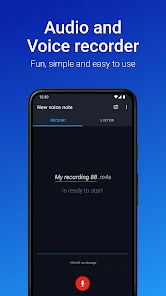
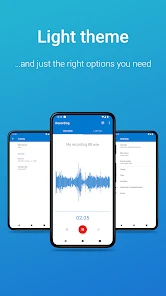
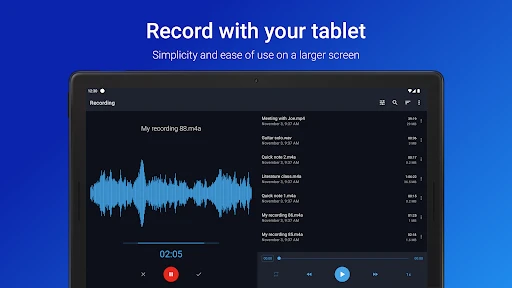
First things first, let's talk about its design. Opening the app for the first time feels like a breeze. The interface is super intuitive—no clutter, just straightforward options that make recording a cinch. You know how some apps make you feel like you need a degree to use them? Not this one! The big red button is all you need to start capturing those sweet sounds around you. It's simplicity at its finest. Plus, navigating through your recordings is as easy as pie.
Choosing a recording approach
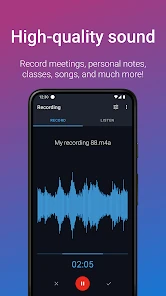
Now, onto the quality aspect. One word: superb! The recordings are crystal clear, and you can even choose the format and quality of your recording. Whether you want high-quality audio for a professional setting or something lighter to save space, the app lets you tweak the settings to your liking. And let's not forget about the noise reduction feature, which is an absolute godsend when you're in a noisy environment. It’s like having a professional-grade recorder, but without the hefty price tag.
Those settings are most useful when I decide what the file is for before recording. A short personal memo does not need the same quality choice as a discussion I may want to review carefully, and a lighter setting can be a practical trade-off when storage matters. I’d test the sound in the actual room first: noise reduction cannot make a distant speaker or loud background disappear, and a quick test helps me adjust where I place the phone before an important take.
Sharing and organizing recordings
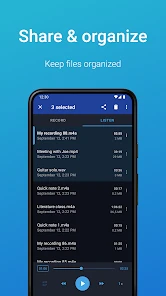
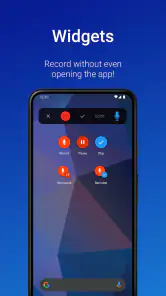
What sets this app apart are its nifty features. You can easily share your recordings via email or your favorite messaging app, which is super convenient. Need to trim a recording? Done. Want to set up automatic uploads to your cloud storage? You got it. The app even supports Android Wear, so you can record directly from your smartwatch. It’s like they thought of everything! Also, the ability to pin recordings to your home screen for quick access is a small but mighty feature that I absolutely love.
You May Like

Clash of Clans Is Won Between the Battles

Android Auto Makes the Case for Quieter Car Software

MobiOffice: Transforming Mobile Productivity with Seamless Integration

EA SPORTS FC™ Mobile Soccer: Redefining Mobile Sports Gaming

How Microsoft OneDrive Became a Mobile Productivity Giant

How Google Translate Breaks Language Barriers Effortlessly
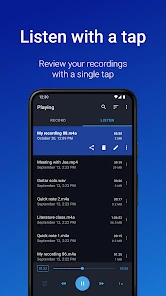
Another neat aspect is the ability to organize your recordings. You can tag and color-code them, making it super easy to find what you need when you need it. No more scrolling endlessly through a list of unnamed files!
For a useful routine, I’d name a recording right after stopping, then add a tag or color that identifies its purpose—such as a class, an interview or a personal reminder. That small habit matters more than it sounds: trimming can remove a quiet lead-in or dead air, but it will not rescue a file I can no longer identify. If I use cloud uploads, I’d also check what destination I selected and whether it is appropriate for the content before relying on it as my only copy.
Small workflows that make the recorder more useful
I find a recorder works best when it has a defined job rather than becoming a dumping ground for every sound. For example, after a planning conversation, I might record a short recap to myself: the decisions, the next action and anything I need to check. That keeps the file focused and makes it easier to revisit than a long, unedited recording. I would avoid putting names or sensitive details in a file title if the phone’s screen might be visible to other people; a simple project label can be enough to find it later.
Home-screen pinning can help when one recording is temporarily important, such as a pronunciation practice clip or a note I need to replay during a task. I’d treat that as a shortcut, not a filing system: once the item is no longer current, I’d remove the shortcut and keep the recording organized with the rest. Likewise, color-coding becomes more useful when I settle on a small, consistent scheme instead of assigning colors casually. A few stable meanings—work, study and personal—are easier to remember than a new code for every file.
Where it fits—and where it doesn’t
I’d recommend this app to someone who wants a dedicated recorder for voice notes, lessons, brainstorming or a permitted conversation, especially if they value a fast start and simple organization. Imagine leaving a lecture with a few key points still unclear: I could record a brief follow-up thought outside the room, label it for that course and revisit it while studying, rather than trying to remember what I meant later. For a long interview, though, I’d test the phone’s placement, available space and sound quality in advance instead of assuming a pocket recording will be clean.
Compared with the basic recorder that may come with a phone, its appeal is the extra organization and workflow options; compared with a full audio editor, it is less about detailed production and more about capturing and finding spoken material. That makes it a poor fit if I need extensive editing, dependable transcription, or a professional multi-microphone setup. I’d choose a dedicated transcription or audio-editing tool for those jobs rather than expect a straightforward recorder to do everything.
A realistic day with voice notes
One practical routine would be to use it for small pieces of information that otherwise disappear between tasks. On the way home, I might dictate a shopping reminder, then make a separate note about an idea for tomorrow instead of mixing both into one long file. If I’m studying, I could record a question immediately after a lesson and tag it for the right subject, then listen back when I sit down to review. The important step is to stop and label each clip while I still remember why I made it.
For an in-person conversation, I would use a different standard. I’d ask first, place the phone where it can capture voices clearly, and make a brief test recording before relying on a longer one. If the discussion includes confidential information, I’d decide beforehand whether recording is appropriate at all and whether sharing or automatic cloud upload fits the situation. Those choices are more important than squeezing every possible feature out of the app.
Practical details and a cautious verdict
The app is free to download, with in-app purchases ranging from $1.49 to $4.99 per item. It is rated for Everyone, and version 2.9.4 requires Android 9 or later. It first appeared on February 15, 2012, and Digipom continues to offer a focused tool rather than a broad productivity suite. If you’re deciding whether to pay for anything, I’d first use the free version for your actual routine and check which options you need; there’s little value in buying extras just because they are available.
Questions I would settle before relying on it
Can I use it for a quick note without setting up a complicated workflow? That is where its straightforward recording and organization approach is appealing. Can I count on a recording for an important interview without testing first? I would not. Room acoustics, distance from the speaker and the phone’s position all affect what you can understand later, so I’d make a short test and listen back before the real session.
What about finding a clip days later? I’d rename it promptly and use tags or colors consistently, rather than trusting myself to remember a vague filename. And if I want to share a recording, I’d choose the recipient and destination deliberately, especially if other people’s voices are in it. For automatic uploads, I’d verify the selected cloud destination and consider whether that workflow suits the recording; convenience should not replace a conscious choice about sensitive material.
Should someone choose this over a transcription app or an editor? I’d choose it when the main goal is to capture speech and retrieve it later. If the next step is turning speech into searchable text, making precise edits or mixing multiple sources, a more specialized option is a better match. A recorder can be a dependable first step in a workflow without being the entire workflow.
Final Thoughts
In a nutshell, the app is a fantastic tool for anyone who needs a reliable and high-quality voice recording app that's packed with useful features. It's easy to use, versatile, and won't leave you fumbling around trying to figure out how to make a simple recording. If you haven't tried it yet, I highly recommend giving it a go. Who knew recording could be this easy and fun?
My recommendation is strongest for people who want an uncomplicated way to capture and sort spoken notes, and more cautious for anyone handling private or work-sensitive audio. Before an important recording, I’d confirm the permission choices, try a short test, check the saved file and decide where it should be stored or shared. That little bit of care makes the app’s convenience more useful—and helps me choose a more specialized tool when the job calls for one.
Who will get the most from it
I’d particularly point this toward students who want to preserve their own follow-up thoughts, people who dictate reminders while their hands are busy, and anyone who regularly needs to keep short spoken notes in order. The tagging and color choices reward a little consistency, so it suits someone willing to spend a moment filing a clip after recording. It is less compelling for a person who only makes a voice memo once in a while and is already happy with the recorder built into their phone.
I would also skip it as my main tool for a formal production workflow. Recording is only one part of that work: precise editing, transcription, noise cleanup beyond what a simple setting can manage, or a multi-microphone arrangement calls for tools designed around those tasks. Easy access and straightforward organization are the strengths here, not a promise that every audio job belongs in one app.
A careful recommendation
My overall view is positive, with a practical condition: treat each recording as a file you will need to identify and handle responsibly later. A test clip, a meaningful name and a deliberate decision about sharing take little effort, yet they prevent common frustrations such as muffled speech, forgotten context or sending audio to the wrong place. For personal notes and everyday spoken reminders, that is a sensible balance of convenience and control.
If you want a low-friction Android recorder with more ways to organize clips than a barebones option, this is an easy one to try. I would keep looking if transcription, advanced editing or strict handling of sensitive recordings is central to the job. Used for the tasks it suits, it feels like a focused tool rather than an all-purpose audio studio—and that is exactly why I’d recommend it to the right person.
Easy Voice Recorder Frequently Asked Questions
Can I use Easy Voice Recorder to capture a lecture, meeting, or personal reminder?
Easy Voice Recorder is intended for everyday audio recording, so it can be useful for capturing spoken information such as a lecture, meeting, or personal reminder. Before recording other people, make sure you follow any applicable rules and get permission when needed. The app is focused on recording and keeping audio, rather than providing a complicated editing workflow.
Is Easy Voice Recorder suitable for quick, everyday recordings?
Yes. Easy Voice Recorder is a productivity app designed as an everyday companion for capturing important moments. Its straightforward focus makes it a practical choice for recording a personal reminder, a thought you want to revisit, or spoken information you need to keep. It is aimed at users who want a dedicated recording app rather than a complicated audio-editing workflow.
Who develops Easy Voice Recorder, and is it intended for general audiences?
Easy Voice Recorder is developed by Digipom and is rated Everyone, so it is presented for a broad audience. The app is focused on recording audio for everyday purposes, such as saving personal notes or keeping a record of spoken information. Its simple, practical purpose makes it relevant to students, professionals, and anyone who wants to capture a moment in audio.
What is Easy Voice Recorder and what are its primary features?
Easy Voice Recorder is a user-friendly application designed for easy audio recording on Android and iOS devices. Its primary features include high-quality audio recording, MP3 recording support, easy sharing options, and the ability to manage and organize recordings efficiently. It caters to various needs, from recording personal notes to capturing lectures or meetings.
How does Easy Voice Recorder handle background noise during recording?
Easy Voice Recorder offers features to minimize background noise, ensuring clear audio quality. It includes options for noise and echo reduction, which are particularly useful in environments with ambient disturbances. While it does not eliminate noise entirely, it significantly enhances the clarity of the recordings, making it ideal for professional or personal use.
Pros
- High-quality audio recording
- User-friendly interface
- Supports multiple formats
- Unlimited recording duration
- Background recording feature
Cons
- Limited editing options
- Ads in free version
- No transcription feature
- Limited cloud sync options
- Paid features can be costly
- Category
- Productivity
- Version
- 2.9.4













