Easy Metronome
- 2.53K
- 4.9
- Installs
- 1.00M
- Price
- Free

Screenshots
Analysis by Reviewed
I like a metronome best when I can start a practice session without turning setup into its own task. Easy Metronome is built around that simple idea: give me a steady reference, let me shape it to the music, and stay out of the way once I begin playing. It suits focused practice more than elaborate music production, and that distinction is what makes it useful.
A practical fit for everyday practice
In a typical session, I might set a comfortable pulse for scales, then slow it down when a tricky passage starts to rush. A clear beat can reveal whether the problem is a difficult fingering or simply uneven timing. I also find a metronome useful when rehearsing alone: keeping the pulse consistent makes it easier to notice where I lose confidence, rather than letting each repetition drift at a different speed.
For a beginner, a steady click is a low-pressure way to build a sense of timing. For an experienced player, it can help make practice more deliberate. I would not treat it as a substitute for listening to other musicians, though. A metronome gives you a fixed pulse; it does not teach you how to respond to a band, shape a phrase, or make expressive timing choices.
Simple controls, with room to adjust
Easy Metronome is a music and audio app from Digipom. Its straightforward approach is a real strength when I want to begin quickly rather than browse through a crowded collection of tools. The app has a 4.9 average from around 26,000 ratings, and it has been installed over a million times. Those figures suggest that its uncomplicated purpose resonates with plenty of musicians, though popularity alone is not a reason to choose it.
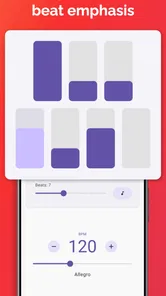
The practical question is whether the controls suit your instrument and routine. Changing the beat pattern or accent can make a pulse easier to follow, while choosing a different click sound may help if one tone becomes irritating during a long session. Saving settings is useful when I return to the same exercise: it cuts down on setup and helps me keep the focus on playing. A small tip is to choose a sound that remains distinct from your instrument without being so sharp that it becomes tiring.
Making the beat useful, not just audible
A metronome becomes more revealing when I use it to diagnose a specific habit instead of leaving it on for an entire practice. For example, I can play a scale while paying attention to whether the notes land evenly between clicks, then switch to a passage where I tend to hurry. If the timing falls apart at the same spot each time, that tells me where to slow down and listen closely. The click is most helpful when it gives me information about my playing, not when it merely fills the room with sound.
I also like to separate technical practice from musical phrasing. For a repeated exercise, a stable beat helps me compare one attempt with the next. For a song that needs flexibility, I can use the metronome to establish the underlying pulse, then turn it off and decide whether the phrase still feels natural. That approach avoids treating every musical moment as if it must be mechanically uniform.
More From Our News Desk

Weather by Xiaomi Review: Clear at a Glance, Less Clear Up Close

X Under Pressure: Can It Recover When Posting Goes Wrong?

Clash of Clans Is Won Between the Battles

Android Auto Makes the Case for Quieter Car Software

MobiOffice: Transforming Mobile Productivity with Seamless Integration

EA SPORTS FC™ Mobile Soccer: Redefining Mobile Sports Gaming
Where a basic metronome may not be enough
The pared-back feel that makes this app approachable may not satisfy everyone. If you want a complete practice system with lessons, recordings, notation, or detailed progress tracking, a dedicated music-learning app is a better fit. Likewise, players who need a metronome integrated into a recording or arrangement workflow may prefer a desktop tool or a broader music-production app. Easy Metronome is most compelling when the task is simply to hold a pulse and get on with playing.
It is also worth thinking about how you practise. A click can make a passage more controlled, but relying on it for every repetition may leave you less prepared to keep time on your own. I like to use it as a reference rather than a crutch: work with the beat, then try a run without it and see whether the rhythm holds. That small change turns a convenient click into a more useful test of internal timing.
One realistic use is a short session before leaving for a rehearsal. I can pick a passage that tends to speed up, set a manageable pulse, and repeat it steadily before packing my instrument. If I have only a few minutes, a simple interface matters more than a long feature list. On the other hand, if I am practising with other people, I would use the app for individual preparation rather than assume a phone click will be audible or convenient for everyone in the room.
Choosing a tempo that helps rather than frustrates
When a passage feels difficult, I find it tempting to set a tempo that is only a little slower than performance speed. That can make each repetition tense without giving me room to notice what is happening. I get more from choosing a pace where I can play cleanly, then raising it only after the rhythm and movement feel settled. This is a practical way to use tempo changes as a learning aid instead of turning them into a test of patience.
For a longer session, I would also avoid making every exercise use the same beat sound and accent pattern. A click that works well for a quiet instrument may disappear under a louder one, while a piercing tone can become tiring when repeated. Trying a different sound or accent can make the pulse easier to distinguish, but the best option is the one I can follow without straining. If I still cannot hear it clearly, the issue may be the room or the playback setup rather than the tempo itself.
Getting Started with Easy Metronome
Right off the bat, the first thing I noticed about Easy Metronome is how straightforward it is to get started. You know how some apps overwhelm you with options and settings? Well, not this one. As soon as you open it, you're greeted with a simple interface that even a complete newbie can navigate with ease. Whether you're a professional musician or someone who just likes to jam out in your bedroom, this app scales beautifully to meet your needs.
Features that Stand Out
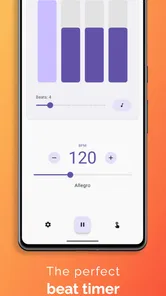
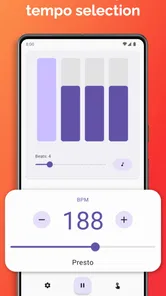
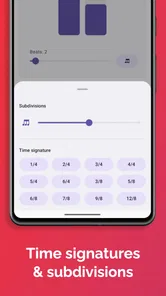
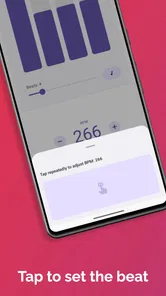
One of the standout features is its wide range of tempos – from a slow 30 beats per minute to a rapid 250. It’s like having a personal conductor who’s always ready to go, no matter what speed you need. I particularly love how you can adjust the beats per measure and even add accents on specific beats. This is super helpful when you're working with complex time signatures or preparing for a challenging piece.
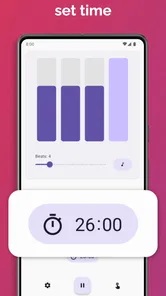
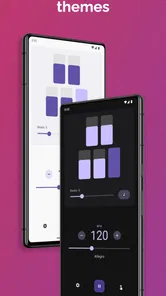
Another cool feature is the visual beat indicator. It not only helps you hear the beat but see it too, which is a boon when you're trying to internalize complex rhythms. Plus, the app’s ability to save your favorite settings means you don’t have to fiddle around every time you open it up.
Using settings with intention
Saved settings are especially handy when I alternate between very different tasks, such as warming up with a regular pulse and working through a passage with a particular accent. Rather than rebuilding the setup each time, I can return to a familiar arrangement and spend the session playing. I would still check the selected beat pattern before starting: a saved choice is convenient, but it only helps if it matches what I intend to practise that day.
The visual cue has a different kind of value from the sound. It can help when I am learning a rhythm and want another way to follow the pulse, or when surrounding noise makes listening less comfortable. But I would not rely on looking at the screen while playing a part that needs close attention. A useful routine is to glance at the indicator during a count-in, then focus on the instrument and listen for the beat once the exercise is underway.
User Experience
Using Easy Metronome feels intuitive and, dare I say, fun. The app doesn’t just stick to the basics but offers a range of customization options. You can change the sound of the beat to match your preference – whether it's a classic click, a drum, or even a beep. This is particularly nice if you find certain sounds annoying after a while (which I definitely do!).
Moreover, the app is lightweight and doesn’t drain your battery, which is always a plus when you're on the go. I’ve used it in countless practice sessions and it's never let me down.
What to expect from a phone metronome
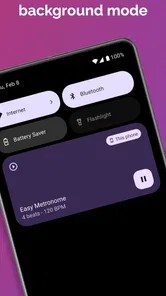
A phone is an appealing place for a metronome because it is already close at hand, and the visual beat indicator adds something a small physical device may not offer. The trade-off is that the phone is still a general-purpose device: notifications, other audio, or simply having it packed away can interrupt a focused session. I prefer to place it where I can see the cue without needing to pick it up between repetitions, then leave the screen alone while I play.
Against a basic physical metronome, this app is easier to carry and gives me sound choices and saved settings without another item in my case. A physical unit can be the better choice if I want a dedicated control surface or do not want my phone involved in practice. Against a full-featured music app, Easy Metronome is less of a workstation and more of a direct tool. That narrow role is an advantage for quick practice, but it is not a replacement for recording, arranging, or structured lessons.
Cost and who should choose it
The app is free to download, with optional in-app purchases priced from $1.49 to $1.99 per item. It is rated for Everyone, so it is accessible to a broad audience. Version 1.3.4 is the current release, and the app first appeared on August 14, 2023. I would start with the free version and decide whether any paid option is worthwhile only after the basic routine feels right for you.
For a new player, the useful question is not whether a metronome can fix timing by itself, but whether a steady reference makes practice easier to organize. For someone returning to an instrument after a break, it can provide a simple structure for short sessions without requiring a lesson plan. More experienced musicians may value it for drills and preparation, while people who mainly want to compose, record, or analyse performances are likely to outgrow its focused purpose quickly.
Compared with a physical metronome, a phone app is easier to carry and offers a visual cue alongside the beat, but it also depends on having your phone nearby and ready. Compared with feature-heavy practice apps, this one keeps its purpose narrow. That trade-off is welcome if you want a quick tempo reference, but not if you expect coaching or a full set of practice tools.
When I would choose another tool
I would look elsewhere if a practice session depends on more than a shared pulse: for example, if I need to record a take, follow written notation, or receive guided feedback in the same place. A broader music-learning app can make sense for someone who wants lessons and progress tracking, while a desktop music-production tool is a better match for work that has to fit into an arrangement or recording. Choosing the simpler option is sensible only when the job really is to keep time.
There is also a practical distinction between practising alone and trying to use a phone click as a group cue. In a quiet room, the app can be a useful personal reference. In a rehearsal space, competing instruments may make a phone speaker hard to follow, and passing one device around is not a substitute for agreeing on tempo together. I would use it to prepare my own part, then rely on listening and communication when playing with others.
Final Thoughts
All in all, Easy Metronome does exactly what it promises – it makes keeping time easy and accessible for everyone. Whether you’re a seasoned musician or just someone interested in improving your rhythm, this app is worth a try. It's reliable, simple, and a fantastic tool for anyone looking to bring a little more harmony into their musical life.
So, next time you’re struggling to keep up with your favorite beats, give Easy Metronome a whirl. You might just find it's the missing piece in your musical puzzle.
A sensible way to decide
I would give the free version a trial during an ordinary practice session, not during a time-sensitive rehearsal where I need everything to work immediately. Try it with the instrument you actually use, check that the beat and visual cue are comfortable, and see whether returning to saved settings makes your routine smoother. If you find yourself wishing for lessons, recording tools, or more detailed practice guidance, that is a sign to choose a broader product rather than expecting a metronome to become one.
My recommendation is specific: choose this app if you want a portable, adjustable pulse for solo practice and appreciate a visual reference as well as sound. Skip it if your priority is a full music workspace, active coaching, or a dependable group sound source in a noisy room. For the everyday job of helping me practise a passage at a deliberate pace, its simplicity is the point, not a missing layer of complexity.
Easy Metronome Frequently Asked Questions
What is Easy Metronome used for?
Easy Metronome is designed to provide a steady tempo for instrument practice and live music performance. It can serve as a timing reference when you are working through a piece, developing rhythmic consistency, or preparing to perform. Its focus is on metronome functions rather than general music playback, so it is most relevant to musicians who want tempo support on a mobile device.
Who develops Easy Metronome, and is it popular with users?
Easy Metronome is developed by Digipom and sits in the Music & Audio category. It has a 4.9 average from around 26,000 ratings, with over 1 million installs. That level of adoption suggests that many users have chosen it as a mobile metronome, though the best way to decide whether it suits your routine is to try its tempo-focused features for yourself.
Is Easy Metronome free to download, and does it include in-app purchases?
Easy Metronome is free to download, so you can try it without paying an upfront price. The app also offers optional in-app purchases priced from $1.49 to $1.99 per item. Its core purpose is to provide precise tempo for instrument practice and live music performance, making it a practical option to explore if you want a metronome on your device.
Who develops Easy Metronome, and what kind of app is it?
Easy Metronome is a Music & Audio app developed by Digipom. It focuses on keeping a steady tempo for instrument practice and live music performance, rather than serving as a general music player. Its simple name and purpose make it easy to understand what you are downloading: a dedicated metronome for musicians who want timing support on a mobile device.
What platforms is Easy Metronome available on?
Easy Metronome is available for both Android and iOS devices, making it accessible for a wide range of users. Whether you have a smartphone or a tablet, you can download Easy Metronome from the Google Play Store or Apple App Store. Keep in mind that the app may require a specific version of the operating system to function properly.
Pros
- User-friendly interface
- Accurate tempo settings
- Customizable sound options
- Visual tempo indicator
- Free to use
Cons
- Limited advanced features
- Ads in free version
- No landscape mode
- Requires internet for features
- Limited sound options













