Easy Voice Recorder Pro
- 4.73K
- 4.7
- Installs
- 500.00K
- Price
- $4.99
Screenshots
Analysis by Reviewed
I judge a recorder by what happens after the first tap: can I capture a useful clip without fuss, then find it again when I need it? Easy Voice Recorder Pro is built around that simple job. Digipom’s productivity app has been around since Mar 26, 2012, and its current version is 2.9.4. That history makes it an established option, though what matters most is whether its recording and file-handling workflow suits the way you use your phone.
A focused tool, not an all-in-one note system
What I like about a dedicated recorder is that it keeps the first step uncomplicated. You can use it to capture a reminder, a thought, or a longer session without turning the task into a meeting-management project. That focus is useful when the sound itself is what you need to keep: a lecturer’s explanation, a question you want to ask later, or a melody that might otherwise slip away.
The trade-off is that a recording remains a recording. If your ideal workflow includes searchable transcripts, automatic speaker labels, or action items extracted from a discussion, a transcription or meeting app is a more suitable choice. I would also treat recording as a matter of consent and context: a convenient phone tool does not replace asking permission when that is appropriate or required.
How it fits into a normal day
One realistic use is capturing a work idea while walking between appointments. I would start a short clip, say the key point and any next step aloud, then rename or categorize it when I have a free moment. That is often quicker than typing on the move, but it only pays off if I review the clip later. For a one-line reminder that needs to appear in a task list, a notes or to-do app may be more useful.
For a class or interview, I would set the phone in a stable place, make a brief test recording, and check the playback before the important part begins. That practical check helps catch a muffled microphone or a noisy position while there is still time to adjust. It also sets a sensible expectation: recording software cannot make a distant speaker clear just because the app has audio options.
Getting Started with Easy Voice Recorder Pro
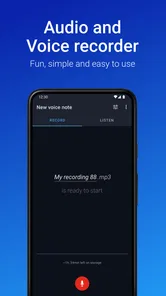
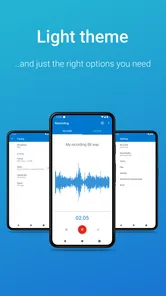
First things first, installing Easy Voice Recorder Pro is as straightforward as it gets. Available on both Android and iOS, the app is lightweight and doesn’t eat up much storage space. Once you open it, you’re greeted with a clean, intuitive interface that makes recording a one-tap affair. No more fumbling through menus when you’re in a hurry!
Recording Quality and Features
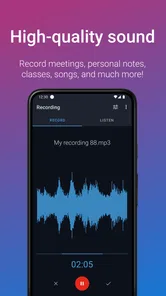
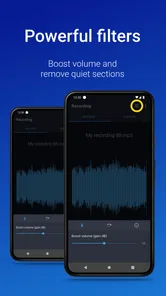
This is where Easy Voice Recorder Pro truly shines. The app supports a variety of audio formats including PCM, MP4, and AAC, ensuring that your recordings are crystal clear. Whether you’re recording a lecture, a meeting, or your own musical masterpiece, this app has got you covered. The noise reduction feature is a lifesaver in noisy environments, cutting through the chaos to bring you clear audio.
More From Our News Desk

Weather by Xiaomi Review: Clear at a Glance, Less Clear Up Close

X Under Pressure: Can It Recover When Posting Goes Wrong?

Clash of Clans Is Won Between the Battles

Android Auto Makes the Case for Quieter Car Software

MobiOffice: Transforming Mobile Productivity with Seamless Integration

EA SPORTS FC™ Mobile Soccer: Redefining Mobile Sports Gaming
One of the standout features in the Pro version is the ability to record in stereo, which is a game-changer if you’re looking for that extra bit of depth in your recordings. Plus, with unlimited recording time, you’re not constrained by pesky time limits. Just hit record and let it roll!
Choosing settings for the job
Format and recording conditions involve a practical trade-off. For a spoken reminder or a short interview, a compact format is usually easier to share and store; for music or material where preserving detail matters more, I’d test the available quality options before relying on them for an important session. Stereo can help convey space when a source moves or multiple instruments are involved, but it is not automatically better for a single person speaking close to the phone. In that situation, getting the microphone nearer to the speaker and reducing background noise can matter more than choosing stereo.
I’d also make a short test recording in the actual room before a lecture or performance. Listen back with headphones, check that voices are clear, and confirm that the phone is positioned where it will not be bumped or covered. Noise reduction can help with distracting ambience, but it cannot reliably rescue distant speech or heavy competing noise. Keeping the phone still and close enough is a simple habit that often makes a bigger difference than trying to fix a poor recording afterward.
When a phone recorder is enough—and when it is not
Compared with the basic recorder bundled with a phone, a dedicated app can make sense when you want a more intentional place for recordings and value options such as stereo or different formats. The built-in option remains hard to beat for occasional, low-stakes clips: it is already there, and there is no need to pay for a separate tool if you rarely record. The choice is less about declaring one recorder universally better and more about whether the extra workflow is useful often enough to justify it.
There is also a clear boundary between recording and audio production. A musician who wants to layer several takes, edit tracks, or apply detailed effects should use a dedicated audio workstation. Someone who needs a searchable record of a long interview may prefer transcription software. I see this app as a practical middle ground for people who want to preserve sound cleanly and manage recordings without taking on a bigger creative or administrative system.
Organizing and Sharing Your Recordings
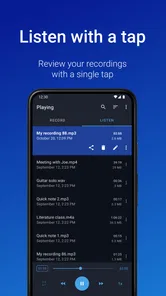
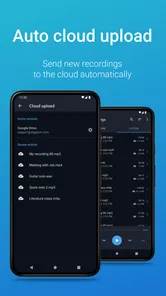
Managing your recordings is super easy with this app. You can organize your files into categories, making it a cinch to find that one recording from last week’s meeting. And when it comes to sharing, Easy Voice Recorder Pro doesn’t disappoint. You can easily share your recordings via email, messaging apps, or upload them to cloud services like Google Drive and Dropbox.
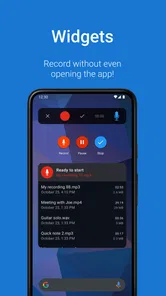
The app also offers handy widgets and shortcuts, so you can start recording directly from your home screen. It’s these little touches that really enhance the user experience, making recording as seamless as possible.
Small habits that prevent lost or confusing clips
A shortcut is most valuable when the phone is already in your hand and there is no time to search for an app. I would use it for a passing idea, then add enough context to the recording itself to identify why it matters: a project name, the person I need to follow up with, or the date of an event. That spoken context can be more useful than a vague file name when I am sorting clips later.
For recurring material, categories can serve as a lightweight filing system, but I would keep them broad enough to maintain. A separate category for every tiny topic can become more work than browsing the recordings. Before sending a clip, I would listen to its start and finish, confirm that it is the intended take, and consider whether a cloud destination is appropriate for the content. These checks take little time and reduce the chance of sharing the wrong audio or losing track of a useful file.
A few practical questions before choosing
Will it work for a long lecture or rehearsal? The app is described as allowing unlimited recording time, but a long session still depends on practical things such as available device storage and battery. I would begin with a short test and make sure the phone can stay powered and positioned safely for the whole session. That is more useful preparation than assuming a recording app can remove every device limitation.
Can I use it for music? It can capture musical ideas, and stereo may help when the sound has spatial character, but recording is not the same as multitrack production. I would use it to preserve a performance or sketch, then move to editing software if the goal is arranging or polishing several parts. For speech, a close, steady phone position is usually a better first adjustment than switching formats at random.
Is it worthwhile if I already have a recorder? That depends on frequency and friction. If you record only now and then, the built-in app is likely enough. If you often need a quick capture, categories, shortcuts, and sharing, a dedicated paid recorder may earn its place. The app has a 4.7 average from around 34,000 ratings, while its Everyone age rating indicates broad suitability; neither replaces checking whether its particular workflow matches your needs.
A realistic capture-and-review workflow
For a busy day, I’d use a home-screen shortcut to capture a quick idea without navigating through several screens, then give the file a meaningful name or place it in a category as soon as I have a moment. That small follow-up step matters: a week later, “project notes” is much easier to recognize than a collection of anonymous recordings. Before sharing a file, I’d play back the beginning and end to make sure I selected the intended take and that it contains no private conversation I did not mean to send.
Sharing is convenient, but the destination is still part of the workflow. Sending a short voice memo to a colleague is different from uploading a long class recording to a cloud account, especially if mobile data, storage, or confidentiality matters to you. I would choose the sharing method deliberately and keep a separate copy of anything important. A recorder is only one part of reliable record-keeping; organization and backup habits determine whether a useful clip is still easy to find later.
Who should choose it—and who should not
Digipom’s app is a sensible option if you regularly record spoken notes, lessons, interviews, or musical ideas and want recording controls without the extra structure of a full production suite. It has a 4.7 average from around 34,000 ratings, and more than 500,000 installs suggest it has found an audience among people looking for a straightforward recording tool. It is a paid app at $4.99, rated for Everyone, and its current version is 2.9.4; those details make it worth weighing as a focused utility rather than a free recorder you may already have on your phone.
The usual built-in recorder is still the better choice if you only capture an occasional reminder and do not need a separate paid app. At the other end, musicians who need multitrack editing, effects, or detailed production controls should look at a dedicated audio workstation. Easy Voice Recorder Pro sits between those options: more focused on recording than a general notes app, but not a replacement for editing software or transcription tools. The app has been available since Mar 26, 2012, so it is an established product; I would still judge it by whether its current workflow matches your device and habits, rather than assuming longevity guarantees every feature you want.
What its long-running presence does—and does not—tell me
A product that has stayed available over many years has had time to become familiar to users, but longevity alone is not proof that every detail will suit a newer phone or a particular recording setup. The useful evidence for me is the current version and the actual behavior on my device. Before relying on it for a one-off interview or performance, I would try the exact format and sharing route I expect to use, rather than assume an old successful workflow will behave identically in every situation.
Its current version, 2.9.4, gives existing users a concrete point of reference, but I would not infer a specific redesign or feature change from a version number alone. The practical question is whether the way I record has changed: perhaps I now need transcription, more editing control, or an easier way to collaborate. If so, even a dependable recorder may no longer be the right center of that workflow. I would watch future versions for changes that affect those needs, while treating them as possibilities until they are actually available.
Final Thoughts
All in all, Easy Voice Recorder Pro is a solid choice for anyone looking to up their recording game. It’s packed with features that cater to both casual users and audio enthusiasts alike. The app’s ease of use, combined with its powerful features, make it a must-have tool for anyone who frequently records audio.
If you’re tired of mediocre audio recording apps that promise the world but deliver little, give Easy Voice Recorder Pro a try. It’s a small investment for a big leap in your recording quality. Trust me, your ears will thank you!
My recommendation is more measured: it makes sense when you record often enough to value quick access, format choices, and a place to manage your clips. If your needs are occasional, start with the recorder already on your device; if you need transcripts or serious editing, choose a tool built for those jobs. For everyone in between, a brief test in your normal recording environment is the best way to decide whether its sound and workflow earn a place in your routine.
Easy Voice Recorder Pro Frequently Asked Questions
Is Easy Voice Recorder Pro easy to use for someone who has never used a recording app?
Easy Voice Recorder Pro is intended to make everyday audio recording straightforward, so it can suit users who want to capture a note, lecture, or meeting without learning a complicated workflow. Its interface is described as user-friendly, with tools for managing recordings after they are made. If you are new to recording apps, consider whether a simple recorder meets your needs before choosing more specialized audio software.
Can I record audio in the background while using other apps?
Yes. Easy Voice Recorder Pro supports background recording, which can be useful when you need to keep a recording going while handling another task on your device. This can help with capturing a lecture, meeting, or personal note without keeping the recorder open in the foreground. As with any recording app, check that recording is appropriate in your situation and that you have permission when needed.
Does Easy Voice Recorder Pro let me share or back up recordings?
Easy Voice Recorder Pro supports easy sharing and automatic uploading to cloud services. You can also save recordings on your device, which gives you options for keeping or sending audio files. Cloud uploading can be useful if you want recordings accessible beyond the device where they were made, while sharing helps when you need to pass a recording to someone else. Review your preferred storage and sharing workflow before downloading.
Is Easy Voice Recorder Pro compatible with my device?
Easy Voice Recorder Pro is available for Android and iOS, and the Android version requires Android 9 or later. Before downloading, check your device’s operating system version and confirm the app is available for your device in its app store. The app is intended as a straightforward recording tool, so its suitability also depends on whether you want to capture audio such as notes, lectures, or meetings.
How much does Easy Voice Recorder Pro cost, and is it a one-time purchase?
Easy Voice Recorder Pro is priced at $4.99. It is a paid app, so check the purchase details shown in your app store before downloading and completing the transaction. The Pro edition is designed to provide additional recording options and an ad-free experience compared with the free version. Store information also describes the app as suitable for everyone.
Pros
- High-quality audio recording
- User-friendly interface
- Supports multiple formats
- Background recording available
- No ads in the pro version
Cons
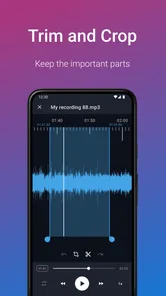
- Limited editing features
- No cloud sync with free version
- Files can be large
- No transcription option
- Limited free version features













