

Draw Cartoons 2 PRO
- 912.00
- 4.6
- Installs
- 50.00K
- Price
- $9.99

Screenshots
Analysis by Reviewed
I like animation apps that let me test an idea before I worry about polished drawings, and that is where Draw Cartoons 2 PRO makes sense to me. It is an animation app from Zaliv Armenia, listed in Art & Design, and its appeal is practical: build a small scene, give it movement, and add a voice or music without starting from a blank professional timeline. I would treat it as a friendly, hands-on place to learn the logic of animation rather than a shortcut to studio-level results.
A useful first project is smaller than you think
Before deciding whether this is the right tool for you, I would try a scene with just one character and one clear action. A character turning toward a sound, waving at the viewer, or reacting to a dropped object is enough to test whether you enjoy arranging movement and adjusting timing. Starting small also makes it easier to tell whether the workflow feels comfortable on your device, without investing an evening in a story that may become awkward to revise.
That approach is especially helpful if you are new to animation. The first challenge is rarely inventing a complicated plot; it is noticing how much a pause, a change of direction, or a well-timed reaction can communicate. I would use the app to explore those basics through short attempts, then add visual detail only when it helps the action read more clearly.
Making a cartoon one scene at a time
The app has a 4.6 average from around 6,300 ratings, and it has passed 50,000 installs. Those figures suggest a steady audience, but what matters more to me is the kind of work it invites: short, character-led cartoons where timing and a simple gag can matter more than perfect artwork. Its Everyone content rating also makes it approachable for family projects, though an adult may still want to guide a younger child through saving and organizing work.
Starting with movement, not a blank page
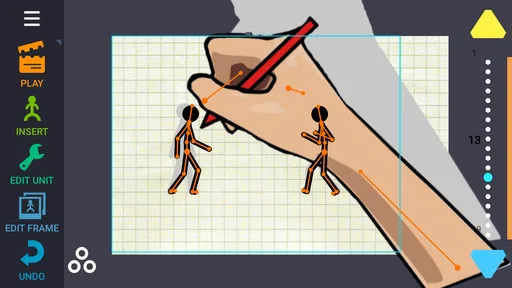
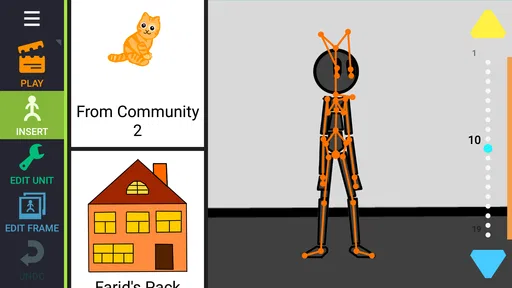
First things first, the app is available on both Android and iOS, which is awesome because, honestly, I can't be the only one switching between devices. Installing it was a breeze, and before I knew it, I was knee-deep in a world of animation possibilities. The app's interface is pretty intuitive. You don't need to be a tech wizard to figure it out. It's got this neat tutorial that walks you through the basics, so even if you're like me and have the artistic ability of a potato, you're in good hands.
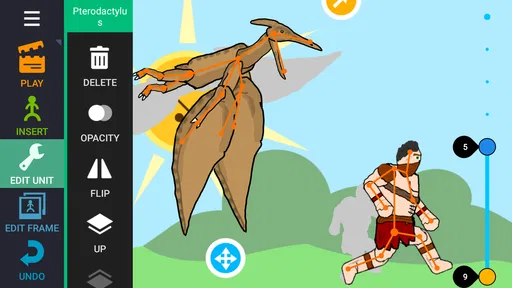
The pre-made characters and objects are useful for more than getting started quickly. They let you focus on staging: who is in the foreground, where a character looks, and what needs to happen for a joke to land. I would plan a tiny sequence before recording anything, even just a character entering, pausing, and reacting. That simple beat structure makes a short animation feel intentional and saves you from trying to repair a confusing scene with extra movement later.
Building a short scene and giving it a voice
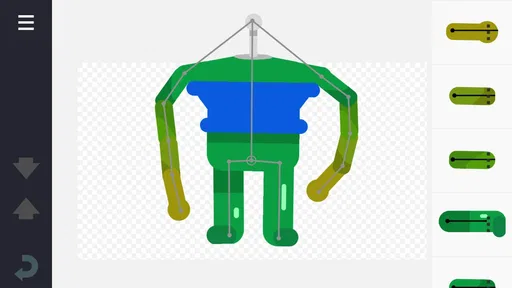
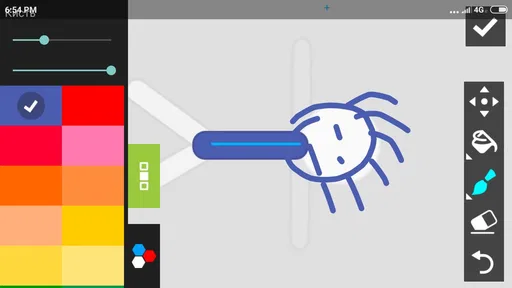
The app comes packed with a bunch of pre-made characters and items. I was like a kid in a candy store, playing around with different characters and scenes. And the best part? You can customize them! Want your character to have blue hair and a pirate hat? Done! It's as simple as dragging and dropping. The timeline feature is a game-changer. It lets you control every frame and add voiceovers or music. It’s like having a mini animation studio in your pocket.
More From Our News Desk

 Gmail
GmailGmail in a Busy Inbox: Who Benefits Most?
From first account to crowded workday, Gmail earns its place through dependable search and flexible sorting—but its best fit depends on how much inbox maintenance you can tolerate.

 Prime Video
Switching to Prime Video: What Changes in Your Viewing Routine
Prime Video can make a compelling second home for streaming, but switching means learning a different catalog, rental layer, and route from browsing to playback.

 Universal TV Remote Control
Universal TV Remote Control Works Best as a Reliable Backup
A phone remote earns its place through quick setup and reliable habits. Here is how to get more from Universal TV Remote Control—and where its limits show.

 Weather - By Xiaomi
Weather by Xiaomi Review: Clear at a Glance, Less Clear Up Close
Xiaomi’s weather app makes everyday forecasts quick to scan, but its calm surface can leave useful details and recovery paths harder to find than they should be.

 X
XX Under Pressure: Can It Recover When Posting Goes Wrong?
A resilience-focused review of X, examining setup, mistaken posts, interruptions, weak connections, and the gaps that matter when recovery needs to be dependable.

 Clash of Clans
Clash of Clans Is Won Between the Battles
Its raids are quick; its community is a long-term project of coordination, teaching, rivalry, and shared responsibility—with all the friction that entails.
Latest News



One practical way I would use that timeline is to animate the action first, then add dialogue once the pauses feel right. A spoken line can make a character seem slow or rushed even when the poses are unchanged, so leaving breathing room around a punchline is worth the extra pass. For a quick family birthday greeting, for instance, I could make a character wave, deliver one recorded message, and end on a simple visual gag. That is a manageable project for a spare evening, unlike trying to produce a long episode in one sitting.
One of the coolest features is the voiceover tool. I had a blast recording silly voices for my characters. It adds a personal touch and makes your cartoons more engaging. Plus, the app allows you to export your creations in various formats. Whether you want to share your masterpiece on social media or just keep it for personal viewing, the app has got you covered.
Small workflow choices that save time
I would record dialogue in a quiet moment rather than trying to capture it while other people are talking nearby. Even a playful cartoon can feel harder to follow when the voice is difficult to hear, and a clean recording gives the visual timing a better chance to work. If a line feels too long, trimming the wording before animating around it is usually easier than reshaping the whole scene afterward.
For a project with several beats, I would also think about the ending before adding lots of movement. A clear final pose or reaction gives the scene a stopping point and makes it easier to judge how much setup the opening needs. This is a small planning habit, but it can keep a simple animation from turning into a string of unrelated gestures.
Where it fits among animation tools
Compared with drawing apps that focus on making a polished still image, this one puts the emphasis on turning characters into a moving scene. That is a better fit when your goal is a quick skit, a visual message, or a first experiment with timing. Compared with desktop animation software, the phone-friendly approach is less suited to detailed frame-by-frame control and complex production. I would choose a dedicated drawing app for careful illustration, and a larger professional tool when a project needs deeper editing; here, the trade-off is a more approachable route from idea to cartoon.
There is also a useful creative constraint in working with ready-made characters: it can push you to make the story carry the humor rather than relying on intricate artwork. If you want a distinctive character, spend a little time adjusting its look before animating, then keep that design consistent across the scene. Changing too many visual details while also learning the timeline can make a small project feel harder than it needs to be.
Sharing, keeping, and revisiting a cartoon
Exporting is useful whether the result is meant for a friend or just for your own practice. I would make a short test export early, particularly if the finished piece matters for a birthday message or a school project. That gives you a chance to check that the pacing and sound feel right outside the editing process, while there is still time to make a small adjustment rather than discovering a problem after the scene feels finished.
For children working with an adult, a simple naming habit can help too: give each attempt a title that describes its action, not just “new cartoon.” That makes it easier to return to a version and remember what you were trying to improve. The app’s Everyone rating does not remove the practical need for guidance with a paid creative tool, especially when a child is learning how to keep track of their work.
What may slow a project down
While it is a fantastic tool, it's not without its quirks. Sometimes, the app can be a bit laggy, especially when working on longer animations. It's nothing too major, but it can be a tad annoying. However, considering the wealth of features this app offers, it's a small price to pay.
That limitation affects how I would plan a project: keep early attempts short, save sensible versions as you go, and test a small export before investing time in a long sequence. The app is more enjoyable when you treat each animation as a compact scene that can be revised, rather than assuming a large project will stay effortless from start to finish. Longer work also makes it more important to keep the story simple and avoid adding actions that do not help the scene.
Who will enjoy it, and who may want another tool
While the app can make animation feel approachable, it is not the best fit for every creative goal. Someone who mainly wants to sketch, paint, or refine a still illustration will get more direct control from a drawing-first app. A creator building a complex production with detailed editing needs may be happier on desktop software, where a larger workspace and specialized controls are a better match. The trade-off here is clear: this is appealing when the priority is making a short cartoon without taking on a demanding production workflow.
It is also worth thinking about how you like to work. If you enjoy moving characters around, trying a line aloud, and making several small timing adjustments, the hands-on process can be part of the fun. If you want to write a script and have a polished animation appear with little editing, this is not a shortcut to that result. The creative decisions still belong to you, and the best outcomes come from keeping the idea manageable.
Also, if you're hoping for a plethora of advanced tools akin to professional software, you might be a bit underwhelmed. But for casual animators or those just starting, this app is a real gem. It’s perfect for creating fun, quick animations to share with friends or on social media. Trust me, your Instagram followers will thank you!
Who should give it a try
I would recommend it to beginners who want to understand how movement, pauses, and sound work together, and to anyone who enjoys making short cartoons for friends or family. It can also suit a parent and child collaborating on a tiny story, with the adult helping keep the project organized. I would skip it if your priority is precise illustration, a complex production workflow, or fine control over every detail; a drawing-focused or desktop animation tool will be a better match for those needs.
The app costs $9.99, so I would think about how often I will actually make cartoons before buying it. It is a more considered purchase than a casual free experiment, but the price may feel reasonable if you expect to return to it for several short projects. The current version is 2.98, while the app first arrived on Aug 11, 2013. Those facts show a product with a long history and a current release, but they do not by themselves tell me exactly which changes arrived between versions. Existing users should judge an update by whether it works well on their device and supports the way they create, rather than expecting a particular new feature from the version number alone.
What to consider before committing
For an existing user, a new version number is not a reason by itself to rebuild a familiar process. I would first check that the app still handles the kind of short scenes I make, then decide whether any change affects how I stage, record, or export them. Keeping a compact test project is a sensible way to compare the experience without putting a favorite animation at risk.
For someone new, the practical question is whether the app’s character-led approach matches the cartoons they want to make. A person who has a few playful ideas and wants to bring them to life may find enough value in repeated small projects. Someone who only wants to try animation once, or expects professional control immediately, should weigh the one-time purchase carefully and consider whether a different kind of tool better fits that intention.
Worth trying for the right kind of cartoon
In a nutshell, it is a delightful app that brings the joy of animation to everyone. Whether you're a beginner looking to explore animation or a seasoned creator wanting a handy tool on the go, this app is worth checking out. It's user-friendly, packed with features, and most importantly, it's fun! So, go ahead and unleash your creativity. Who knows? You might just create the next viral cartoon sensation!
My more grounded recommendation is to begin with a scene that has one clear action and one short line, then see whether the editing style suits you before planning anything ambitious. If you enjoy arranging characters and shaping a joke through timing, this can be a pleasing way to make something personal. If you mainly want advanced production controls or artwork that looks hand-drawn in every frame, another tool will serve you better. For a compact, playful animation workflow, though, it has a clear place.
A final word on choosing it
When deciding whether to keep using it, I would focus on the work you actually want to make rather than the promise of a more ambitious project someday. A short animated greeting, a funny reaction, or a quick visual explanation is a realistic target for this kind of workflow. If those are projects you would genuinely enjoy finishing, the app has a practical role; if your goal is meticulous illustration or a production with many moving parts, choosing a tool built around that level of control will likely feel better.
For my part, I would recommend it as a focused, playful way into character animation, with the caveat that the paid price and occasional slowdown make it worth trying the workflow thoughtfully rather than buying on impulse. Its strongest appeal is the connection between simple staging, expressive timing, and personal voice recording. Keep the scenes short, shape the action before adding sound, and it is much easier to discover whether making cartoons this way is something you will return to.
Draw Cartoons 2 PRO Frequently Asked Questions
What does Draw Cartoons 2 PRO let you create?
Draw Cartoons 2 PRO is an Art & Design app focused on making animations. Its store summary describes it as “the ultimate tool for creating animations,” and the short description is “Draw Cartoons 2.” It may appeal to people who want to build cartoon scenes and bring their drawings to life, whether they are exploring animation for fun or developing their creative skills.
Who develops Draw Cartoons 2 PRO, and what should I know about its audience?
Draw Cartoons 2 PRO is developed by Zaliv Armenia and has an Everyone content rating, making it broadly suitable for users of different ages. The app has a 4.6 average from around 6,300 ratings, alongside 898 written reviews. These figures offer a sense of its reception, though individual experiences can vary depending on what you want from an animation app.
What is Draw Cartoons 2 PRO and how does it differ from the free version?
Draw Cartoons 2 PRO is an advanced animation app that allows users to create stunning cartoons with ease. Compared to the free version, the PRO edition offers additional features such as more character templates, extended editing tools, and the removal of ads, providing a smoother and more professional experience for animators of all levels.
Is Draw Cartoons 2 PRO suitable for beginners?
Yes, Draw Cartoons 2 PRO is designed to be user-friendly for beginners. It provides intuitive tools and step-by-step tutorials to help new users understand the basics of animation. The app offers a simple interface that makes it easy to start creating animations without having any previous experience in animation design.
Can I export my animations in various formats using Draw Cartoons 2 PRO?
Draw Cartoons 2 PRO allows you to export your animations in multiple formats, including popular ones like MP4 and GIF. This feature enables you to share your creations easily across different platforms and social media, making it convenient to showcase your work to a broader audience.
Pros
- Intuitive interface for all ages.
- Wide range of drawing tools available.
- Export animations in various formats.
- Regular updates with new features.
- Offline mode supports creativity anywhere.
Cons
- Limited free version features.
- Occasional app crashes reported.
- In-app purchases can be costly.
- Lacks advanced editing tools.
- Ads in free version can be intrusive.












