DODO - Live Video Chat
- 739.00
- 4.2
- Installs
- 5.00M
- Price
- Free

Screenshots







Analysis by Reviewed
When I open a live video chat app, the network quickly becomes part of the conversation: a delay can interrupt a joke, and a frozen picture can make it hard to know whether the other person has heard me. That is the central trade-off with DODO - Live Video Chat. It offers the chance to meet people spontaneously, but the quality of that moment depends on both sides having a steady connection and feeling comfortable on camera.
Why a stable connection matters
Unlike a text-based social app, DODO asks you to be present in real time. If the video stutters, the exchange can lose its natural rhythm, and trying to talk over a delay is tiring. I would use it when I have a reliable connection and a few unhurried minutes, rather than when I am rushing between tasks or relying on a signal that keeps dropping.
A practical tip is to try a short session before settling in for a longer chat. It gives you a feel for whether the connection is comfortable enough for conversation, without turning a quiet moment into a frustrating one. If the call becomes choppy, pausing to reconnect or ending the conversation politely is usually better than straining to keep talking.
I also find it helps to distinguish a brief hiccup from a conversation that simply is not working. A small delay may clear, but repeated freezes make it hard to take turns naturally. Rather than keep asking “Can you hear me?” over and over, I would give the connection a moment, then end the chat if it remains difficult. That keeps a technical problem from becoming an awkward exchange.
Best suited to a particular kind of social mood
DODO is a social app from Xiani Software Limited, built around live video conversations with new people. I can see it suiting someone who enjoys spontaneous introductions and does not mind the unpredictability of meeting strangers. It is less fitting if you want carefully curated communities, a known circle of friends, or communication that stays private and asynchronous; a messaging app or a group-based social platform may suit those needs better.
For example, if I had a free half-hour at home and wanted a change from scrolling, I could open the app and see whether a conversation develops. I would treat each match as a brief introduction, not assume it will become a lasting friendship. That expectation makes the random format easier to enjoy and helps keep the experience low-pressure.
It is also a better fit for a particular kind of curiosity than for every social need. I might use a spontaneous chat to hear another person’s perspective or practise introducing myself, but I would not rely on it to arrange a planned conversation or find a dependable contact. If I want to speak with someone specific, the usual messaging or calling app is more practical because I can choose the person and time.
You May Like

Clash of Clans Is Won Between the Battles

Android Auto Makes the Case for Quieter Car Software

MobiOffice: Transforming Mobile Productivity with Seamless Integration

EA SPORTS FC™ Mobile Soccer: Redefining Mobile Sports Gaming

How Microsoft OneDrive Became a Mobile Productivity Giant

How Google Translate Breaks Language Barriers Effortlessly
For someone trying video chat for the first time, I would make the first visit a short test rather than a long commitment. Decide in advance how much time feels comfortable, and leave whenever the interaction stops being enjoyable. That simple boundary makes an unpredictable format easier to approach, especially if you are unsure how you feel about talking face-to-face with strangers.
Mobile use, privacy, and sensible limits
Video chat is more comfortable when you can sit somewhere quiet, hold your phone steadily, and choose what appears behind you. I would avoid starting a call in a public place where other people may be captured in the background, or while walking somewhere that needs my attention. A headset can also make a conversation easier to follow in a noisy room, though it cannot fix a weak network.
As with any app that connects you with strangers, I would keep personal details out of early conversations and end a chat if it feels uncomfortable. The published description of privacy protections in the original text should not replace your own caution: avoid showing documents, addresses, or other identifying details on camera. If you are choosing the app for a teenager, note that its age rating is Mature 17+.
One mobile detail worth thinking about is what the camera can reveal beyond your face. A work badge, a family photo, a window view, or a notification appearing on screen can disclose more than you meant to share. Before starting, I would glance at the background and move anything personal out of frame. It is an easy habit that gives you more control without making the conversation feel guarded.
It is equally sensible to decide what “enough” looks like before opening the app. A few short introductions may be all you want from a session; you do not owe anyone a longer conversation just because you were matched. Keeping that in mind is useful when a chat is merely dull as well as when it feels uncomfortable. A polite goodbye and leaving are reasonable ways to manage your time.
Getting Started with DODO
Jumping into DODO is like diving into a pool of endless possibilities. The app is available for both Android and iOS, making it super accessible. Once you download and install it, the setup process is a breeze. You’ll need to create an account, which is pretty standard. But here's the cool part – you can either use your email or streamline the process by signing up through your social media accounts. Easy peasy, right?
DODO is free to download, but in-app purchases range from $0.99 to $274.99 per item, so I would check what an item costs before buying anything. The app has a 4.2 average from around 30,000 ratings and over 5 million installs. Those figures suggest a sizable audience, but they cannot tell you whether a particular chat will be enjoyable or reliable. Its current version is 1.0.103, and it requires Android 6.0 or later.
Because the app is free to download but offers paid items, I would separate trying the basic experience from deciding whether to spend. If an in-app item is presented during use, pause long enough to understand its price and what it does before confirming a purchase. That matters particularly in a fast, social setting, where it is easy to tap through a prompt without considering whether the expense is worthwhile for your own use.
Features That Stand Out
The main allure of this app is its live video chat feature. Imagine being able to video call someone from the other side of the world at the tap of a button. It’s like having a global meetup in your pocket. You’re randomly matched with users, and boom, you're face-to-face, ready to chat. The interface is sleek and user-friendly, so even if you’re not the most tech-savvy person out there, you’ll navigate it like a pro.
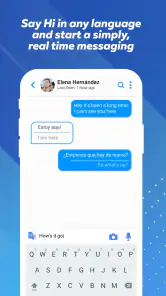
Another nifty feature is the real-time translation. Let’s say you’re matched with someone who speaks a different language. No sweat! The app translates your conversation in real-time, making communication seamless. It’s like having your personal translator right there with you.
Translation can help bridge a language gap, but I would still keep sentences simple and leave room for misunderstandings. Humor, slang, and quick back-and-forth can be harder to convey than a straightforward introduction. A useful approach is to ask one clear question at a time and confirm what you mean when a translation seems surprising. That makes the feature more of a conversation aid than a guarantee of perfect understanding.
There is a small social advantage to that translation support: it can make an opening less intimidating when you and the other person do not share a fluent language. I would use it to get past basic introductions, not to assume every nuance will carry over. If a topic matters, rephrase it in simpler words and check that the other person understood. That little bit of patience is more useful than trying to speak quickly.
The random format also changes how I would approach each match. I would keep an easy opening question ready, such as asking what the other person likes doing in their free time, rather than trying to plan a whole conversation in advance. If there is no common thread, I would not force it. A brief, friendly exchange is still a complete interaction; the app does not need to produce a new friend every time to make a short session worthwhile.
Privacy and Safety
One thing that often crosses our minds with apps like these is safety. You’ll be glad to know that DODO takes privacy seriously. Users’ data is encrypted, and there are options to report or block any inappropriate behavior. It’s reassuring to know that while you’re out there making new friends, the app has got your back.
Those tools are most useful when I act promptly: if someone crosses a boundary, I would leave the conversation and use the available reporting or blocking options rather than debate with them. I would also avoid treating a friendly first chat as proof of someone’s identity. Random video contact can be fun, but it still calls for the same judgment I would use when meeting a stranger elsewhere online.
I would also keep expectations realistic about what safety tools can do. Reporting and blocking can help me respond to an unwanted interaction, but neither turns a stranger into a known person or removes the need to protect my information. I would avoid sharing contact details early, especially if a conversation quickly shifts from casual chat to pressure for personal information. Trust should build slowly, if it builds at all.
If the app is being considered for someone near its age threshold, I would treat the Mature 17+ rating as a reason to think carefully about whether the format is appropriate, not as a substitute for supervision or judgment. Live video can feel more immediate than browsing posts because another person is responding in real time. A user should be comfortable ending a conversation and understand that they can decline to reveal personal details.
My Two Cents
In my experience, DODO - Live Video Chat is like a breath of fresh air. It's not every day that you get to connect with someone across the globe without spending a penny on travel. The app is perfect for those who love meeting new people or learning about different cultures. Plus, it’s a great way to practice any foreign languages you’re trying to master.
However, like any platform, it has its quirks. Sometimes the connections can be a bit laggy, especially if you or the other person has a weak internet connection. But hey, that’s just the nature of video calls, right?
That network dependence also affects when I would choose it over familiar social options. If I want to catch up with a specific friend, a regular call or message is more dependable because I can contact the person I have in mind. If I want to browse posts at my own pace, a conventional social feed is less demanding. DODO’s appeal is the chance encounter, not control over who appears or a guaranteed smooth conversation.
For a more data-conscious session, I would use video when connected to Wi-Fi where possible, keep chats purposeful, and close the app when I am done rather than leave a live session running. Video can use more mobile data than text, so anyone with a limited plan should pay attention to their own usage. I would also lower expectations when reception is poor; switching to a different activity may be less frustrating than repeatedly trying to force a conversation through an unstable connection.
A realistic routine might be to wait until I am home, check that my connection is behaving, and set aside a short window for a few introductions. If the first conversation is hard to hear, I can end it rather than spend the whole break troubleshooting. If it goes well, I can continue while I have the time and a comfortable place to talk. That is a better use of the app than opening it in a queue or during a commute, where noise, movement, and an unstable signal can make the interaction awkward.
For anyone watching mobile data closely, the main trade-off is straightforward: video gives a more direct sense of the person you are speaking with, but it is heavier than text-based socialising. Wi-Fi is the sensible choice for a longer session when available. If you do use mobile data, keep the session intentional and check your device’s own usage information afterward. That gives you a personal basis for deciding whether video chat fits your plan, rather than guessing from how long a call felt.
I would not choose DODO as a replacement for a group community, a carefully moderated interest forum, or a dependable way to reach friends. Those formats are better when I want continuity, topic-focused discussion, or control over who can contact me. I would choose it when the point is to have an unplanned face-to-face exchange and I am comfortable with the possibility that a match will be brief, the connection may falter, or the conversation may not click.
Its 4.2 average and audience of over 5 million installs make it clear that many people have tried it, but popularity is only a starting point when deciding whether a live chat style suits you. The more useful question is whether you like spontaneous conversation enough to accept its unevenness. If you prefer predictable, low-pressure communication, a text app gives you more time to think and less dependence on a steady video connection.
All in all, if you’re looking to break the monotony and make some global friends, DODO - Live Video Chat might just be the app for you. It’s fun, engaging, and a little unpredictable – just like life should be! I would recommend it to adults who are comfortable on camera, curious about spontaneous conversation, and prepared for the occasional technical wobble. If dependable calls, known contacts, or low-data communication matter more, another format will likely fit better.
DODO - Live Video Chat Frequently Asked Questions
Is DODO - Live Video Chat free to download, and are there optional costs?
DODO - Live Video Chat is free to download, so you can try its social video-chat experience without an upfront purchase. It also offers in-app purchases, with prices ranging from $0.99 to $274.99 per item. These purchases are optional, but it is worth checking the price shown in the app before confirming anything, especially if you share a device or payment method.
Is DODO - Live Video Chat suitable for younger users?
DODO - Live Video Chat is rated Mature 17+, so it is intended for adults rather than children or younger teens. Because it connects people through live video interactions, users should also consider their comfort with meeting strangers online and take care with personal details. Parents and guardians may want to review the age rating and discuss online safety before allowing access.
What is DODO - Live Video Chat and how does it work?
DODO - Live Video Chat is a social networking app that facilitates real-time video interactions with people from around the world. By using this app, users can connect via live video chats, explore new friendships, and engage in diverse cultures. The app employs a simple interface that allows users to easily start or join video calls with a single tap, making it accessible for users of all ages.
Is DODO - Live Video Chat safe to use?
DODO - Live Video Chat implements several safety measures to support a secure user experience. These include real-time moderation, privacy controls, and the ability to block or report users who violate community guidelines. Despite these measures, users are encouraged to exercise caution and avoid sharing personal information during video interactions to maintain their privacy and security.
What are the main features of DODO - Live Video Chat?
DODO - Live Video Chat offers a variety of features including instant video calling, live chat rooms, and a global user community for diverse interactions. Users can also enjoy features such as language translation, virtual gifts, and real-time face filters to enhance their video chatting experience. The app is designed to be user-friendly and provides seamless connectivity across different devices.
Pros
- Easy to use interface.
- Real-time video communication.
- Connects with people worldwide.
- Multiple chat options available.
- Good video quality.
Cons
- Requires stable internet connection.
- Potential privacy concerns.
- Contains in-app purchases.
- Ads can be intrusive.
- Limited free features.

- Category
- Social
- Version
- 1.0.103











