DevBytes-For Busy Developers
- 65.00
- 4.5
- Installs
- 5.00M
- Price
- Free

Screenshots



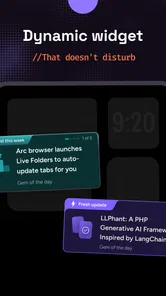
Analysis by Reviewed
When I want to keep up with developer news but have only a spare minute, I prefer a focused reading routine over opening several sites and losing my place. DevBytes is a free news and magazines app from DevBytes: Tech, AI and Coding news, aimed at people who want technology and programming updates in a compact format. It has a 4.6 average from around 15,000 ratings and over 1 million installs, which gives it a substantial audience, though popularity alone cannot tell you whether its reading style will suit you.
What a quick check-in can realistically do
The best way I’d use a developer-focused news reader is as a small part of the day, not as a replacement for deep research. A few minutes between tasks can help me spot a topic worth following; later, I can take time to read the original technical documentation or a detailed article. That distinction matters: short updates are useful for awareness, but they are not enough to validate a coding decision or understand a complex change in full.
For example, on a commute I might scan a handful of stories, make a mental note of a tool or programming subject I keep seeing, then investigate it properly when I’m back at a desk. I would avoid trying to learn a whole framework from quick news bites. Treating the app as a starting point rather than a complete technical reference makes its format more useful and reduces the chance of mistaking a headline for practical guidance.
Why DevBytes?
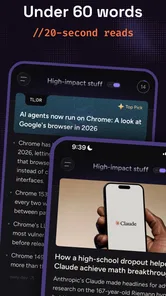
Let's face it, as developers, we're constantly juggling a million things at once. Between meetings, coding marathons, and trying to have a life outside of work, keeping up with the latest industry trends can feel like an impossible task. This is where DevBytes comes in handy. The app offers bite-sized tech news and updates that are easy to digest, perfect for those moments when you're stuck in line for coffee or during your morning commute.
Features Galore
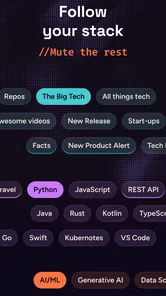
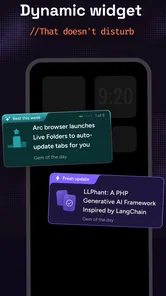
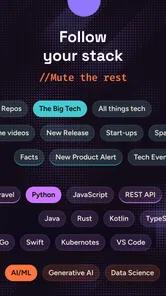
One of the standout features of DevBytes is its personalized news feed. The app tailors the content based on your interests and past reading habits, ensuring you only get the updates that matter most to you. Plus, the sleek, user-friendly interface makes navigation a breeze. No more endless scrolling through irrelevant articles – just the information you need, when you need it.
Another cool feature is the app's offline mode. We've all been there – stuck on a plane or in a remote area with spotty internet. With DevBytes, you can save articles to read later, no Wi-Fi required. It's like having a personal tech magazine, right in your pocket.
Making the reading habit work for you
I’d keep the feed focused on the subjects I actually work with, then use an occasional broader reading session to check whether I’m missing developments outside my usual lane. Personalization can make a busy feed feel manageable, but it also creates a trade-off: a narrow set of interests may keep familiar topics in view while making unrelated areas easier to overlook. If I’m exploring a new specialty, I’d deliberately widen what I read instead of assuming a tailored feed is a complete picture.
More From Our News Desk

Weather by Xiaomi Review: Clear at a Glance, Less Clear Up Close

X Under Pressure: Can It Recover When Posting Goes Wrong?

Clash of Clans Is Won Between the Battles

Android Auto Makes the Case for Quieter Car Software

MobiOffice: Transforming Mobile Productivity with Seamless Integration

EA SPORTS FC™ Mobile Soccer: Redefining Mobile Sports Gaming
Offline reading is especially practical when I know I’ll have a connection gap. I’d save articles while online before a flight or a long stretch away from reliable service, rather than expect an article I have not saved to be available later. That simple habit turns spare time into reading time without making the app responsible for tasks it may not handle. When I return to a connection, I can follow up on anything that deserves a closer look.
Using it around a real workday
A useful routine would be to check the feed during a natural pause, not to keep it open beside an editor all day. If a story mentions a library or language I use, I can save it and return when I have enough time to judge whether it matters to my project. That prevents a passing headline from interrupting focused work, while still giving me a way to capture a lead before I forget it.
For a learner, the same approach can turn a short reading session into a list of questions for later study. I would note unfamiliar terms, then look for a tutorial or official documentation rather than expecting a news item to teach the subject from first principles. The trade-off is that this adds a second step, but it also keeps casual reading honest: discovering a topic is not the same as mastering it.
Community and Collaboration
Beyond just news, DevBytes also fosters a community of like-minded developers. Engage in discussions, share insights, and even collaborate on projects through its built-in forums. It's a fantastic way to network and learn from others in the field without having to leave the comfort of your home.
And let's not forget the expert interviews and podcasts available at your fingertips. Whether you're into web development, AI, or cybersecurity, there's something for everyone. Listen to industry leaders as they share their thoughts and experiences, offering invaluable insights you won't find elsewhere.
How it compares with other ways to follow technology
Compared with checking general news sites, a developer-oriented feed can make it easier to spend a short break on programming-related subjects instead of sorting through broad headlines. It also differs from a forum or a social feed: discussion can surface useful perspectives, but it is not the same as a structured news-reading habit, and opinions from other users should not stand in for checking a source yourself. For release details, code examples, or urgent security guidance, I’d go directly to the relevant project or authoritative source.
This makes the app a better fit for developers who want a lightweight discovery routine than for readers who need a complete, carefully verified research archive. If I were looking for extensive technical documentation, a specialist reference, or a way to track every update to a particular project, I’d choose those tools for the job and use this app only as a supplement. Its value is in helping me notice what may be worth investigating, not in doing that investigation for me.
Speed, reliability, and device fit
For this kind of app, my speed expectation is modest: opening a reading session and moving between articles should feel like a quick check-in, rather than a demanding work task. Actual responsiveness depends on the device and connection, so I wouldn’t treat a slow moment as proof of a general problem. Offline reading can help with access when the network is unavailable, provided I have saved the articles beforehand; it does not remove the need to plan for that gap.
It is rated for Everyone, is free, and runs on Android 6.0 or later. The current version is 5.0.2, and it was released on March 21, 2022. I’d expect an older or storage-constrained phone to have less room for saved reading and other apps, so I’d keep offline saves purposeful rather than collecting everything. If the app stops responding, the sensible first step is to reopen it and check the connection before relying on it for a time-sensitive read. I would not make it my only route to essential technical information.
Who should make room for it
I see the strongest fit for someone who already reads about software but wants a more deliberate way to discover subjects between longer sessions. Developers can use it to notice conversations beyond their immediate project; students can use it to encounter terminology and follow up with proper learning materials. The key is to treat the feed as a prompt for curiosity, rather than as a checklist that must be cleared.
It is less suitable for someone who wants a single authoritative source, exhaustive coverage of a specialized field, or a hands-on coding course. A broad news reader may be a better choice if technology is only one of several interests, while official documentation and project announcements are better for confirming technical details. I would also skip a personalized feed if I know I tend to mistake a tailored selection for the whole picture; periodically reading outside familiar topics takes intention.
Keeping it useful without letting it become noise
One practical way to control the habit is to decide what a reading session is for before opening the app. I might use a brief check-in to scan for one promising subject, then stop and save only the pieces I genuinely plan to revisit. This creates a simple boundary between discovery and reading, and it avoids turning a compact news habit into another endless scroll.
Saved items need a little judgment too. I would not use the offline collection as a permanent archive or assume that a saved article will replace a stable reference. Instead, I’d treat it as a temporary reading queue: review it when I have time, follow useful leads to their source, and clear out items that no longer matter. That workflow is especially helpful before travel, because it makes offline access purposeful without filling a phone with material I may never open.
Final Thoughts
In a nutshell, DevBytes is the perfect companion for any developer looking to stay ahead of the curve. It’s like having a personal assistant who knows exactly what you need to know, when you need to know it. Whether you're a seasoned pro or just starting out, this app is a must-have in your digital toolkit. So go ahead, give it a whirl and see how it can transform your daily routine.
In the world of tech, staying informed is key, and DevBytes makes it easier than ever. Happy coding!
My practical verdict
I’d recommend it to developers and learners who enjoy brief, topic-focused reading and want a convenient way to collect things to revisit. I’d skip it if I needed guaranteed coverage of a niche, a full technical course, or a primary source for production decisions. The app is free to try, but the useful test is whether its reading rhythm fits your day: use a short session to discover topics, save worthwhile pieces before going offline, and verify important details elsewhere. Used with those boundaries, it can be a handy companion rather than another feed demanding constant attention.
DevBytes-For Busy Developers Frequently Asked Questions
Who develops DevBytes, and what kind of app is it?
DevBytes is a News & Magazines app developed by DevBytes: Tech, AI and Coding news. It focuses on technology content, bringing together tech news, coding tips, and programming insights for developers. If you are looking for a dedicated place to follow technology topics and developer-focused material, its purpose is clear from the outset.
Is DevBytes free to download, and what should I expect when getting started?
DevBytes is free to download, so you can try the app without paying an upfront purchase price. Its stated focus is on tech news, coding tips, and programming insights, making it most relevant to people who want developer-oriented content. It is listed as an Everyone app, so it is intended for a general audience.
Can I use DevBytes on an older Android phone?
DevBytes is an Android app for discovering tech news, coding tips, and programming insights. It supports Android 6.0 and later, so it may be suitable for an older phone if it runs that version or a newer one. The app is free to download, and its content is intended for a general audience.
What is DevBytes and who is it for?
DevBytes is a mobile application designed specifically for developers who are always on the go. It provides bite-sized, easily digestible coding tutorials and news updates, perfect for busy professionals looking to stay updated with the latest in technology without investing too much time. It's ideal for developers who want quick insights and learning in their spare moments.
How often is the content updated on DevBytes?
The content on DevBytes is updated regularly to ensure users have access to the latest tutorials, coding challenges, and tech news. New content is typically added weekly, with a focus on current trends and technologies in the software development world. This frequent updating helps developers stay relevant and informed without much effort.
Pros
- Lightweight and fast interface for quick usage.
- Comprehensive coding resources available.
- Offline mode for uninterrupted learning.
- Regular updates with new content.
- User-friendly design tailored for developers.
Cons
- Limited to tech-focused content only.
- No community interaction features.
- Requires account for full access.
- Ads present in the free version.
- Limited support for non-English languages.











