Deep Think - AI Seek Chatbot
- 751.00
- 4.8
- Installs
- 5.00M
- Price
- Free

Screenshots


Analysis by Reviewed
I treat Deep Think - AI Seek Chatbot as a conversational tool for turning a half-formed question into something I can work with. Its strongest appeal is the chance to keep refining an answer in one exchange instead of restarting a search every time I want a different angle. That makes it useful for brainstorming and everyday writing, though I wouldn’t mistake a smooth conversation for reliable research or professional advice.
A quick start, with a clear trade-off
Deep Think is a free productivity app from Guru AI Lab, rated for Everyone. It has a 4.5 average from around 42,000 ratings and over a million installs, which suggests that many people are giving it a try. The current version is 2.4.0-25112462, and it runs on Android 7.0 or later. Optional in-app purchases range from $6.99 to $99.99 per item, so I’d check the purchase terms before committing to anything paid.
For me, the important question isn’t whether a chatbot can produce a quick reply; it’s whether I can guide that reply toward something useful. Deep Think makes sense when I have the time to ask a follow-up, add context, or request another version. If I only need a current fact with a clear source, I’d reach for a search engine instead.
How the conversation works in everyday use
The app can be useful for more than looking up a fact. I’d use it to turn a vague task into a workable first draft: ask for a few approaches, choose one, then request a shorter version or a friendlier tone. That back-and-forth is more convenient than restarting a search for every small adjustment. It also helps to give the chatbot the audience and purpose up front; “explain this for a new team member” tends to be a more useful starting point than a bare topic.
Where it helps—and where I stay cautious
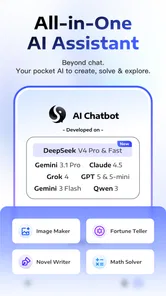
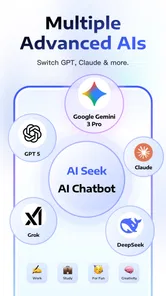
The app’s description points to several AI systems, including Gemini 3 Pro, Grok, Claude, and DeepSeek-V3.2. That range is an intriguing part of its pitch, but I wouldn’t treat a fluent answer as proof that a claim is correct. For homework, planning, or unfamiliar subjects, I’d use the response as a starting point and check important details against dependable sources. It’s also wise to avoid putting private or sensitive information into a chatbot unless you’re comfortable with how the service handles it.
A useful way to work with an answer is to ask for its assumptions before acting on it. If I’m comparing two plans, I might ask what each plan depends on and which details would change the recommendation. That doesn’t guarantee the answer is sound, but it can reveal where I need to check facts or supply missing context. I also get better results when I separate a complicated request into stages: first ask for options, then pick one, then request a usable draft.
For a realistic everyday use, imagine I’m organizing a weekend meal with friends and have only a rough idea of what to cook. I could ask for a few menu directions, explain a dietary constraint, and then request a practical shopping checklist. The useful part is being able to refine the answer in conversation. I would still review the ingredients and quantities myself rather than assuming the first suggestion is suitable for everyone.
More From Our News Desk

Weather by Xiaomi Review: Clear at a Glance, Less Clear Up Close

X Under Pressure: Can It Recover When Posting Goes Wrong?

Clash of Clans Is Won Between the Battles

Android Auto Makes the Case for Quieter Car Software

MobiOffice: Transforming Mobile Productivity with Seamless Integration

EA SPORTS FC™ Mobile Soccer: Redefining Mobile Sports Gaming
That kind of exchange is also where I’d be specific about what “practical” means. A short list for a small gathering is different from a plan that needs to accommodate several preferences, a tight budget, or limited preparation time. I’d add those constraints explicitly, then check whether the response has actually followed them. With AI, a detail mentioned in the prompt can be overlooked, so I’d scan the final checklist before shopping rather than treating it as ready to use.
Compared with a conventional search app, a chatbot is better for shaping a response to your context, but it can be less dependable when you need a source you can inspect immediately. Compared with a notes or writing app, it can help generate and revise material, but it is not a replacement for a place to store polished work or manage a project. I’d keep it alongside those tools rather than expecting one chat window to handle every step.
The distinction matters most when a task has two parts: thinking and record-keeping. Deep Think can help me get unstuck on a draft or outline, while a document editor is better for maintaining the finished version, tracking changes, and keeping material organized over time. For research, I’d use search to find material I can inspect and cite, then use a chatbot to help explain or reorganize my own notes. That division of labor is more dependable than asking one tool to generate, verify, and preserve everything.
Useful workflows beyond a quick answer
For a work message, I’d start by describing the recipient, the goal, and the tone I want, then ask for a draft that keeps the key points. A second prompt can make it warmer or more concise without changing the underlying request. Before sending, I’d compare the result with my original intent: a polished sentence can accidentally soften a boundary or make a commitment I didn’t mean to make.
For learning, I’d use the conversation to unpack a difficult idea in layers. I might ask for a plain-language explanation, then request an example, and finally ask what a beginner commonly misunderstands. This is more useful than asking for a complete lesson all at once because I can stop at the point where the explanation becomes clear. Still, I’d verify material used for an assignment or exam, especially when a precise definition or source matters.
Another good use is preparing for a conversation rather than scripting it. I can ask for a few questions to raise in a meeting or for possible objections to a proposal, then choose only the ones that fit. The trade-off is that a chatbot may offer generic possibilities unless I describe the situation carefully. I treat its suggestions as prompts for my own judgment, not as a substitute for knowing the people involved.
The limits I would keep in mind
The main limitation is the uncertainty that comes with AI answers: a smooth, confident reply can still be incomplete or mistaken. The broad range of paid purchase options is another reason to try the free experience carefully before spending. I’d also avoid relying on it for high-stakes decisions, where professional advice or direct verification matters more than a quick conversational answer.
There’s also a practical risk in long conversations: useful details and assumptions can get mixed together, and I may forget which parts came from me and which came from the assistant. For a task that matters, I’d keep a separate note of verified facts, decisions, and open questions. That is especially helpful if I return to the work later, because a conversational thread is not the same thing as a carefully maintained project record.
Before paying, I’d ask myself what repeated job the app is saving me time on. If I only open it occasionally for casual questions, the free experience may be enough; if I’m considering a purchase, I’d review the available terms and make sure the value suits my own routine. I wouldn’t assume that a higher-cost option automatically means better answers for my particular task. The sensible test is whether it improves a workflow I actually use.
Who should give it a try
I think Deep Think is a good fit for curious people who want help brainstorming, getting an explanation in plainer language, or shaping a rough idea into a more useful question. It may also suit language learners who want low-pressure practice, though I’d treat its corrections as suggestions rather than a formal lesson. If you need tightly sourced research, a distraction-free writing workspace, or guaranteed factual accuracy, a dedicated search, writing, or reference tool is likely the better choice.
I’d particularly recommend trying it if you often know what you want to say but struggle to find a starting point. Asking for several possible openings, outlines, or ways to frame a problem can make the blank page less intimidating. It is less suitable if you need a fixed, repeatable process with carefully controlled outputs, or if you prefer not to have a conversational AI shape your first ideas. In those cases, a template, specialist tool, or your own notes may be a better fit.
One practical habit makes the experience more useful: ask for alternatives, then ask what assumptions each option depends on. That can expose gaps before you act on an answer. For longer tasks, keep your own notes on decisions and useful details instead of relying on a chat history as your only record. It’s a small adjustment, but it makes the chatbot easier to use as a thinking aid rather than an authority.
My verdict
Deep Think is worth trying if you enjoy exploring questions through conversation and want a flexible helper for everyday thinking. I like the low-friction approach and the possibility of refining a request instead of settling for the first reply. I’d keep my expectations grounded, verify anything important, and decide whether the paid options offer enough value for my own routine. Used that way, it can be a useful companion to search, notes, and careful judgment—not a substitute for them.
Getting to Know the App
First off, let me tell you how easy it is to get started with Deep Think - AI Seek Chatbot. Once you download and install the app, you’re greeted with a simple, user-friendly interface. No complicated setups or long tutorials, just jump right in and start chatting.
The app is designed to cater to a wide range of queries. Whether you want to discuss the meaning of life, need help with homework, or just want to chat about the latest movies, this app has got you covered. I was quite impressed with how the AI adapts to different topics, making each conversation feel natural and engaging.
The Conversation Experience
What makes this app stand out is its ability to engage in meaningful conversations. I found myself losing track of time while discussing various topics. The AI’s responses are surprisingly human-like, and it even throws in a bit of humor now and then. This makes the interaction not only informative but also entertaining.
One thing I particularly appreciated is the app’s ability to remember previous conversations. This means you can pick up where you left off, making the experience feel continuous and personal. It’s like having a friend who remembers your last chat, adding a personal touch to the interaction.
Why You’ll Love It
If you’re someone who loves learning new things or enjoys deep conversations, this app is definitely for you. The AI-powered chatbot is not just about answering questions; it’s about making the conversation enjoyable and insightful. Plus, the app’s sleek design and intuitive navigation make it a pleasure to use.
Another cool feature is its ability to handle multiple languages. So, if you’re bilingual or learning a new language, you can switch between languages and practice conversing in real-time. This adds an educational layer to the app, making it a versatile tool for both entertainment and learning.
In conclusion, Deep Think - AI Seek Chatbot is more than just a chatbot; it’s a companion ready to embark on intellectual journeys with you. So, if you’re in the mood for some deep thinking or casual chit-chat, give this app a try. It’s like having your own personal guru, ready to chat anytime, anywhere.
Deep Think - AI Seek Chatbot Frequently Asked Questions
Can Deep Think - AI Seek Chatbot help with both writing and problem-solving?
Yes. Deep Think - AI Seek Chatbot is presented as a tool for writing and solving, so it may be useful for drafting text, exploring ideas, and working through questions. Its store description says it is built on Gemini 3 Pro, Grok, Claude, and DeepSeek-V3.2. Treat generated responses as assistance rather than guaranteed answers, and review important work before relying on it.
Is Deep Think - AI Seek Chatbot suitable for beginners?
The app is designed around conversational interactions, so you can ask questions or request help in everyday language rather than needing specialized technical knowledge. It is listed with an Everyone content rating, making it suitable for a broad audience. As with other AI chat tools, clear and specific prompts can make it easier to get useful responses, and you should check important information independently.
Who develops Deep Think - AI Seek Chatbot, and what devices can run it?
Deep Think - AI Seek Chatbot is a productivity app developed by Guru AI Lab. It is available for Android and iOS, and the Android version requires Android 7.0 or later. Its Everyone content rating makes it suitable for a broad audience. Check your device’s operating-system requirements before downloading so you can confirm compatibility.
What is Deep Think - AI Seek Chatbot?
Deep Think - AI Seek Chatbot is an innovative AI-powered chat application designed to simulate human-like conversations. It leverages advanced machine learning algorithms to provide users with engaging and intelligent interactions. The app is perfect for those looking for a virtual assistant capable of answering questions, providing information, and holding meaningful conversations on a wide array of topics. Its store description says it is built on Gemini 3 Pro, Grok, Claude, and DeepSeek-V3.2 to help you write and solve.
How does Deep Think - AI Seek Chatbot ensure user privacy and data security?
Deep Think - AI Seek Chatbot takes user privacy and data security very seriously. It incorporates robust encryption protocols to protect user data during transmission and storage. Additionally, the app adheres to strict privacy policies, ensuring that user data is not shared with third parties without consent. Users can trust that their interactions with the chatbot remain confidential and secure. As with any AI chat app, avoid entering sensitive personal or financial information into conversations.
Pros
- Intuitive and user-friendly interface.
- Accurate and quick AI responses.
- Supports multiple languages.
- Customizable chat settings.
- Seamless integration with other apps.
Cons
- Requires constant internet connection.
- Limited free version features.
- Occasional AI response errors.
- High battery consumption during use.
- Personal data privacy concerns.













