CastChat - Match & Voice Chat
- 5.63K
- 4.8
- Installs
- 10.00M
- Price
- Free

Screenshots





Analysis by Reviewed
For me, the appeal of CastChat - Match & Voice Chat is the move from browsing messages to actually hearing another person. That small shift changes the pace: a voice conversation can feel more immediate than a string of texts, and it gives you a chance to find out quickly whether you enjoy talking with someone. I’d consider it when I want a social break that involves meeting people, not simply scrolling through another feed.
A voice-first way to meet people
CastChat is a free communication app from Guru AI Lab, with a Teen content rating. It has a 4.8 average across around 52,000 ratings and over 10 million installs. Those figures suggest it has found a sizable audience, but they don’t guarantee that every match will be a good one; the quality of a social app still depends on who is around and what each person wants from a conversation.
The key idea is that matching leads into voice chat, making the conversation itself the main event. That suits people who find text introductions tiring or hard to read. Tone and timing can make a first exchange feel warmer, while also helping you decide sooner whether to continue. The trade-off is that voice asks more of you: you need a suitable moment and a willingness to speak, rather than replying whenever you happen to have a free hand.
Choosing the right moment to speak
That difference is worth considering before you install a voice-led social app. If you usually open communication apps while commuting, waiting in a queue, or sharing a room, speaking may be awkward even when you are interested in meeting someone. I would save voice conversations for a place where I can hear clearly and talk without feeling rushed. It is a small adjustment, but it makes the experience more comfortable and gives the other person a fair chance to have a real conversation with you.
CastChat is less useful when you only have a few seconds to check messages. A text conversation can pause naturally while you deal with something else; live speech is harder to fit around interruptions. If you want to browse quietly, or you are not in the mood to respond out loud, there is no reason to force a voice session just because matching is available. I see the app as an option for a particular social mood, not something that needs to replace every other way I communicate.
Connecting the World, One Chat at a Time
So here’s the deal: CastChat lets you match with people from all over the world and jump straight into voice chats. It’s like speed dating, but for conversations! The app is designed to make you feel like you’re part of a global community, chatting with folks from different cultures and backgrounds. Whether you want to practice a new language, make friends, or just have a good laugh, this app has got you covered.
How It Works
Upon downloading the app, you’re greeted with a sleek, user-friendly interface that makes navigation a breeze. You create a profile, set your preferences, and voila – you’re ready to mingle! The app uses an intelligent algorithm to match you with users who share similar interests. Once matched, you can start a voice chat with the tap of a button. It’s quick, efficient, and honestly, quite addictive.
More From Our News Desk

Weather by Xiaomi Review: Clear at a Glance, Less Clear Up Close

X Under Pressure: Can It Recover When Posting Goes Wrong?

Clash of Clans Is Won Between the Battles

Android Auto Makes the Case for Quieter Car Software

MobiOffice: Transforming Mobile Productivity with Seamless Integration

EA SPORTS FC™ Mobile Soccer: Redefining Mobile Sports Gaming
One of the standout features is the emphasis on voice communication. In a world dominated by text, it’s refreshing to engage in real-time conversations that foster genuine connections. Plus, there’s something exciting about hearing someone’s voice for the first time, don’t you think?
Making a match work in real life
A good way to try the app is to set a small goal before opening it: have one short conversation, practise a greeting in another language, or ask someone about a game you both enjoy. That keeps the experience manageable and gives you a natural way to begin. If the exchange feels awkward, you can treat it as a brief introduction rather than a failed friendship; not every match needs to turn into a regular contact.
For a practical example, imagine finishing a gaming session while friends are offline and wanting to talk rather than queue alone. You could use CastChat to find someone for a casual conversation, then see whether shared interests give you enough to discuss. It is better suited to that open-ended social moment than to coordinating a team that needs precise schedules, persistent voice rooms, or reliable contact with the same group. For organized play, a dedicated group-chat service may be the more useful tool.
Turning a shared interest into a conversation
A useful way to avoid the feeling of making small talk from scratch is to pick one simple topic before you begin. If you are there because of games, ask what the other person enjoys playing or what kind of session they were hoping to find. If your aim is language practice, decide on a manageable theme—food, hobbies, or a recent game—rather than trying to improvise a lesson. A specific opening gives both people something to respond to, while still leaving room for the chat to go somewhere unexpected.
I would also treat a first match as a quick test of conversational fit, not a promise that you have found a new regular gaming partner. Someone may be fun to talk with but have a different schedule, or may simply be using the app for a short social break. That distinction helps keep expectations realistic. If you enjoy the exchange, you can choose whether to favorite the person; if it does not click, ending the chat and trying another time is a reasonable outcome.
Features That Stand Out
The app offers a variety of features that enhance the chatting experience. The ability to send text messages and share pictures during voice chats adds a layer of interaction that makes conversations more dynamic and personal. There’s also a feature that allows you to favorite users, making it easier to reconnect with people you vibe with.
Those options make a useful little workflow possible: use voice to see whether conversation clicks, switch to text when you need to share a thought without interrupting, and favorite someone only when you genuinely want to find them again. That is more intentional than treating every match as a contact to collect. If you are trying to practise a language, for instance, you can focus on speaking first and use text to clarify a word or keep a topic moving; it turns a casual chat into a low-pressure routine without making every exchange feel like a lesson.
Making the conversation comfortable
Voice can make a chat feel more personal, but it also means you should decide what you are comfortable sharing before you start. I would keep a first conversation focused on ordinary interests and avoid volunteering identifying details simply to fill a silence. A friendly exchange does not need to become intimate quickly. If someone presses for information you would rather keep private, you can change the subject or leave; you do not owe a stranger a detailed explanation.
The text option can be useful for more than sending a quick follow-up. It gives you a way to slow down when you need to think, clarify a phrase, or share a detail that is easier to write than say. That can be particularly helpful for people who are shy about speaking immediately or who are practising a language and want a moment to find the right words. At the same time, if your priority is a purely text-based connection, a messaging-first service will likely feel more natural than starting with voice.
Where the trade-offs matter
Voice matching is not the right fit for every mood or setting. A noisy commute, a shared room, or a quick break at work may make speaking inconvenient, and the spontaneous nature of meeting strangers can be less comfortable than messaging people you already know. In those moments, a text-first social app gives you more control over when and how you respond. I would also approach profile and preference choices thoughtfully: a clear, low-detail introduction can give a conversation a starting point without sharing personal information too quickly.
The app is aimed at teens and adults, so I would treat that age guidance as a reason to use ordinary online caution, not as a promise that every interaction will suit every user. Keep identifying details private, leave a conversation that feels uncomfortable, and avoid feeling obliged to continue just because a match has started. Those habits matter particularly in a service built around quick contact with people you may not know.
What to expect from a first session
I would go into a first session with a modest expectation: the goal is to see whether the format suits you, not to find a perfect friend immediately. Matching with someone new can produce lively conversation, but it can also lead to pauses, mismatched interests, or a chat that naturally ends after a few minutes. That is normal for spontaneous social discovery. If you are prepared for a range of outcomes, a brief conversation can still be worthwhile without needing to turn into a lasting connection.
It helps to decide in advance how much time and attention you can give the app. If you have only a moment, it may be better to wait rather than begin a conversation you will have to abandon abruptly. If you have a little breathing room, you can listen, respond thoughtfully, and see whether the interaction develops. I find that this is a more considerate way to use voice matching than treating it as something to dip into while distracted.
When another chat tool is better
CastChat occupies a different niche from the usual messaging apps. A conventional messenger is strongest when you already have someone’s contact details and want dependable ongoing conversations; a gaming group-chat app is often better for coordinating a known team. CastChat’s appeal is discovery followed by voice, so it makes more sense when meeting a new person is the point. If you mainly need a quiet place to keep up with family, classmates, or a fixed gaming squad, your existing group messenger will probably be less effort.
It is also worth thinking about what happens after a good first exchange. Favoriting someone gives you a way to make reconnecting easier, but a favorite is not the same as a dependable friendship or a scheduled team arrangement. I would use the feature as a reminder of a conversation I enjoyed, then let future contact develop naturally rather than assuming every promising match will remain active.
Who is most likely to enjoy it
I think CastChat makes the most sense for someone who is curious about meeting people through conversation and does not mind starting with a stranger. It may suit a player who has finished a game and wants to chat casually, a language learner who wants low-pressure speaking practice, or someone who simply prefers hearing a voice to trading introductory messages. The common thread is that the person is open to an unscripted exchange and has a suitable moment to take part.
On the other hand, I would skip it if your main goal is to maintain a private, dependable circle with people you already know, or if you strongly prefer to communicate only in text. It may also be a poor fit when you need a structured place for a team to coordinate matches over time. In those cases, a regular messenger or gaming group-chat tool is better matched to the job; CastChat’s discovery-led approach is a benefit only when meeting someone new is part of what you want.
Features That Stand Out
The app offers a variety of features that enhance the chatting experience. The ability to send text messages and share pictures during voice chats adds a layer of interaction that makes conversations more dynamic and personal. There’s also a feature that allows you to favorite users, making it easier to reconnect with people you vibe with.
Before settling in, check whether you have enough privacy and time for a spoken conversation. That simple choice makes voice matching feel less intrusive and helps you avoid starting a chat you cannot comfortably finish. If you would rather ease into contact, text can be a gentler first step; if conversation is the reason you opened the app, voice is the feature that makes this particular service distinct.
Final Thoughts
All in all, CastChat - Match & Voice Chat is a delightful app that does exactly what it sets out to do – connect people through voice in a meaningful way. Whether you’re looking to expand your social circle, learn about new cultures, or simply pass the time with interesting conversations, this app is definitely worth checking out. It’s easy to use, packed with cool features, and most importantly, it makes the world feel a little bit smaller and a lot more connected.
Its release was on November 4, 2020, and the current version is 2.34.0-251128401, with Android 8.0 as the minimum operating system. The app is free to install, with in-app purchases ranging from $0.99 to $89.99 per item. I’d keep that distinction in mind: you can try the basic social experience without paying, while optional purchases may matter if you choose to spend. For me, it is most appealing when I want spontaneous conversation, not a replacement for the messaging tools I already use.
So, if you’re ready to embark on a conversational adventure, give CastChat a try. Who knows? Your next great friendship could be just a voice chat away.
CastChat - Match & Voice Chat Frequently Asked Questions
Does CastChat support text messaging as well as voice chat?
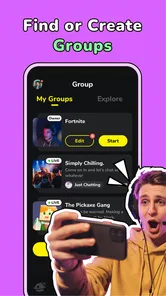
CastChat is built around voice communication, matching, and group chat, so it can suit people who want to connect with other players and take part in conversations. Its store summary highlights finding teammates, hanging out, and group chat. If you mainly want a text-only messenger, consider whether that voice-and-community focus matches how you plan to communicate.
Can I use CastChat without joining a voice conversation right away?
CastChat brings together matching, voice chat, and social interaction, making it useful for meeting people as well as talking with them. You do not need to treat every interaction as a voice call; you can first explore the app’s matching and group-chat setting and decide what feels comfortable. Be mindful of what personal details you share as you meet new people.
Is CastChat suitable for finding teammates for different games?
CastChat is designed as a place to find teammates, hang out, and group chat, and it supports all games. That makes it relevant if you want to connect with other players rather than use a separate social space for each title. You can also use its voice chat and matching features to meet people and join conversations.
What age group is CastChat intended for?
CastChat has a Teen content rating, so it is intended for teen users and older audiences. Since the app centers on meeting people and chatting, it is sensible for younger users and their families to consider personal boundaries and online safety before joining conversations. Anyone using the app should be thoughtful about what they share with people they have just met.
What is CastChat and how does it work?
CastChat is a social networking app designed to connect users through voice chat and matching features. By creating a profile, users can participate in voice chat rooms, meet new friends, or even find potential romantic partners. The app uses algorithms to match users based on interests and preferences, ensuring a personalized experience. Accessible on both Android and iOS, CastChat offers an engaging way to interact with others through voice communication.
Pros
- User-friendly interface
- easy navigation.
- Connects users with shared interests.
- High-quality voice chat feature.
- Fast and reliable matchmaking system.
- Offers diverse chat room categories.
Cons
- Requires stable internet connection.
- Limited free features available.
- In-app ads can be intrusive.
- Profile setup can be time-consuming.
- Some features behind paywall.













