Dazzly: Color by Number Game
- 6.10K
- 4.6
- Installs
- 5.00M
- Price
- Free

Screenshots


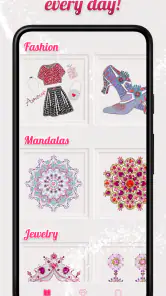
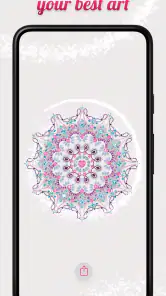
Analysis by Reviewed
I usually reach for a coloring app when I have a few spare minutes and want something more absorbing than scrolling, but not demanding enough to feel like another task. Dazzly: Color by Number Game is built for that in-between moment: you choose a picture, fill its numbered spaces with matching colors, and watch the artwork take shape. In my experience, the appeal is less about making artistic decisions from scratch and more about settling into a clear, repeatable rhythm.
Choosing a moment for a coloring session
Before opening Dazzly, it helps to be honest about the kind of break you have. If I have only a minute or two, I would rather browse and pick an image than feel rushed to finish it. When I have a longer pause, I can settle into the number-matching and give a detailed design the attention it needs. That distinction matters: the app suits short, interruptible sessions, but it does not make every picture equally convenient for every setting.
A realistic use might be a quiet stretch on the train or a wait before an appointment. I can choose one image, color a few visible sections, then stop when I need to put my phone away. The task is easy to understand when I return, so I do not need to reconstruct a plan or remember where I left off. I would avoid choosing a very intricate image if I expected frequent interruptions, since repeatedly scanning for tiny numbered spaces can turn a relaxing break into a fiddly one.
A small pause that fits a real day
That rhythm works well in ordinary situations. I can imagine opening Dazzly while waiting for an appointment or taking a quiet break after work, choosing an image, and completing a few sections before putting my phone away. The numbered areas make it easy to return later without needing to remember a complicated process. If you want freeform drawing, precise brush control, or a project you can develop over several sessions, though, a drawing app or a physical coloring book may suit you better.
Dazzly is an entertainment app from GEODE, and it is free to install. Its broad appeal is reflected in a 4.6 average from around 124,000 ratings, while more than 5 million installs suggest it has found a sizeable audience. It is rated for everyone, so the basic idea is approachable for children and adults alike. The current version is 25.11.2, and it requires Android 8.0 or later. I would still treat the age rating as a general guide rather than a promise that every image or prompt will suit every family’s preferences.
What kind of attention the app asks for
Color-by-number is more guided than drawing, but it is not entirely passive. I still need to locate the spaces that match the selected number, and small sections ask for more careful visual scanning than broad areas do. That makes the activity useful when I want a mild focus task: it gives my attention somewhere specific to go without asking me to invent a composition or make artistic decisions.
There is a trade-off here. If I am tired enough that even following a simple visual cue feels irritating, Dazzly is not necessarily the right way to rest; music or an audio show may be easier. On the other hand, if scrolling leaves me restless, the small repeated actions can give a break a clearer shape. I would think of it as a quiet activity to do, rather than something designed to run unnoticed in the background.
More From Our News Desk

Weather by Xiaomi Review: Clear at a Glance, Less Clear Up Close

X Under Pressure: Can It Recover When Posting Goes Wrong?

Clash of Clans Is Won Between the Battles

Android Auto Makes the Case for Quieter Car Software

MobiOffice: Transforming Mobile Productivity with Seamless Integration

EA SPORTS FC™ Mobile Soccer: Redefining Mobile Sports Gaming
Getting Started with Dazzly
First off, downloading Dazzly: Color by Number Game is a breeze. Available on both Android and iOS, you can find it easily in your app store. Once installed, you’re greeted with an interface that’s as colorful as it is user-friendly. The app is designed to be intuitive, so even if you're not tech-savvy, you'll find your way around in no time.
The Joy of Coloring
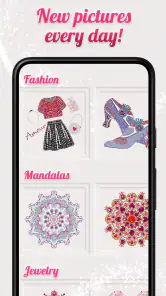
Now, let's dive into the fun part - coloring! The game offers a multitude of images ranging from intricate mandalas to stunning landscapes, all waiting for your artistic touch. Each image is broken down into numbered sections, and your task is to fill in each section with the corresponding color. It might sound simple, but trust me, it’s incredibly satisfying. As you progress, watching the image come to life is nothing short of magical.
One of the things I love about this game is that it doesn’t just stop at static images. Dazzly spices things up with animated pictures and glitter effects that add a little extra sparkle to your creations. It’s like having a mini art gallery right in your pocket!
Following the picture from first tap to finish
For a smoother session, I’d choose an image based on the time and attention I have, rather than picking the most detailed-looking one by default. A picture with many small sections can be satisfying when I’m settled in, but it is less convenient if I’m trying to color one-handed in a short queue. Starting with a simpler design gives me a quick sense of progress; saving the more intricate work for a longer break makes the app feel less like a chore.
The number guide also changes the kind of attention the activity asks for. I’m not deciding which colors belong in the scene, so it is easier to relax than with a blank canvas. At the same time, I still need to scan for the right numbered spaces, especially when they are small or close together. That makes Dazzly a better fit for gentle focus than for completely hands-off background entertainment. If my mind is too tired to track details, I would choose music or an audio show instead.
Making the session easier to pick up again
A useful habit is to decide what counts as a satisfying stopping point before I begin. Rather than treating a finished picture as the only successful outcome, I can work through a small patch of the image and leave the rest for another break. That keeps the activity compatible with an unpredictable day and avoids turning a relaxing pastime into a deadline. When choosing a picture, I would also consider how much uninterrupted attention I can give it, not just whether its finished appearance appeals to me.
On a phone, the size and density of the numbered spaces can affect how comfortable a session feels. If I notice myself repeatedly hunting for a tiny section, I would switch to a less intricate image instead of assuming I need to push through. This is a practical difference from freehand drawing: the app removes decisions about what to paint, but locating the right area is still part of the work. The best fit is a picture whose detail feels engaging rather than tedious.
Where the finished picture goes
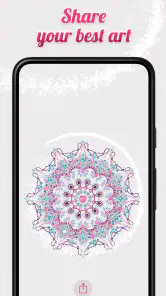
Finishing an image does not have to be the end of the session: the app lets you save creations to your device and share them with friends. That handoff is useful if you want to keep a favorite result or send it to someone who enjoys the same kind of visual pastime. I’d treat sharing as an optional bonus, though; the strongest part for me is the quiet process, not the pressure to turn every completed picture into something to post.
For me, saving and sharing serve different purposes. Saving makes sense when I want to keep a result for myself; sharing is better when I have a particular person in mind who would enjoy seeing it. Neither needs to become the reason for coloring. If I am choosing the app mainly to create original artwork for a portfolio or to make precise edits, the guided coloring format is not a substitute for a drawing tool. Its handoff is about preserving or passing along a completed image, not continuing to work on it with professional controls.
What to expect before spending
There is a practical trade-off around spending. Dazzly is free, but it offers in-app purchases priced from $9.99 to $99.99 per item. I would start by seeing how much of the coloring experience I enjoy before considering any purchase, and check the item details carefully rather than assuming every image or effect is included at no cost. If you prefer a coloring app with no paid extras at all, that possibility may be a reason to compare alternatives first.
The sensible way to approach those purchases is to use the app first and decide whether its particular style keeps you coming back. A high-priced item is not automatically worthwhile just because it includes appealing content; I would weigh it against how often I actually color and whether the available experience already meets my needs. If I only want an occasional short distraction, staying with the free option may be enough. If avoiding optional spending is a firm requirement, an app with a payment model you prefer—or a paper book bought once—may feel more comfortable.
Why Dazzly Stands Out
So, what makes Dazzly stand out from other coloring apps, you ask? For starters, it’s not just about coloring within the lines. The app offers a range of features designed to enhance your experience. You can save your masterpieces to your device and share them with friends, spreading the joy (and maybe showing off a bit!).
Moreover, the app is continually updated with new images, ensuring that there’s always something fresh to color. And for those who are a bit more competitive, the app includes challenges and leaderboards to keep you motivated. Who knew coloring could be so exhilarating?
Using the optional goals without losing the point
Challenges and leaderboards can give a session a defined target, which may help when I want a little structure beyond selecting a picture. They are not essential to the basic appeal, though. If a score or comparison makes a calm hobby feel like another obligation, I would simply treat those elements as optional and return to coloring at my own pace. For someone who enjoys goals, they may provide a reason to open the app; for someone who values a screen-free-feeling break, they may be easy to ignore.
That distinction is useful when deciding whether Dazzly is right for a child or for shared family downtime. The basic numbered coloring idea is straightforward, but the best experience still depends on the person’s patience for detail and comfort with in-app purchase options. I would sit with a younger user at first, help them choose an image that is not overly fiddly, and make sure they understand that buying something is a separate decision. The everyone rating makes the app broadly accessible; it does not mean every family will want every optional prompt or purchase.
How it compares with other ways to color
Compared with a plain digital color-by-number book, Dazzly’s animated pictures and glitter effects make the finished image feel more decorative, while the number-matching structure keeps each session guided. A standard drawing app gives you more control but asks you to choose colors and make marks yourself; that is more rewarding if creative freedom matters to you, but less restful if you want a ready-made route through a picture. Paper coloring avoids screen time and can feel more tactile, although it is less convenient to carry around and pick up in a spare minute.
The choice also depends on what keeps you engaged. Challenges and leaderboards can give a session a goal beyond finishing a picture, but anyone who dislikes comparison or score-like prompts may prefer to ignore that side and color at their own pace. I would not use the competitive angle as the main reason to install it; the straightforward pleasure of completing an image is a better match for the app’s strongest use case.
Who will enjoy it—and who may not
I would recommend Dazzly to someone who likes visual puzzles, wants a guided creative break, or finds satisfaction in watching a busy image gradually become complete. It is especially suited to people who want to color without choosing a palette or learning drawing tools. The numbered structure also makes it approachable when I have no particular artistic idea in mind: I can start with the picture already laid out and focus on the next small step.
I would be less likely to recommend it to someone who wants to make original marks, control every brushstroke, avoid screen-based activities, or have no optional purchases in an app. A physical coloring book is a better fit for tactile materials and a break from the phone. A drawing app is better for experimentation and authorship. Dazzly sits between those choices: more guided and decorative than drawing from scratch, but more portable and visually animated than coloring on paper.
The Relaxation Factor
We can’t overlook the app’s ability to provide genuine relaxation. There’s something therapeutic about the repetitive nature of coloring, and Dazzly nails this aspect perfectly. It’s a perfect way to unwind after a long day, and it’s suitable for all ages. Whether you’re a kid or just a kid at heart, this app has something for everyone.
My own qualification is that relaxation depends on the picture and the moment. A detailed design can be absorbing when I am ready to concentrate, yet frustrating when I am distracted or in a hurry. I would not expect every session to feel soothing automatically. Choosing an image that matches my available attention, and allowing myself to stop before it is complete, makes the experience more likely to stay pleasant.
My take after considering the whole routine
As a complete routine, Dazzly is straightforward: pick an image, follow the numbered spaces, pause when life interrupts, and save or share a finished result if that appeals. Its strongest handoff is the one back to everyday life—the activity is easy to set aside without needing to preserve a complicated creative process. The main friction is equally clear: small areas require attention, and optional purchases mean I would check costs before treating every image or effect as part of the free experience.
In conclusion, if you’re looking for a fun and relaxing way to pass the time, Dazzly: Color by Number Game is definitely worth checking out. With its easy-to-use interface, variety of images, and engaging features, it’s a fantastic app that brings a splash of color to your day. Happy coloring!
Dazzly: Color by Number Game Frequently Asked Questions
What is the minimum operating system needed to run Dazzly?
Check that your device meets Dazzly’s minimum operating system requirement before downloading. The app requires Android 8.0 or later, so devices running an older version may not be compatible. If you use an iPhone or iPad, check the app’s compatibility details in the relevant app store before installing. Keeping your device’s software up to date can also help you access the current app version.
Can I use Dazzly for a quick break, or does coloring take a long time?
Dazzly’s color-by-number format makes it easy to pick up an image and work through it at your own pace. You can focus on a few numbered sections when you have a short break, or continue for longer when you want a more absorbing activity. The experience centers on gradually completing a design, so you can decide how much time to spend rather than needing to draw from scratch.
Is Dazzly free to download, and what should I know about optional spending?
Dazzly is free to download, so you can try its diamond-art coloring experience without paying upfront. The app also offers in-app purchases, with listed items ranging from $9.99 to $99.99. Before making a purchase, check what it includes and whether it suits your preferences. The free starting point and optional spending make it worth reviewing the available choices before you begin.
What kind of coloring experience does Dazzly offer compared with a basic coloring app?
Dazzly focuses on diamond-art-style color-by-number designs rather than freehand drawing. You follow numbered areas and fill them with colors, giving the activity a guided, low-pressure feel. This makes it appealing if you enjoy completing detailed pictures but do not want to choose every color or draw each shape yourself. Its entertainment focus is on relaxing through the coloring process.
What is Dazzly: Color by Number Game all about?
Dazzly: Color by Number Game is a creative and relaxing app that allows users to fill in intricate designs with a simple color-by-number system. It's perfect for those looking to unwind by engaging in a calming artistic activity. With a variety of vibrant designs and themes, it caters to all age groups and provides a sense of accomplishment upon completion.
Pros
- User-friendly interface for all ages.
- Wide variety of designs to choose from.
- Regular updates with new designs.
- Offline mode available for convenience.
- In-app tutorials for beginners.
Cons
- Frequent ads can be disruptive.
- Limited free content without purchases.
- Some designs are overly simplistic.
- Occasional app crashes reported.
- Requires significant storage space.
- Category
- Entertainment
- Version
- 25.11.2











