Daily Mail: Breaking News
- 6.69K
- 3.9
- Installs
- 5.00M
- Price
- Free

Screenshots



Analysis by Reviewed
I find a news app most useful when I can dip in for a quick update without turning every spare minute into a long reading session. Daily Mail: Breaking News is aimed at that kind of habit, mixing current affairs with sport, entertainment, lifestyle stories and visual coverage. I’d consider it when I want a broad, lively news feed on my phone, rather than a quiet, narrowly focused briefing.
Where it fits in a daily news routine
The app makes the most sense as a flexible place to browse, not as a strict checklist I need to complete. I can open it with one question in mind—what is happening today?—and then decide whether I have time to follow a story further. That distinction matters: a broad feed is useful for discovery, but it can also tempt me into reading well beyond the few minutes I meant to spend.
If I want a quick overview, I’d scan headlines and choose only the items that connect to something I care about. If I’m following a particular event, I’d use the feed to spot related coverage, then compare its account with another source before treating any one article as the whole picture. This is especially useful for topics where background and competing perspectives matter more than a fast first impression.
Reading when the connection is part of the experience
Because stories, photos and video need to load, the quality of the experience depends in part on the network available at the moment. On a reliable connection, moving from a headline to a gallery or clip makes the coverage feel more immediate. On a weak signal, I’d stick to text and avoid repeatedly opening media-heavy stories while waiting for them to appear. That simple choice makes the app more comfortable to use on a busy commute or in a crowded public place.
A quick check between other things
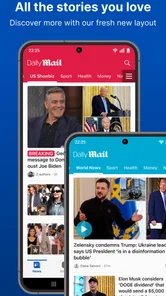
The first thing you'll notice about the Daily Mail: Breaking News app is its user-friendly interface. It’s like having a personal newsstand right at your fingertips. The app is designed to make navigation a breeze, which means no more endless scrolling trying to find what you're looking for. Trust me, whether you're on your morning commute or just lounging around at home, this app brings the news to you, fast and easy.
For a realistic everyday routine, I’d open it while having breakfast, scan a few headlines, and save the longer reads for a calmer moment. If I’m on a train with patchy reception, I wouldn’t rely on video to catch up; I’d choose a text story and let the richer elements wait until the connection is steadier. The useful distinction is between checking what’s happening and settling in to explore a story—the app can serve both moods, but the second is more demanding of time and connectivity.
Personalisation, alerts and visual reporting
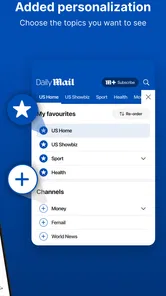
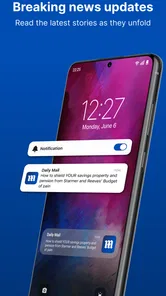
One of the features I absolutely love is the personalized news feed. The app takes into account your reading habits and interests, curating a selection of stories that you’re likely to find intriguing. This means you spend less time searching and more time reading. Plus, the push notifications are a real game-changer. They ensure you're always in the loop, even on the busiest of days.
More From Our News Desk

Weather by Xiaomi Review: Clear at a Glance, Less Clear Up Close

X Under Pressure: Can It Recover When Posting Goes Wrong?

Clash of Clans Is Won Between the Battles

Android Auto Makes the Case for Quieter Car Software

MobiOffice: Transforming Mobile Productivity with Seamless Integration

EA SPORTS FC™ Mobile Soccer: Redefining Mobile Sports Gaming
I’d treat alerts as a starting point, not a complete account of a developing story. A notification can bring me back to the app, but I still want to open the article and see its context before drawing a conclusion. If the volume of interruptions becomes distracting, reviewing which notifications I actually value is a sensible habit. That keeps breaking coverage useful instead of letting it compete with every other demand on my attention.
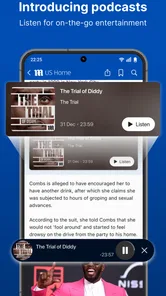
Another aspect worth mentioning is the multimedia integration. Articles are often accompanied by videos and photo galleries, which really enrich the reading experience. Whether it's a breaking news story or a lifestyle piece, the added visuals bring the content to life.
Making visual coverage work for you
Photos and clips change how I use a story: they can make an event easier to follow at a glance, but they also make it less suitable for every setting. I’d save a gallery for a moment when I can look at the screen properly, rather than trying to follow it while walking or balancing a coffee. That small choice improves both attention and safety, and it avoids treating every piece of coverage as something to consume immediately.
A practical way to keep the feed manageable is to decide what I want from each visit before opening it. For example, I might check headlines during a short break, but leave video and longer articles for home. This gives the app room to be entertaining without letting its variety blur into an endless scroll. Readers who prefer a clean list of text headlines may find that the visual emphasis adds more activity than they want.
Choosing the right moment to read
So, why should you give this app a try? For starters, it’s perfect for those who want to stay informed but are pressed for time. The concise news summaries are great when you need a quick update, and the in-depth articles are there for when you have a bit more time to dive deep.
There is a trade-off: visual stories can be engaging, but they’re less convenient when you’re trying to conserve mobile data or have only a few seconds to spare. I’d use a short check-in for headlines and return later to photo-led coverage when I’m on a dependable connection. If you’re often offline, need a highly restrained text-only briefing, or want a specialist source focused on one subject, a different news app may suit you better.
Moreover, the app covers a wide range of topics, from politics and world news to entertainment and sports. This diversity means you’re not just getting a narrow view of the world. Instead, you’re presented with a broad spectrum of news that can cater to a variety of interests.
Compared with a broadcaster’s app, which may center on its own reporting and formats, this is a broad mix that can be handy when I want to browse beyond one beat. Compared with a plain headline aggregator, its photos and videos give stories more visual presence, though that can make a quick scan feel busier. I’d pair it with a more focused source when a topic calls for depth or a different editorial perspective, rather than expecting one app to cover every need.
That comparison also helps answer whether it can replace a newspaper or a specialist publication. For casual discovery across several subjects, it can be a convenient first stop. For detailed coverage of finance, local government, science, or another particular field, I’d look for a source built around that subject. A broad news app is best judged by how well it helps me find what I want, not by whether it can be everything at once.
And if you’re worried about missing out on local news, don’t be. The app includes a section dedicated to regional stories, ensuring you stay informed about what’s happening in your own backyard.
Who it suits, and what to keep in mind
I’d recommend it most to readers who like variety and want news, sport, entertainment and lifestyle coverage together. It is also a reasonable fit for someone who enjoys photo-led reporting and checks the news in short sessions throughout the day. It is less suitable for readers who want a minimalist interface, a tightly filtered subject feed, or a dependable way to read without a connection.
Daily Mail Online publishes this free news and magazines app, which is rated for Everyone 10+. It has an average rating of 3.9 from around 127,000 ratings, and has been installed over 5 million times. Those figures suggest a widely used option, though they can’t tell you whether its mix and presentation match your own preferences. The app’s current version is 6.9.1, and it is available for devices running iOS 8.0 or later.
The app is free to download, while in-app purchases range from $2.99 to $10.99 per item. I’d check any purchase prompt carefully before proceeding, especially if I only want to browse the free news experience. It has been available since November 28, 2011, so it is an established choice rather than a new experiment, but an older release date alone is no guarantee that it will suit every reader’s habits.
For recovery after a story stalls, I’d first check whether other apps can load over the same connection, then retry the article once reception improves. If only a video or gallery is slow, switching back to text is a practical way to keep reading without repeatedly waiting on the same media. I would not assume that every story will be ready without a network, so anyone who needs guaranteed reading during a flight or in a dead zone should choose a service whose offline options meet that need.
Handling interruptions and limited data
When I’m using a metered mobile plan, I’d be deliberate about which stories I open and how long I stay with media-heavy coverage. Headlines and text are the sensible starting point; galleries and video are better saved for Wi-Fi or a time when I’m comfortable using more data. I can’t infer the exact amount a particular visit will use, because that depends on what I choose to load, so the useful habit is to treat visual content as optional rather than letting it play an automatic role in every check-in.
If an article seems stuck, I would avoid tapping it over and over. First I’d see whether the connection itself is working, then return once it is stable. If the issue appears limited to a single clip, I’d move on to another story instead of letting one slow item hold up the whole session. This is a small but useful distinction: a temporary network problem does not necessarily mean the entire app is unavailable, and changing what I try to load can keep a short visit productive.
Alerts also depend on being connected at the right moment, so I wouldn’t use them as a guarantee that I’ll see every development immediately. For a story that matters to me, I’d check the feed when I have a moment and use notifications as prompts rather than a complete monitoring system. This keeps the app helpful without giving it more authority over my attention than it deserves.
A connectivity-aware verdict
All in all, the Daily Mail: Breaking News app is a solid choice for anyone looking to stay connected with the world. Its intuitive design, personalized content, and comprehensive coverage make it stand out in the sea of news apps available today. So, if you haven’t already, give it a download and let it revolutionize the way you consume news. You won’t regret it!
My recommendation is more specific: try it if you like browsing a wide range of news and appreciate pictures and video alongside articles. Keep alerts selective, use a strong connection for media-rich stories, and turn to a specialist or text-focused alternative when that better fits your priorities. With those expectations, it can be a convenient companion for regular check-ins, while its reliance on connected content is worth considering before making it your only news source.
Daily Mail: Breaking News Frequently Asked Questions
What does Daily Mail: Breaking News cover?
The app brings together news, gossip, sports, and photos from the Daily Mail site. Its coverage is broad, so readers can browse several kinds of stories in one place rather than using it for just one subject. That mix may appeal if you follow current events alongside entertainment and sports, though the subjects you choose to read will shape your experience.
How much storage space does Daily Mail: Breaking News require?
The amount of storage an app needs can vary with the device and the version being installed, so it is sensible to check the download details shown for your phone or tablet before proceeding. Also leave some room for app updates and any content stored while using it. Checking available storage first can help avoid an interrupted installation or a device running short on space.
What is the current version of Daily Mail: Breaking News?
The current version is 6.9.1. Keeping an app up to date can provide access to its latest release, so check the app store on your device for available updates after installing. Version numbers can change as newer releases arrive. If you are troubleshooting an issue, confirming that you have the current version is a useful first step before trying other basic fixes.
Who publishes Daily Mail: Breaking News, and what kind of app is it?
Daily Mail: Breaking News is a News & Magazines app published by Daily Mail Online. It brings together news, gossip, sports, and photos from the Daily Mail site, making it a mobile option for readers who want those subjects in one place. Its focus is broad rather than limited to a single topic, so the app may suit people who follow both current events and entertainment coverage.
Is Daily Mail: Breaking News available for my device?
The app is available for Android devices running Android 8.0 or later. If your device uses an earlier Android version, it does not meet the stated minimum requirement. Daily Mail: Breaking News is also offered for iOS, so iPhone and iPad users can look for it in the Apple App Store. Check your device’s operating system before downloading to make sure it is compatible.
Pros
- Comprehensive global news coverage.
- User-friendly interface design.
- Customizable news alerts.
- Offline reading feature.
- High-quality multimedia content.
Cons
- Frequent ads can be disruptive.
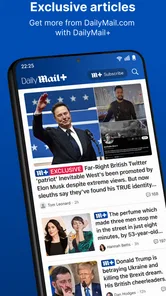
- Some articles are behind paywall.
- Occasional app crashes reported.
- Limited personalization options.
- Subscription can be costly.