

Colliz - DIY Wallpaper Craft
- 267.00
- 3.6
- Installs
- 10.00M
- Price
- Free

Screenshots
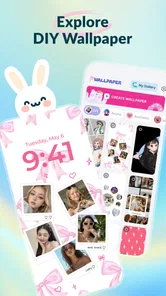

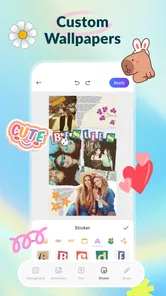

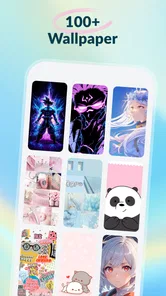
Analysis by Reviewed
If you want to give your phone a more personal look but find ordinary wallpaper browsing a little dull, Colliz is worth a look. It’s a personalization app from Braly JSC built around making wallpaper designs and photo collages, with a craft-oriented feel rather than just a gallery of ready-made backgrounds. I’d approach it as a small creative tool: useful when you want to make something that feels like yours, less useful if all you need is a quick, polished wallpaper with no decisions involved.
What to expect from a craft-first wallpaper app
The main appeal is the chance to shape a visual idea yourself. Colliz brings DIY live wallpaper creation and collage design into one app, so the experience is broader than picking an image and setting it as a background. Its trend-focused angle may also help when you’re short on inspiration, though I’d treat trends as a starting point, not a guarantee that every style will suit your screen or taste.
That distinction matters when comparing Colliz with the usual alternatives. A standard wallpaper app is generally the faster choice if you want to browse finished images and apply one. A general photo editor may give you more familiar editing controls for carefully retouching a single picture. Colliz makes more sense when the fun is in arranging a look, combining photos, or trying a crafted visual direction rather than simply downloading a background.
I’d also keep expectations realistic: “live” and “DIY” describe the app’s creative focus, but they don’t mean every design will automatically look good on every device. A composition that seems balanced while editing can feel crowded once icons and widgets sit on top of it. Think of the first design as a draft for your actual home screen, not just an image to admire in the editor.
Colliz is free to install and is rated for Everyone. It has an average rating of 3.6 from around 6,400 ratings, alongside roughly 267 written reviews, and has passed 10 million installs. Those numbers suggest a sizeable audience, but the middling average is a reminder that creative apps can be subjective: people looking for a simple, predictable wallpaper picker may have a different experience from users who enjoy experimenting.
Getting started without overthinking the setup
When you first open Colliz, give yourself a small, specific goal instead of trying to explore every creative possibility at once. For example, choose one photo you already like and see whether you can turn it into a background that feels calmer, brighter, or more personal. Starting with a clear idea makes it easier to judge the result than scrolling through styles without knowing what you want.
If you plan to use your own photos, pick an image with a clear subject and some breathing room around it. That extra space can be valuable on a phone screen, where app icons may cover parts of the background. A close-up with important details near the edges can be harder to use than a less dramatic image with a simple central focus. This is a practical choice to make before you begin designing, not a problem you need to solve with more effects later.
More From Our News Desk

 Gmail
GmailGmail in a Busy Inbox: Who Benefits Most?
From first account to crowded workday, Gmail earns its place through dependable search and flexible sorting—but its best fit depends on how much inbox maintenance you can tolerate.

 Prime Video
Switching to Prime Video: What Changes in Your Viewing Routine
Prime Video can make a compelling second home for streaming, but switching means learning a different catalog, rental layer, and route from browsing to playback.

 Universal TV Remote Control
Universal TV Remote Control Works Best as a Reliable Backup
A phone remote earns its place through quick setup and reliable habits. Here is how to get more from Universal TV Remote Control—and where its limits show.

 Weather - By Xiaomi
Weather by Xiaomi Review: Clear at a Glance, Less Clear Up Close
Xiaomi’s weather app makes everyday forecasts quick to scan, but its calm surface can leave useful details and recovery paths harder to find than they should be.

 X
XX Under Pressure: Can It Recover When Posting Goes Wrong?
A resilience-focused review of X, examining setup, mistaken posts, interruptions, weak connections, and the gaps that matter when recovery needs to be dependable.

 Clash of Clans
Clash of Clans Is Won Between the Battles
Its raids are quick; its community is a long-term project of coordination, teaching, rivalry, and shared responsibility—with all the friction that entails.
Latest News



For a first attempt, make one change at a time. Try a composition or visual treatment, then pause and look at the overall balance before adding more. The craft approach can tempt you to keep decorating, but a wallpaper has a job as well as a style: it should make your screen feel distinctive without making icons hard to spot. A restrained first design is often a better test of whether the app suits you than an elaborate one.
I’d also avoid treating the trend area as a checklist. Use it to spot a mood or arrangement that catches your eye, then adapt the idea to your own photo or preference. Copying a look too literally can leave you with a wallpaper that feels fashionable but not personal. The better result is usually the one where a trend gives you a nudge and your own choices determine the final feel.
Your first useful result: design for the screen, not just the editor
A realistic first success might be making a collage from a few meaningful photos for a home screen you look at every day. Before saving or applying it, check whether the important parts remain visible when you imagine your icons over the top. If the subject competes with the places where you keep your most-used apps, simplify the arrangement or move the visual emphasis toward a less busy area.
This is one of the most useful habits for any wallpaper-making workflow: evaluate the image in context. A design can look attractive on a plain editing canvas and still become distracting in daily use. If you use several home-screen pages, a quieter background can be more comfortable than a detailed collage, while a more expressive design may work better on a screen with fewer icons. The right choice depends on how you actually use your phone.
For a lock screen, consider whether the central image leaves room for the information your device displays. For a home screen, focus instead on contrast and readability around icons. These are different jobs, so one design does not have to serve both perfectly. Making separate choices for those two contexts is a simple way to get more value from a wallpaper app, even if you keep the visual style consistent.
Colliz’s combination of DIY wallpapers and photo collages is most appealing when you want the finished background to carry a personal story. A family snapshot, a travel picture, or a set of images tied to a hobby can feel more individual than a generic background. On the other hand, if you prefer a clean, abstract wallpaper that doesn’t draw attention, a conventional wallpaper library may get you there faster and with less effort.
Where first-time users may get stuck
The likely point of confusion is the difference between making something visually interesting and making something comfortable to live with. A collage can become too busy, especially when every photo seems worth including. I’d start with fewer images than you think you need, then add another only if the composition still feels empty. Leaving space is not wasted space; it can make the final screen easier to use.
Another common snag is expecting a trend suggestion to do all the creative work. Trends can point you toward a look, but you still need to decide whether it fits your photos and the layout of your screen. If the result feels forced, step back and keep only the part you liked: perhaps the overall mood, the use of color, or the idea of a collage. You don’t need to preserve every element of an inspiration style.
It’s also sensible to check the app’s cost model before investing time in a design. Colliz is free, but it offers in-app purchases ranging from $5.99 to $49.99 per item. I’d explore the free experience first and make sure the basic creative workflow suits you before paying for anything. If a particular option is presented as a purchase, consider whether it solves a real need for your design rather than buying simply because it is visible.
Colliz is currently at version 2.0.8 and requires Android 7.0 or later. That makes the Android requirement relevant if you’re installing on an older phone; checking your device’s software version first can save a wasted download. The app’s personalization focus also means it is best judged by the finished screen and your comfort using it, not just by how many styles or ideas you can browse.
Who will enjoy it, and when another option is better
I’d recommend giving Colliz a try if you like making your phone feel personal, enjoy arranging photos, or want to experiment with a crafted wallpaper rather than settle for a ready-made image. It can be especially satisfying for someone who already keeps a few favorite pictures on their device and wants to turn them into a background with a more deliberate look.
I’d skip it if your priority is speed, minimalism, or precise photo editing. Someone who wants to set a wallpaper in seconds is likely better served by the phone’s built-in wallpaper settings or a straightforward wallpaper browser. If you need detailed control over image correction, a dedicated photo editor may be a better fit. Colliz occupies the middle ground: more hands-on than browsing, but focused on wallpaper and collage creation rather than being a full-purpose image-editing studio.
The best next step after your first design is to use it for a while before making another. Notice whether icons remain easy to find, whether the image feels too busy after repeated use, and whether the visual style still feels like you once the novelty wears off. If it works, try adapting the same idea for a different screen or occasion. If it doesn’t, simplify rather than starting over with a completely new look.
Overall, Colliz is a reasonable choice for curious first-time creators who want to make their own phone background and are happy to experiment. Its strengths are the combination of wallpaper craft, collage-making, and trend inspiration; its trade-offs are the extra decisions involved and the need to check designs in real screen use. I’d start with one photo, keep the first composition simple, and decide whether the result improves your everyday screen before exploring paid options.
A practical routine for making the result last
One useful way to keep the first session manageable is to separate choosing a concept from judging the finished wallpaper. Pick the photo or visual mood first, make a deliberately simple draft, and then step away from the editor for a moment. When you return, ask whether the design still reads clearly at a glance. That short pause helps me notice clutter I overlook while concentrating on individual details.
For an everyday example, imagine making a background from a weekend trip photo before Monday. I’d choose a frame that brings back the memory without putting the most important detail under the clock or a cluster of icons. If the picture feels too busy, a collage can help give several snapshots a shared purpose, but it can also compete with the phone’s interface. I’d use the smallest set of images that tells the story, then keep the home screen’s most-used area visually quieter.
It’s also worth considering how often you actually want to change your background. If you enjoy refreshing your phone for a new season, a hobby, or a personal milestone, a hands-on maker can be more satisfying than repeatedly searching a library. If you rarely change wallpapers, the extra time spent learning a creative workflow may not pay off; choosing one finished image through the phone’s settings could be the more comfortable habit.
Choosing a workflow that fits your patience
Colliz is best approached as a place to explore and assemble an idea, not as a shortcut to professional photo correction. That distinction can save frustration: if a picture needs careful retouching, prepare it in a dedicated editor and then use the wallpaper workflow for the composition. If the photo already looks good and the goal is simply to give it a more personal presentation, starting in Colliz makes more sense.
When a design seems wrong, I wouldn’t immediately add more decoration to fix it. First check the crop, the amount of empty space, and whether the subject has a clear visual priority. Those choices often matter more on a phone than extra embellishment, because the background sits behind practical information all day. This is especially useful for people who keep many apps on the first screen: a simpler composition may feel less exciting in the editor but work better in regular use.
There’s a small trade-off between making a wallpaper expressive and making it durable. A highly specific collage can feel meaningful now, but may become visually tiring if you see it every time you unlock the phone. A calmer design can last longer, while a more personal one may be worth changing sooner. I’d choose based on whether I want a background to quietly support the screen or act as a visible reminder of a person, place, or interest.
The app was released on November 5, 2025, and its current version is 2.0.8. I’d treat those details as useful context rather than a reason to expect a particular creative style: what matters for a first-time user is whether the available workflow feels intuitive and whether the result works on their own device. If you’re deciding between trying it and sticking with your current wallpaper routine, a single small project is a low-pressure way to find out.
My overall recommendation is therefore quite specific: try Colliz if the process of making a background sounds enjoyable in its own right, especially if you have personal photos you’d like to bring together. Keep your first project modest, judge it with your icons visible, and only explore paid options if you’ve found a clear reason to continue. If your main goal is an instant background or detailed image repair, a wallpaper browser or dedicated editor remains the better match.
Colliz - DIY Wallpaper Craft Frequently Asked Questions
What is Colliz - DIY Wallpaper Craft?
Colliz - DIY Wallpaper Craft is a creative personalization app focused on making custom phone wallpapers. It lets you combine decorative elements, colors, patterns, and other design assets into a layout that reflects your style. The experience is aimed at casual crafting rather than professional graphic design, so it may suit users who want to experiment with a personalized background without learning complex editing software.
How do you create a wallpaper in Colliz?
You generally start with a blank canvas or a design template, then add and arrange available visual elements to build your wallpaper. Depending on the options offered in your version, you may be able to adjust colors, backgrounds, placement, and other decorative details before saving the result. Take time to check the preview on your device, since icons and clock widgets can cover parts of a finished design.
Is Colliz - DIY Wallpaper Craft free to use?
The app may be available to download without an upfront charge, but that does not necessarily mean every design asset or feature is free. Apps in this category can include ads, optional purchases, subscriptions, or locked content, and availability may vary by platform or region. Before committing to a purchase, review the current price and subscription terms shown in the official app store listing.
Can I save and use my designs as my phone wallpaper?
Colliz is intended to help you make wallpaper-style designs, and the finished image may be saved or applied through the options available in the app and your device. The exact steps can differ between Android and iOS, and some versions may require access to photos or media storage to save an image. Check the export quality and fit before setting it as your background.
What should I check before downloading Colliz - DIY Wallpaper Craft?
Check that your phone meets the app’s current operating-system requirements and that you have enough storage for the app and saved designs. Read the store listing for details about ads, in-app purchases, permissions, and privacy practices, since these can change over time. Also look at recent reviews to see whether users report issues with saving, performance, or the design tools on devices like yours.
Pros
- Create custom wallpapers from photos
- colors
- and decorative elements.
- A hands-on editing process makes it easy to try different design ideas.
- Useful for giving your home screen a personal look.
- Designed for quick wallpaper creation without advanced editing skills.
- A good fit for users who enjoy crafting and experimenting with visuals.
Cons
- The range of available patterns and decorations may feel limited.
- Some design elements or features may require in-app purchases.
- Results may look less polished than wallpapers made in a full graphics editor.
- Small details can be difficult to arrange precisely on a phone screen.
- Wallpaper quality may depend on the resolution of the images you use.













