Citizen: Protect The World
- 31.57K
- 4.5
- Installs
- 5.00M
- Price
- Free

Screenshots
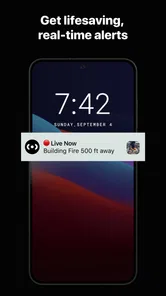
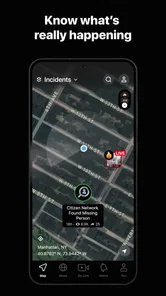
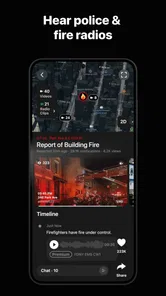
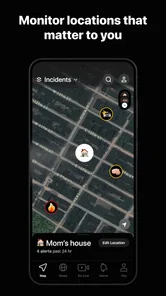
Analysis by Reviewed
I find Citizen easiest to judge by the job I want it to do: help me notice nearby public-safety activity and decide whether it changes my plans. It is a news and community-updates app from Sp0n Inc., rather than a replacement for emergency services or a guarantee that every incident will appear. Used with that distinction in mind, Citizen: Protect The World can be a useful extra source of local context, especially when I’m unfamiliar with an area or want to keep an eye on a regular route.
A practical routine for checking nearby activity
My sensible starting point is to look at the map when I have a reason to check, then read the details of an alert before reacting. A pin or notification is a prompt to learn more, not proof that I know the full story. If something affects my commute, for example, I would use the report as a cue to pause, check the route, and rely on official emergency instructions where needed. That small habit helps keep a fast-moving feed informative instead of alarming.
The app is free to download, and it has a 4.5 average from around 100,000 ratings, with over 5 million installs. Those figures suggest it has reached a broad audience, but they don’t tell me whether activity will be equally useful in every neighborhood. Local coverage matters more than popularity: someone in a busy area may find frequent updates, while someone elsewhere may see fewer reports. I’d try it during ordinary days before relying on it as part of a safety routine.
Settings and habits that make alerts more useful
Alerts are most helpful when they’re relevant enough to act on. I’d begin by choosing the areas I genuinely need to follow—such as home, work, or a family member’s school—and then review whether the notifications are adding useful context or simply interrupting the day. If an alert becomes background noise, I’m less likely to notice the one that matters. A quick settings check after a move, a new commute, or a change in routine can keep the app aligned with real life.
There’s also a useful distinction between checking proactively and letting notifications drive every decision. I’d reserve a quick map check for moments when I’m heading somewhere unfamiliar or hearing about a nearby incident, rather than repeatedly refreshing without a specific question. Community reports and live video can offer firsthand context, but they are still individual contributions; I’d treat them as leads to assess, not as a complete or verified account of an event.
Where it fits—and where it doesn’t
Compared with a standard news app, Citizen is more focused on nearby incidents and immediate local awareness than on broad headlines. Compared with official emergency channels, it can add community context, but it shouldn’t take their place when instructions or confirmed information are needed. That makes it a better fit for people who want an additional neighborhood signal than for anyone seeking a single authoritative source or a calm, general news reader.
I’d also think about the emotional side of using an incident-focused feed. Frequent exposure to troubling reports can make a neighborhood feel less safe than a fuller picture would suggest. I’d keep notifications purposeful, avoid treating every post as representative of daily life, and step away if checking the feed starts increasing anxiety. The app is intended for teens and older users, and that age guidance is worth considering when deciding whether it suits a younger family member.
More From Our News Desk

Weather by Xiaomi Review: Clear at a Glance, Less Clear Up Close

X Under Pressure: Can It Recover When Posting Goes Wrong?

Clash of Clans Is Won Between the Battles

Android Auto Makes the Case for Quieter Car Software

MobiOffice: Transforming Mobile Productivity with Seamless Integration

EA SPORTS FC™ Mobile Soccer: Redefining Mobile Sports Gaming
What is Citizen: Protect The World?
Imagine an app that keeps you in the loop about what's happening in your neighborhood, from safety alerts to community events. Citizen: Protect The World does just that and more. With real-time notifications about incidents near you, it’s designed to help you navigate the world with a little more peace of mind. The app taps into public safety data and user-generated content to give you a comprehensive view of your surroundings.
User Experience and Features
First things first, the user interface is sleek and intuitive. When you open the app, you're greeted with a map that highlights incidents around you. You can zoom in and out to see more or less detail, which is pretty handy. The app allows you to set up alerts for specific areas, so whether it's your home, work, or your kid's school, you're always in the know.
One of the standout features of this app is the live video option. Users can livestream events as they happen, providing a firsthand account of incidents. This feature can be a game-changer in emergencies, giving you a real-time look at what’s happening. Plus, there's a community aspect to it. You can connect with others in your area to share information and provide help if needed.
Why You Might Love It
What I love about Citizen: Protect The World is how it empowers users to make informed decisions. Whether it's a roadblock on your commute or something more serious, having up-to-date information means you're never caught off guard. The app also encourages transparency and accountability, as it allows users to report incidents and share their experiences.
Another cool thing is the app's focus on mental health. In stressful situations, quick access to mental health resources can be crucial. The app provides links to helplines and support networks, which I think is incredibly thoughtful.
Final Thoughts
In a world where staying informed can make a huge difference, Citizen: Protect The World is doing a stellar job. It’s not just about safety; it’s about creating a connected community that looks out for one another. If you're someone who values being in the know and having a tool that helps you feel a bit safer, this app is definitely worth checking out.
So, go ahead and give it a try. You might find it becomes one of those essential apps you can't live without. Stay safe out there!
Deciding whether it belongs in your routine
A realistic use case is a late change to an evening journey: before leaving, I can check the map for nearby reports and use any relevant detail to reconsider a route or timing. I wouldn’t make a detour solely because of an unverified post, and I wouldn’t stop to film an unfolding emergency. The safest value of a community feed is awareness and sensible planning, not turning bystanders into responders.
The app may suit people who travel across unfamiliar neighborhoods, follow several places as part of family life, or want local incident updates alongside regular news. It may be a poor fit for someone who prefers a quiet feed, finds crime coverage stressful, or needs only official emergency notices. In those cases, a local authority’s alert channel or a conventional news app may be the more focused choice. Citizen works best as a supplement, not as the only place I look.
Practical limits and the best way to use reports
Live video can make an event easier to understand, but a stream is still a partial view from one person’s position and may be confusing without context. I’d avoid sharing identifying details or treating a dramatic clip as confirmation of what happened. The same caution applies to community posts: compare details across reports when possible, and give official guidance priority if safety instructions are involved. That approach preserves the benefit of fast local information without overstating what a feed can establish.
There is a cost consideration beyond the free download: Citizen offers in-app purchases, with listed items ranging from $4.99 to $399.99. I’d first decide whether the free experience meets my needs and check the purchase screen carefully before paying for anything. The current version is 0.1272.0 and the minimum operating-system requirement is 9, so it is also worth checking device compatibility before building a routine around it.
A measured verdict for everyday use
My recommendation is to set up only the areas that matter, tune notifications until they are noticeable rather than constant, and treat each post as a starting point for judgment. That combination is more useful than simply turning on every alert and hoping the feed will make decisions for me. Citizen can add timely neighborhood awareness, but its usefulness depends on local activity, the quality of reports, and how comfortably I handle a steady stream of safety-related news.
Released on January 16, 2017, the app has had time to become a familiar name in this space, but I’d still judge it by how well it serves my particular area and habits. If I want nearby context and can keep a critical eye on user-generated reports, I’d give it a place among my information tools. If I need certainty, official instructions, or a less intense news experience, I’d turn elsewhere first.
A low-pressure way to decide if it suits you
I’d give the app a short trial period with notifications limited to places I actually visit, rather than immediately following every area that interests me. During that time, I’d notice whether alerts help answer practical questions—such as whether to leave earlier or choose a different route—or simply pull me into reading more incident posts. That distinction is a useful test: if the feed rarely changes a decision and often disrupts attention, keeping it installed may not be worthwhile.
For someone who mainly wants to know whether a particular street or nearby block is affected, the map-and-detail approach can be more useful than scrolling through a general news feed. For someone looking for national reporting, background, and carefully developed coverage, a traditional news source is still the better tool. I see Citizen as a narrow, local layer that can sit beside those sources, not compete with them on every kind of news.
Using the feed without letting it set the mood
A practical boundary is to check the app at decision points—before a trip, after hearing about a nearby event, or when a notification seems relevant—instead of making it the first thing I open whenever I have a spare minute. This keeps the map connected to a real task and makes it easier to close the app once I have enough context. If a report is upsetting, I would rather pause and verify what I can through authoritative channels than keep refreshing for more posts.
That approach also helps with a common uncertainty: whether a quiet map means an area is safe. It only tells me that the app is not showing a report I can use at that moment; it cannot establish that nothing is happening. I would never use an empty feed as a reason to ignore ordinary precautions or official advice. Its strongest role is to add information when reports are available, not to certify conditions when they are not.
Who gets the most from its local focus
I can see the appeal for people whose day involves moving between several neighborhoods: a caregiver making school and work trips, a delivery worker planning across an unfamiliar area, or someone visiting a city and wanting another source of immediate local context. In each case, the benefit comes from checking a relevant place at the right time, not from assuming that a live feed can predict what will happen next.
On the other hand, anyone who wants only weather, traffic, or broad headlines may find a dedicated service less distracting. Likewise, a person who needs dependable instructions during an emergency should rely on the appropriate emergency service or local authority. Citizen’s community perspective can complement those sources, but it does not make the user a dispatcher or investigator. That boundary is central to using the app responsibly.
My verdict after weighing the trade-offs
For me, Citizen is worth considering if nearby reports would genuinely help me make everyday choices and I’m comfortable reading them with care. The best routine is modest: follow only useful areas, inspect details before drawing conclusions, and treat official directions as the priority. That combination makes the app more manageable and more actionable than leaving every possible alert switched on.
I would skip it if safety-related updates make me anxious, if my area has little activity in the feed, or if I want one definitive source rather than a mix of community reports and local context. For everyone else, it can be a useful companion to ordinary news and official alerts, provided its limits stay clear. I’d judge its value not by how often it sends something, but by whether the information helps me make a calmer, better-informed choice.
Citizen: Protect The World Frequently Asked Questions
What should I know before relying on Citizen for urgent help?
Citizen is designed to provide emergency news alerts and community crime updates, helping users stay aware of events around them. Treat it as an information tool rather than a substitute for emergency services or official instructions. If you face immediate danger, contact the appropriate local emergency service and follow directions from authorities. Alerts can help inform your decisions, but personal safety should remain the priority.
Does Citizen: Protect The World provide live alerts and community updates?
Yes. Citizen’s focus is live emergency news alerts and 24/7 community crime updates. The app is intended to help users keep track of incidents that may affect their surroundings, with alerts and updates contributing to a more current picture of local activity. The usefulness of that coverage can depend on what is happening in a particular area and the reports available there.
Is Citizen: Protect The World suitable for teenagers?
Citizen: Protect The World has a Teen content rating, so it is intended for users who meet that age guidance. Because it focuses on emergency news and community crime updates, some reports may describe serious or unsettling situations. Anyone considering the app for a younger user should take the content rating into account and decide whether this kind of real-time safety coverage is appropriate.
What is Citizen: Protect The World and how does it work?
Citizen: Protect The World is a safety app designed to keep users informed about emergencies and incidents happening in their vicinity. By using real-time location data, the app alerts users about nearby events such as crimes, natural disasters, and public safety threats. Users can also report incidents they witness, helping others stay informed. The app aims to create a safer community by fostering awareness and enabling quick responses to emergencies.
Is Citizen: Protect The World free to use?
Yes, Citizen: Protect The World is available for free on both Android and iOS platforms. While the majority of its features are free, there is a premium subscription option called Citizen Protect. This subscription offers additional benefits such as 24/7 access to a Protect Agent who can assist in emergencies and a personal safety tracker. The free version still provides comprehensive safety alerts and community reports.
Pros
- Real-time safety alerts for your area.
- User-friendly interface for quick navigation.
- Community-driven content for local relevance.
- Option to share incidents with neighbors.
- Supports multiple cities for broader use.
Cons
- Requires constant internet connection.
- Can drain battery quickly if used often.
- Some alerts may be inaccurate.
- Privacy concerns with location tracking.
- Limited features without premium subscription.











