Bloomberg: Finance Market News
- 6.16K
- 4.0
- Installs
- 10.00M
- Price
- Free

Screenshots

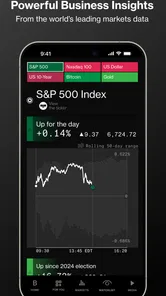

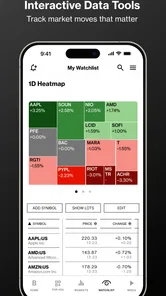
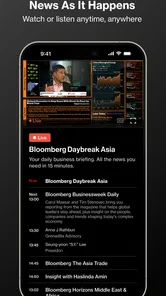
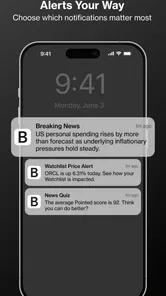

Analysis by Reviewed
When it comes to staying updated with the latest in financial news, the Bloomberg: Finance Market News app is a total game-changer. If you're looking to dive into the world of finance, this app is like your personal gateway to all things money-related. Let me walk you through my experience with this app, which truly keeps you on top of your financial game.
Building a useful daily routine
I get the most from Bloomberg when I give it a clear job instead of treating it as a feed to scroll endlessly. A quick morning check can help me see which business stories and market developments deserve attention; later, I can return to a specific topic rather than starting over with a broad news search. That repeatable habit is useful for people who follow markets as part of work or personal investing, but it also helps curious readers avoid confusing a busy news cycle with a reason to make a trade.
For example, on a commute I might scan headlines, save an article for a quieter moment, and use an alert to keep track of a subject I care about. When I have time, I can read the full piece and compare it with the broader coverage in the app. The practical benefit is continuity: headlines, longer reporting, video, and event context can sit in one routine, rather than being scattered across several general news apps.
A practical routine for busy days
A useful way to keep that routine from becoming another source of distraction is to decide in advance what I’m checking for. On a workday, I might open the app to understand why a company or sector is in the news, then leave once I have enough context to follow the next meeting or conversation. I don’t need to read every headline to get value from a focused visit.
For someone who invests casually, the distinction between following news and reacting to it matters. A headline can flag a development, but I’d read the full story and consider the wider context before treating it as meaningful to a long-term plan. The app is more useful as a way to stay informed than as a prompt for immediate trading decisions.
It also suits a split-day pattern: scan a few headlines while waiting for coffee, then return to one saved story during a lunch break. That gives me a natural stopping point and reduces the temptation to refresh a feed whenever there is a quiet moment. If finance is only a passing interest, though, this level of attention may be more than you want to give the news.
The First Impression
As soon as I opened the Bloomberg: Finance Market News app, I was greeted by a sleek and intuitive interface. It’s clean, modern, and doesn’t overwhelm you with unnecessary clutter. The app feels like it’s designed with the user in mind, making it easy to navigate through its various features. Whether you’re a seasoned investor or someone just curious about the financial world, the app caters to all levels of expertise.
More From Our News Desk

Weather by Xiaomi Review: Clear at a Glance, Less Clear Up Close

X Under Pressure: Can It Recover When Posting Goes Wrong?

Clash of Clans Is Won Between the Battles

Android Auto Makes the Case for Quieter Car Software

MobiOffice: Transforming Mobile Productivity with Seamless Integration

EA SPORTS FC™ Mobile Soccer: Redefining Mobile Sports Gaming
Features that Stand Out
One of the first things I noticed was the real-time updates. This app ensures you're never behind on the latest market trends. You get access to comprehensive news coverage, detailed analysis, and insights that are crucial for making informed financial decisions. The customization options are also noteworthy. You can tailor your news feed according to your interests, focusing on specific markets or stocks, which is super handy.
Another highlight is the app’s integration with Bloomberg TV. You can stream live shows or catch up on recorded segments, which is perfect for those who prefer visual content over reading articles. Plus, the economic calendar feature is a lifesaver; it keeps track of important financial events, helping you plan your investment moves ahead of time.
Settings and faster patterns
I’d start by shaping the feed around a manageable set of interests rather than trying to follow every company or market at once. That makes the home view more useful and reduces the chance that a personally relevant story gets lost in a crowded stream. Alerts are best used just as selectively: I’d reserve them for news I genuinely want to notice promptly, and leave routine reading for a deliberate check-in. Too many notifications can turn a helpful news app into background noise.
The calendar and video work well as complementary ways to understand a story, not as substitutes for reading carefully. If an economic event is coming up, I can use the calendar to anticipate when coverage may matter, then check reporting afterward for context. A TV segment is convenient when I’m away from a screen or prefer listening, while an article is easier to revisit for details. These small choices make the app more efficient without assuming every format suits every moment.
Making the tools work together
One repeatable pattern I find helpful is to use the calendar as a planning cue, not a prediction tool. I can note an event that may affect a topic I follow, then check the app after it takes place to understand how coverage develops. That approach keeps me from assuming the calendar itself explains what an event means for a particular company or investment.
Likewise, video is a useful change of format when reading is inconvenient, but I wouldn’t rely on it for every detail. If I hear a point in a segment that I want to evaluate, I can look for the related written coverage and take time with the explanation. This pairing makes better use of the app’s formats than treating a live stream as a complete substitute for reporting.
Personalization is most effective when it reflects questions I genuinely return to. A short list of markets or companies can make the feed more relevant; following too many individual names can recreate the clutter I was trying to avoid. I’d review those choices when my interests change, rather than continually adding topics because a headline caught my eye.
User Experience
Using the app is a breeze. The navigation is straightforward, and the performance is smooth without any noticeable lags. I particularly appreciate the search functionality, which is robust and accurate, allowing you to find specific news or topics quickly. The app also offers personalized alerts, which means you’ll get notified about the news that matters most to you, right when it happens.
For those on the go, the offline reading mode is a blessing. You can download articles and read them at your convenience, without needing an internet connection. This feature makes it incredibly convenient for frequent travelers or those with limited data access.
Search and offline reading in practice
Search is especially useful when I’ve seen a story earlier and want to revisit its subject without scrolling back through a broad stream. I use it with a specific company, topic, or event in mind, then read beyond the first result if I need more context. That is a better use of search than treating one article as the whole picture.
Offline reading works best as a small bit of preparation. Before a flight or a stretch with unreliable connectivity, I can save pieces I already intend to read; once I’m disconnected, I have something purposeful rather than hoping a live feed will load. It won’t replace fresh updates while offline, so I see it as a reading convenience, not a way to keep up with changing markets in real time.
If you’re deciding whether the app is suitable for a commute, the key question is what you want to do during it. Downloaded articles can fit a no-signal journey, while live updates and streaming naturally depend on being connected. I’d choose the format before leaving, especially if I want to avoid spending the trip switching between headlines and video.
Who will get the most from it
This is a strong fit if business and finance are recurring interests, whether you’re an investor following companies, a professional tracking economic developments, or a reader who wants reporting with a financial focus. Bloomberg LP CM develops the app, which sits in the news and magazine category. It is free to install, rated for Everyone 10+, and has an average rating of 4.0 from around 79,000 ratings, with over 10 million installs. Those figures suggest a widely used option, though they don’t tell me whether its particular coverage and reading experience will suit every person.
I wouldn’t choose it as my only source for general local news, entertainment, or a simple view of market prices. A broad news app may be better if finance is only an occasional interest; someone who mainly wants charts, portfolio tracking, or trade execution may prefer a dedicated investing tool. Bloomberg’s strength is the combination of financial journalism and related formats, not replacing every tool in a reader’s routine. I also treat reporting as context, not a personalized recommendation to buy or sell.
How it compares with other news choices
Compared with a general news app, Bloomberg is a more deliberate choice for someone who wants business and markets to be central rather than one topic among many. The trade-off is straightforward: a broad aggregator may make it easier to move between local, cultural, and international headlines, while this app keeps attention closer to finance. I’d choose between them based on what I actually want to understand each day, not on which one has the longer feed.
It also occupies a different role from a brokerage or market-data tool. Those can be the better fit when the main task is checking a portfolio, studying charts, or placing trades. I’d use Bloomberg to follow the reporting and economic context around a development, then use a dedicated investing service for account-specific tasks. Keeping those jobs separate helps prevent a news story from feeling like a trading instruction.
For new readers, the financial focus can make the app a useful way to learn the language of business coverage through repeated exposure to the same companies, sectors, and economic topics. But if the terminology feels dense, I’d slow down and choose fewer stories rather than trying to master the whole market at once. The strongest use case is sustained curiosity, not a quick promise that every financial question will be answered in one visit.
Limits, access, and expectations
The app is free, but in-app purchases range from $29.99 to $399.99 per item, so I’d check what an offer covers before committing. Readers who only want occasional headlines may find a paid option hard to justify, while those who rely on deeper coverage could value access differently. The app was released on March 17, 2014, and requires iOS 7.0 or later; compatibility is worth checking before installing on an older device.
There is also a practical trade-off in having so much finance-focused material in one place: the volume can encourage constant checking. I’d keep the feed focused, choose only genuinely useful alerts, and use offline reading for pieces I already intend to finish. If the app starts pulling attention away from the day instead of helping me understand it, that is a sign to narrow the routine rather than add more notifications.
Where expectations need adjusting
“Real-time” news is not the same as a complete decision-making setup. Reporting can tell me what has happened and offer context, but it doesn’t know my time horizon, financial circumstances, or tolerance for risk. I’d avoid opening the app in search of a single answer about what to buy or sell; its more dependable role is helping me understand developments and ask better questions.
Access is another point to approach thoughtfully. Since the app can include paid purchases, I’d read the terms of any offer on screen and decide whether the material is something I will use repeatedly. A person who checks a handful of headlines now and then may be perfectly content with free access, while a regular reader should judge any purchase against their own reading habits rather than assuming it is necessary.
The minimum operating-system requirement matters most for people keeping an older device in service. I’d check compatibility before planning a new routine around the app, rather than discovering a limitation after deciding it will be my main source. On a supported device, the more important question is whether finance-centered coverage matches the way I want to spend my attention.
Conclusion
In a nutshell, the Bloomberg: Finance Market News app is a must-have for anyone serious about keeping up with financial news. Its user-friendly design, coupled with a plethora of features, makes it stand out among other finance apps. Whether you’re looking to monitor stock prices, catch up on the latest economic developments, or watch Bloomberg TV on the go, this app has got you covered.
I’m genuinely impressed with how comprehensive and accessible this app is. It’s like having a financial advisor right in your pocket. So, if you haven’t already, give it a try and see how it transforms the way you consume financial news.
My verdict on building a habit
I’d recommend it most to readers who already have a reason to return to business news: following a sector, keeping up with economic developments, or adding financial reporting to a professional routine. The app’s value comes from combining several ways to engage with that subject, but it still rewards restraint. A focused feed, a few purposeful alerts, and a habit of reading the full story when a headline matters are more useful than trying to monitor everything.
If you mainly want broad daily headlines, fast market quotes, or tools for managing investments, another kind of app will likely serve you better. For me, Bloomberg makes the most sense as a reporting companion: I can use it to stay informed, revisit topics, and put market conversations in context without confusing news consumption with a plan. That is a worthwhile role, provided the financial focus is genuinely something I want in my day.
Bloomberg: Finance Market News Frequently Asked Questions
Can I download Bloomberg: Finance Market News for free?
Yes. Bloomberg: Finance Market News is free to download, and you can explore some content without paying. The app also includes in-app purchases for readers who want access to paid options, with prices ranging from $29.99 to $399.99 per item. Review the purchase details shown in the app before committing, so you understand which content or access option you are selecting.
Who publishes Bloomberg: Finance Market News, and what is the app mainly for?
Bloomberg LP CM publishes Bloomberg: Finance Market News, a News & Magazines app centered on financial and business coverage. Its focus includes world news about finance, business, economics, the stock market, and investment portfolios. It is designed for readers who want to keep up with developments in those areas, whether they follow markets casually or regularly seek business news.
What devices and operating systems can I use with Bloomberg: Finance Market News?
Bloomberg: Finance Market News is a mobile app for Android and iOS, so it can be a convenient way to follow news on a phone or tablet. On Android, it requires version 7.0 or later. The app is published by Bloomberg LP CM and is categorized under News & Magazines, making it suitable for readers who want business and financial coverage alongside other news.
Is Bloomberg: Finance Market News appropriate for younger users?
The app has an Everyone 10+ age rating, so it is intended for a broad audience while being marked for users aged ten and older. Its focus is news about finance, business, economics, markets, and investment portfolios rather than games or entertainment. Parents may still want to consider whether financial news and market coverage are suitable for the young people using their device.
What features does the Bloomberg app offer for financial market news?
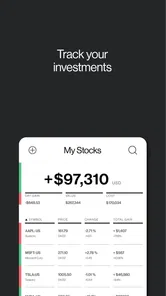
The Bloomberg app provides comprehensive financial news coverage, including breaking news, market analysis, and real-time data on stocks, commodities, and currencies. Users can customize their news feed, access Bloomberg TV live, and receive alerts on market movements. Additionally, it offers tools for tracking portfolios and financial instruments, making it an essential app for investors.
Pros
- Comprehensive financial coverage.
- Real-time market updates.
- User-friendly interface.
- Customizable news feed.
- Offline reading capabilities.
Cons
- Subscription required for full access.
- Occasional app crashes.
- Limited free content.
- Ads in the free version.
- Resource-heavy on older devices.












