BimmerLink for BMW and MINI
- 308.00
- 4.2
- Installs
- 500.00K
- Price
- Free

Screenshots
Analysis by Reviewed
If you’re looking for a way to make sense of a warning light before deciding what to do next, BimmerLink can be useful for a BMW or MINI owner who likes to investigate rather than guess. I see its main value as a source of vehicle-specific diagnostic information, not a replacement for a mechanic. It can help you ask better questions and make a more informed call, but interpreting what a code means still takes care.
Where setup can become frustrating
The first hurdle is getting a reliable connection between the phone, an OBD adapter, and the car. The adapter is not an optional extra: it is the bridge to the vehicle, and a poor match or an unstable connection can make the app seem unreliable. Before blaming the software, check that the adapter is suitable for your vehicle and that Bluetooth is paired with it as its instructions require.
It also helps to think about what you want to learn before connecting. If your goal is simply to clear a warning, pause first and note the code or symptoms. Clearing a code without understanding why it appeared can remove a useful clue, while a recurring warning deserves proper diagnosis. For a driver who only wants directions, music, or routine trip information, this kind of diagnostic setup is probably more effort than it is worth.
Small checks before the first scan
I would treat the first connection as a short setup task, not something to rush through beside a warning light. Check that the adapter is firmly connected, that it is the one paired with the phone, and that no other app is trying to use it at the same time. If the car is in a state where the adapter or vehicle systems are not ready, waiting until it is safely parked and following the adapter’s own instructions is a better start than repeatedly tapping reconnect.
Before spending money on hardware, look closely at the adapter’s stated compatibility with your particular BMW or MINI. A device that works with one car is not automatically the right choice for another, and a connection problem can be hard to distinguish from a software issue if the hardware fit is uncertain. A useful practical approach is to buy only after checking the vehicle and adapter details, then keep the adapter’s instructions nearby for initial pairing. That reduces guesswork without assuming the app can overcome a hardware mismatch.
A more useful way to check a fault
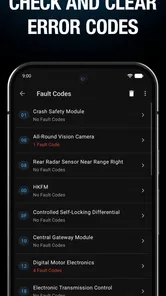
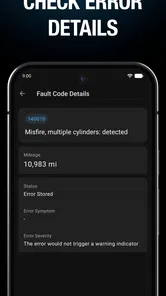
For an everyday example, imagine a dashboard warning appears on the way home. Once safely parked, you could use the app and adapter to read the trouble code, write it down, and compare it with the car’s symptoms before deciding whether to book a workshop visit. That does not make the code a definitive diagnosis, but it gives you something more concrete to discuss with a technician than “a light came on.”
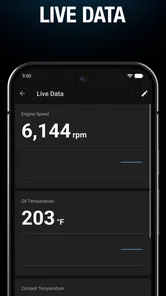
Live data can also be more useful when you approach it with a specific question, rather than scrolling through readings without context. If something behaves differently during a drive, a focused check may help you describe when it happens. Keep your attention on the road: review information while parked or have a passenger handle the phone. The app is for checking the car, not for adding screen interaction to driving.
More From Our News Desk

 Lark Player:Music Player & MP3
Switching to Lark Player: A Better Fit for Music Stored on Your Phone?
Lark Player makes sense if your music already lives on your phone. Here is what changes, what does not transfer by assumption, and how to test the switch without regret.

 Tile Master® - Matching Game
Tile Master Finds Its Place in the Gaps of a Noisy Phone
OS changes rarely transform a tile puzzle, but they reshape the small rituals around it. Tile Master’s appeal lies in how well its brief, tactile rounds fit the modern phone.

 Google Docs
 Shows What Mobile Writing Still Gets Wrong
Google Docs still makes a strong case for the shared document, but its real significance is how it exposes the gap between cloud convenience and genuinely capable mobile work.

 YouTube Studio
 Is Becoming a Creator’s Daily Control Room
As publishing turns into a daily, data-led habit, YouTube Studio is becoming the control room creators reach for between uploads—not another tool for making videos.

 Tiles Hop Music & Ball Game
Tiles Hop Review: When the Beat Is Clear, Every Miss Counts
Tiles Hop turns a simple bouncing-ball premise into a sharp test of timing. Its best design is immediate and readable; its weakest moments come when recovery feels less clear than the beat.

 Piano - Music Keyboard & Tiles
: Inviting Rhythm, Unproven Recovery
A tile-tapping piano game lives or dies by timing. This resilience-focused review separates what its format promises from what players still need to verify.
Latest News



One detail that helps keep a scan useful is to record the circumstances along with the code: whether the car was cold or warm, whether the warning appeared at startup or later, and what you noticed in the way it ran. Those notes do not diagnose the fault, but they preserve context that can disappear once a warning is cleared or the car is switched off. I would also avoid treating a single unusual live reading as proof of a failed part. Readings make more sense when tied to a specific symptom and reviewed by someone who understands the vehicle.
How it compares with general OBD tools
Compared with a general-purpose OBD reader, this app is aimed at BMW and MINI owners and offers a more marque-focused way to inspect vehicle information. That focus is a strength if you own one of those cars; it is not a reason to choose it for another make. A basic reader may be the simpler choice for someone who only wants a quick, occasional code check, while a workshop remains the better option for diagnosis that needs hands-on testing.
The choice depends on what you want from a scan. A simple reader can suit someone who wants a quick answer to a basic engine-code question and has no interest in looking beyond that. BimmerLink makes more sense when the owner values access to BMW- or MINI-oriented information and is willing to use an adapter and interpret results cautiously. Neither option turns a code into a complete mechanical explanation. If the car needs tests that involve inspection, repair, or specialist equipment, a professional workshop is the more appropriate tool for the job.
What is BimmerLink?
Ever found yourself wishing you could have a more in-depth understanding of what’s going on under the hood of your beloved BMW or MINI? Well, let me introduce you to an app that can make that happen: BimmerLink. This handy app is like having your very own diagnostic tool right in your pocket. If you're a car enthusiast like me, you'll find this app quite the game-changer.
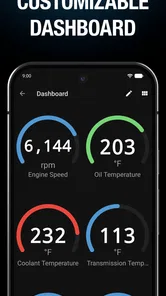
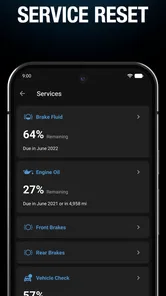
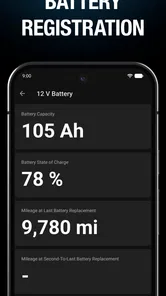
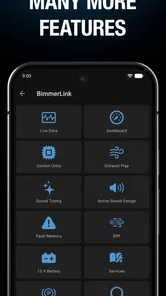
BimmerLink is an app designed specifically for BMW and MINI owners who want to keep a closer eye on their vehicles. It connects directly to your car's onboard system, allowing you to monitor various metrics and even perform some basic diagnosis. Gone are the days of making unnecessary trips to the mechanic just to check on something minor. With this app, you can take a peek into real-time data, including engine parameters, exhaust gas values, and even read trouble codes.
Features That Stand Out
One of the most impressive features of BimmerLink is its ability to perform a comprehensive diagnosis. The app lets you read and clear diagnostic trouble codes, which can save you a ton of time and money. Plus, it gives you access to live data directly from your car. Ever wanted to see how your car performs under certain conditions? Now you can, and it’s as simple as a few taps on your smartphone.
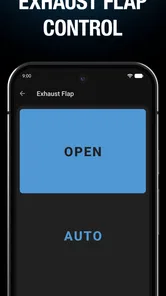
Another cool feature is the ability to control your exhaust flap. If your BMW or MINI is equipped with an exhaust flap, you can open and close it as you please. It’s a nifty little trick, especially if you want to hear your engine roar!
That exhaust control is naturally relevant only to a car equipped with the appropriate flap, so I would not choose the app solely for that function without first checking the vehicle. If you do use it, think about where and when you change the setting; a quiet residential street is not the place to test a louder exhaust. The feature is an extra for owners who have the matching hardware, rather than a reason to expect the same experience across every BMW or MINI.
User Experience and Interface
Now, let’s talk about the user experience. The app is fairly user-friendly with an intuitive interface that doesn’t overwhelm you with too much technical jargon. It’s designed to be straightforward, ensuring that even those who aren’t as tech-savvy can navigate it with ease. Connecting the app to your car is a breeze, requiring just an OBD adapter and a Bluetooth connection.
However, one thing to keep in mind is that the app is only as good as the hardware you pair it with. So, investing in a quality OBD adapter is crucial for the best experience. Trust me, skimping on this could lead to frustrations down the road.
Choosing it for the right job
In the Auto & Vehicles category, BimmerLink is a free app from SG Software GmbH & Co. KG, with optional in-app purchases priced from $9.99 to $39.99 per item. It has a 4.4 average from around 4,500 ratings, and more than 100,000 installs. It is rated for everyone, first released on June 7, 2020, and its current version is 2.36.6-6860, with Android 6.0 as the minimum requirement.
Those figures may reassure a BMW or MINI owner considering a dedicated tool, but they do not guarantee that every adapter, vehicle, or fault will behave alike. Compatibility and what the car exposes can vary, so check the adapter’s fit for your setup before spending money. The app makes most sense for owners who enjoy learning about their car, or who want useful information to take to a service appointment. If you expect it to identify every mechanical cause automatically, or to replace specialist equipment, you are likely to be disappointed.
In practical terms, I think it is most worthwhile for someone who owns a compatible BMW or MINI, has a specific reason to check vehicle information, and is comfortable doing a little preparation. It is less compelling for a driver who rarely sees warnings and only wants a quick, occasional scan; borrowing a suitable reader or asking a workshop may be more sensible than buying hardware for one use. It is also not the right choice for diagnosing a serious fault at the roadside, where safety and professional assistance matter more than trying another scan.
When the connection or reading seems wrong
If a connection fails, I would work through the simple checks in order: make sure the car and adapter are ready, confirm Bluetooth is enabled and paired with the intended adapter, and close any other app that may already be using the connection. Then reconnect and give the app another try. If readings still look odd, avoid repeatedly clearing codes; record what you see and whether the car has any symptoms, then seek proper diagnosis when needed.
If the app stops responding after a connection attempt, I would pause rather than cycling through settings at random. Close the competing connection, check that the phone is still paired to the intended adapter, and start a fresh connection attempt. If that does not help, compare the adapter’s instructions with the setup and check whether the vehicle itself is behaving normally. Repeating the same attempt without changing anything is unlikely to clarify whether the issue is the phone, adapter, or car.
When the app is not the cause
Not every problem that appears while using a vehicle app is caused by the app. A weak or incompatible adapter, a phone’s Bluetooth state, or the vehicle itself can all affect what you can access. Similarly, a trouble code points to an issue the car has detected; it does not, by itself, prove which part has failed. That distinction is important: BimmerLink can help you gather clues, but safety-critical warnings, persistent faults, and drivability problems call for a qualified technician.
There is also a difference between a connection that drops and a car fault that remains after a successful scan. The first calls for checking the pairing and adapter; the second calls for understanding what the vehicle reported and deciding on a safe next step. If the car feels unsafe, runs poorly, or continues to show a serious warning, I would not use a successful connection as reassurance that it is fine to keep driving. A code reader can help with communication, but it cannot inspect a part or confirm that a repair is safe.
Final Thoughts
In conclusion, BimmerLink is a must-have for any BMW or MINI owner who loves to keep tabs on their vehicle’s performance. It gives you a level of insight and control that was once reserved for mechanics. While the initial setup might require a bit of investment, the long-term benefits outweigh the costs. You’ll not only save on diagnostic fees but also enjoy the peace of mind that comes with knowing exactly what’s happening with your car at any given moment.
So, if you’re ready to take your car maintenance to the next level, give BimmerLink a try. Who knows, you might just find yourself enjoying the ride even more!
My practical verdict
I’d choose this when I want a BMW- or MINI-specific window into the car and am comfortable treating the results as information, not instructions. A useful habit is to keep a short note of the warning, the conditions when it appeared, and the code before changing anything. That small record can make a later conversation with a technician much clearer, even if the app does not settle the diagnosis on its own.
My bottom line is that the app is strongest as a prepared owner’s companion: connect when safely parked, go in with a question, save what the car reports, and use that information to decide whether the next step is observation or professional help. It is not a universal scanner for every make, a substitute for a workshop, or a reason to clear a warning just to make the dashboard look tidy. With those limits in mind, it can be a practical way to understand a BMW or MINI a little better.
BimmerLink for BMW and MINI Frequently Asked Questions
What should I check before downloading BimmerLink?
BimmerLink is an Auto & Vehicles app developed by SG Software GmbH & Co. KG. It is free to download, with in-app purchases ranging from $9.99 to $39.99 per item. The app is rated for Everyone, and its current version is 2.36.6-6860. Before installing, check that your device runs Android 6.0 or later and that you have the equipment needed to connect it to your car.
What is BimmerLink and what can it do for my BMW or MINI?
BimmerLink is an advanced diagnostic tool for BMW and MINI vehicles, allowing users to access and clear fault codes, monitor live sensor data, and access a range of vehicle-specific features. The app provides real-time insights into your car's performance, enabling you to make informed decisions about maintenance and repairs. It is a must-have for car enthusiasts looking to optimize their vehicle’s performance and keep track of its health.
Is BimmerLink compatible with all BMW and MINI models?
BimmerLink is compatible with a wide range of BMW and MINI models, but not all. It is essential to check the compatibility list on the official website or within the app before purchasing. Compatibility may vary based on the model year and specific features of your vehicle, so ensure your car is supported to fully utilize the app’s capabilities.
Do I need any additional hardware to use BimmerLink?
Yes, to use BimmerLink, you will need a compatible OBD adapter that connects your smartphone to your vehicle's OBD-II port. The app supports several popular adapters like the OBDLink CX and UniCarScan UCSI-2000. This hardware is crucial for the app to communicate with your car’s onboard systems and provide accurate data.
Can BimmerLink help in improving my vehicle's performance?
While BimmerLink itself doesn't directly enhance performance, it provides valuable data that can help you maintain your vehicle more effectively. By monitoring real-time data and diagnosing issues early, you can ensure your vehicle runs at its optimal performance. The app helps in identifying problems that, if left unattended, could lead to performance degradation.
Pros
- Comprehensive diagnostics tool
- User-friendly interface
- Real-time data display
- Supports multiple vehicle models
- Customizable settings
Cons
- Requires Bluetooth connection
- Limited to BMW and MINI
- Subscription needed for full access
- May drain battery quickly
- Initial setup can be complex