Backbone — Next-Level Play
- 2.97K
- 4.6
- Installs
- 500.00K
- Price
- Free

Screenshots

Analysis by Reviewed
I’d think of Backbone less as another game to install and more as a hub for people who want their phone gaming to feel organized, social, and ready for a controller. That distinction matters before you spend time setting it up: the app can make a mobile gaming routine more convenient, but it cannot turn every title into a better experience or replace the games themselves. I’d first ask how I actually play—whether I switch between games, use a controller, and share sessions with friends—because those habits determine whether the app earns a place on my phone.
How the free access fits into the decision
The app is free to download, which makes it easy to explore before deciding whether it belongs in your regular gaming routine. There are in-app purchases listed at $39.99 per item, so I’d treat the free access and any paid value as separate questions: you can try the app without paying, but a purchase may matter depending on what you want from it. I wouldn’t assume that paying is necessary just to see whether the app suits your setup.
Backbone is a social app from developer Backbone, rather than a game in its own right. That distinction matters when judging its value: the app is most useful as a way to organize and connect around mobile gaming, while the actual enjoyment still depends on the games you play and the hardware you use. Its Teen age rating is also worth keeping in mind if you’re choosing apps for a younger player.
Transform Your Phone into a Gaming Console
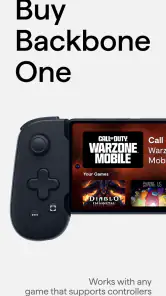
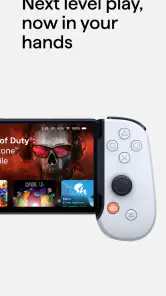
So, what’s the deal with Backbone — Next-Level Play? Well, the app pairs with the Backbone One controller, a sleek piece of hardware that snaps right onto your iPhone. Just imagine having a portable Xbox or PlayStation controller that fits snugly around your phone, giving you those tactile joystick feels that touchscreen gaming just can’t match. The app seamlessly integrates with this controller, providing an immersive experience that’ll have you hooked from the get-go.
Seamless Integration and Access to Games
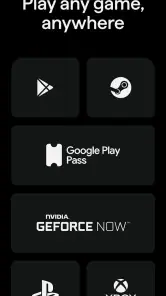
One of the coolest things about Backbone is its integration with your existing game library. Whether you’re into Apple Arcade, Xbox Game Pass, or even Google Stadia, this app has got you covered. It automatically detects the games you’ve installed and gives you easy access to jump right in without any fuss. Plus, the app’s interface is incredibly intuitive, making it super easy to browse through your games and find exactly what you’re in the mood for.
In practical terms, I’d use that central library to cut down on the small annoyances of mobile play: remembering which game is installed, finding it among other apps, and deciding what to play during a short break. If you already move between several games, a unified place to browse can be more useful than another recommendation feed. If you usually play just one title, though, opening that game directly may be quicker, and the app may not change your routine much.
One useful habit is to check whether a game actually suits controller play before building your routine around it. A controller-friendly setup can make longer sessions feel more comfortable, but it won’t make every mobile game a better fit; titles designed around taps and swipes may still feel most natural on the touchscreen. I’d keep both ways of playing available rather than treating the controller as a universal replacement.
More From Our News Desk

Clash of Clans Is Won Between the Battles

Android Auto Makes the Case for Quieter Car Software

MobiOffice: Transforming Mobile Productivity with Seamless Integration

EA SPORTS FC™ Mobile Soccer: Redefining Mobile Sports Gaming

How Microsoft OneDrive Became a Mobile Productivity Giant

How Google Translate Breaks Language Barriers Effortlessly
A simple test is to try the app around a game you already enjoy, rather than reorganizing your whole phone at once. Add only the titles you return to often, then see whether having them together saves you a step during a real break. If you find yourself bypassing the hub and tapping the same game icon every time, that’s a useful sign that the library is not solving a problem for you.
Social Features and Connectivity
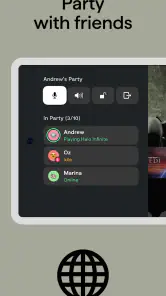
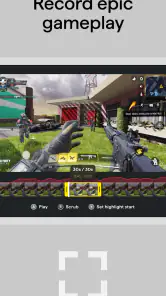
Gaming is more fun with friends, am I right? Backbone knows this all too well and has some nifty social features that make it easy to connect and play with your buddies. You can create parties, invite friends, and even chat with them while gaming. The app also supports seamless screen recording and sharing, so you can flaunt your epic wins or hilarious fails on social media without breaking a sweat.
That social layer is most valuable when your friends are already part of your gaming life and you want to make a spontaneous session easier to arrange. For example, after work I might have only enough time for a quick game; being able to connect with friends from the gaming hub sounds more convenient than messaging separately and then launching everything one step at a time. If your group uses other chat apps and rarely plays together, however, those social tools may add little, and your usual messaging setup could remain the simpler choice.
Screen recording and sharing also suit different kinds of players. I can see the appeal for someone who likes saving a funny moment or showing a skillful play, while a player who never posts clips may not get much from that part of the experience. It’s worth thinking about whether sharing is genuinely part of how you play, rather than counting every social feature as automatic value.
For a more deliberate routine, I’d decide in advance what I want the social layer to do: help arrange a session, keep conversation alongside play, or make it easier to share a clip afterward. If none of those outcomes matters to my group, I wouldn’t move everyone to a new hub just because it is available. Social tools are only convenient when the people I play with are willing to use them too.
Now, let’s talk about the app’s connectivity. I was genuinely impressed by how stable and responsive the connection is between the Backbone One controller and the app. There’s minimal lag, which is crucial for those high-stakes gaming moments. You can tell they’ve put a lot of thought into ensuring that your gameplay remains uninterrupted and smooth.
The main trade-off is that this experience is tied to using the Backbone One controller. If you don’t own it or don’t want to add a controller to your setup, the app’s central appeal is harder to access; touchscreen controls or a different controller-supported arrangement may be a better fit. I’d also consider where I tend to play: a controller makes more sense when I can sit down and hold my phone comfortably than when I’m trying to play one-handed on the move.
That changes the practical value question: the free download is not the same thing as a complete no-cost controller setup. I’d separate the decision to try the app from the decision to buy hardware or pay for anything inside it. Before spending, check that the games you most want to play actually work well with a controller and that you expect to use the setup often enough to justify another device in your gaming kit.
Game Discovery and Recommendations
If you’re anything like me, you’re always on the lookout for the next big game to sink your teeth into. Backbone’s got a killer recommendation engine that curates games based on your preferences and past gameplay. It’s like having a personal gaming concierge that knows exactly what you’ll love. I found myself discovering hidden gems I might have missed otherwise, which is always a pleasant surprise.
I’d treat recommendations as a way to browse, not as a promise that every suggestion will match my taste. They’re most helpful when I’m between games and willing to try something new; if I already know exactly what I want to play, searching my existing library is likely faster. That’s a small but important distinction when deciding whether this app is a discovery tool for you or simply a convenient launcher.
One way to get more from discovery is to use it when you have time to explore, not when you are rushing to start a specific game. I’d browse recommendations during a longer pause, save the titles that genuinely catch my attention, and then return to them when I’m ready to play. That keeps the feature from becoming another stream of suggestions to scroll past and makes it easier to judge whether it is finding things I would otherwise overlook.
Backbone also hosts exclusive content and events, which makes the gaming experience feel fresh and exciting. Whether it’s new releases, beta tests, or special in-app challenges, there’s always something to look forward to.
For a sense of how established the app is, it has a 4.6 average from around 19,000 ratings, and it has passed 500,000 installs. It was released on December 7, 2022, and its current version is 1.13.7, with Android 11 as the minimum operating system. Those details help set expectations about its history and compatibility, but I’d still check that your own phone meets the requirements before planning to use it.
Compared with a basic game launcher, Backbone puts more emphasis on controller-centered play and the social side of gaming. Compared with simply opening games one by one, that can make a mixed library feel more organized and connected. The trade-off is that a straightforward launcher asks less of you: if you don’t need controller integration, discovery, or group play, the simpler option may be enough.
It also occupies a different niche from a general messaging app. A chat app may be better for friends who already coordinate there and only occasionally play together; Backbone makes more sense when gaming itself is the common thread and you want the game library, sessions, and sharing to sit closer together. I would not switch communication habits for its social features unless my group found that arrangement genuinely easier.
Who is likely to get the most from it?
I can see the strongest fit for someone who plays several mobile games, likes using a controller, and wants a single place to get into games and connect with friends. It is also appealing to players who enjoy browsing for something new rather than sticking to one familiar title. In those cases, the app can support a routine instead of merely adding another icon to the home screen.
It is less convincing for a player who mainly enjoys touchscreen-first games, rarely switches titles, or already has a smooth way to find and launch everything. It may also be a poor match if you play in situations where holding a controller is awkward, or if your friends are not interested in using the same social space. For those people, the usual game icons and existing chat app can be a better, simpler combination.
For younger users, I’d also make the Teen rating part of the decision rather than focusing only on the games themselves. A parent choosing an app for a child should consider the social and sharing side as well as the age label, and decide whether those features fit the family’s expectations. That is a more useful check than assuming every gaming hub is just a neutral launcher.
Final Thoughts
All in all, Backbone — Next-Level Play is more than just an app; it’s a gateway to a richer, more connected gaming universe. Whether you’re a casual gamer or a hardcore enthusiast, this app elevates the mobile gaming experience to a whole new level. So, if you’re ready to transform your smartphone into a gaming powerhouse, give Backbone a spin. It might just be the best gaming decision you make this year!
My recommendation is strongest for players who already have, or genuinely want, the Backbone One controller and who will use the library, social features, or game discovery regularly. The free app makes trying it less of a commitment, while the listed in-app purchases mean I’d look carefully at what I’d actually use before paying. If you mainly play touchscreen-first games, prefer a basic launcher, or rarely game with friends, I’d skip it for now and stick with the setup that already works for you.
My buy-or-skip verdict is therefore conditional: try the free app if you’re curious, but don’t treat that as a reason to make a larger purchase automatically. I’d pay only when a specific feature or item clearly adds something I’ll use, and I’d avoid guessing what a purchase includes from its price alone. If the controller-centered and social workflow already matches how you play, Backbone can be a worthwhile companion; if not, keeping your current setup is a perfectly sensible choice.
Backbone — Next-Level Play Frequently Asked Questions
Does Backbone work without a Backbone controller?
Backbone is an app in the Social category that aims to turn your phone into a serious gaming device. The app’s role and the physical controller are separate considerations, so check that your intended setup works for the games you plan to play before downloading. Controller support can make a difference to how comfortably a game plays, especially when it is designed for gamepad input.
What should I check on my phone before downloading Backbone?
Check that your phone meets the app’s operating-system requirement before installing it. You should also consider whether your device is suitable for the games you want to play and whether you have enough available storage for the app and those games. A phone that handles your chosen games well will make for a more comfortable experience than focusing on the app alone.
Is Backbone free to download, and are there optional purchases?
Backbone is free to download, so you can try the app without paying upfront. It also offers in-app purchases, with items priced at $39.99 each. Before making a purchase, consider whether the extra features suit the way you play; the app’s basic gaming use and paid options are separate considerations.
What age group is Backbone intended for?
Backbone is rated Teen, which makes it worth checking the app’s age guidance before downloading it for a younger user. It is a social app centered on gaming, so consider how the person using it will interact with gaming content and other players. Parents and guardians can decide whether that experience is appropriate for their household.
What platforms is Backbone compatible with?
Backbone is designed to enhance your gaming experience on both iOS and Android devices. It seamlessly integrates with your smartphone, transforming it into a portable gaming console. However, to ensure the best performance and compatibility, make sure your device is running on the latest version of its operating system. The app requires iOS 11 or later.
Pros
- Enhances mobile gaming experience.
- Compatible with many popular games.
- Ergonomic design fits comfortably.
- Easy to set up and start playing.
- Improves control and precision.
Cons
- Limited iOS compatibility.
- Requires additional app download.
- Battery life could be improved.
- Not compatible with all devices.
- Price might be high for some.
- Category
- Social
- Version
- 1.13.7