AZFamily's First Alert Weather
- 217.00
- 4.5
- Installs
- 10.00K
- Price
- Free

Screenshots
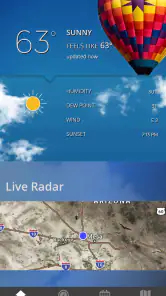
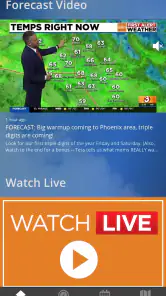
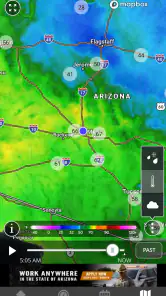
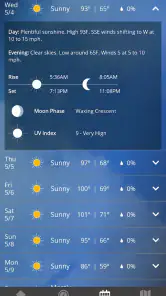
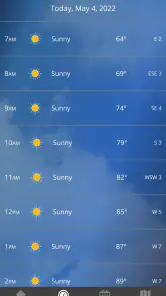
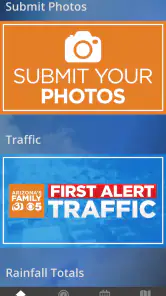
Analysis by Reviewed
When I want a quick answer to “What will the weather do today?”, I usually do not need a crowded dashboard full of worldwide maps. I need a dependable local view that helps me decide whether to leave early, carry a jacket, change an outdoor plan, or keep an eye on a developing situation. AZFamily's First Alert Weather is built around that kind of regional decision-making. It is a free weather app from Gray Media, associated with AZFamily, and its focus is the viewing region rather than an enormous collection of unrelated locations.
I spent time using it as a practical daily weather tool rather than treating it as a one-time forecast lookup. That distinction matters. A weather app becomes useful when it fits naturally into small routines: checking conditions before a commute, looking at the next few hours before walking the dog, or confirming whether a planned errand is sensible. My overall impression is that this is a straightforward choice for people who want local weather information connected to a familiar regional source, while users who need advanced forecasting tools may be happier with a broader alternative.
How I Decided Whether It Was Worth Using
My first test was simple: could I open the app and understand the current situation without spending time learning a complicated interface? For a weather app, speed and clarity count as much as the amount of information shown. I looked for the details that affect an ordinary decision: what is happening now, what is likely to happen soon, and whether the broader outlook suggests a change worth planning around.
I also considered the app's local identity. The store summary presents the First Alert Weather App as a way to get the latest weather for its viewing region, and that regional focus is the key to judging it properly. This is not best understood as a replacement for every kind of meteorological service. It is better viewed as a local companion for people who already value AZFamily's coverage or who want weather information presented with that regional context.
Another criterion was friction. A free app is easy to try, but that does not automatically make it convenient. I wanted to know whether it could become part of a morning routine without feeling like work. I also paid attention to the trade-off between local simplicity and the depth offered by large general-purpose weather platforms. The right choice depends less on a universal ranking and more on how much weather detail you actually use.
A practical morning routine
My most useful everyday scenario was a normal workday with an uncertain outdoor commute. I would check the app before leaving, glance at the immediate conditions, and then look ahead far enough to decide whether I needed extra time or different clothing. Later, I could return to it before making an evening plan. That repeated, short interaction is where the app makes the most sense: it supports a decision without demanding a research session.
For someone living in or regularly traveling through the AZFamily viewing area, this regional emphasis can reduce noise. A worldwide weather app may offer many layers, locations, and data categories, but those options can bury the local answer. Here, the value comes from opening a source that is already oriented toward the place you care about.
More From Our News Desk

Weather by Xiaomi Review: Clear at a Glance, Less Clear Up Close

X Under Pressure: Can It Recover When Posting Goes Wrong?

Clash of Clans Is Won Between the Battles

Android Auto Makes the Case for Quieter Car Software

MobiOffice: Transforming Mobile Productivity with Seamless Integration

EA SPORTS FC™ Mobile Soccer: Redefining Mobile Sports Gaming
Who is likely to appreciate it
I would point this app toward local residents, commuters, families planning ordinary activities, and anyone who prefers a regional broadcaster's weather service over an anonymous global forecast. It also suits people who want a free starting point and do not want to pay before discovering whether a weather app fits their routine. The content rating is Everyone, so it is presented as an app for a broad audience rather than a specialist tool.
It is especially sensible when your main question is local and immediate: “Is it a good time to go out?” or “Should I adjust today's plan?” You do not need to be interested in meteorology to get value from it. The app's role is practical, and I found that its strongest case is regular, quick checking rather than deep analysis.
Where this product wins
The clearest strength is focus. AZFamily's Weather, as the short description identifies it, has a recognizable local purpose instead of trying to be everything to everyone. That makes it easier to recommend to a friend who wants regional weather without sorting through a large collection of unrelated tools. I also like that the app comes from Gray Media, because the product feels connected to a local media brand rather than being presented as a detached utility.
That connection can matter during changing conditions. When a local weather source is already part of your information habits, using its dedicated app can make checking the forecast feel more consistent. I would not claim that a local identity automatically makes every forecast more accurate, but it does make the app more relevant to people whose daily decisions are tied to the region it serves.
A second advantage is the low barrier to entry. The app is free, and its current release is version 6.2.602. It supports devices running Android 9 or later, which gives it a reasonable place on many still-used phones without requiring a very recent operating system. That does not tell me how every device will perform, but it does make the installation decision uncomplicated for compatible users.
There is also a useful psychological advantage to a focused weather tool: I am less tempted to overanalyze. With some weather platforms, I can spend several minutes moving between radar views, model comparisons, maps, and settings when all I wanted was a quick decision. A regional app can be better precisely because it encourages a short, repeatable check.
Three ways to get more value from it
First, I recommend checking the app at two different moments instead of relying on one glance. Look once before the day begins, then check again before an outdoor commitment. Weather decisions are time-sensitive, and a single morning visit may not be enough for an afternoon plan. This workflow turns the app into a planning habit rather than a static forecast screen.
Second, use it as a confirmation tool when your plans are flexible. If I am deciding between a walk, an errand, or an indoor activity, I do not need a perfect long-range prediction. I need enough local context to choose sensibly and then reassess later. The app is well suited to that kind of staged decision-making, especially for people who do not want to interpret technical weather data.
Third, keep the regional scope in mind when traveling. Before leaving the viewing area, I would compare its usefulness with a service designed for multiple destinations. The app can remain helpful for the place it covers, but a traveler who constantly crosses regions should not assume that a local-first tool will be the most convenient single source everywhere. That is not a flaw in its purpose; it is a reminder to match the app to the geography of your life.
Where alternatives may fit better
The usual alternatives fall into a few categories. General weather apps are often better for people who monitor several cities, travel frequently, or want one interface for locations across different regions. Their broader coverage may save time if your day regularly involves multiple destinations. I would choose that category over this app if local viewing-region relevance is only a small part of what I need.
Another category is the specialist weather tool. Users who enjoy detailed radar interpretation, extended meteorological information, or highly customized monitoring may prefer an app built around depth. I would not choose AZFamily's First Alert Weather as my only tool if my decisions depended on examining weather systems in a technical way. A focused regional app is easier for ordinary checking, but simplicity can become a limitation for advanced users.
There is also the option of using a phone's built-in weather experience. That can be convenient when you want the fewest installed apps and only need a basic glance. The reason to move to this app is not merely to see a temperature; it is to use a weather source with a specific regional identity. If that local connection does not matter to you, the built-in option may be enough.
My main caution is therefore about expectations. Do not install it expecting a universal travel planner or a professional forecasting workstation. Install it if you want a regional weather companion from Gray Media and prefer a direct local approach. That distinction prevents the most common disappointment: judging a focused app for not behaving like an entirely different category.
The cost of switching
Because the app is free, the financial cost of trying it is low. The more important cost is habit. If you already rely on another weather app, switching means learning where you personally find the information you use, deciding which source you trust for daily planning, and possibly maintaining two apps while comparing them. That comparison period can be worthwhile, but it is still a small amount of effort.
I would handle the change gradually. Keep your usual weather source available, install this one, and use both during the same kinds of situations: morning planning, an outdoor appointment, and a day when conditions are changing. After several checks, ask which app answers your actual question faster. Do not judge only by the number of screens or features. The better app is often the one you can consult consistently and understand immediately.
There is little reason to switch if your current service already handles your local needs and you regularly depend on tools outside this app's regional purpose. On the other hand, switching is reasonable if you live in the AZFamily viewing area, want a free regional option, and feel that your existing app gives you too much irrelevant information. In that case, the change may simplify your routine rather than complicate it.
The app's public response is encouraging without being something I would use as the only basis for a decision: it holds a 4.5 average from around six hundred ratings, with over two hundred written reviews and more than ten thousand installs. Those figures suggest that other users have found a reason to keep it, but my recommendation still comes from matching its design and purpose to a particular kind of weather need.
Small limitations worth considering
The regional focus is both the main benefit and the main boundary. If you are planning a trip, coordinating several locations, or comparing conditions across a wide area, you may find yourself reaching for another service anyway. Using two sources is not necessarily a problem, but it weakens the case for making this your one and only weather app.
I also think advanced users should be realistic about convenience versus control. A focused app may help me decide what to do next, but it is not automatically the best environment for someone who wants to inspect every available detail. More information is not always better for a casual user, yet less specialized depth can matter when the weather decision is unusually important.
Finally, a local media connection will appeal more to some people than others. If you already follow AZFamily, the app has a natural place in your routine. If you do not care about the source and simply want the broadest possible weather coverage, another category may serve you better. That is a genuine preference difference, not a technical defect.
My recommendation
I recommend AZFamily's First Alert Weather to anyone in its viewing region who wants a free, approachable weather app tied to a familiar local source. It is a good fit for quick daily checks, practical planning, and users who prefer regional relevance over a feature-heavy interface. The Everyone rating also makes it an easy app to consider for a household with different ages and levels of weather interest.
I would skip it as a primary choice if I traveled constantly, tracked many locations, or needed specialist-level weather analysis. In those situations, a broad multi-location service or a more advanced weather category is likely to reduce the need for a second app. I would also avoid switching simply for the sake of switching if my current tool already gives me clear local answers.
For the right user, though, the decision is straightforward. Try it during the moments that actually matter in your week, not just while browsing an app store. If it helps you answer local planning questions quickly and you appreciate the AZFamily connection, it can earn a regular place on your phone. My final verdict is that this is a focused local weather companion, not an all-purpose forecasting laboratory—and that focus is exactly why I would recommend it to regional users.
AZFamily's First Alert Weather Frequently Asked Questions
Who develops AZFamily's First Alert Weather, and who is it intended for?
AZFamily's First Alert Weather is developed by Gray Media and is intended for people who want weather updates for AZFamily's viewing region. Its focus on local forecasts and changing conditions makes it especially relevant to Arizona residents, including people in Phoenix and nearby communities. The app is rated for Everyone, so its content is intended for a broad audience.
What is AZFamily's First Alert Weather?
AZFamily's First Alert Weather is a weather app focused on Arizona forecasts, alerts, radar, and changing local conditions. It provides access to current temperatures, hourly and extended forecasts, interactive radar views, severe-weather notifications, and weather information from the AZFamily news team. It is especially useful for residents who want localized updates for Phoenix and surrounding communities.
Does AZFamily's First Alert Weather provide severe weather alerts?
Yes, the app is designed to deliver important weather warnings and notifications, including alerts for severe storms, excessive heat, flash flooding, dust storms, and other potentially dangerous conditions affecting your selected location. Users should enable notifications and location permissions to receive timely updates. Alert availability and timing can depend on official warnings and the app’s coverage in your area.
Can I use the app for locations outside Arizona?
The app’s strongest feature is its Arizona-focused weather coverage, making it particularly valuable for users in Phoenix and nearby communities. You may be able to search for or follow additional locations, but the depth of forecasts, news reports, and live coverage may be greatest within the AZFamily viewing area. Travelers should confirm that their destination is supported before relying on it as their only weather source.
Does AZFamily's First Alert Weather include radar and live weather information?
Yes, the app typically includes interactive radar and other visual weather tools that help users follow rain, storms, and developing conditions. Depending on the current version, you may also find forecast videos, local weather updates, maps, and reports from meteorologists. Radar can be useful for short-term planning, although it should be combined with official alerts during dangerous or rapidly changing weather.
Pros
- Accurate local forecasts tailored to Arizona communities.
- First Alert notifications help users prepare for severe weather.
- Interactive radar makes tracking storms easy.
- Live video updates provide useful context during changing conditions.
- Clean layout makes essential weather information easy to find.
Cons
- Coverage is mainly useful for Arizona residents and visitors.
- Some features may require location access to work properly.
- Frequent alerts can become distracting during active weather periods.
- Weather radar and video content may use significant mobile data.
- Forecast accuracy can vary during rapidly changing desert conditions.
- Category
- Weather
- Version
- 6.2.602













