Astrospheric
- 339.00
- 4.3
- Installs
- 100.00K
- Price
- Free

Screenshots
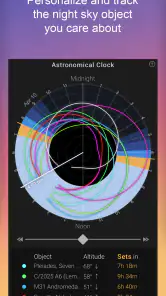
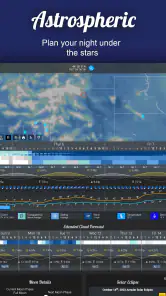
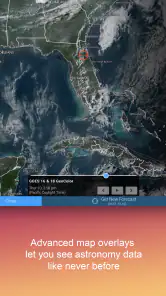
Analysis by Reviewed
If you enjoy looking at the night sky, the hardest part is often not choosing a target. It is deciding whether the sky will cooperate when you finally have time to observe. Astrospheric is a free weather app from Daniel Fiordalis built around that exact problem: planning astronomical observing in North America rather than checking a general forecast and hoping for the best.
I found its appeal in the way it turns several ordinary weather questions into one observing decision. Will clouds cover the target? Will transparency be good enough for faint objects? Will the air be steady for detailed planetary views? Is the forecast improving or getting worse during the hours I have available? Those are more useful questions for an astronomer than simply asking whether it will rain.
The app is available to everyone and has passed the 100K+ install mark, with a 4.3 average from around 791 ratings and about 339 written reviews. That gives it a reassuring amount of real-world attention without making it feel like a mass-market weather product. It is a specialist tool, and that is both its greatest strength and its first warning: it makes more sense if you already understand why observing conditions matter.
From a free evening to a practical observing decision
Starting with the actual observing problem
My usual starting condition is familiar. I have a clear evening in mind, perhaps a telescope already set up or a drive to a darker location being considered, but a normal weather app gives me only a broad picture. A sunny icon during the day does not tell me whether thin cloud will ruin a deep-sky session. A low chance of rain does not guarantee a sharp view of planets. A temperature forecast says little about whether the sky will look washed out.
Astrospheric approaches the forecast from the observer’s side. Instead of treating astronomy as an afterthought, it puts sky quality at the center. The store summary describes it as advanced astronomy forecasting for North American astronomers, and that focus is clear in the way the app encourages you to evaluate a whole observing window rather than one headline weather symbol.
That distinction matters when your plans involve effort. A quick look from the garden can tolerate uncertainty. A long drive, a heavy telescope, or a carefully planned imaging session cannot. I would use this app before committing to the latter, especially when a general forecast is too vague to justify packing equipment.
Choosing a location before checking the sky
The workflow begins with the place where I expect to observe. That sounds obvious, but it changes the quality of the decision. A forecast for a nearby town may not represent a hilltop, rural field, or darker site several miles away. I treat the location as part of the observing plan, not as a minor setting.
More From Our News Desk

Clash of Clans Is Won Between the Battles

Android Auto Makes the Case for Quieter Car Software

MobiOffice: Transforming Mobile Productivity with Seamless Integration

EA SPORTS FC™ Mobile Soccer: Redefining Mobile Sports Gaming

How Microsoft OneDrive Became a Mobile Productivity Giant

How Google Translate Breaks Language Barriers Effortlessly
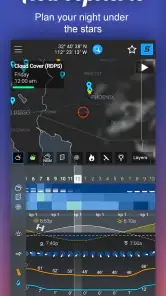
Once the location is selected, I look at the forecast as a sequence of conditions across the night. This is more useful than asking whether the evening is simply “clear.” An opening early in the night may be enough for the Moon or a bright planet, while a deep-sky target may need a longer uninterrupted stretch. Reading the forecast in time blocks helps me decide whether to shorten the session, delay it, or avoid the trip.
A practical tip is to check the forecast twice: once when the idea first occurs and again closer to departure. Astronomy plans are unusually sensitive to small changes in cloud and atmospheric quality. I would not treat the first favorable view as a guarantee, particularly if the session requires travel or if the target is difficult to see.
Reading beyond the simple cloud symbol
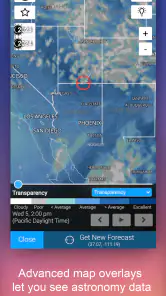
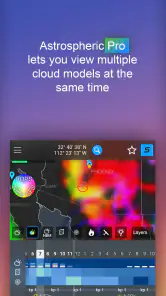
The most important adjustment for newcomers is learning not to stop at cloud cover. A sky can appear mostly clear and still disappoint because haze, moisture, dust, or unstable air reduces contrast and detail. Astrospheric is valuable because it presents astronomy-relevant conditions together, encouraging a more complete judgement.
For deep-sky observing, I pay particular attention to whether the overall atmosphere looks transparent enough for faint objects. For lunar and planetary work, steadiness becomes more important than a perfectly dark background. For wide-field viewing, a short clear gap may be worthwhile, while imaging generally demands more patience because changing conditions can interrupt a sequence.
This creates one of the app’s less obvious benefits: it helps match the night to the target. I might accept a mediocre forecast for bright lunar features, but not for a faint galaxy. Conversely, I would not automatically cancel a planetary session just because the night is not ideal for deep-sky work. The forecast becomes a way to choose the right activity, not merely a pass-or-fail test.
Turning the forecast into a schedule
After examining the conditions, I would divide the session into priorities. If the best window arrives early, I put the most demanding target first. If the forecast improves later, I use the opening part of the evening for setup, alignment, or easier objects. This simple change prevents a common mistake: spending the best sky on preparation and reaching the telescope only after conditions have declined.
For a realistic example, imagine planning a Friday session after work. I would first check the local forecast, then compare the useful observing hours with my travel and setup time. If the sky is clear only briefly, I might stay close to home and choose bright targets. If the conditions remain stable for longer, a darker site becomes more reasonable. The app does not make that decision for me; it gives me a better basis for making it.
Another useful habit is to separate “possible” from “worth the effort.” A forecast can show a technically usable opening that is too short for a complicated setup. That is where personal experience still matters. Astrospheric improves the input, but I remain responsible for judging equipment, target difficulty, fatigue, and travel.
Handing the information to the rest of the setup
An astronomy forecast is rarely the only source I use. The handoff usually goes from Astrospheric to a target-planning tool, a star chart, or my own observing list. I use the forecast to decide what kind of night I have, then use other resources to decide what to observe and where to point.
This division of labor is sensible. A specialist forecast should not replace a sky map, and a sky map should not be expected to explain whether the atmosphere will support fine detail. The app is strongest as the condition-checking stage between “I want to observe” and “I am choosing targets.”
For an imaging workflow, the handoff is even more important. I would check whether the forecast supports a long, uninterrupted run before committing to calibration, focusing, and capture. If the conditions are marginal, I might switch to a less demanding target or use the time for equipment maintenance. The app cannot rescue a poorly chosen target, but it can stop me from beginning an ambitious session under obviously unsuitable conditions.
There is also a human handoff. If several people are planning an outing, I would share the conclusion rather than merely saying “the weather looks okay.” The useful message is more specific: the early hours are promising, the later period is uncertain, and bright targets are safer than faint ones. That kind of conversation is easier when the forecast is organized around astronomy rather than general weather language.
What the result feels like in practice
The result is not a dramatic prediction that removes uncertainty. It is a calmer, more informed decision. I spend less time interpreting a generic weather screen and more time asking whether the expected conditions fit the session I actually want.
That is especially helpful for beginners who have already discovered that “clear” does not always mean “good for astronomy.” Astrospheric gives them a reason to learn the difference between visibility, transparency, and steadiness. It also helps experienced observers avoid treating every clear night as equally valuable.
The app’s free price makes experimentation easy. I can use it as a second opinion before a casual session without having to justify another subscription. At the same time, in-app purchases ranging from $0.99 to $29.99 per item mean that some users should review the purchase choices carefully before assuming every part of the experience is included at no cost. I would begin with the free experience and only consider an optional purchase if it clearly improves my own planning routine.
The current version is 15.1.0, and the app supports devices running Android 5.0 or later. That broad minimum requirement is useful for people using older Android hardware as a field companion. Still, an older phone may not feel as comfortable for detailed forecast reading, especially outdoors or while wearing gloves. The practical experience depends not only on compatibility but also on screen size, brightness, and how easily you can inspect the forecast at the observing site.
Where the workflow breaks down
The first friction is specialization. If I only want to know whether I need an umbrella, this is more app than I need. A standard weather service is faster for commuting, errands, and general daily planning. Astrospheric earns its place when the question is whether the sky is useful for astronomy.
The second limitation is that a forecast remains a forecast. Local terrain, rapidly changing cloud, and conditions that vary across a small area can undermine a promising outlook. I would be especially cautious when traveling to a site with a different elevation or landscape from the selected location. The app improves planning, but it should not encourage false confidence.
Another possible barrier is interpretation. A person who has never compared atmospheric steadiness with transparency may see several indicators and not know which one matters. The app is more rewarding after a little practical experience. I would advise a beginner to use it alongside actual observations: note what the forecast suggested, look through the telescope, and gradually learn which conditions matter for the targets they enjoy.
The workflow can also break when users confuse forecast quality with target visibility. Even excellent sky conditions cannot make an object easy if the Moon is bright, the target is low, the telescope is poorly aligned, or the observer is unfamiliar with the field. Astrospheric helps answer “is the atmosphere suitable?” It does not answer every question involved in successful observing.
Finally, the North American focus is important. That makes the app particularly relevant to observers in that region, but it also means I would not choose it automatically for a location elsewhere. A different astronomy forecast service may be the better fit if its coverage and model presentation are designed for the user’s part of the world.
Who should make it part of a routine
I would recommend it to amateur astronomers who regularly plan around weather, especially anyone using a telescope for more than occasional casual viewing. It is also a good fit for people who travel to darker locations and want a more meaningful check before loading equipment into a car.
It suits observers who enjoy learning how conditions affect different targets. The app becomes more useful when I treat the forecast as a planning layer: select a location, inspect the night in stages, match targets to the strongest window, and then confirm the plan with a chart or observing list.
I would skip it if my needs stop at ordinary local weather, if I rarely observe outdoors, or if I want a completely automatic recommendation about what to view. I would also look for another option when observing outside North America or when my priority is a broader package covering radar, severe-weather alerts, and everyday forecasts.
My recommendation after using the complete workflow
Astrospheric succeeds because it tackles the part of astronomy planning that general weather apps handle poorly: deciding whether the atmosphere is worth the time, transport, and equipment involved. From the first location check to the final choice of targets, it gives the workflow a more useful structure.
My advice is to use it as a decision aid, not as a promise. Check the location, study the whole observing window, identify the strongest period, and choose targets that match the conditions. Then keep a backup plan for a shorter session or an easier object. That approach makes the app more valuable than simply opening it once and looking for a green signal.
Daniel Fiordalis has made a focused weather tool rather than another general forecast screen. Its specialist nature creates a learning curve and leaves room for uncertainty, but that trade-off is worthwhile for North American astronomers who want to spend fewer clear nights guessing. If your evenings under the stars depend on making the right go-or-no-go call, this is a practical free starting point.
Astrospheric Frequently Asked Questions
Is Astrospheric useful for beginners who are new to stargazing?
Yes. Astrospheric can help beginners understand whether a night looks promising before they take out a telescope or binoculars. Its astronomy-focused conditions, including cloud cover, transparency, seeing, and darkness information, offer more context than a general weather forecast. The different factors may take time to interpret, but newcomers can start by checking for clearer periods and gradually learn which conditions matter most for the kind of observing they enjoy.
What devices and platforms can I use Astrospheric on?
Astrospheric is a weather app for astronomy planning, and its Android version supports devices running Android 5.0 or later. The app is also available for iOS, so users can check the relevant app store for compatibility with their device. Before installing, make sure your operating system meets the requirements and review the current store page for the version and availability that apply to your platform.
What is Astrospheric, and who is it designed for?
Astrospheric is an astronomy weather and observing-planning app designed for stargazers, astrophotographers, amateur astronomers, and anyone who wants to know whether sky conditions are suitable for observing. It combines forecasts such as cloud cover, transparency, seeing, smoke, wind, humidity, and darkness information, helping users choose the best time and location for viewing stars, planets, deep-sky objects, or photographing the night sky.
How accurate are Astrospheric’s astronomy forecasts?
Astrospheric provides specialized forecasts intended for astronomy rather than relying only on ordinary weather information. However, forecast accuracy can vary according to location, forecast range, changing weather systems, and the quality of available model data. Conditions such as localized clouds, haze, smoke, and rapidly changing wind may differ from the prediction, so the app is best used as a planning aid and checked again shortly before starting an observing session.
What information does Astrospheric show for an observing session?
The app presents several conditions that are especially useful for astronomical observation, including cloud coverage, transparency, atmospheric seeing, smoke, wind, humidity, and darkness-related information. Depending on the selected location and forecast period, users can compare upcoming hours or nights and identify periods with clearer skies. This makes it easier to decide whether a session is suitable for visual observing, planetary work, or astrophotography.
Pros
- Clear astronomy forecasts tailored to your observing location.
- Useful cloud
- seeing
- transparency
- and smoke predictions in one view.
- Supports planning sessions with detailed hourly forecast information.
- Includes astronomical event data for upcoming observing opportunities.
- Helpful for both beginners and experienced amateur astronomers.
Cons
- Some advanced forecast details may be difficult for beginners to interpret.
- Forecast accuracy depends heavily on available regional weather data.
- Many features are most useful only for dedicated skywatchers.
- The interface can feel information-dense on smaller phone screens.
- Some functionality may require a subscription or paid upgrade.
- Category
- Weather
- Version
- 15.1.0











