AR Drawing: Sketch, Art, Trace
- 72.00
- 3.1
- Installs
- 10.00M
- Price
- Free
Screenshots
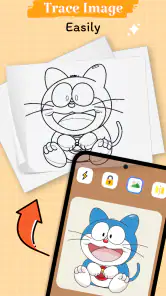
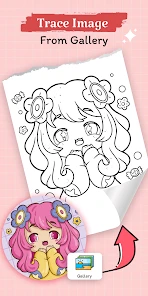
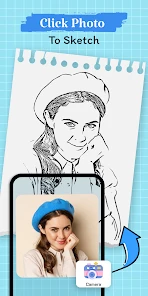
Analysis by Reviewed
For someone who wants a visible guide while drawing, AR Drawing: Sketch, Art, Trace offers a different starting point from a blank canvas. It is an art and design app from Color App Team, and its camera-based approach is most useful when you want to follow an image on paper rather than make every decision from memory. I see it as a low-pressure way to practise drawing, though it depends on being comfortable positioning a phone and working around its camera view.
Who benefits from drawing with a guide?
I’d recommend trying it if you’re a beginner who finds proportions hard to judge, or if you want a quick activity to share with a child or friend. A tracing guide can make the first marks feel less intimidating, and completing a recognizable picture may help someone stay interested long enough to practise. It can also suit a more experienced artist who wants a reference for a rough draft, rather than a replacement for their usual tools.
For example, if I had a quiet stretch at home and wanted to draw a simple picture on paper, I could use the projected image as a starting point, then add my own details after tracing the outline. That distinction matters: the app can guide the hand, but the choices about line weight, texture, and finishing touches still belong to me. I’d treat the result as practice or a personal sketch, not assume that tracing alone teaches every part of drawing.
Making the setup work in your space
The camera-based method has practical trade-offs that are easy to overlook. The phone needs to stay positioned so the guide remains visible on the paper, which can make a stable surface and a comfortable drawing angle more important than they are with a normal sketchbook. Before starting a detailed picture, I’d test the arrangement with a few simple lines; that gives you a chance to adjust the paper and phone before investing time in the drawing.
It is also worth choosing a subject that matches the time and control you have. A simple outline is easier to follow when you’re learning the setup, while a dense design may demand steadier positioning and more patience. If the image shifts or the camera view is awkward from where you’re sitting, a printed reference beside the page—or a conventional drawing app on a tablet—may be less distracting. The AR approach is distinctive, but it is not automatically the easiest option in every room or for every hand position.
Accessibility in everyday use
For different abilities and contexts, the main appeal is that a visual guide can reduce the need to invent a whole image from scratch. That may help someone who prefers a concrete reference, is building confidence, or wants a shared drawing activity with clear steps. At the same time, tracing asks for sustained visual attention and controlled hand movements. If holding a pencil steadily, looking between the screen and paper, or keeping a phone in position is uncomfortable, this workflow may create more effort than a large paper reference or a drawing tool designed around a different input method.
I’d also consider the surroundings: glare, limited table space, or a busy room can make it harder to focus on both the projected guide and the paper. A short test on a familiar, uncluttered surface is a sensible way to see whether the process suits you. The app is free and rated for Everyone, but those facts do not mean the camera-based interaction will feel equally comfortable to every person.
You May Like

Clash of Clans Is Won Between the Battles

Android Auto Makes the Case for Quieter Car Software

MobiOffice: Transforming Mobile Productivity with Seamless Integration

EA SPORTS FC™ Mobile Soccer: Redefining Mobile Sports Gaming

How Microsoft OneDrive Became a Mobile Productivity Giant

How Google Translate Breaks Language Barriers Effortlessly
A useful way to judge the experience is to separate the drawing task into setup, tracing, and finishing. The guide may help with the outline, but it does not remove the need to choose a pencil, decide how much detail to attempt, or make the page comfortable to work on. I’d set up the paper first, then place the phone where the camera view is easy to check without repeatedly reaching across the drawing. That small change can make a short session feel calmer, especially for someone who finds switching attention between screen and page tiring.
It can also help to pause after tracing the main shape and look at the paper without following the guide. This gives you a chance to notice whether the proportions feel right and decide what to add by hand. For learners, that pause turns the app from a simple copying aid into a prompt for observation: compare the outline with the result, then choose one feature to refine. It is a modest practice routine, not a promise of instant drawing skill, and it keeps the user involved in the decisions that tracing cannot make.
Choosing a subject and pace
Not every reference image is equally suitable for this kind of drawing. A bold silhouette or a simple object is easier to follow than a picture with many overlapping details, especially when the phone and paper need to remain aligned. I’d begin with a design that has a clear outer contour, then add interior marks only if the first pass feels manageable. This is a practical way to avoid spending a long time on tiny lines before you know whether the setup works for your posture and vision.
For a child or a group activity, I’d keep the goal small: trace one recognizable shape, then invite everyone to personalize it with their own colors or extra details. That makes the guide a starting point rather than a test of accuracy. For an adult practising alone, repeating the same kind of outline on different days can make it easier to notice progress in steadiness and control. Neither approach requires treating the finished page as polished artwork; the value is in making drawing approachable and giving the hand a clear task.
Have you ever wished you could trace a drawing perfectly without the fear of messing up? Well, let me introduce you to AR Drawing: Sketch, Art, Trace, an app that feels like it’s straight out of the future! This app is a game-changer for anyone who loves to sketch and create art but might need a little guidance along the way.
Getting Started with Augmented Reality
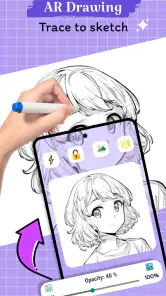
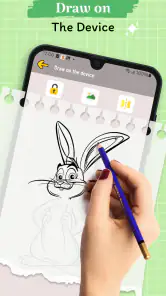
When I first downloaded AR Drawing: Sketch, Art, Trace, I was pretty skeptical. I mean, how accurately could an app really project a drawing onto a piece of paper? But boy, was I surprised! The setup was a breeze. All you need is your smartphone and a desire to draw. Once you open the app, it uses your camera to project images onto your sketchpad. It’s like your smartphone becomes a magical window into an artist's world!
Features That Make It Stand Out
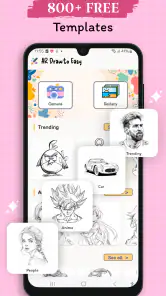
One of the coolest features of this app is the wide variety of templates it offers. Whether you’re into drawing cute animals, intricate mandalas, or even complex architectural designs, there’s something for everyone. The app’s library is vast and keeps updating with fresh content, so you never run out of inspiration.
What really sets this app apart, though, is its precision. The augmented reality technology is so spot-on that it feels like the design is actually printed on the paper. You can adjust the size and position of the image to fit your paper perfectly, which is a lifesaver for artists who want everything just right.
Why I’m Hooked
As someone who’s always been passionate about drawing but lacks the natural talent, this app has been a godsend. It’s not just about tracing; it’s about learning. With each sketch, I feel like I’m getting better and understanding more about proportions and shading. Plus, it’s incredibly satisfying to see a finished piece that looks so professional!
The app doesn’t just cater to beginners, though. Even seasoned artists can find value in it by using it as a tool to experiment with new styles or to quickly draft ideas that can be later refined. The flexibility and ease of use make it a versatile addition to any artist’s toolkit.
Working around the phone-and-paper workflow
The central trade-off is that this is not a conventional canvas where your hand and image share one surface. You look at the phone’s camera view while drawing on paper, so your attention moves between the two. If you already enjoy sketching from a book or a printed reference, the arrangement may feel familiar after a little practice. If you prefer to keep your eyes on the pencil tip, a printed image placed beside the page can be simpler, even if it cannot be adjusted in the same way.
For someone who wants a finished digital illustration, a standard drawing app is usually the more direct option: it keeps the artwork on screen and is better suited to editing and refining a digital result. Here, the appeal is the physical act of drawing with a guide. I’d choose this app when I want pencil or pen on paper and a reference that can be positioned for the page, not when I need a digital file or a full set of editing tools.
When access depends on the situation
Different settings can change how usable the camera-based method feels. A steady desk and good, even light make it easier to manage the paper and keep the guide in view. A small table, a shared workspace, or a position where the phone has to be held by hand can turn a relaxed activity into a balancing task. If you’re drawing away from home, I’d consider whether you can rest the phone securely and keep the paper from moving before choosing a complicated image.
Visual comfort matters too. The person drawing needs to distinguish the guide from the marks being made on paper, and repeated glances at a screen may be tiring for some people. Anyone who finds that back-and-forth difficult could try shorter sessions or use a larger, simpler outline. If the visual demands remain uncomfortable, a printed reference, a person drawing alongside them, or another art method may be a kinder fit. No single approach works equally well for every body or setting.
Final Thoughts
In a world where technology is constantly pushing the boundaries of what’s possible, AR Drawing: Sketch, Art, Trace is a perfect example of how it can enhance creativity. Whether you’re a beginner just starting your artistic journey or a seasoned pro looking for a new tool, this app offers something for everyone. It’s easy to use, endlessly inspiring, and quite frankly, just plain fun.
So, if you’ve ever wanted to take your sketching skills to the next level, give this app a try. You might just find that it’s the artistic companion you’ve been searching for all along.
A practical choice, with sensible expectations
Compared with a standard drawing app, this one puts the guide on a physical page, which can feel more natural if you enjoy pencil-and-paper work. Compared with tracing a printed picture, it gives you an adjustable on-screen reference, but asks you to manage a phone and paper together. If your goal is freehand practice without a visual aid, a blank sketchbook is a better fit; if you need layers, editing, or a digital finished image, a conventional digital art app is likely more suitable.
The app is free, has an Everyone content rating, and runs on Android 5.0 or later. It was released on April 9, 2024, and version 1.1.55 is the current version. It has an average rating of 3.1 from around 6,600 ratings, with about 72 written reviews, and has over 10 million installs. I’d weigh that modest average alongside your own needs: the AR tracing idea is appealing, but whether it works well for you depends heavily on the phone-and-paper setup and the kind of drawing you want to do.
That average rating is a useful reason to approach it with measured expectations rather than assume the idea will suit everyone. A camera-guided drawing process is unusual enough that comfort with the setup matters as much as interest in art. I’d use the free access to try a short, low-stakes sketch first, then decide whether the guide feels helpful or distracting. The app is aimed at a broad audience, but someone seeking structured lessons, professional editing, or a hands-free drawing method should look at alternatives that are built around those needs.
If you’re wondering whether it is suitable for a first drawing attempt, I’d say yes when the goal is to get a recognizable outline onto paper and you have a stable place to work. If you want to develop freehand observation, use the guide as a reference rather than tracing every line, and occasionally try the subject again without it. If your main question is whether the camera workflow replaces paper references or a full digital art app, it doesn’t: it offers a distinct middle ground, with the convenience of an adjustable guide and the physical feel of a sketchbook, but also the extra setup that combination requires.
My advice is to begin with a short, uncomplicated sketch and judge the experience by how comfortably you can see the guide and control your pencil. If that feels smooth, it can be an enjoyable prompt for practice and a handy way to get started when a blank page feels daunting. If the setup gets in the way, there’s no need to force it; a printed reference or another drawing method may better support the way you like to work.
AR Drawing: Sketch, Art, Trace Frequently Asked Questions
Is AR Drawing: Sketch, Art, Trace free to download, and what is its age rating?
AR Drawing: Sketch, Art, Trace is free to download and is rated for Everyone, so it is presented as suitable for a broad audience. If you are choosing an art app for a child, it is still sensible to review the app together and check how its available tools fit their needs. The app is in the Art & Design category.
Who develops AR Drawing: Sketch, Art, Trace, and how established is it?
AR Drawing: Sketch, Art, Trace is developed by Color App Team. It has been available since April 9, 2024, and its current version is 1.1.55. The app has passed the ten-million-install mark, giving prospective users a useful sense of its reach. Those details can help when comparing drawing apps, while the best fit still depends on the tracing and sketching experience you want.
What is AR Drawing: Sketch, Art, Trace and how does it work?
AR Drawing: Sketch, Art, Trace is an innovative app designed for artists and hobbyists alike, allowing users to create stunning sketches and drawings using augmented reality technology. The app overlays digital images onto real-world surfaces, enabling you to trace and draw with precision. It’s an excellent tool for both beginners and experienced artists looking to enhance their skills.
Is AR Drawing: Sketch, Art, Trace suitable for beginners?
Yes, AR Drawing: Sketch, Art, Trace is highly suitable for beginners. The app provides a user-friendly interface with step-by-step tutorials and guidance, making it easy for novices to start their artistic journey. Its augmented reality features simplify the drawing process, allowing beginners to trace images effortlessly and improve their skills over time.
What devices are compatible with AR Drawing: Sketch, Art, Trace?
AR Drawing: Sketch, Art, Trace is an Android app with a minimum operating-system requirement of Android 5.0. Before downloading, check that your device meets this requirement and has a camera suitable for using the app’s augmented-reality drawing approach. Compatibility can vary by device, so confirming the app’s availability for your particular model in its app store is a practical final check.
Pros
- Easy to use interface for beginners.
- Supports various art styles and techniques.
- Offers augmented reality tools for tracing.
- Helps improve drawing skills efficiently.
- Regular updates with new features.
Cons
- Requires a stable internet connection.
- Limited free version features.
- May lag on older devices.
- Ads can be intrusive.
- Subscription needed for premium tools.
- Category
- Art & Design
- Version
- 1.1.55












