Neon Clock Wallpaper
- 114.00
- 3.8
- Installs
- 5.00M
- Price
- Free
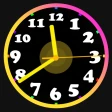
Screenshots
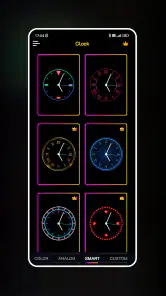
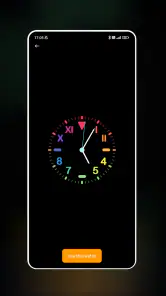
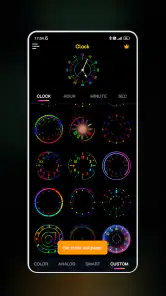
Analysis by Reviewed
I’m most drawn to the simple idea at the heart of Neon Clock Wallpaper: making the clock part of the look of your screen instead of leaving it as a plain utility. If you enjoy bold color and want your home screen to feel more personal, a neon clock can change its mood at a glance. I’d think of this as a visual choice first and a practical clock second; it suits someone who wants their phone to look distinctive without rebuilding the whole layout.
A clock that sets the screen’s tone
The appeal is the combination of time display and vivid styling. Rather than choosing a separate wallpaper and treating the clock as an afterthought, you can make the clock itself the feature. In everyday use, that can give a frequently seen screen a more deliberate look. The trade-off is that a bright design may compete with app icons or make a busy wallpaper feel crowded, so I’d try a simpler background if the clock is hard to read.
It’s worth remembering that a striking screen is not automatically a more useful one. I’d choose a design that stays legible at a quick glance, especially if I often check the time while walking between tasks. A restrained color combination can work better than the most vivid option when icons and notifications already fill the screen.
A Splash of Color and Functionality
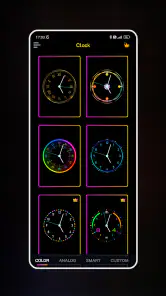
First things first, when you open up the Neon Clock Wallpaper app, you're greeted with a bright and user-friendly interface. It’s like stepping into a world where time and neon lights collide in the best way possible. The app offers a variety of neon clock designs that you can set as your wallpaper, each one more dazzling than the last. Whether you prefer a classic analog look or something a bit more modern and digital, this app has got you covered.
Customization Galore
One of the standout features of this app is the level of customization it offers. You can tweak almost every aspect of the clock design to suit your personal style. Want to change the color of the neon glow? Go for it! Fancy a different clock face? It’s just a tap away. The app gives you the freedom to mix and match colors and styles until your heart’s content. And trust me, once you start playing around with the options, it’s hard to stop!
Choosing a design for real life
My practical tip is to settle on a style only after checking it against your normal home screen. If you rely on seeing icons clearly, leave enough visual breathing room around them; if you mostly want a quick time check, prioritize contrast over decoration. I’d also keep a second, calmer look in mind for days when the neon effect feels too loud. That small bit of restraint can make the personalization feel intentional rather than distracting.
For a realistic routine, imagine checking your phone before heading out, then glancing at it between errands. A readable clock can make those quick checks feel effortless, while an elaborate glow may be enjoyable when you have time to look but less convenient in bright surroundings. I’d use the more expressive design when I want the screen to stand out and choose the clearest option when speed matters.
You May Like

Clash of Clans Is Won Between the Battles

Android Auto Makes the Case for Quieter Car Software

MobiOffice: Transforming Mobile Productivity with Seamless Integration

EA SPORTS FC™ Mobile Soccer: Redefining Mobile Sports Gaming

How Microsoft OneDrive Became a Mobile Productivity Giant

How Google Translate Breaks Language Barriers Effortlessly
Performance and User Experience
Now, I know what you might be thinking: "All these flashy features must slow down my phone, right?" Surprisingly, no! The app runs smoothly without draining your battery or causing any noticeable lag. I was pleasantly surprised to find that even with such vibrant animations, my phone’s performance remained top-notch. The developers clearly put a lot of thought into optimizing the app for everyday use.
How it fits beside other personalization choices
Compared with choosing a static wallpaper alone, this app puts more emphasis on a styled clock and gives you more room to adjust its appearance. That focus is useful if the time display is the part of the screen you want to change. If your priority is a coordinated theme across icons, widgets, and backgrounds, a broader customization option may suit you better. I’d also avoid expecting a neon clock to solve every home-screen layout problem: it adds a focal point, but you still need to arrange the rest of the screen around it.
One sensible way to judge it is to try a design during an ordinary week rather than deciding from the first preview. Notice whether you can read it quickly, whether it sits comfortably with your icons, and whether you still enjoy seeing it after the novelty fades. Those small checks are more useful than picking the flashiest option just because it looks impressive for a moment.
Making the most of a clock-led screen
I’d start by treating the clock as the anchor for the home screen, then place the apps I use most often where they remain easy to spot around it. This is especially helpful if the selected design has a bright center or a wide glow: leaving that area less cluttered lets the clock stay visually clear without making the whole screen feel empty. If the first arrangement looks busy, changing the wallpaper behind the clock may be a better fix than adding more effects or colors.
There’s also a useful distinction between a screen you look at for a second and one you enjoy when you unlock the phone. For quick checks, large visual contrast matters more than intricate styling. For a screen you mainly see while choosing an app, a more decorative face can be worth the compromise. I’d decide which of those jobs matters most before spending time on fine adjustments.
If you change your wallpaper often, consider saving a mental note of the color combination and clock style that worked well together. A design that looked balanced on one background may clash with a new image, even if the clock itself has not changed. Rechecking the whole screen after a wallpaper swap prevents an attractive clock from becoming a distracting patch of light among unrelated colors.
Where it works best in a daily routine
Picture getting ready in the morning, checking the time while packing a bag, and then glancing at your phone while waiting for a ride. In that kind of routine, a clock that is easy to recognize can be a pleasant convenience, but only if its styling does not make the display harder to scan. I’d favor a simpler face on busy mornings and save a stronger neon look for a home screen where I have time to appreciate it.
The same approach helps if you use your phone in different settings. A design that feels lively in a dim room can be harder to read outdoors, so I would test it in the places where I actually check the time rather than judging only in a comfortable indoor setting. If readability varies, choosing a clearer color and a less crowded background is a practical compromise; the point is to enjoy the look without having to decipher it.
This clock-centered approach is also best when the home screen is a place you enjoy personalizing. If you only want the time to be visible and do not care how it looks, the clock already built into your phone may be simpler. If you want a coordinated visual overhaul, an app focused on broader themes may be a better starting point than a design centered on neon clocks.
What to consider before settling on a style
One question I’d ask before committing is whether the design remains readable at the glance I usually give my phone. A face that looks crisp when I stop to inspect it may be less effective when I’m moving or in bright surroundings. I’d check it with my everyday icons in place, not just in a clean preview, and choose legibility over extra glow if those two goals compete.
Another practical consideration is how much change you actually want. The app is most appealing when you want the clock to become a visible part of the screen’s identity. It is less compelling if you are looking for new icons, a full set of matching widgets, or a complete redesign of how the phone works. The central idea is deliberately narrower, which can be a strength when you want one strong visual adjustment and a limitation when you expect a whole theme.
Customization Galore
One of the standout features of this app is the level of customization it offers. You can tweak almost every aspect of the clock design to suit your personal style. Want to change the color of the neon glow? Go for it! Fancy a different clock face? It’s just a tap away. The app gives you the freedom to mix and match colors and styles until your heart’s content. And trust me, once you start playing around with the options, it’s hard to stop!
Is It Worth Your Time?
In my opinion, if you're someone who loves to personalize your device and enjoys a bit of visual flair, Neon Clock Wallpaper is definitely worth checking out. It’s not just about having another clock on your screen; it’s about making a statement every time you unlock your phone. Plus, with frequent updates and new designs being added, the app keeps things fresh and exciting.
Color App Team makes this free personalization app, which is rated for Everyone and has an average rating of 3.8 from around 6,900 ratings, with more than 5 million installs. It was released on November 6, 2023, and version 1.6.5 supports Android 5.0 and later. The free starting point makes it easy to explore, though optional in-app purchases range from $7.99 to $20.99 per item, so I’d check what is included before paying. A few hundred written reviews give prospective users some additional context, but I’d still judge the visual style against my own screen rather than treating popularity as a guarantee that it will suit everyone.
This is a better fit for someone who enjoys changing the look of a phone and is happy to spend a little time finding a readable design. If you prefer a minimal screen, want a complete theme rather than a clock-focused change, or find bright accents distracting, I’d stick with a plain wallpaper or another personalization approach. The app’s central idea is appealing, but it works best when the neon treatment matches how you actually use your phone.
So, if you're ready to transform your phone’s home screen into a neon wonderland, why not give Neon Clock Wallpaper a try? It’s a fun way to add a splash of color to your day, and who doesn’t love a bit of customization? Go ahead, dive into the neon world and let your creativity shine!
Neon Clock Wallpaper Frequently Asked Questions
Is Neon Clock Wallpaper suitable for someone who only wants to change their phone’s look?
Yes. Neon Clock Wallpaper is a personalization app focused on giving your screen a more distinctive appearance with vibrant clock designs. It may appeal to anyone who enjoys neon visuals or wants a clock to become part of their wallpaper style. The app is rated for Everyone, and its main purpose is visual customization rather than adding a broad set of phone-management tools.
What is Neon Clock Wallpaper and how does it work?
Neon Clock Wallpaper is a dynamic and visually appealing application that allows users to set a neon-themed clock as their live wallpaper on Android and iOS devices. Once installed, users can customize the clock’s appearance, including colors, styles, and sizes, to match their personal taste and home screen aesthetics. The app operates seamlessly in the background, ensuring minimal battery consumption while providing a vibrant display.
Is Neon Clock Wallpaper free to use?
Yes, Neon Clock Wallpaper is available as a free download. However, it includes in-app purchases, so some features or content may require payment. The app is developed by Color App Team and is described as a way to design your screen with unique, vibrant clocks. Its free starting price makes it easy to try before deciding whether any optional purchases suit your needs.
Does Neon Clock Wallpaper significantly drain battery life?
Neon Clock Wallpaper is designed to be energy-efficient, ensuring it does not significantly drain your device's battery. The app uses advanced algorithms to minimize its impact on battery life by optimizing animations and screen refresh rates. However, as with any live wallpaper, there might be some battery consumption, especially on older devices or those with less efficient battery management systems.
Can I customize the appearance of the Neon Clock?
Absolutely! Neon Clock Wallpaper offers extensive customization options, allowing users to personalize their clock’s design. You can choose from a variety of neon colors, clock styles, and sizes to fit your preference. Additionally, users can adjust the brightness and glow effects to create a unique and personalized visual experience that complements their device's theme.
Pros
- Vibrant and eye-catching display.
- Customizable clock styles.
- Battery-friendly operation.
- Smooth animations.
- User-friendly interface.
Cons
- Limited free customization options.
- Ads in the free version.
- Occasional lag on older devices.
- No widget support.
- Requires internet for extra themes.
- Category
- Personalization
- Version
- 1.6.5












