Ambient Weather Network
- 856.00
- 4.6
- Installs
- 100.00K
- Price
- Free

Screenshots
Analysis by Reviewed
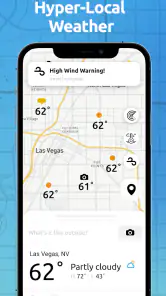
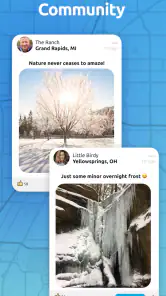
Weather apps usually answer one broad question: what is happening in the sky around me? Ambient Weather Network takes a more local approach. Its central idea is to connect people with a hyper-local weather community, and that changes how I use it. Instead of treating the forecast as a single official answer for an entire town, I can look at weather information coming from nearby locations and compare it with what I am seeing outside.
That makes this free weather app from Ambient Weather more interesting than a simple temperature-and-rain display. I see it as a useful companion for people who care about conditions at a particular property, neighborhood, or outdoor destination. It is not automatically the best replacement for every conventional forecast app, but its community-centered view gives it a practical role when broad regional predictions feel too vague.
The app has been available since August 15, 2018, and its current version is 4.6.5. It is rated for Everyone, supports Android 7.0 and later, and has passed one hundred thousand installs. Its average rating is 4.6 from around 4.2 thousand ratings, which suggests that the focused concept works well for a substantial group of users. I would still judge it less like a general-purpose weather utility and more like a local observation tool.
Why hyper-local weather matters more than another general forecast
The capability that stands out is the connection to a network of nearby weather information. A standard forecast may describe a whole city or region, yet weather can vary noticeably between a sheltered residential street, an exposed hillside, a coastal area, and an open field. When I am deciding whether to water plants, ride a bike, set up outdoor equipment, or leave a window open, the conditions at a nearby location are often more useful than a regional average.
This is the real effect of the network approach: it gives context. A forecast tells me what is expected; local observations help me understand what is actually happening around a specific place. Those two things are related, but they are not interchangeable. I find the app most valuable when I use it to add a second layer of evidence rather than expecting it to replace every other weather source.
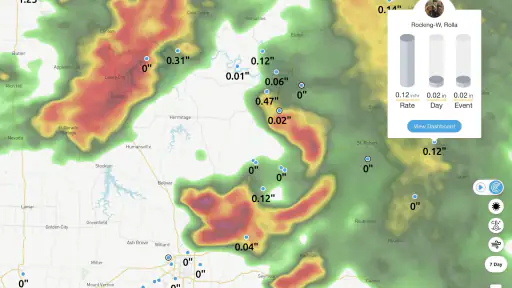
The distinction is especially helpful during unsettled weather. A general forecast might say that rain is possible across a large area, while a nearby observation can help me see whether the shower has already reached a particular neighborhood or whether the surrounding area is still dry. That does not turn the app into a guaranteed prediction, but it can make a decision feel less abstract.
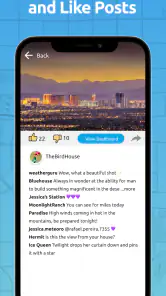
I also like the community aspect because it makes weather feel less isolated. Instead of checking only a national or regional service, I can think in terms of a shared local picture. For gardeners, hobbyists, outdoor workers, and people who maintain property, that local perspective can be more actionable than a polished forecast that covers too much ground.
More From Our News Desk

Clash of Clans Is Won Between the Battles

Android Auto Makes the Case for Quieter Car Software

MobiOffice: Transforming Mobile Productivity with Seamless Integration

EA SPORTS FC™ Mobile Soccer: Redefining Mobile Sports Gaming

How Microsoft OneDrive Became a Mobile Productivity Giant

How Google Translate Breaks Language Barriers Effortlessly
How I interpret the network in everyday use
I would begin by treating the app as a place to inspect local conditions, not as a magic answer to every weather question. The most useful habit is comparison: check the nearby information, look outside, and consider how exposed or sheltered your own location is. A station close to you may still experience different conditions if it sits at another elevation or in a different landscape.
That small mental adjustment prevents overconfidence. Hyper-local does not mean identical. It means closer and more relevant than a broad regional summary. I appreciate the app more when I use it with that nuance, because the network can sharpen my awareness without pretending that weather stops changing between two nearby streets.
For a morning routine, I might use a conventional forecast to understand the wider day, then open Ambient Weather Network before making a local decision. If I am planning outdoor work, the network view helps me ask a more useful question: what are conditions like near the place where I will actually be? That workflow is more practical than repeatedly refreshing a general forecast that covers a large area.
Another useful habit is checking the app before relying on a weather-sensitive plan, rather than only checking after conditions become uncomfortable. For example, if I am preparing outdoor furniture or planning a long walk, a quick local look can influence when I start. The benefit is not just the information itself; it is the way the app encourages a more location-aware decision.
A realistic day when the app earns its place
Imagine I have planned to spend the afternoon working in a garden. A broad forecast may show a chance of rain, but that leaves several practical questions unanswered. Is the nearby area already wet? Does the local weather appear stable enough for a few hours outside? Would it be smarter to do the planting early and postpone painting or electrical work?
I would use Ambient Weather Network as a local check before leaving home and again before starting the job. If nearby conditions suggest that the weather is changing sooner than the general forecast implies, I can adjust the order of tasks. I might do the work that tolerates dampness first, keep delicate materials indoors, or delay the whole plan. That is a modest advantage, but it is exactly the kind of small decision that makes a weather app worthwhile.
The same approach works for a cyclist comparing a home location with a destination, a parent deciding whether an outdoor activity is comfortable, or someone checking conditions around a second property. The app is not valuable because it makes the decision for me. It is valuable because it gives the decision a more local starting point.
For people who maintain gardens or outdoor spaces, this can also improve timing. A regional forecast may be enough for a rough plan, but a nearby observation can make the difference between preparing for dry conditions and discovering that the local area is already dealing with rain or a different pattern. I would still use common sense and protect sensitive equipment, but the network adds useful situational awareness.
Where the experience can feel less straightforward
The community model also creates a trade-off. The usefulness of a local network depends on how relevant the nearby information is to my exact situation. If I am looking at a location that is not representative of my surroundings, I need to interpret it carefully. Distance matters, but so do buildings, terrain, shade, exposure, and elevation.
This means the app rewards users who are willing to think about context. Someone who wants one large, simple forecast card may find that effort unnecessary. A conventional weather app is often easier for a quick glance at the day ahead, especially when I only need a general idea of temperature or precipitation. Ambient Weather Network is better when local detail matters enough to justify a closer look.
There is also a learning curve in understanding what local observations can and cannot tell me. A reading from a nearby place is evidence, not a promise about the next hour. I would avoid using it as the sole basis for high-consequence decisions. For routine plans, however, it can be a sensible addition to a broader forecast.
The app’s free price makes trying it low-risk, although in-app purchases range from $4.99 to $99.99 per item. That pricing detail is worth noticing before spending money inside the app. I would start with the free experience and decide whether the network fits my habits before considering any optional purchase. For a casual user who checks the weather only once a day, paying may not feel necessary.
How it compares with ordinary weather apps
Most mainstream weather apps are designed around speed and broad coverage. They are excellent when I want a forecast for the day, an hourly outlook, or a quick warning about changing conditions. Their strength is convenience: open the app, read the summary, and move on.
Ambient Weather Network has a different emphasis. Its appeal is the local community view rather than simply presenting a generalized forecast. I would choose a mainstream alternative when I need a fast overview for travel across a large area or when I want a familiar forecast interface with minimal interpretation. I would choose this app when the weather at a particular nearby location is more important than the regional picture.
In practice, I do not see these options as mutually exclusive. The most useful workflow can be to use a standard forecast for planning the day and the network for checking local reality. That combination avoids asking one tool to do two different jobs. It also helps me notice when a broad forecast and nearby conditions tell slightly different stories.
The trade-off is attention. A simple forecast is efficient, while a local network invites comparison and judgment. That is a strength for an enthusiast or property owner, but it may feel like extra work for somebody who only wants to know whether to carry an umbrella.
Who benefits most from the local-community approach
I think the strongest audience includes people whose plans depend on conditions at a specific place. Gardeners can use the local view when organizing outdoor tasks. Cyclists, walkers, and other outdoor hobbyists can check conditions around their route or destination. Property owners may appreciate having a more immediate sense of what is happening around a home, workshop, or other location.
It can also suit users who are frustrated by forecasts that feel too broad for their neighborhood. If a regional forecast regularly seems out of step with what happens outside your door, a hyper-local network is worth exploring. The benefit is greatest when you are willing to compare nearby information with your own observations instead of expecting perfect precision.
I would be less enthusiastic about recommending it to someone who wants only a universal, no-thinking-required forecast. Travelers who move between many locations may prefer an app built around broad map coverage and quick destination searches. Likewise, if your weather needs are limited to a morning temperature check, the community angle may offer more detail than you will use.
The Everyone content rating makes it approachable for a broad household audience, and the Android requirement of version 7.0 or later means it remains compatible with many older devices. On iOS or Android, the main question is not whether the app is complicated in principle, but whether its local focus matches the way you make weather decisions.
Small habits that make the app more useful
My first tip is to avoid checking only when a plan is already in trouble. Look at local conditions while planning, then use the information to arrange tasks by weather sensitivity. Put flexible work first, protect materials that cannot tolerate moisture, and leave a backup option when conditions are unsettled.
My second tip is to compare location rather than assuming the nearest point is automatically the best point. A nearby observation may be affected by a different setting, so I would pay attention to whether it represents an open, elevated, shaded, or built-up environment. That extra thought is one of the main differences between using the network intelligently and treating it like a single unquestionable forecast.
My third tip is to use the app as a confirmation tool for local decisions, not as a substitute for caution. If I am handling equipment, traveling, or planning an activity where conditions could become unsafe, I would consult broader forecasts and official alerts as appropriate. The network is strongest for everyday awareness and planning, not for removing uncertainty from weather.
A fourth useful workflow is to check before and after moving locations. Conditions at home may not resemble those at a park, worksite, or second property. Looking at the local network around the destination can prevent the common mistake of assuming that a comfortable morning at home means the same conditions exist elsewhere.
My final view after using its focused idea
Ambient Weather Network succeeds because it concentrates on a real weakness in ordinary weather apps: broad forecasts can miss the practical differences between nearby places. The local-community approach gives me more context for decisions that happen close to the ground, especially when I care about a garden, route, property, or outdoor schedule.
It is not the app I would rely on alone for every forecast, and its value depends on interpreting local information with some judgment. The community model is most rewarding for people who want to understand conditions around a specific place, while casual users may find a simpler forecast more efficient. That is not a flaw so much as a clear boundary around the app’s purpose.
With a 4.6 average and more than one hundred thousand installs, it has clearly found an audience for this focused style of weather checking. I would recommend trying the free version if regional forecasts routinely feel too general for your needs. The key benefit is not more weather information for its own sake, but better local context when a small difference in conditions can change your plan.
For me, that makes it a worthwhile companion rather than a complete replacement. Ambient Weather, the developer behind it, has built an app that is most convincing when I use it before making a local decision: check the wider outlook elsewhere if needed, inspect the nearby picture here, and then act with realistic expectations. That is a practical role, and for the right user, it is a genuinely useful one.
Ambient Weather Network Frequently Asked Questions
Can I use Ambient Weather Network on my phone or tablet?
Ambient Weather Network is a weather app for mobile devices, and its listed minimum operating system is version 7.0. Before downloading, check that your device runs a compatible system version and that you have enough storage for the app. The developer is Ambient Weather, and the app is rated for Everyone, making it suitable for a general audience.
Who develops Ambient Weather Network, and is it popular with users?
Ambient Weather Network is developed by Ambient Weather and is designed around a hyper-local weather community. It has an average rating of 4.6 from around 4,200 ratings, with over 100,000 installs. Those figures offer a quick sense of its reach, but individual experiences can vary depending on the weather stations available nearby and whether you connect a personal station.
What is Ambient Weather Network, and what can I use it for?
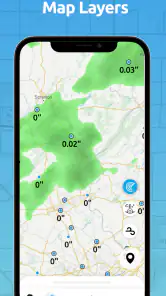
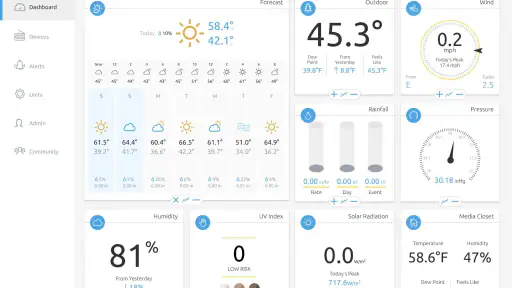
Ambient Weather Network is a weather-monitoring app that connects users with personal weather stations and nearby reporting stations. It can display current conditions, forecasts, historical readings, maps, alerts, and detailed measurements such as temperature, humidity, wind, rainfall, and pressure. It is especially useful for homeowners, gardeners, outdoor enthusiasts, and anyone who wants more localized information than a standard city forecast provides.
Do I need an Ambient Weather station to use the app?
You can browse publicly available weather station data without owning an Ambient Weather device, depending on the information shared in your area. However, the app provides its greatest value when paired with a compatible Ambient Weather station. Connecting your own station lets you monitor conditions at your property, review personal historical data, check sensor readings remotely, and share selected information with other users through the network.
Is Ambient Weather Network free to download and use?
Ambient Weather Network is free to download, and many of its basic features can be used without paying a subscription. In-app purchases are listed from $4.99 to $99.99 per item, so check the purchase details before paying for optional features or services. The exact experience may also depend on the connected weather station, account features, or services offered by the developer.
Pros
- Live weather data from nearby personal weather stations
- Detailed charts help track temperature
- wind
- rain
- and pressure
- Useful alerts for severe weather and changing conditions
- Station map makes it easy to compare local weather readings
- Supports connected Ambient Weather hardware and sensor history
Cons
- Data quality depends on the accuracy and upkeep of each station
- Some features require compatible Ambient Weather hardware
- The station map can feel crowded in densely covered areas
- Historical data depth may vary between stations
- Frequent updates may increase battery and mobile data usage
- Category
- Weather
- Version
- 4.6.5











