Alerta Sísmica México - SASSLA
- 493.00
- 4.8
- Installs
- 5.00M
- Price
- Free

Screenshots

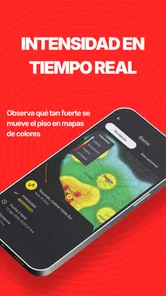
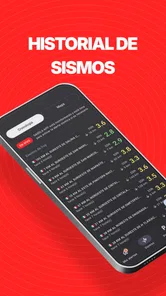
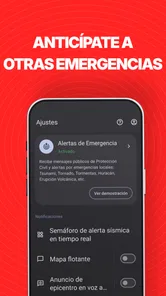
Analysis by Reviewed
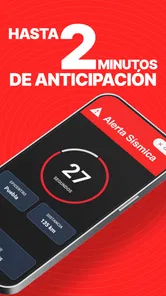
When I first looked at Alerta Sísmica México - SASSLA, I understood its appeal immediately: it is a news and information app built around earthquake alerts, not a general news feed that happens to mention earthquakes. Its purpose is to give people in Mexico more time to react when a strong earthquake is detected, with the store summary describing a possible warning of up to two minutes. That makes it the kind of app I would consider before an emergency, while I still have time to configure it calmly.
The app is free to install, is suitable for Everyone, and comes from SASSLA México. It has attracted over five million installs and a 4.8 average from around 651 thousand ratings, which gives me useful context: this is not an obscure experiment with a handful of users. Still, popularity does not replace preparation. An earthquake warning is valuable only if the phone can alert me, I understand what the alert means, and I already know what I will do next.
What the app feels like when you begin
The first thing I would tell a new user is not to treat this as a normal headline-reading app. The important moment is not browsing through information; it is receiving a warning quickly enough to make a sensible decision. That changes how I judge it. A clean interface matters, but so do attention, sound, phone placement, and having a simple response plan ready.
In everyday use, I see the strongest value for people who live, work, study, or regularly travel in areas of Mexico where earthquake alerts are relevant. It can also be useful for families who want the same warning source available on several phones. I would be especially inclined to install it on a parent’s phone, a child’s device used at home, or a work phone that is normally nearby rather than buried in a bag.
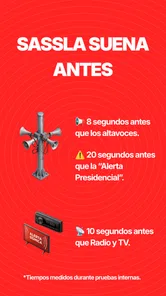
There is an important distinction between an early warning and a prediction. The app is intended to warn after an earthquake has been detected, giving some people time before stronger shaking reaches them. That time can vary with location and circumstances, so I would never use the alert as a promise that every user will always receive a fixed amount of notice. The “up to two minutes” wording describes the maximum possibility, not a personal guarantee.
That distinction also helps set realistic expectations about what the app can and cannot do. It cannot prevent damage, tell me exactly how severe the experience will feel inside my building, or replace local emergency guidance. Its job is narrower and more practical: draw my attention to a developing earthquake quickly enough that I can begin a safe response.
Why I would choose it over checking ordinary news
Traditional news apps are useful for context after an event, but they are usually the wrong tool for the first seconds of an emergency. I would have to open the app, wait for a story, and interpret a headline. A dedicated seismic alert app is designed around urgency instead of reading. That difference is more important than having a large collection of articles.
More From Our News Desk

Weather by Xiaomi Review: Clear at a Glance, Less Clear Up Close

X Under Pressure: Can It Recover When Posting Goes Wrong?

Clash of Clans Is Won Between the Battles

Android Auto Makes the Case for Quieter Car Software

MobiOffice: Transforming Mobile Productivity with Seamless Integration

EA SPORTS FC™ Mobile Soccer: Redefining Mobile Sports Gaming
Social networks have the opposite problem. They can spread reports quickly, but the first posts may be confusing, duplicated, or emotional. They also encourage me to look at the screen instead of moving away from hazards. SASSLA’s focused purpose makes it easier to build a routine: notice the alert, act, and check fuller information afterward.
I would not describe it as a complete replacement for every other source. Official instructions, local authorities, building procedures, and trusted news can still matter after the immediate warning. My preferred setup would be to use this app for the first signal, then use established sources for confirmation and updates once I am in a safer position.
Setting it up without rushing
The current version is 8.0.0r4-public, and it requires Android 6.0 or later. That makes compatibility worth checking before I rely on it. If I were helping someone install it, I would do so while the phone is charged and connected, rather than waiting until an earthquake has already started. The app is free, although in-app purchases are listed from $2.99 to $34.99 per item, so I would review any purchase screen carefully and avoid assuming that every option is included at no cost.
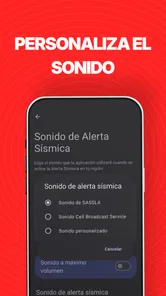
After installation, I would open the app and take time to understand its alert behavior instead of closing the setup immediately. I would look for the controls that affect notifications and make sure the phone is allowed to get the app’s attention. I would also check the device’s own sound and notification settings. A warning that arrives silently while the phone is in another room is much less useful than one I can actually notice.
I would keep the phone in a place where alerts can be heard during normal routines. At night, that may mean a bedside table rather than a distant charger. At work, it may mean keeping the device out of a closed drawer. In a backpack, even a strong notification can be muffled. This is a small practical detail, but it is one of the biggest differences between installing an alert app and making it part of an emergency plan.
For a family, I would configure each person’s phone individually rather than assuming one installation covers everyone. I would then agree on a simple rule: when the alert sounds, nobody waits for a group chat to confirm it before taking basic safety action. Group messages are useful afterward, but they can create hesitation at exactly the wrong time.
I would also avoid testing the app during a stressful moment by changing several phone settings at once. A better approach is to adjust one setting, observe how the phone behaves during ordinary notifications, and then leave the configuration alone. The goal is not to make the device noisy all day; it is to make an important warning noticeable without turning every notification into an emergency.
The first meaningful success
For me, the first successful action is not merely opening the app. It is completing a small rehearsal: I know where the phone is, I recognize the alert as an earthquake warning, and I can name the safest nearby place before I need it. The app becomes genuinely useful when its signal is connected to a decision, not when it is simply present on the home screen.
A realistic example would be an afternoon at home when I am cooking and my phone is on a counter. If an alert arrives, I would move away from glass, cabinets, and anything that could fall, then follow the safety plan for that room. I would not stop to search online for an explanation first. Once the immediate movement is complete, I could use the app or another trusted source to understand what happened.
At work, the plan may be different. I would identify the building’s evacuation guidance and the safer interior areas in advance. During an alert, I would avoid crowding a staircase without instructions, avoid elevators, and follow the established procedure. The app helps me start paying attention; it does not know the safest route through every building.
In a classroom, I would want students to know that the alert is a cue to follow the teacher or institution’s earthquake procedure. In a car, I would not interact with the phone while driving. The warning may still be useful, but the appropriate response depends on traffic and the surrounding environment. These examples show why the best preparation is not memorizing a single universal reaction.
Confusions that can make the experience disappointing
The most common misunderstanding is expecting an exact countdown. The possible warning period depends on where the person is in relation to the earthquake and how the event develops. Someone may receive less notice than someone elsewhere, and a warning does not mean the strongest shaking will arrive at the same moment for everyone. I would judge the app by whether it gives me useful notice when conditions allow, not by expecting a fixed timer.
Another confusion is treating every notification as proof that major damage is about to occur nearby. Alerts are designed to prompt caution, not to provide a complete damage assessment. I would act safely first and look for additional information later. If the event feels minor where I am, that still does not make it wise to dismiss the warning automatically; conditions can differ across locations.
Some users may also expect a conventional news experience with long articles, constant headlines, and broad coverage. That is not the reason I would install this app. Its value is concentrated in earthquake awareness and rapid attention. If I mainly want politics, sports, entertainment, or a daily news digest, a general news app will probably suit me better.
The presence of optional purchases is another point to handle carefully. Because the app is free to install but lists paid items, I would read each screen before confirming anything. A first-time user should not feel pressured to buy something simply because the situation is urgent. I would establish the basic alert workflow first and decide later whether any paid option is useful.
I would also remember that the app cannot compensate for a phone that is powered off, inaccessible, or configured in a way that hides important notifications. Rather than assuming the app has failed, I would first check the practical chain: phone location, battery, notification visibility, and whether the device is being used in a setting where sound or vibration is restricted.
How I would use it after installation
Once the initial setup is complete, I would stop opening the app repeatedly just to reassure myself that it is installed. The more useful routine is occasional maintenance: keep the app available, keep the operating system compatible, and make sure my emergency plan still matches my home, workplace, or school. The alert is only one part of that system.
I would place the app alongside, not instead of, basic preparation. That means knowing where to move away from windows, identifying heavy objects that could fall, keeping important contacts available, and understanding the building’s instructions. The app can improve reaction time, but it cannot decide whether a particular doorway, hallway, or exterior area is safe in my surroundings.
One less obvious trade-off is attention. An alert system must be noticeable, but if I make every phone sound urgent, I may start ignoring it. I would keep ordinary notifications organized so that the earthquake warning remains distinct in my mind. This is a behavioral choice rather than a flashy feature, yet it directly affects whether I respond promptly.
Another useful habit is discussing the app with the people who share my space. I would explain what the alert means and what it does not mean, especially to children or older relatives. I would not rely on everyone discovering the correct response in the moment. A short conversation before an emergency can prevent arguments about whether to wait, call someone, or start filming.
The app is also a better fit for users who value a specialized warning tool and are willing to prepare around it. Someone who dislikes notifications, rarely keeps a phone nearby, or expects a complete emergency-management service may be disappointed. In those cases, building procedures and other established warning channels should carry more weight than any single mobile application.
My recommendation for a first-time user
I recommend installing Alerta Sísmica México - SASSLA if you are in Mexico and want a focused way to receive earthquake-related warnings before relying on ordinary news coverage. I would install it during a calm day, review its notification behavior, place the phone where I can notice it, and connect the alert to a specific safety plan. That path gives the app a real purpose instead of leaving it as an unused icon.
The app’s strong rating and large user base suggest that many people find this focused approach valuable, while the free entry point makes trying it straightforward. At the same time, I would keep my expectations grounded: early warning is not prediction, the available notice can vary, and no application replaces sensible action or local instructions.
For me, the deciding question is simple: will I keep the phone close enough to hear the warning and already know what to do? If the answer is yes, this is a practical addition to my emergency preparation. If the answer is no, a different routine—such as improving building readiness and following official local guidance—may help more than downloading another app. Used with that perspective, SASSLA is not a source of false certainty; it is a focused opportunity to gain awareness before an earthquake’s stronger effects reach me.
Alerta Sísmica México - SASSLA Frequently Asked Questions
Is Alerta Sísmica México - SASSLA available for iPhone as well as Android?
Alerta Sísmica México - SASSLA is an app for mobile devices, and users should check the store on their own device to confirm that it is available for their operating system. On Android, it supports devices running version 6.0 or later. Whichever device you use, review the app’s compatibility and notification settings before relying on it for earthquake alerts.
Can I use SASSLA to prepare my household for an earthquake?
The app’s alerts and earthquake information can be one part of household preparation, helping users think about how they will respond when shaking is expected or begins. It should not be the only part of a plan: decide where to take cover, identify hazards, and agree how household members will communicate. Follow guidance from official civil protection authorities as well.
Is Alerta Sísmica México - SASSLA free to download?
The app is free to download, making it possible to try its earthquake alerts and information without an upfront purchase. It also offers in-app purchases, so review any purchase details shown in the app before confirming a transaction. As with any alert app, consider whether it suits your needs and keep your phone’s notification settings configured to receive important updates.
What is Alerta Sísmica México - SASSLA?
Alerta Sísmica México - SASSLA is an earthquake alert and information app designed to notify users about seismic activity affecting Mexico. It can provide alerts, reports, maps, and educational information intended to help people react more quickly. Its usefulness depends on location, available monitoring data, internet access, device settings, and the coverage of the supported seismic warning systems. The app’s stated purpose is to offer an earthquake early warning that may arrive up to two minutes before a strong earthquake, although actual warning time varies.
Does SASSLA guarantee that I will receive an earthquake warning before shaking begins?
No application can guarantee that every user will receive an alert before an earthquake is felt. Warning time varies according to the earthquake’s location, intensity, distance from the user, detection speed, network conditions, and phone configuration. Some earthquakes may occur too close to a location to provide advance notice, while smaller or distant events may generate information without a noticeable warning.
Pros
- Real-time earthquake alerts can provide valuable warning seconds before shaking arrives.
- Covers earthquakes affecting Mexico
- including events detected near the country’s borders.
- Clear alert notifications are easy to understand during stressful situations.
- Useful safety information helps users prepare before
- during
- and after an earthquake.
- Can complement official emergency channels with an additional source of earthquake information.
Cons
- Alert timing and accuracy depend on sensor coverage
- location
- and network connectivity.
- Notifications may arrive late or be unavailable during internet or power disruptions.
- Frequent minor-earthquake alerts could become distracting for some users.
- Location access and notification permissions may be required for full functionality.
- It should not replace official instructions
- emergency services
- or a personal safety plan.











