Times Tables - Multiplication
- 45.00
- 4.5
- Installs
- 1.00M
- Price
- Free
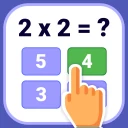
Screenshots
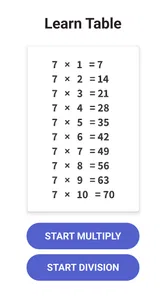
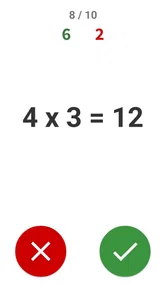
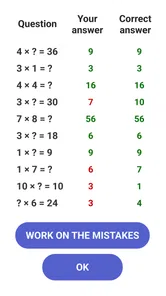
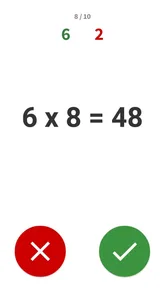

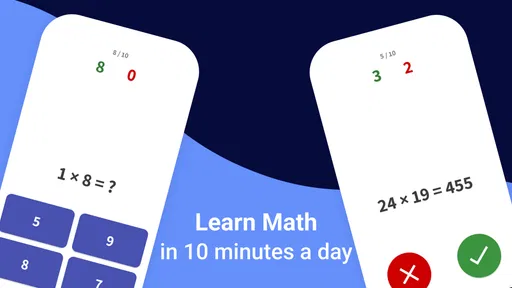
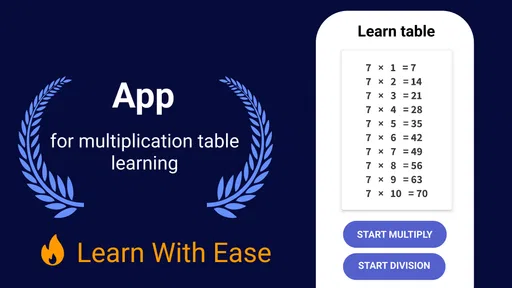

Analysis by Reviewed
When I’m choosing a math game for a child, I first ask what kind of help they actually need. Times Tables - Multiplication has a deliberately limited job: it gives children a game-based way to practice multiplication and division facts. That can be handy when a learner already recognizes the ideas but needs more chances to recall answers, especially if a worksheet is losing its appeal. I’d treat it as a practice companion, not a full math course or a substitute for explaining a new concept.
Who benefits from a focused practice game
This is most promising for a child who has met multiplication and division in class and wants a more engaging way to revisit them. It can also suit families looking for a small activity between homework and dinner, or something a child can return to for brief practice with an adult nearby. If the learner needs support across several areas of math, or has not yet understood what multiplication represents, I would begin with teaching and concrete examples rather than expecting a game to fill that gap.
The difference between remembering a fact and understanding it matters. A child might quickly give an answer to a familiar multiplication prompt yet struggle to show equal groups with objects or explain the relationship to division. I’d use that difference as a guide: let the game provide repetition, then occasionally ask the child to show or explain one answer away from the screen. That quick check helps me decide whether practice is sticking or whether the underlying idea needs attention.
Where practice can feel confusing
I find that practice can feel confusing when a child knows some answers but cannot tell whether the difficulty is recalling a fact or understanding the question. I’d use a pause as a cue to ask them to explain what they think the prompt is asking, rather than immediately repeating it or supplying the answer. That small distinction can help guide the next step.
A game helps with repetition, not every kind of math learning
Multiplication often becomes easier through repeated recall, but children can get stuck for different reasons. One may understand what multiplication means yet hesitate over a particular table; another may be unsure why a multiplication fact works at all. A game centered on times tables is more naturally suited to the first problem. I would use it to reinforce facts a child has already encountered, while explaining new ideas separately when needed.
The same distinction matters for division. Practicing division can help a child connect it with multiplication, but quick answers alone do not necessarily build an understanding of remainders, written methods, or word problems. If a child can answer a prompt in the game but cannot explain how they reached the answer on paper, I would treat that as a sign to pause and work through the reasoning together rather than simply continue playing.
It is also worth noticing how a child reacts to practice. Some children enjoy trying again after a mistake; others become tense when answers are timed or presented as a challenge. I would sit nearby for an early session and watch whether the format encourages concentration or turns a small error into frustration. A game should make practice easier to begin, not become another source of pressure.
More From Our News Desk

Weather by Xiaomi Review: Clear at a Glance, Less Clear Up Close

X Under Pressure: Can It Recover When Posting Goes Wrong?

Clash of Clans Is Won Between the Battles

Android Auto Makes the Case for Quieter Car Software

MobiOffice: Transforming Mobile Productivity with Seamless Integration

EA SPORTS FC™ Mobile Soccer: Redefining Mobile Sports Gaming
The most useful role for this game is steady recall practice, not a complete math curriculum. That expectation helps set a fair standard: it can support a learning routine, but it cannot diagnose why a child is struggling or adapt a family’s teaching plan on its own.
Small setup checks before handing it over
Before a child starts, I’d confirm that the device can run the game. Its minimum Android requirement is version 6.0, so checking the device’s software version is a practical first step if the app will not install or open. The game is free to download, with in-app purchases listed from $0.99 to $19.99 per item. I’d review purchase settings with the child before leaving them to play, so an optional purchase does not become an unexpected interruption.
The age rating is Everyone, which makes the intended audience broad, but it does not remove the value of an adult’s first look. I’d open the game myself, check that the text and interaction are comfortable for the child, and make sure they understand what to do when they get an answer wrong. A brief introduction can prevent the common problem of a young learner tapping through a game without understanding what each prompt is asking.
Times Tables - Multiplication is made by BrainSoft Apps. It was released on March 30, 2021, and the current version is 2.4.9. Those details are useful when troubleshooting an installation: if something seems inconsistent, I would first check that the installed version is current and that the device meets the minimum requirement, rather than assuming the child has made a mistake.
Build a routine that reveals what needs work
For a realistic everyday use, I’d try a short session after homework or while waiting for a meal, rather than presenting the game as a long study block. A child can practice a few facts, then explain one answer aloud: for example, how they knew the result instead of guessing. This simple follow-up turns tapping into a chance to check understanding without making the session feel like another worksheet.
A helpful workflow is to keep a small note of the facts that repeatedly cause hesitation. If the child pauses on the same multiplication family across several sessions, practice those facts outside the game too: use them in a quick oral question, write them on paper, or connect them to equal groups. This is not a feature of the app; it is a way to make a focused practice game more useful by carrying its lessons into ordinary situations.
I would also avoid treating a streak of correct answers as proof that every table is secure. Familiar prompts can feel easy after repetition, while a different wording or a written problem may still be difficult. Every few sessions, ask the child to work out a fact without the game and describe the relationship between multiplication and division. If they can do both, the practice is transferring; if not, they may need explanation rather than more repetition.
Recovering when a session goes off track
If a child becomes distracted or starts guessing, I would stop the session instead of pushing through. A short break and a return later are often more productive than turning a learning game into a contest. On the next attempt, the adult can make the task smaller by asking about one troublesome fact at a time, then letting the child use the game for additional practice when they are ready.
If the game does not open or behaves unexpectedly, start with basic checks: close it and reopen it, restart the device, and confirm the software version is compatible. If the issue persists, checking for an available app update is a sensible next step. These checks do not establish the cause, but they can separate a temporary device hiccup from a learning difficulty. I would not ask a child to keep tapping at a frozen screen or assume that an incorrect response means the game has failed.
When a child says the game is too hard, ask what part is difficult before changing the routine. They may know the multiplication fact but read the prompt too quickly, or they may need help understanding division as the reverse of multiplication. When they say it is too easy, ask them to solve a few facts without hints or explain their reasoning. Those conversations tell you more than simply increasing the amount of play.
When another learning option is a better fit
This game is a reasonable choice when the immediate goal is times-table practice and the child is comfortable learning through a game. The listing shows an average rating of 4.5 from around 13,000 ratings, and more than a million installs, which suggests it has reached a substantial audience. Those figures can offer context, but they cannot tell me whether its style suits a particular child; a brief supervised try is more useful than popularity alone.
Compared with printed worksheets, a game can make repeated practice feel less like routine seatwork. Worksheets, however, are often better when a child needs to show written working or prepare for a classroom task that expects answers on paper. Compared with a broad math-learning app, Times Tables - Multiplication has a tighter purpose: that can be an advantage when the child needs focused repetition, but a disadvantage if they need lessons on fractions, geometry, or multi-step word problems as well.
I would look elsewhere if the main need is a structured teaching sequence, detailed explanations, progress reporting for an adult, or practice across many branches of mathematics. I would also choose a non-game format if a child is easily distracted by play or becomes discouraged by challenge-based practice. In those cases, direct teaching, a workbook, or a broader learning resource may be a better match, with the game reserved for occasional recall practice.
Who is likely to get the most from it
Times Tables - Multiplication is aimed at children, but an adult’s involvement can make its focused format more effective. It works best when someone knows which facts the child is learning, gives them room to try, and checks that practice is building confidence rather than merely filling time. For a parent or caregiver, the practical question is not whether the child spends longer in the game; it is whether they become quicker and more secure with the facts they are currently learning.
The game is less suitable as a stand-alone answer to persistent math difficulties. If a child repeatedly struggles to understand the same idea, more rounds may increase frustration without addressing the reason. I’d use that pattern as a cue to slow down, demonstrate the concept with objects or drawings, and ask a teacher for guidance if the difficulty continues. The game can support that work, but it should not carry the whole responsibility for it.
My practical verdict
I see this as a focused, low-barrier way to add game-based repetition to a child’s multiplication and division practice. It is free to start, intended for everyone, and backed by a strong average rating, while optional purchases mean I would check purchase controls before a child uses it independently. Its value depends less on how long a session lasts than on whether the child is practicing the right facts and can use them away from the screen.
I’d recommend giving it a try if a child already understands the basics and needs more chances to recall times tables without another stack of exercises. Keep sessions modest, talk through repeated mistakes, and use paper or real-world examples when the goal is deeper understanding. If you need a complete math course or a way to teach concepts from the ground up, choose a broader resource instead. For targeted practice, though, Times Tables - Multiplication can be a useful addition to a child’s routine when an adult helps connect the game to what they are learning.
A simple way to judge whether it is working
Rather than judging a session by speed or how long a child stays interested, I’d look for a small change that matters outside the game: fewer pauses on the facts they have been practicing, or more confidence explaining a result. Keep the check informal and use a couple of examples in conversation or on paper. If the child performs well only while playing, that is useful information too; it suggests the game is familiar but the learning may need to be practiced in another format.
That makes the app easiest to evaluate as a short trial within an existing routine. A parent does not need to build a complicated tracking system: simply notice which facts feel secure, which ones keep causing hesitation, and whether the child remains willing to practice. If the activity starts creating arguments or rushed guesses, changing the format is a sensible decision rather than a failure to make the game work.
Choosing the right role for screen practice
For children who enjoy interactive practice, the game can be a welcome alternative to asking the same facts aloud over and over. It is especially useful when the adult wants a quick activity but still plans to stay involved enough to discuss mistakes. By contrast, a child preparing to write out calculations may benefit more from a pencil-and-paper exercise, while a learner who needs a concept introduced slowly may do better with a teacher, visual examples, or a broader lesson resource.
There is also a practical balance between independence and guidance. I would let a child try answers themselves, then step in when they repeatedly guess or seem unsure what a prompt is asking. Taking over every response removes the practice; leaving a confused learner alone can turn repetition into frustration. A little observation at the start helps an adult find the right amount of support without making every round feel like a lesson.
What to check before deciding to keep it
Because the game is free to download but includes optional purchases, I’d make the purchase boundaries clear before handing over the device. That is a straightforward household check, not a reason to avoid trying it. I’d also consider whether the child can comfortably read and respond to the prompts on the device being used; if not, an adult can help assess whether the issue is the screen or the math task itself.
BrainSoft Apps has made a narrowly aimed educational game, and that focus is the central trade-off. A child who needs multiplication and division recall may appreciate having a game devoted to that practice, while a family hoping for lessons across the whole school curriculum will need something broader alongside it. Knowing that distinction before starting makes it easier to set expectations and decide whether the game deserves a place in the routine.
Times Tables - Multiplication Frequently Asked Questions
What is Times Tables - Multiplication, and who is it for?
Times Tables - Multiplication is an educational app focused on helping learners practise multiplication facts and build confidence with times tables. It may suit children learning multiplication for the first time, students who want extra practice, and adults brushing up on basic arithmetic. Check the app’s store listing for its current age guidance and learning features, as available content can vary by version.
How does the app help users practise multiplication?
The app is designed around practising multiplication problems, giving learners a way to work through times-table questions at their own pace. Depending on the version, practice may be organised by table or difficulty and may include quizzes or progress feedback. These features can make repetition more engaging, but the app is best used alongside schoolwork or other learning activities rather than as a complete maths course.
Is Times Tables - Multiplication suitable for beginners?
It can be useful for beginners who are ready to learn multiplication, especially when they practise one table at a time and take breaks between sessions. A parent, caregiver, or teacher may want to help younger learners get started and explain any mistakes. Before downloading, review the screenshots and description to confirm that the app’s difficulty, language, and instructions match the learner’s needs.
Does the app require an internet connection, and does it include ads or in-app purchases?
Internet access, advertising, and in-app purchases can depend on the particular app version and the platform’s store listing. Some learning activities may work offline, while downloads, updates, or certain features may require a connection. Check the app’s current listing and privacy details before installing, especially if you prefer an ad-free experience, want to manage spending, or are setting up the app for a child.
Is Times Tables - Multiplication free, and what should I check before downloading?
The price and included features may differ between Android and iOS or change over time, so check the relevant app store for the latest details. Look for device compatibility, required permissions, supported languages, age guidance, and recent user feedback. If a child will use the app, review its privacy information and available parental controls before downloading, and try a short practice session to see whether it fits their learning style.
Pros
- Offers focused practice for learning multiplication tables.
- Suitable for quick sessions whenever you have a few spare minutes.
- Can help learners build speed through repeated practice.
- Useful for children who benefit from interactive study.
- Provides an alternative to practicing tables with paper worksheets.
Cons
- May feel repetitive after extended play.
- Learners may need adult guidance to get started.
- Does not replace explanations of multiplication concepts.
- Can be less engaging for children who prefer varied activities.
- Check compatibility and in-app purchase details before downloading.













