Times Table - Learn Math
- 1.23K
- 4.5
- Installs
- 10.00M
- Price
- Free
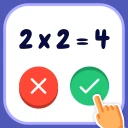
Screenshots
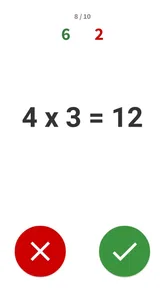
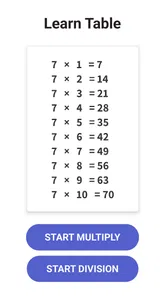
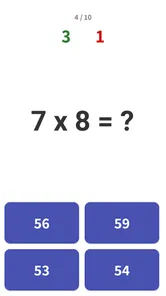

Analysis by Reviewed
When I think about multiplication practice, the tricky part usually isn’t understanding what a times table means; it’s getting quick and confident enough to recall answers without counting. Times Table - Learn Math approaches that challenge as an educational game, turning repeated practice into something more inviting than a worksheet. I’d consider it for a child who needs a little extra table practice, or for an adult who wants a low-pressure way to refresh basic arithmetic.
A simple setting for focused practice
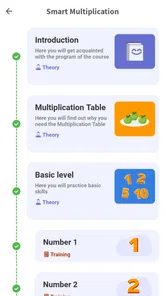
The app’s subject gives it a clear visual and mental setting: the numbers are the point, rather than a story world that competes for attention. That focus suits short practice sessions, especially when a learner is easily distracted by elaborate menus or unrelated activities. BrainSoft Apps keeps the purpose centered on multiplication, and the game format gives that familiar school topic a more playful frame.
There is a useful trade-off here. A focused design can make it easier to get straight to practice, but it may feel plain to someone who expects a rich game world, characters, or a narrative to explore. I would choose it for repeated recall, not for broad entertainment. Its Everyone age rating makes the intended audience broad, though younger players may still benefit from an adult helping them turn a session into a calm, manageable routine.
How to fit it into an ordinary day
I’d use it in small gaps rather than treating it like a long study block: a few rounds after homework, while waiting for an appointment, or during a quiet break at home. For example, a parent could invite a child to play briefly before dinner, then ask them to explain one answer they hesitated over. That turns a quick game into a chance to notice whether the child is recalling a fact or still working it out step by step.
A practical tip is to keep the goal narrow. Instead of trying to cover every table in one sitting, focus on the facts that cause hesitation, then revisit them later. Short, repeated encounters can be less tiring than a long drill, and a game can make it easier to begin. I’d still pair the app with speaking answers aloud or writing a few examples when a learner needs to transfer quick recognition into schoolwork on paper.
Where it sits among learning options
Compared with flashcards, this game may feel more inviting for someone who finds plain repetition dull; compared with a full maths course, it is more tightly focused on multiplication practice. That narrow scope is helpful when times tables are the specific obstacle, but it is not a substitute for explanations of multiplication, division, fractions, or broader problem-solving. If a learner doesn’t yet understand why a multiplication fact works, I’d teach the concept first and use the game afterward to build fluency.
It is free to start, while optional in-app purchases range from $0.99 to $19.99 per item, so I’d check the purchase details before handing a device to a child. The game has a 4.3 average from around 194,000 ratings, and more than 10 million installs; that suggests many people have tried it, but those figures don’t tell me whether its particular practice style will suit an individual learner. The content rating is Everyone, and the current version is 1.9.0, with Android 6.0 as the minimum operating system.
More From Our News Desk

Weather by Xiaomi Review: Clear at a Glance, Less Clear Up Close

X Under Pressure: Can It Recover When Posting Goes Wrong?

Clash of Clans Is Won Between the Battles

Android Auto Makes the Case for Quieter Car Software

MobiOffice: Transforming Mobile Productivity with Seamless Integration

EA SPORTS FC™ Mobile Soccer: Redefining Mobile Sports Gaming
What the practice feels like
Have you ever struggled with memorizing your multiplication tables? I know I have! Luckily, there's an app that can make learning math as easy as pie. Let me introduce you to Times Table - Learn Math. This app is a game-changer for anyone, whether you're a student trying to ace your math tests or an adult looking to sharpen your math skills.
Features that Make Learning Fun
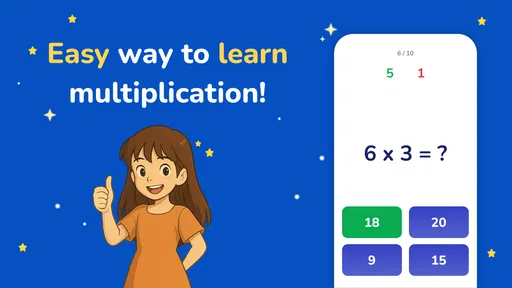
What makes this app stand out is its interactive approach to learning. It transforms the monotonous task of memorizing tables into a fun-filled experience. You get to practice through engaging quizzes and games that adapt to your level. Whether you're a math whiz or just starting, the app adjusts the difficulty to match your pace.
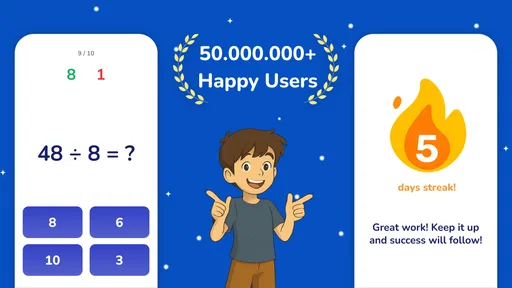
And let’s talk about the rewards system! The app keeps you motivated by handing out badges and trophies as you progress. It’s like having a personal cheerleader on your phone, celebrating your victories big and small.
Why I Love It
Personally, what I love about Times Table - Learn Math is its simplicity and effectiveness. It doesn’t overwhelm you with unnecessary features. Instead, it stays focused on its main goal: making math learning accessible and enjoyable. Plus, the app is designed to cater to different learning styles, which is a huge plus.
An added bonus is the offline mode. You can continue your math journey even without internet access, which is perfect for those long road trips or when you're in a spotty Wi-Fi area.
Wrapping Up
In conclusion, Times Table - Learn Math is more than just an educational app; it's a companion in your learning journey. Whether you’re a parent looking to support your child’s education or an adult aiming to brush up on math skills, this app is a valuable tool. Give it a try, and you might find yourself looking forward to solving those multiplication problems!
So, what are you waiting for? Dive into the world of numbers and make math your friend with this fantastic app!
Making each short session count
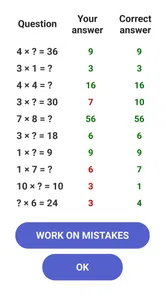
The useful question is not simply how long to play, but what the learner should do with a mistake. I’d treat a wrong or slow answer as a clue, not a reason to restart a round or rush through more questions. Pause on the fact, say it aloud, and connect it to a known one: if 6 × 7 is uncertain, a learner who knows 6 × 5 can add two more sixes. That small bit of reasoning keeps practice from becoming blind guessing.
Once an answer feels easy, I would not keep drilling it just to collect a streak of correct responses. Move attention to the facts that still take effort, then return to the easy ones another day to check that recall has stuck. This is a practical way to use a focused multiplication game alongside school homework, even when the app itself is not being used as a complete lesson plan.
Who is likely to enjoy it, and who may not
I think the game is best for learners who already recognize what multiplication means and want more confidence retrieving the basic facts. A parent can use it as a low-pressure extra activity, while an older learner or adult can use short rounds to rebuild speed after time away from arithmetic. The game format may also help someone who puts off a paper drill simply because it feels repetitive.
I would skip it as the main resource for a child who needs a patient explanation of groups, arrays, or why multiplication works. A teacher, a worked example, or hands-on objects may be more useful at that stage. It is also not the best pick for someone seeking a broad maths curriculum or a richly developed game with exploration and a continuing story. Its narrow subject is an advantage only when multiplication recall is the goal.
What the game format changes
Flashcards are direct and easy to tailor, but they can feel like a test and often rely on an adult to keep the practice moving. This app makes the repetition feel more like play, and its quizzes and games give a learner a reason to return. On the other hand, a card can be turned over slowly while a child explains the reasoning; a timed or game-like response may encourage speed before understanding. I’d choose the format to match the learner rather than assume one method is always better.
A conventional worksheet is still useful when the goal is to write calculations neatly or show working. The game is better suited to quick mental retrieval than to practicing written layout, so I’d use both when a student has a classroom test coming up. For a learner who already knows the facts but struggles with word problems, a problem-solving resource will offer more relevant practice than another round of times tables.
Small trade-offs for parents
The rewards can help make practice feel encouraging, but I would keep praise tied to effort and thought rather than badges alone. If a child starts tapping quickly just to progress, slow the moment down and ask how they worked out a difficult answer. That turns the playful layer into a prompt for conversation instead of making the reward the whole point.
Because the game is free to start and offers optional purchases, I’d look over the purchase choices before a child uses it independently. That is especially sensible on a shared device, where a young player may not distinguish a game reward from a paid option. The game’s Everyone rating makes it broadly suitable by age, but it does not replace a parent’s judgment about screen routines, spending, or whether a child is ready to practice alone.
Sound, pace, and a calm routine
The experience is built around answering multiplication questions rather than moving through a dramatic setting. That gives the practice a straightforward mood: the learner’s attention can stay on the numbers and on whether recall is getting smoother. I would use it in a quiet moment if a child is easily distracted, and keep the session brief enough that the game remains a useful break rather than an argument about screen time.
There is no need to make every session feel like a race. A learner who is anxious about maths may do better when an adult sits nearby, treats pauses as normal, and celebrates a reasoned answer as much as a quick one. If the pace begins to frustrate them, stop and revisit the same facts orally or with paper instead. The point is to build confidence, not to make a simple practice activity feel like another high-stakes test.
My final take on its place
For a concrete routine, I’d try a brief round after homework, note one or two multiplication facts that caused hesitation, and revisit those facts the next time. Afterward, ask the learner to solve a similar example without the screen. That check matters: a correct tap is encouraging, but being able to recall or explain the fact away from the game is what makes the practice useful beyond the app.
As an educational game from BrainSoft Apps, it has a clear role: make multiplication repetition easier to start and more engaging than a plain drill. It will not teach every part of maths, and its game rewards should not be mistaken for proof of mastery. Still, when a learner understands the basics and needs regular, manageable recall practice, I’d be comfortable recommending it as one tool in a broader routine.
Times Table - Learn Math Frequently Asked Questions
Does Times Table - Learn Math support iPhones and iPads?
Times Table - Learn Math is an educational game by BrainSoft Apps, and its listed minimum operating-system requirement is Android 6.0. If you are considering it for an iPhone or iPad, check the relevant app store for device compatibility before downloading. On a compatible Android device, it is free to download, so you can try its multiplication practice without paying upfront.
Is Times Table - Learn Math free to download, and are there optional purchases?
The game is free to download, so you can try its multiplication practice without paying upfront. Optional in-app purchases are also available, with prices ranging from $0.99 to $19.99 per item. These purchases may suit users who want extras, but they are not required to begin using the game. If a child will use it, reviewing purchase settings on the device can help avoid unintended spending.
What devices can run Times Table - Learn Math?
Times Table - Learn Math is an educational game from BrainSoft Apps and requires Android 6.0 or later. Before downloading, check that your device meets this minimum requirement and has enough available storage for an app. The game is free to download, so you can try its multiplication practice without paying upfront.
What is the main purpose of the Times Table - Learn Math app?
The Times Table - Learn Math app is designed to help users, particularly students, master multiplication tables in a fun and interactive way. It offers various exercises and games that enhance learning and retention of multiplication concepts, making math more engaging and less intimidating for learners of all ages. Its short description sums up the focus: “Times Table.”
Is the Times Table - Learn Math app suitable for all age groups?
Yes, the app is suitable for a wide range of age groups, from young children just starting to learn multiplication to adults who need a refresher. The app adjusts its difficulty level based on the user’s proficiency, ensuring everyone can benefit from its educational content. It is rated for Everyone, making it a family-friendly option for practicing basic multiplication.
Pros
- Engaging and interactive learning experience.
- Adaptive difficulty for personalized learning.
- Colorful visuals appeal to children.
- Encourages self-paced learning.
- Improves math skills effectively.
Cons
- Limited to basic multiplication tables.
- May require in-app purchases.
- Ads can be distracting.
- Not suitable for advanced learners.
- Limited offline functionality.













